Site-kit-wp: Error: Account token is missing encountered during Analytics setup for new Google accounts
Bug Description
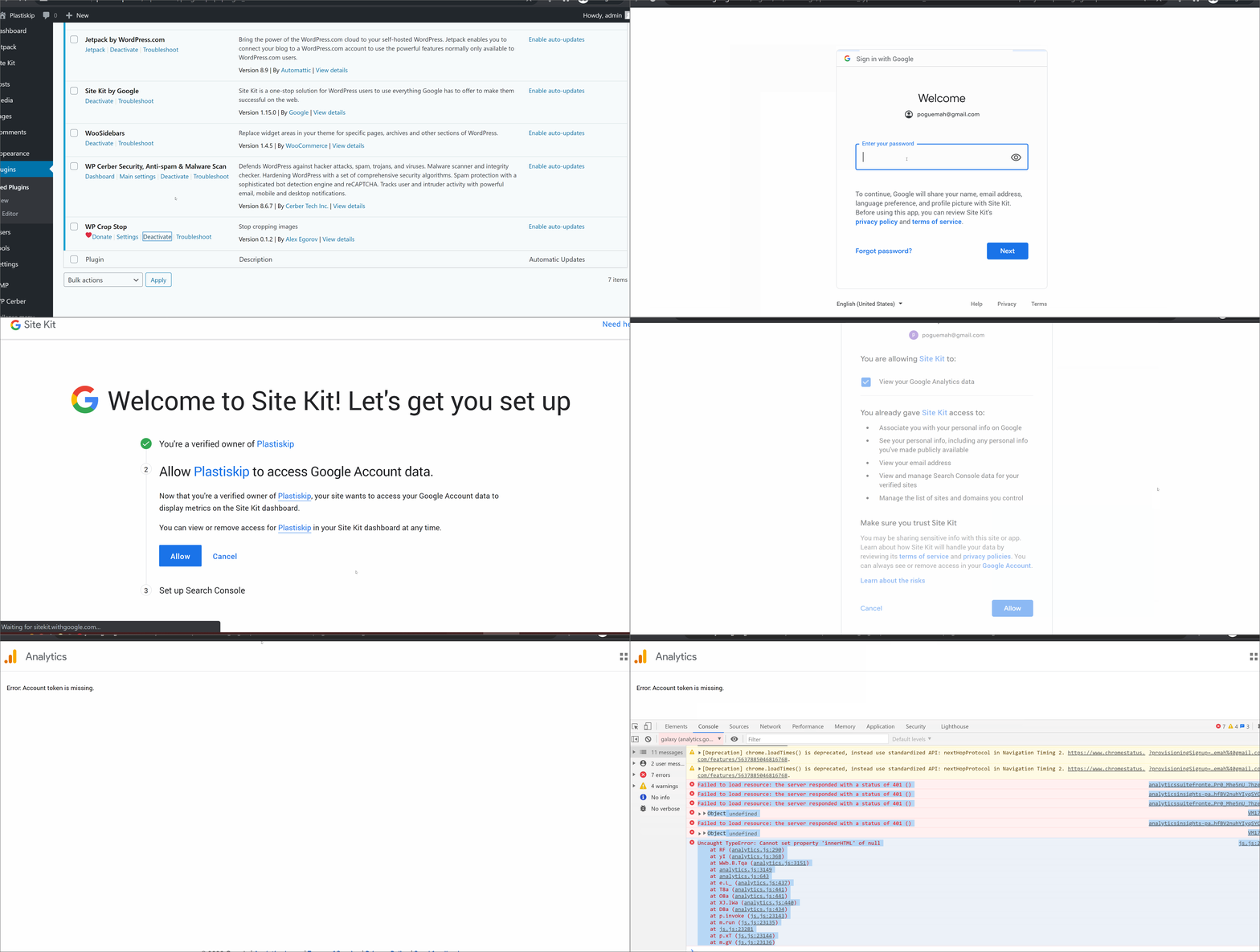
Users with a Google account not previously connected to Analytics may encounter an Error: Account token is missing notice during Site Kit setup. This occurs at the final stage (terms of service) during in product account setup.
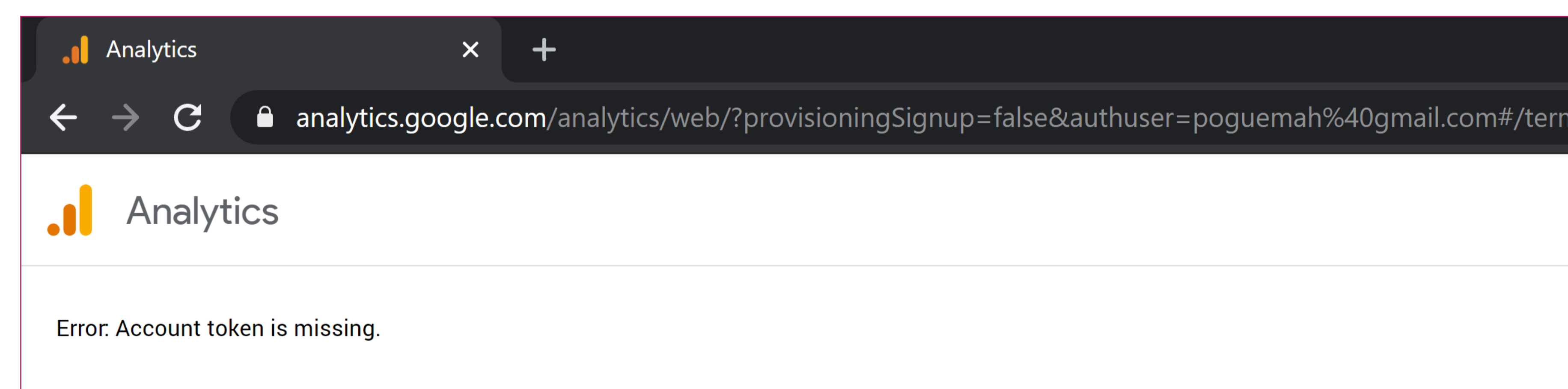
The full URL from the screenshot above is https://analytics.google.com/analytics/web/?provisioningSignup=false&authuser=poguemah%40gmail.com#/termsofservice/
One user reported changing the provisioningSignup value to true, which does allows account creation to continue, but in the Analytics service itself and with no redirection to the plugin. In this case users having to populate all fiends.
More details on this issue at #1632
For those encountering this issue an Analytics account can be created manually at www.analytics.google.com/ before attempting Site Kit Analytics module connection.
Console Errors - On Analytics screen
analyticssuitefrontend-pa.clients6.google.com/v1/productaccess?products=GA&key=AIzaSyAIwF0cjuS_42oLZ5Pr0_Mhe5nU_7hze6g:1 Failed to load resource: the server responded with a status of 401 ()
analyticsinsights-pa.clients6.google.com/v1/search/suggestquery?alt=json&key=AIzaSyANT48CG10vdL_hODhfBV2nuhYIyqSYCQQ:1 Failed to load resource: the server responded with a status of 401 ()
analyticssuitefrontend-pa.clients6.google.com/v1/productaccess?key=AIzaSyAIwF0cjuS_42oLZ5Pr0_Mhe5nU_7hze6g:1 Failed to load resource: the server responded with a status of 401 ()
VM17:123 Object undefined
(anonymous) @ VM17:123
analyticsinsights-pa.clients6.google.com/v1/search/suggestquery?alt=json&key=AIzaSyANT48CG10vdL_hODhfBV2nuhYIyqSYCQQ:1 Failed to load resource: the server responded with a status of 401 ()
VM17:123 Object undefined
(anonymous) @ VM17:123
js.js:23136 Uncaught TypeError: Cannot set property 'innerHTML' of null
    at RF (analytics.js:290)
    at yI (analytics.js:368)
    at WWb.B.Tqa (analytics.js:3151)
    at analytics.js:3149
    at analytics.js:643
    at e.L_ (analytics.js:437)
    at T8a (analytics.js:441)
    at O8a (analytics.js:441)
    at XJ.lWa (analytics.js:440)
    at D8a (analytics.js:434)
    at p.invoke (js.js:23143)
    at m.run (js.js:23135)
    at js.js:23281
    at p.xT (js.js:23144)
    at m.gV (js.js:23136)
Site Health information
### wp-core ###

version: 5.5.1
site_language: en_US
user_language: en_US
permalink: /%post_id%/%postname%/
https_status: false
user_registration: 0
default_comment_status: closed
multisite: false
user_count: 1
dotorg_communication: true

### wp-paths-sizes ###

wordpress_path: /var/www/vhosts/plastiskip.com/httpdocs
wordpress_size: loading...
uploads_path: /var/www/vhosts/plastiskip.com/httpdocs/wp-content/uploads
uploads_size: loading...
themes_path: /var/www/vhosts/plastiskip.com/httpdocs/wp-content/themes
themes_size: loading...
plugins_path: /var/www/vhosts/plastiskip.com/httpdocs/wp-content/plugins
plugins_size: loading...
database_size: loading...
total_size: loading...

### wp-active-theme ###

name: AMPFace (ampface-1)
version: 1.6.0
author: James Ozzie Osborne
author_website: https://ampface.io
parent_theme: none
theme_features: core-block-patterns, custom-header, amp, editor-style, automatic-feed-links, title-tag, post-thumbnails, menus, html5, custom-background, customize-selective-refresh-widgets, custom-logo, widgets
theme_path: /var/www/vhosts/plastiskip.com/httpdocs/wp-content/themes/ampface-1

### wp-mu-plugins (1) ###

Health Check Troubleshooting Mode: author: (undefined), version: 1.7.1

### wp-plugins-active (4) ###

AMP: version: 2.0.1, author: AMP Project Contributors
Health Check & Troubleshooting: version: 1.4.5, author: The WordPress.org community
Site Kit by Google: version: 1.15.0, author: Google
WooSidebars: version: 1.4.5, author: WooCommerce

### wp-plugins-inactive (8) ###

AddToAny Share Buttons: version: 1.7.42, author: AddToAny
Akismet Anti-Spam: version: 4.1.6, author: Automattic
Duplicator: version: 1.3.36, author: Snap Creek
Easy Digital Downloads: version: 2.9.25, author: Sandhills Development, LLC
iThemes Security: version: 7.8.0, author: iThemes
Jetpack by WordPress.com: version: 8.9, author: Automattic
WP Cerber Security, Anti-spam & Malware Scan: version: 8.6.7, author: Cerber Tech Inc.
WP Crop Stop: version: 0.1.2, author: Alex Egorov

### wp-media ###

image_editor: WP_Image_Editor_Imagick
imagick_module_version: 1656
imagemagick_version: ImageMagick 6.7.8-9 2019-02-01 Q16 http://www.imagemagick.org
imagick_limits:
    imagick::RESOURCETYPE_AREA: 7 GB
    imagick::RESOURCETYPE_DISK: -1
    imagick::RESOURCETYPE_FILE: 768
    imagick::RESOURCETYPE_MAP: 7 GB
    imagick::RESOURCETYPE_MEMORY: 4 GB
    imagick::RESOURCETYPE_THREAD: not available
gd_version: bundled (2.1.0 compatible)
ghostscript_version: 9.07

### wp-server ###

server_architecture: Linux 3.10.0-957.5.1.el7.x86_64 x86_64
httpd_software: Apache
php_version: 7.2.15 64bit
php_sapi: cgi-fcgi
max_input_variables: 1000
time_limit: 30
memory_limit: 256M
max_input_time: 60
upload_max_size: 16M
php_post_max_size: 16M
curl_version: 7.29.0 NSS/3.44
suhosin: false
imagick_availability: true
server-headers:
    server: nginx
    date: Mon, 07 Sep 2020 09:34:03 GMT
    content-type: text/html; charset=UTF-8
    x-powered-by: Array
    expires: Wed, 11 Jan 1984 05:00:00 GMT
    cache-control: no-cache, must-revalidate, max-age=0
    link: <http://plastiskip.com/wp-json/>; rel="https://api.w.org/"
htaccess_extra_rules: true

### wp-database ###

extension: mysqli
server_version: 5.5.60-MariaDB
client_version: mysqlnd 5.0.12-dev - 20150407 - $Id: 3591daad22de08524295e1bd073aceeff11e6579 $

### wp-constants ###

WP_HOME: undefined
WP_SITEURL: undefined
WP_CONTENT_DIR: /var/www/vhosts/plastiskip.com/httpdocs/wp-content
WP_PLUGIN_DIR: /var/www/vhosts/plastiskip.com/httpdocs/wp-content/plugins
WP_MAX_MEMORY_LIMIT: 256M
WP_DEBUG: false
WP_DEBUG_DISPLAY: true
WP_DEBUG_LOG: false
SCRIPT_DEBUG: false
WP_CACHE: false
CONCATENATE_SCRIPTS: undefined
COMPRESS_SCRIPTS: undefined
COMPRESS_CSS: undefined
WP_LOCAL_DEV: undefined

### wp-filesystem ###

wordpress: writable
wp-content: writable
uploads: writable
plugins: writable
themes: writable
mu-plugins: writable

### google-site-kit ###

version: 1.15.0
php_version: 7.2.15
wp_version: 5.5.1
reference_url: http://plastiskip.com
amp_mode: secondary
site_status: connected-site
user_status: authenticated
active_modules: site-verification, search-console, analytics
required_scopes:
    openid: ✅
    https://www.googleapis.com/auth/userinfo.profile: ✅
    https://www.googleapis.com/auth/userinfo.email: ✅
    https://www.googleapis.com/auth/siteverification: ✅
    https://www.googleapis.com/auth/webmasters: ✅
    https://www.googleapis.com/auth/analytics.readonly: ✅
search_console_property: http://plastiskip.com/
analytics_account_id: none
analytics_property_id: none
analytics_profile_id: none
analytics_use_snippet: yes

### amp_wp ###

amp_mode_enabled: transitional
amp_reader_theme: legacy
amp_templates_enabled: post, page, attachment, is_singular, is_home, is_archive, is_author, is_date, is_search, is_404, is_category, is_tag
amp_serve_all_templates: true
amp_css_transient_caching_disabled: false
amp_css_transient_caching_threshold: 5000 transients per day
amp_css_transient_caching_sampling_range: 14 days
amp_css_transient_caching_transient_count: 106
amp_css_transient_caching_time_series:
    20200824: 40
    20200825: 40
    20200826: 40
    20200827: 40
    20200828: 40
    20200829: 40
    20200830: 40
    20200831: 67
    20200901: 72
    20200902: 96
    20200903: 100
    20200904: 100
    20200905: 100
    20200906: 103
amp_libxml_version: 2.9.1
Steps to reproduce
- Create new Google account (without accessing Analytics from this account)
- Open site incognito window so caching/connected Google accounts doesn't interfere
- Setup SK
- Attempt Analytics setup
Additional Context
- SK version 1.15.0
- Site is secure but with no https redirection in place
- Setup attempted on http version
- Multiple recently opened support topics on this issue, including the below:
https://wordpress.org/support/topic/account-token-is-missing-2/
https://wordpress.org/support/topic/error-account-token-is-missing-being-shown-despite-resetting-site-kit/
https://wordpress.org/support/topic/account-token-is-missing/
https://wordpress.org/support/topic/google-site-kit-analytics-account-token-is-missing/
https://wordpress.org/support/topic/error-account-token-is-missing-7/
https://wordpress.org/support/topic/error-account-token-is-missing-5/
_Do not alter or remove anything below. The following sections will be managed by moderators only._
Acceptance criteria
Implementation Brief
QA Brief
Changelog entry
 jamesozzie
All 6 comments
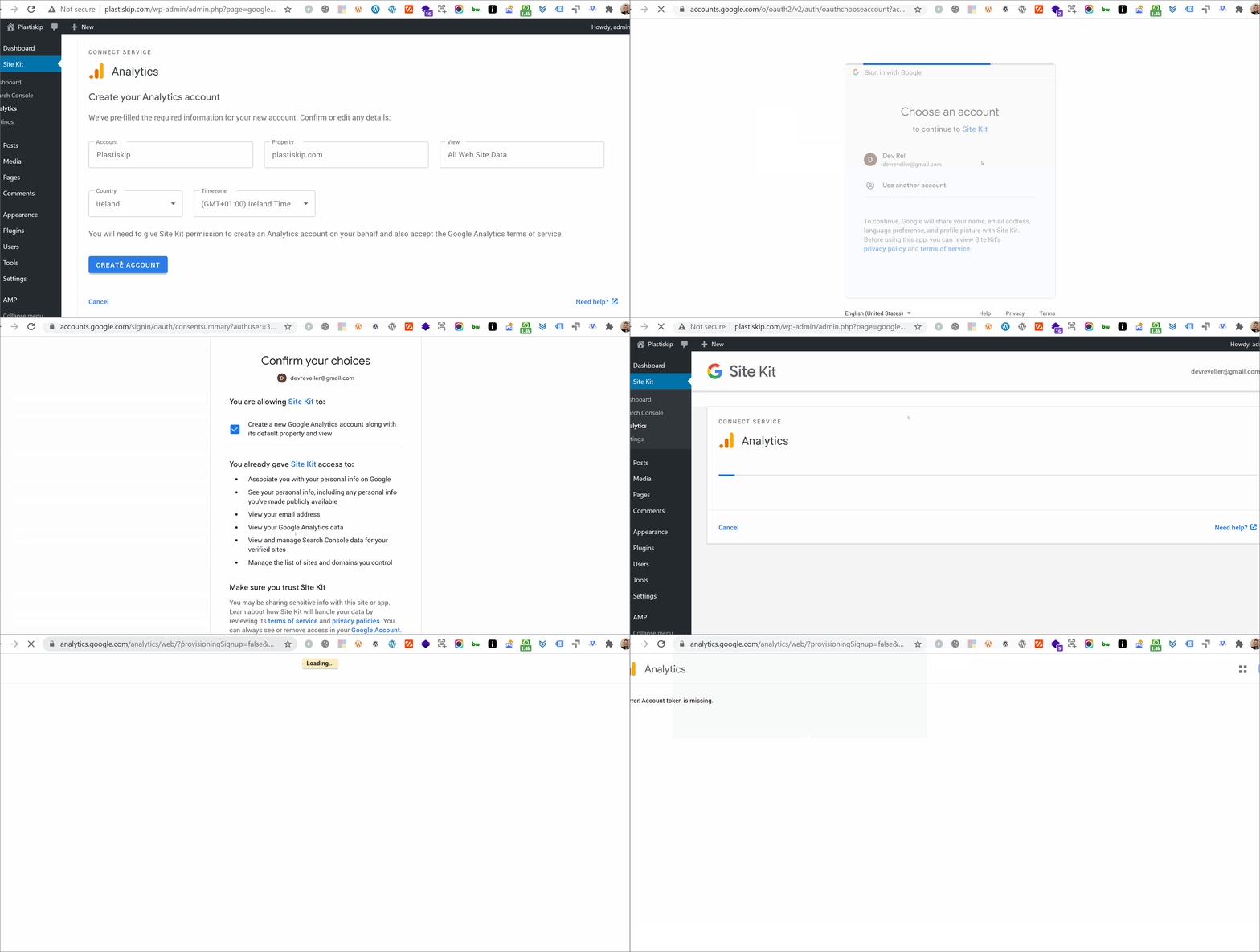
@adamsilverstein Just an update on this. I reproduced this on another Google account (which never visited Analytics or had an Analytics account setup previously).
The URL doesn't change after a user is directed from SK. The same URL appears below from when the terms URL appears to when the error appears:
https://analytics.google.com/analytics/web/?provisioningSignup=false&authuser=devreveller%40gmail.com#/termsofservice/
jamesozzie
on 8 Sep 2020
@jamesozzie Confirming I was able to reproduce with a new account.
Watching the process over a throttled connection I can see that the URL contains the token initially, then I am redirected to a URL without the token (and get the missing token error).
I have updated the internal ticket with these details and will let you know when we make progress.
 adamsilverstein
on 9 Sep 2020
adamsilverstein
on 9 Sep 2020
Update: this issue is related to a bug in the provisioning API itself. I am working with the API team to get this resolved and will update here when a fix is in place.
adamsilverstein
on 17 Sep 2020
@jamesozzie This issue should now be resolved in the API implementation, can you give this another test to see if you are still able to reproduce?
adamsilverstein
on 22 Sep 2020
I've just checked and no issues setting up Analytics from a Google account with no associated Analytics accounts
jamesozzie
on 22 Sep 2020
Excellent, thank you for confirming @jamesozzie! I will go ahead and close this ticket.
When you have a chance, can you please update the support threads to let users know the issue has been resolved (although they have likely worked around the issue by now).
adamsilverstein
on 22 Sep 2020
Related issues
 jsmshay
·
3Comments
jsmshay
·
3Comments
 theeducatedbarfly
·
4Comments
theeducatedbarfly
·
4Comments
 aaemnnosttv
·
3Comments
aaemnnosttv
·
3Comments
 felixarntz
·
4Comments
aaemnnosttv
·
4Comments
felixarntz
·
4Comments
aaemnnosttv
·
4Comments