Site-kit-wp: Analytics Provisioning: improve defaults for blank site names & subdirectory installs.
Bug Description
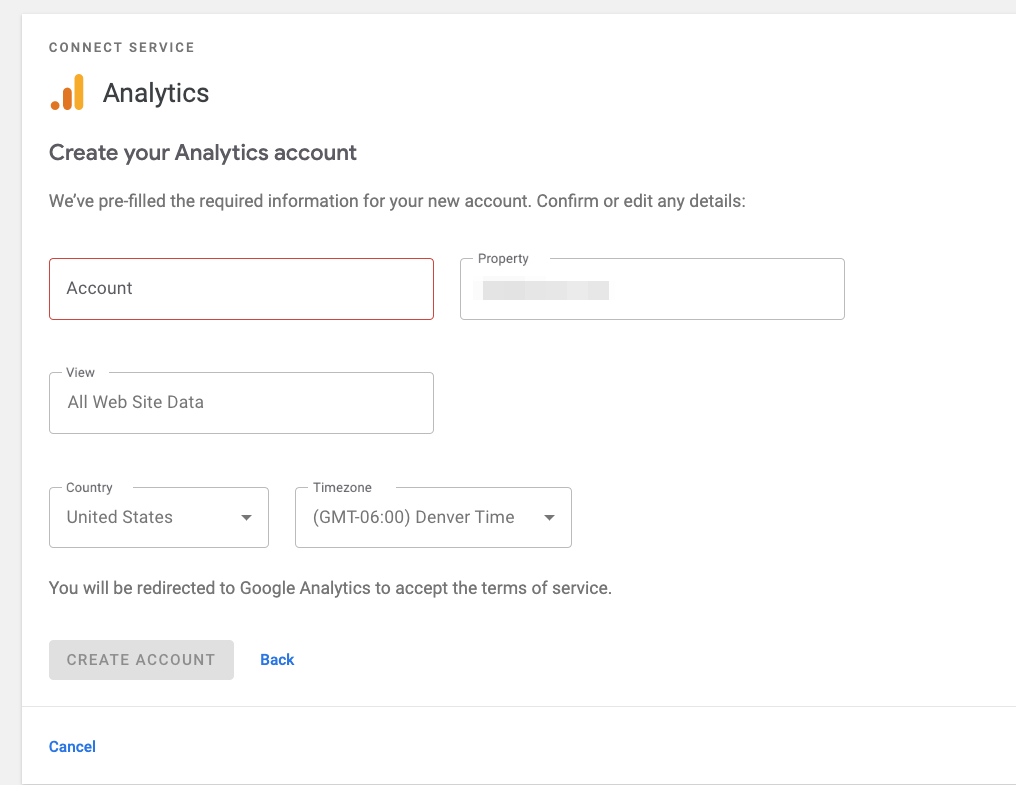
When using a WordPress site with a blank "Site Title" (Settings->General) and creating a new Analytics account in Site Kit, the Account field should be pre-filled with a default value - instead, it is empty.
Steps to reproduce
- Enable Analytics.
- During setup - From the Account dropdown, select "Set up a new account"
- Note: also reproducible from the settings screen.
Expected result:
The account field should be pre-filled with a default value (as stated in the text).
Actual result:
The account field is empty. Users must enter an account name before being able to click "Create Account"
Screenshots
Additional Context
- PHP Version:
- OS: [e.g. iOS]
- Browser [e.g. chrome, safari]
- Plugin Version [e.g. 22]
- Device: [e.g. iPhone6]
_Do not alter or remove anything below. The following sections will be managed by moderators only._
Acceptance criteria
- When using a WordPress site with a blank "Site Title" (Settings->General) and creating a new Analytics account in Site Kit (during setup or from the settings screen), the
Accountfield should be pre-filled with the site URL. - When using a WordPress site installed in a subdirectory, the default property name when provisioning analytics should include the subdirectory path.
Implementation Brief
- In
assets/js/modules/analytics/components/common/AccountCreate/index.js- in the code section that sets up the form store reading// Only set the form if not already present in store.
use the hostname for the accountName value if the siteName is blank:
accountName: siteName || hostname,
- Update property name to include path:
propertyName:${ hostname }${ pathname }.replace( /\/$/, '' ), // Strip trailing slash
QA Brief
- Set the WordPress Site Title to blank/empty.
- Create a new Analytics account from Site Kit.
- Verify in Analytics new account with name
your-test-sitename.comwas created. - Test process with WordPress installed in a subdirectory, verifying property name includes path:
- eg wp-admin is at
testsite.com/wp/wp-admin, in this case the property name for the property should betestsite.com/wp.
- eg wp-admin is at
Changelog entry
- Provide site URL as fallback default value when creating a new Analytics account if site title is empty.
 adamsilverstein
All 10 comments
@adamsilverstein Can you debug a bit more why this might be happening? Could it be that your site name is empty or something like that? I'm not able to replicate it on my end.
Does it happen anywhere you try to create an account, or is it different between e.g. Analytics setup/Analytics settings?
 felixarntz
on 27 Aug 2020
felixarntz
on 27 Aug 2020
Turns out this was user error! I had been testing another issue caused by a blank WordPress site name (where we were showing 'UNDEFINED' during the setup flow) so I had my local testing environment set that way - hence the blank title field.
Still, it did create a confusing user experience and I feel like we can improve the experience by choosing another good default - the site URL (which cannot be blank!). This is the same fix we applied to the setup flow.
I will update the issue description and help move thru AC/IB - this should be straightforward to fix.
adamsilverstein
on 27 Aug 2020
Rather than using the siteURL, I think we should fallback to the hostname rather than the full URL, which we already use for the property name:
https://github.com/google/site-kit-wp/blob/04ffad3598e7a81582f8a211649cee2d1dbb5e6a/assets/js/modules/analytics/components/common/AccountCreate/index.js#L74-L78
E.g. accountName: siteName || hostname,
In light of this duplication, I think perhaps the propertyName should include any potential path (for accuracy with subdirectory installs). So propertyName would be essentially:
propertyName: `${ hostname }${ pathname }`.replace( /\/$/, '' ), // Strip trailing slash
Thoughts @felixarntz ?
 aaemnnosttv
on 31 Aug 2020
aaemnnosttv
on 31 Aug 2020
@aaemnnosttv SGTM!
felixarntz
on 31 Aug 2020
Great suggestions, thanks @aaemnnosttv. I mostly chose siteURL for consistency for how we handle blank site names in the service during setup flow, using the host instead might be a nice improvement there as well.
adamsilverstein
on 31 Aug 2020
Updated IB.
adamsilverstein
on 31 Aug 2020
IB ✅
Regarding the QAB (this isn't needed until CR but no worries 😄 )
eg wp-admin is at
testsite.com/wp/wp-admin, in this case the property name for the property should betestsite.com/wp.
This is not entirely accurate as this can happen in a non-subdirectory install by putting WP in its own directory. A subdirectory install in this case is one where the home URL and admin URLs share a common path after the root of the domain.
E.g. home URL: http://example.com/foo/ and admin URL http://example.com/foo/wp-admin/.
So here the accountName would be example.com and the propertyName would be example.com/foo.
aaemnnosttv
on 31 Aug 2020
Tested
Created a site without a site title:
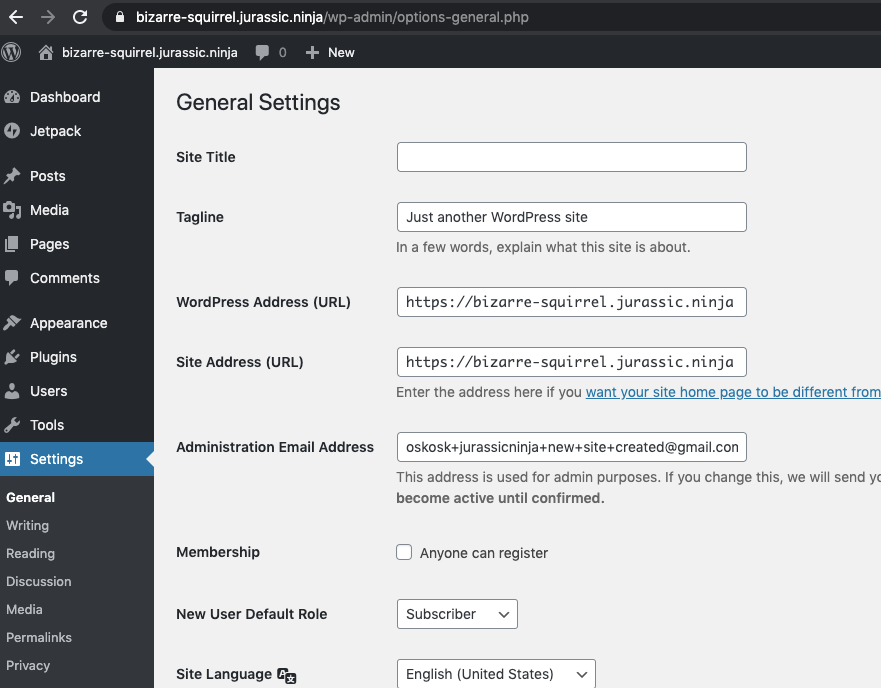
Installed, activated and setup latest SK. Created new Analytics account:

Confirmed account and property were created properlly:

 cole10up
on 24 Sep 2020
cole10up
on 24 Sep 2020
Without spending a tremendous amount of time running through setup issues - just note at this time I'm unable to validate subdirectory installs as the env I tried is throwing an error setting up sitekit.
Passing this to approval with this note to keep moving on the release.
cole10up
on 24 Sep 2020
QA ✅
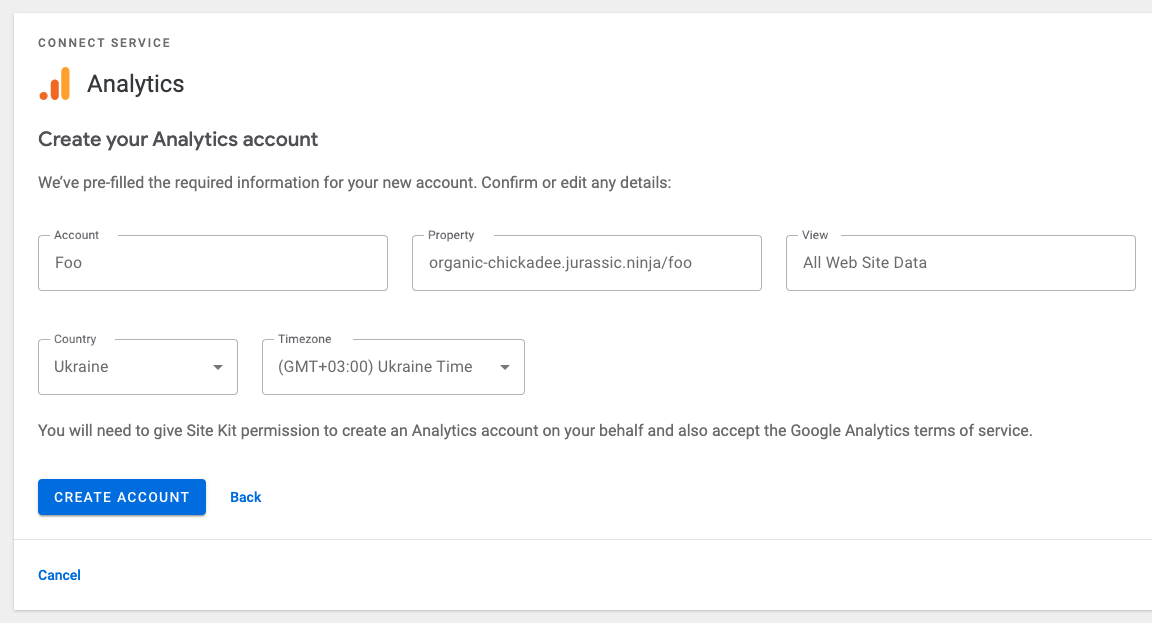
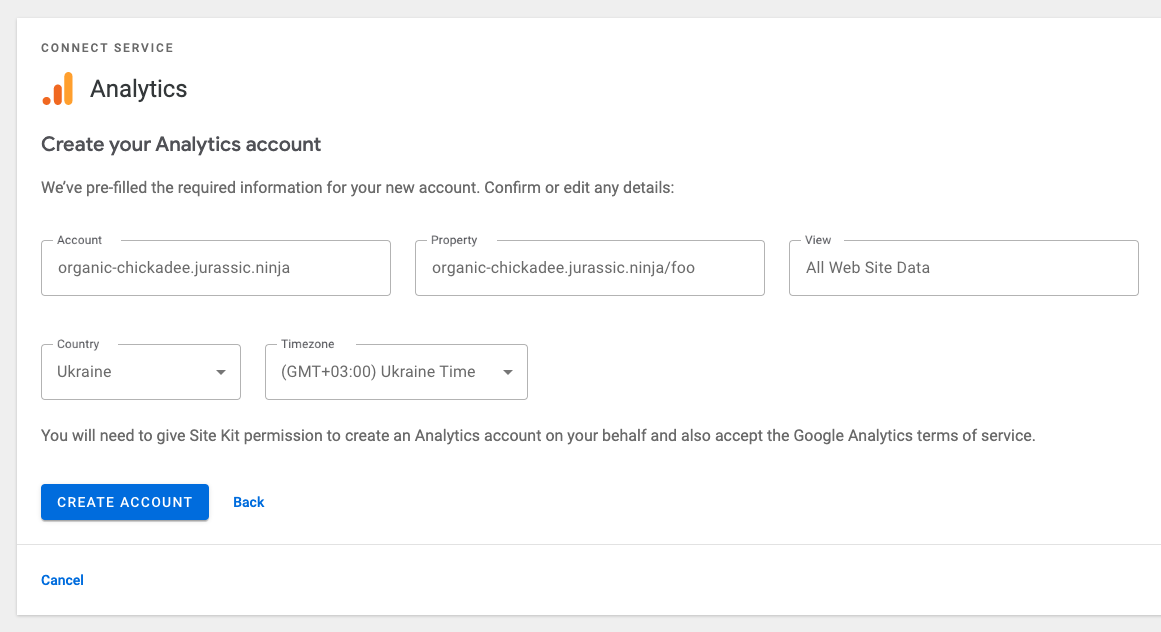
I tested this with a site on a multisite subdirectory install and the fields populated as they should in both cases.
Screenshots
With site title
Without site title
aaemnnosttv
on 24 Sep 2020
Related issues
 tofumatt
·
5Comments
tofumatt
·
5Comments
 jsmshay
·
3Comments
aaemnnosttv
·
5Comments
jsmshay
·
3Comments
aaemnnosttv
·
5Comments
 marrrmarrr
·
5Comments
felixarntz
·
4Comments
marrrmarrr
·
5Comments
felixarntz
·
4Comments
Most helpful comment
IB ✅
Regarding the QAB (this isn't needed until CR but no worries 😄 )
This is not entirely accurate as this can happen in a non-subdirectory install by putting WP in its own directory. A subdirectory install in this case is one where the home URL and admin URLs share a common path after the root of the domain.
E.g. home URL:
http://example.com/foo/and admin URLhttp://example.com/foo/wp-admin/.So here the
accountNamewould beexample.comand thepropertyNamewould beexample.com/foo.