Site-kit-wp: Keep ad blocker detection on AdSense screen until setup complete
Feature Description
- When visiting the AdSense screen - until setup is complete - run the existing ad blocker checks and warn the user that setup cannot complete with an ad blocker enabled.
Details
Site Kit currently tries to help users who may be running an Ad Blocker by telling them to disable it before starting the AdSense setup flow:

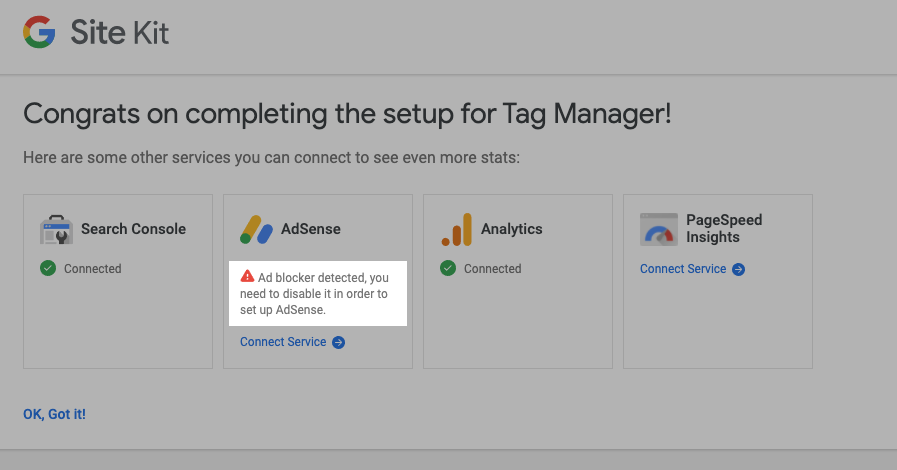
The user may choose to ignore these warnings or only temporarily disable their ad blocker.
Once they activate AdSense if they visit the AdSense page, a warning also shows:

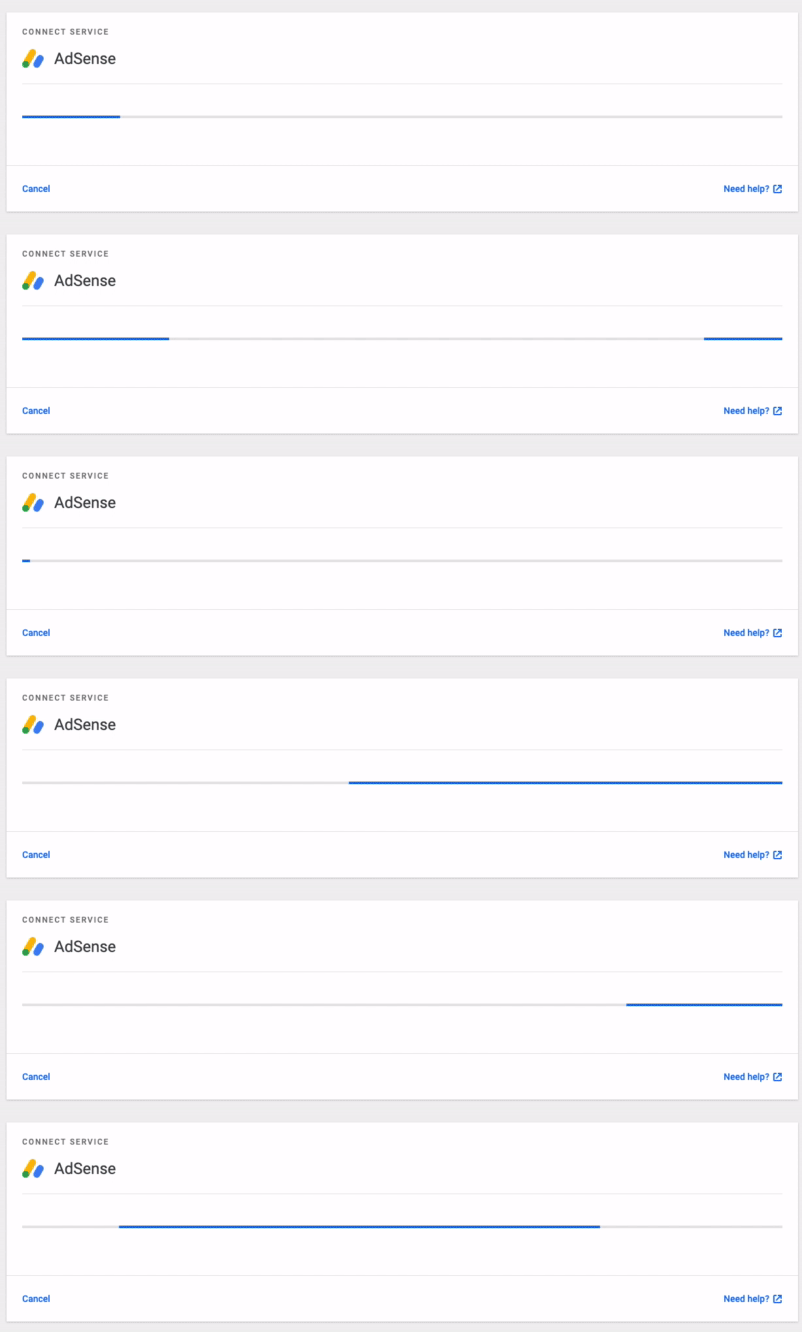
However, if they then disable their ad blocker and get part way thru the AdSense setup - for example, their account is detected but their site is pending approval (which can take days to complete), eg they get here:

Now, they return to their site a few days later to check the AdSense status, and their Ad blocker is on again. In this case, they will get blocked requests and the loader bar will display forever, Site Kit fails to detect the Ad Blocker is running. I am raising this issue because a user reported just this case, and was unable to complete AdSense setup - they did not realize their ad blocker was causing the issue.

Instead, we should still be detecting the ad blocker and tell them to turn it off to complete the setup.
Note: detection is no longer needed once setup is complete - the calls to retrieve data work fine in my testing.
_Do not alter or remove anything below. The following sections will be managed by moderators only._
Acceptance criteria
- The ad blocker warning for AdSense should be displayed at all times during setup if an ad blocker is active.
Implementation Brief
- In
assets/js/modules/adsense/setup/setup-main.jsremove the conditional check that determines whether the<AdBlockerWarningcomponent is rendered to have it always render. - Merge #1699 1699
QA Brief
- Confirm that at any step in the AdSense setup process, that the AdBlocker warning is shown when an ad blocker is enabled.
Changelog entry
- Ensure ad blocker detection is active throughout the entire AdSense module setup.
 adamsilverstein
All 13 comments
@adamsilverstein Have you been able to replicate this yourself? Curious how it happens, we should be checking this at all times during setup - except if the user already has completed account and site setup, see https://github.com/google/site-kit-wp/blob/1.9.0/assets/js/modules/adsense/setup/setup-main.js#L349. I wonder whether they had completed it before at some time and then disconnected the module again potentially so that the flags were set already. Maybe it's best to just remove the checks and always show the AdBlockerWarning component.
 felixarntz
on 15 Jun 2020
felixarntz
on 15 Jun 2020
The IB looks good to me regarding the current AC. However, if an ad blocker is causing API requests to fail for regular AdSense requests, the warning should probably always be shown (even outside of setup). The only reason dashboard requests wouldn't be blocked is because they're made using the batch request endpoint so the URL doesn't have adsense in it. I would imagine this would also cause similar problems on the settings page though as this would use regular module REST routes. Perhaps we should add the ad blocker warning component to SettingsForm and SettingsView components? We might also want to add a tooltip/link to more info as to why this is needed or shown.
Thoughts @adamsilverstein @felixarntz ?
Edit: moving this back to AC for now for potential revision.
 aaemnnosttv
on 29 Jun 2020
aaemnnosttv
on 29 Jun 2020
@aaemnnosttv Let's keep the detection notice in the dashboard for a separate issue if it becomes a problem. Regarding settings, as far as I can see, we don't actually request AdSense API data there, so there it shouldn't be an issue.
felixarntz
on 29 Jun 2020
IB ✅
aaemnnosttv
on 29 Jun 2020
However, if an ad blocker is causing API requests to fail for regular AdSense requests, the warning should probably always be shown (even outside of setup)
In my testing, ad blockers did not affect seeing data on the AdSense module page once setup is complete. Likely as you mentioned because the bulk datapoint doesn't look like an ad request. I will double check on the settings page and address that here i=or in a follow up issue.
adamsilverstein
on 1 Jul 2020
Tested
Installed latest SK release candidate and activated with Adblocker on

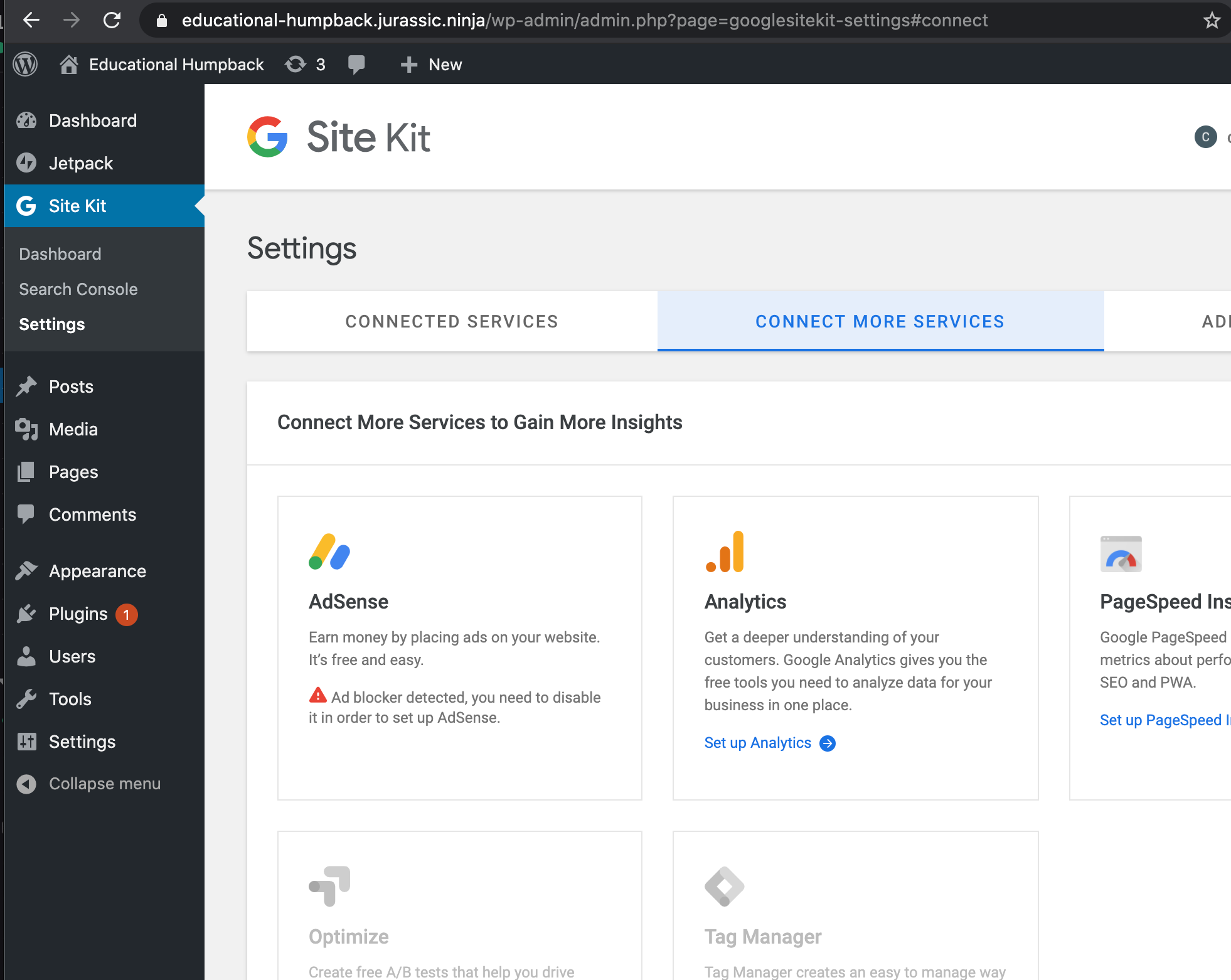
Disabled Adblocker and clicked install module
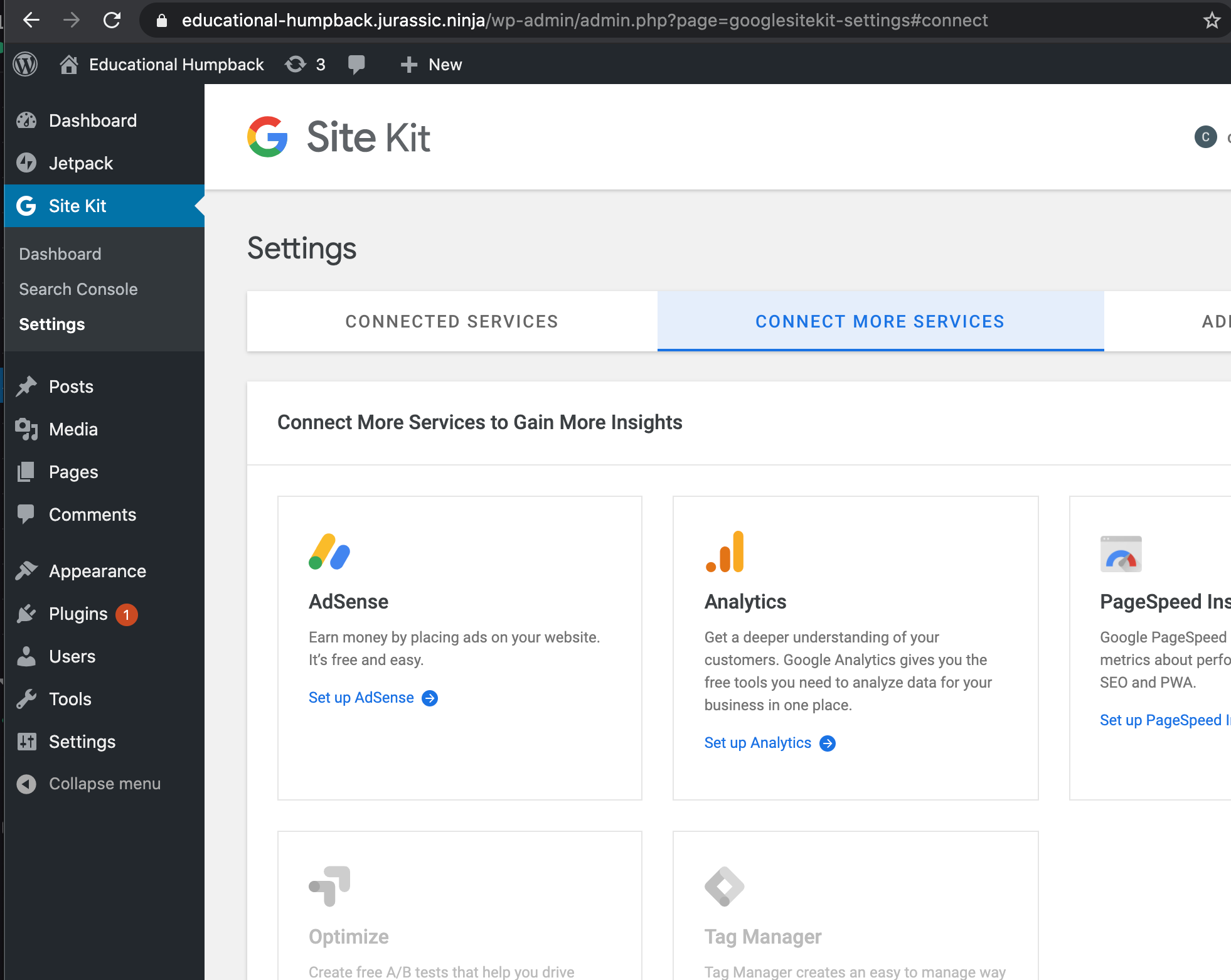
Turned adblocker on after proxy install notice:

Finished disabled Adblocker to pass this screen - completed setup and turned adblocker back on
Notice Adblocker message flashes quickly but is overwritten with 'No ad impressions yet'
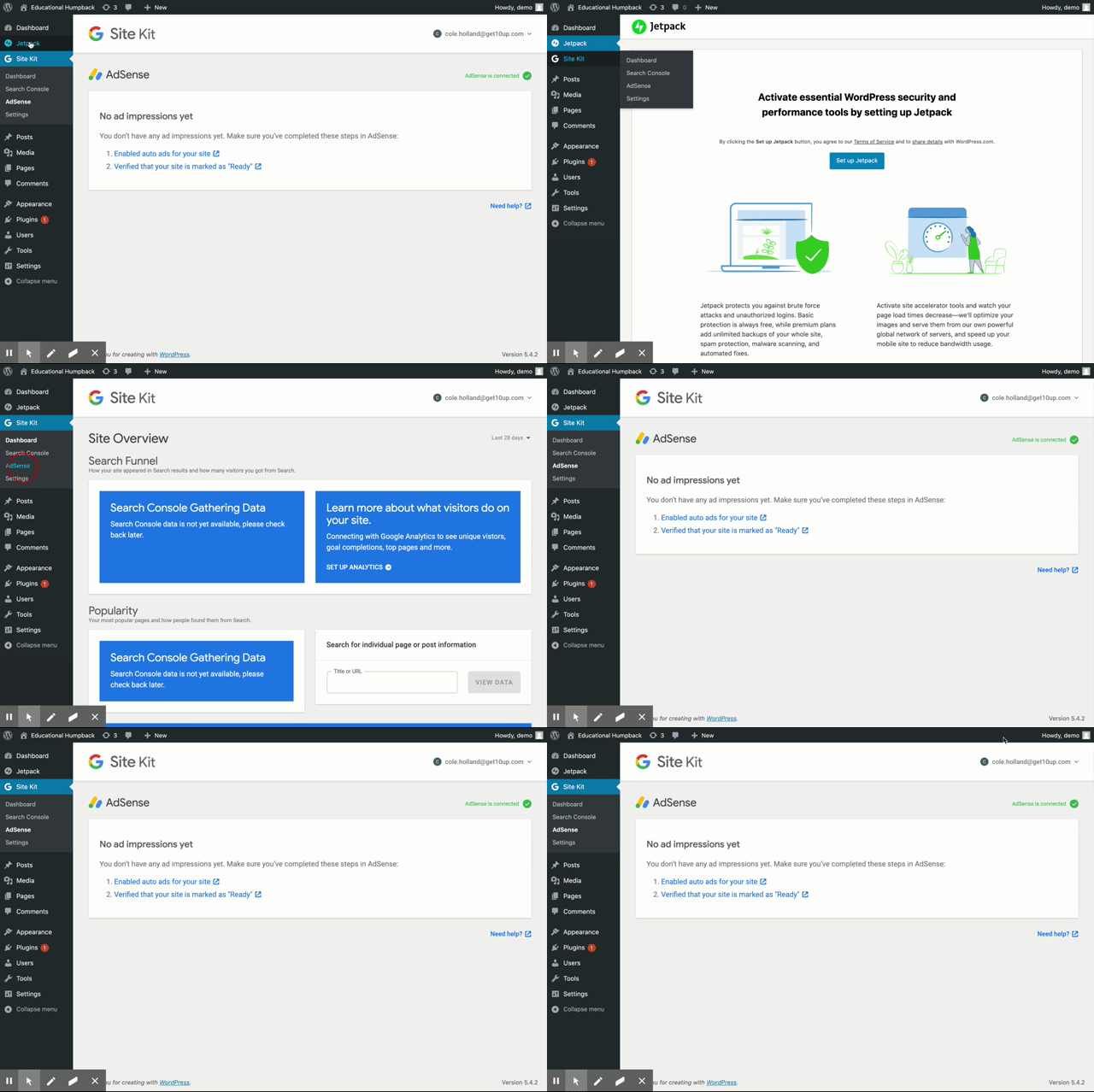
@adamsilverstein - is this acceptable for the above behavior?
 cole10up
on 7 Jul 2020
cole10up
on 7 Jul 2020
@cole10up
- The last screen where you see "Error: You are probably offline" should instead show a message indicating that your Ad blocker needs to be disabled.
- The final screen with a flash of the error message seems wrong - as far as I can tell, setup is not yet "complete" from the plugin perspective, so I would expect the ad blocker message to continue showing.
- Once setup is complete and we have data (or "zero data") the message should no longer show - ad blockers only interfere with module setup.
adamsilverstein
on 7 Jul 2020
@adamsilverstein @felixarntz
The last screen where you see "Error: You are probably offline" should instead show a message indicating that your Ad blocker needs to be disabled.
This would require us to either:
- update all fetch controls in the AdSense store to
receiveIsAdBlockerActive( true )if the request fails with thecode: 'fetch_error'although this currently isn't possible becausecreateFetchStorecontrol callbacks don't have access to the registry. - Update the
ErrorNoticecomponent to conditionally render theAdBlockerWarningiferror.code === 'fetch_error'but this would then show the ad blocker if _any_ request failed - eg. existing tag check, etc - so there are cases where this would be potentially undesirable/inaccurate.
This may be the only option for now and it would still be scoped to AdSense module requests but the request that failed isn't available beyond the control so there would be a bit of an assumption to show the ad blocker warning here instead.
The final screen with a flash of the error message seems wrong - as far as I can tell, setup is not yet "complete" from the plugin perspective, so I would expect the ad blocker message to continue showing.
This is a bit odd as I would expect the dashboard components to only appear if it was in a non-zero-data state. It should still be showing the module setup components then correct? @cole10up it would be good to see the Site Health info at this point so we could confirm the setup status.
aaemnnosttv
on 7 Jul 2020
@aaemnnosttv
This would require us to either:
- update all fetch controls in the AdSense store to
receiveIsAdBlockerActive( true )if the request fails with thecode: 'fetch_error'although this currently isn't possible becausecreateFetchStorecontrol callbacks don't have access to the registry.- Update the
ErrorNoticecomponent to conditionally render theAdBlockerWarningiferror.code === 'fetch_error'but this would then show the ad blocker if _any_ request failed - eg. existing tag check, etc - so there are cases where this would be potentially undesirable/inaccurate.
This may be the only option for now and it would still be scoped to AdSense module requests but the request that failed isn't available beyond the control so there would be a bit of an assumption to show the ad blocker warning here instead.
Hmm but which request exactly got blocked there? Maybe we need to change our JS file name yet another way so it would catch that REST route too? I don't think we should go any further than that with the ad blocker handling.
@adamsilverstein
The final screen with a flash of the error message seems wrong - as far as I can tell, setup is not yet "complete" from the plugin perspective, so I would expect the ad blocker message to continue showing.
This UI is okay as is for now, for the following reasons:
- The screen is part of the dashboard, not setup. At this point the setup is technically complete and the user just needs to take care of these two steps (which we cannot know in the plugin whether they already did or not), and then wait to get initial impressions.
- The flickering itself is terrible, but it's caused by the legacy implementation of how to handle the zero data there. The ad blocker notice that shows for a split second is also part of the legacy UI. We'll refactor this as we refactor the AdSense page to use our new widgets API in the future.
As part of the scope of this issue, we should try to resolve the "Error: You are probably offline"; the other one is not strictly setup-related and out of scope.
felixarntz
on 7 Jul 2020
Hmm but which request exactly got blocked there? Maybe we need to change our JS file name yet another way so it would catch that REST route too? I don't think we should go any further than that with the ad blocker handling.
I looked into this with @cole10up and it requires that you enable your Ad Blocker after the screen loads on this step before clicking "Continue":
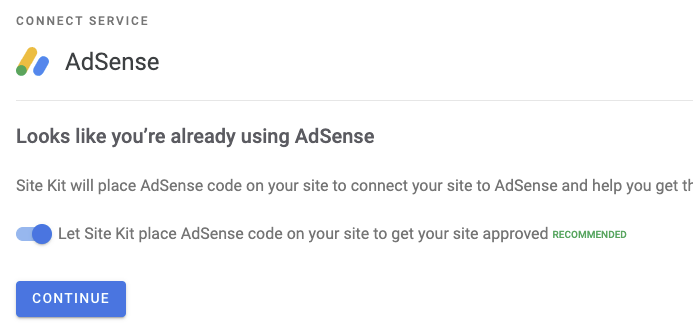
When clicking the button, the POST request to AdSense settings is blocked and you're left in the same place with the error
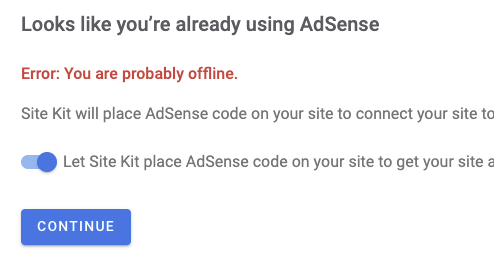
The Ad Blocker warning shows correctly if it's enabled before the screen loads, or if you were to refresh at this point so there's nothing wrong with the Ad Blocker detection in place, but a limitation that it is only able to detect it on page load.
One way around this might be to poll fetch requests for the AdBlock JS file and if it fails, we can receiveIsAdBlockerActive( true ) but only during setup. It's a bit of an edge case though so I'm not sure if it's worth the extra effort. What do you think?
aaemnnosttv
on 7 Jul 2020
@aaemnnosttv Oh that makes sense. If this only happens because the ad blocker was enabled during page lifecycle, I think it's not worth the effort. The main use-case for this detection is browsers that generally have an ad blocker active, to inform users they need to disable it. While you can turn an ad blocker on during page lifecycle, for the vast majority of cases checking on pageload will be sufficient because based on the URL ad blockers typically determine whether they should be disabled or not.
Let's move this to Approval then.
felixarntz
on 7 Jul 2020
@cole10up - moving this to Approval unless there are any cases you found where this was possible that didn't require the AdBlocker to be toggled after the page was loaded in WP?
aaemnnosttv
on 7 Jul 2020
No other cases were found outside of togging the ad blocker after pages were loaded. This is good on my end.
Passed QA ✅
cole10up
on 7 Jul 2020
Related issues
 Loganson
·
5Comments
felixarntz
·
4Comments
Loganson
·
5Comments
felixarntz
·
4Comments
 quindo
·
5Comments
quindo
·
5Comments
 tofumatt
·
3Comments
aaemnnosttv
·
5Comments
tofumatt
·
3Comments
aaemnnosttv
·
5Comments
Most helpful comment
@aaemnnosttv Oh that makes sense. If this only happens because the ad blocker was enabled during page lifecycle, I think it's not worth the effort. The main use-case for this detection is browsers that generally have an ad blocker active, to inform users they need to disable it. While you can turn an ad blocker on during page lifecycle, for the vast majority of cases checking on pageload will be sufficient because based on the URL ad blockers typically determine whether they should be disabled or not.
Let's move this to Approval then.