Site-kit-wp: Analytics: improve provisioning flow reliability
Bug Description
The current Analytics provisioning flow directs users to the Terms of Service agreement page using an outdated URL, that redirects users to the final current URL. In certain cases a rare condition occurs where redirect fails. The user winds up at the incorrect url and encounters an error: Error: Account token is missing. To resolve this issue, Site Kit should direct users directly to the final URL, avoiding the redirect.
Additional details
After Site Kit setup succeeds an error appears after submitting account details and proceeding during the Analytics setup flow.
Error: Account token is missing.
Original Support Topic: https://wordpress.org/support/topic/error-account-token-is-missing/#post-12930778
Other reported issues:
- https://wordpress.org/support/topic/error-account-token-is-missing-2
- https://wordpress.org/support/topic/google-kit-error-account-token-is-missing/
Screenshots
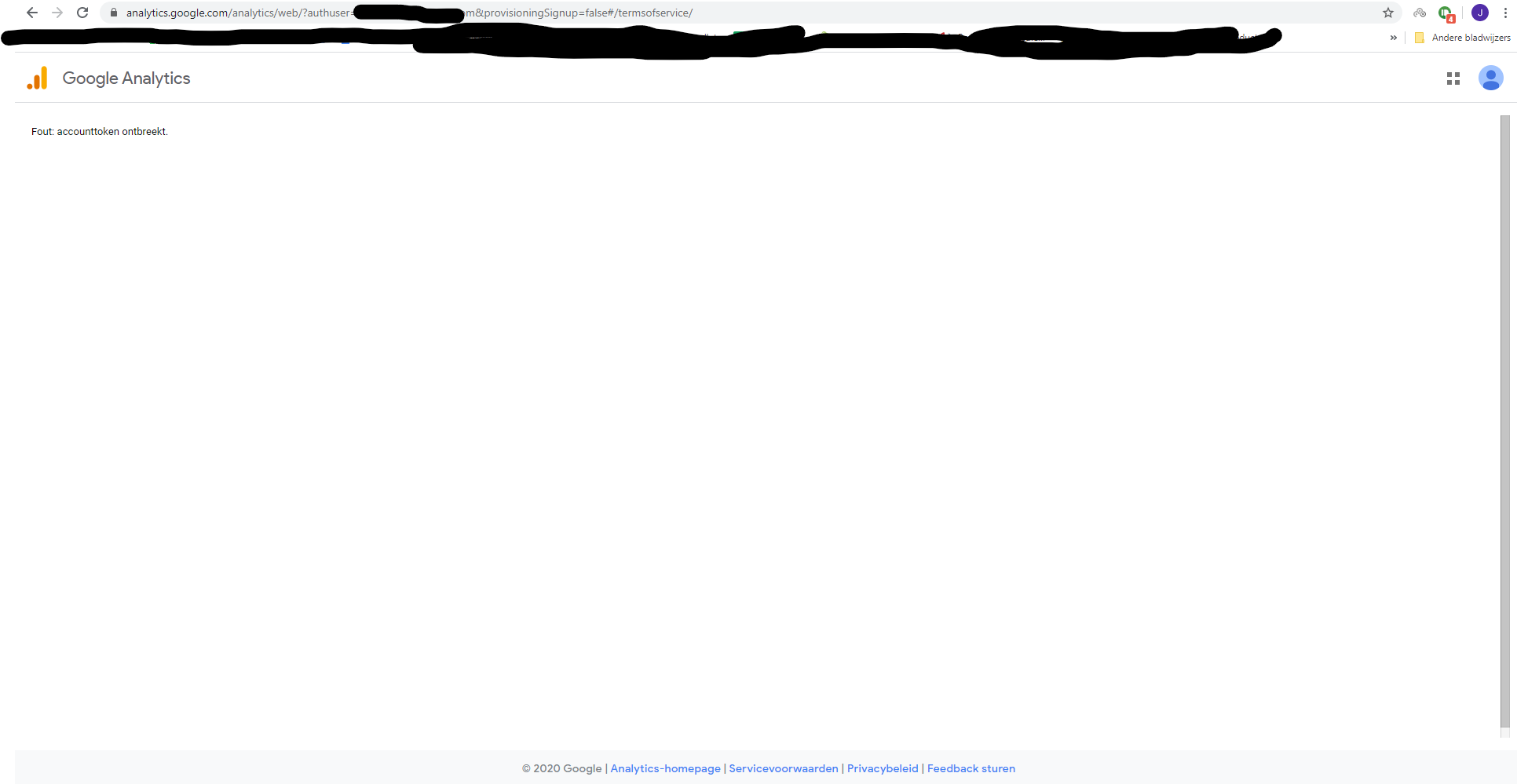

Additional Context
- Reported by two users in the same WordPress support topic
- Not yet re-produced by support
- Screen flashes for a moment after inputting Analytics account details before error appears
- Awaiting Site Health information from impacted users
_Do not alter or remove anything below. The following sections will be managed by moderators only._
Acceptance criteria
- The provisioning flow should work every time. Users should never see a "Error: Account token is missing" error.
- Users should be directed directly to the provisioning URL with the hash #/termsofservice/${ accountTicketID }
instead of#management/TermsOfService/?api.accountTicketId=${ accountTicketID }` (which unreliably redirects to the other URL).
Implementation Brief
- In the file
assets/js/modules/analytics/datastore/accounts.jsin the functiongetAccountTicketTermsOfServiceURLupdate the URL construction hash part:
#management/TermsOfService/?api.accountTicketId=${ accountTicketID }
should be changed to
#/termsofservice/${ accountTicketID }
QA Brief
Changelog entry
- Fix redirect to Google Analytics terms of service occasionally failing due to unnecessary extra redirect.
 jamesozzie
All 28 comments
Another topic: https://wordpress.org/support/topic/google-kit-error-account-token-is-missing/
The user reported not having a Google Analytics account before trying to connect Analytics.
 ernee
on 4 Jun 2020
ernee
on 4 Jun 2020
Have exactly the same problem as described by ernee
 kokosta
on 5 Jun 2020
kokosta
on 5 Jun 2020
I was able to recreate the issue on a new site and with a Google account without an Analytics account. Site Health:
wp-core
version: 5.4.1
site_language: en_US
user_language: en_US
timezone: +00:00
permalink: /%postname%/
https_status: true
user_registration: 0
default_comment_status: closed
multisite: false
user_count: 1
dotorg_communication: true
wp-paths-sizes
wordpress_path: /home/folder/public_html/support2
wordpress_size: 39.45 MB (41362340 bytes)
uploads_path: /home/folder/public_html/support2/wp-content/uploads
uploads_size: 0.00 B (0 bytes)
themes_path: /home/folder/public_html/support2/wp-content/themes
themes_size: 2.77 MB (2905990 bytes)
plugins_path: /home/folder/public_html/support2/wp-content/plugins
plugins_size: 16.84 MB (17656519 bytes)
database_size: 2.13 MB (2228224 bytes)
total_size: 61.18 MB (64153073 bytes)
wp-active-theme
name: Twenty Twenty (twentytwenty)
version: 1.3
author: the WordPress team
author_website: https://wordpress.org/
parent_theme: none
theme_features: automatic-feed-links, custom-background, post-thumbnails, custom-logo, title-tag, html5, align-wide, responsive-embeds, customize-selective-refresh-widgets, editor-color-palette, editor-font-sizes, editor-styles, widgets, menus, editor-style
theme_path: /home/folder/public_html/support2/wp-content/themes/twentytwenty
wp-themes-inactive (1)
Twenty Nineteen: version: 1.5, author: the WordPress team
wp-plugins-active (1)
Site Kit by Google: version: 1.9.0, author: Google
wp-plugins-inactive (1)
SG Optimizer: version: 5.5.5, author: SiteGround
wp-media
image_editor: WP_Image_Editor_Imagick
imagick_module_version: 1684
imagemagick_version: ImageMagick 6.9.4-5 Q16 x86_64 2016-05-31 http://www.imagemagick.org
imagick_limits:
imagick::RESOURCETYPE_AREA: 4 GB
imagick::RESOURCETYPE_DISK: -1
imagick::RESOURCETYPE_FILE: 64
imagick::RESOURCETYPE_MAP: 4 GB
imagick::RESOURCETYPE_MEMORY: 2 GB
imagick::RESOURCETYPE_THREAD: 4
gd_version: bundled (2.1.0 compatible)
ghostscript_version: 9.26
wp-server
server_architecture: Linux 3.12.18-clouder0 x86_64
httpd_software: Apache
php_version: 7.3.16 64bit
php_sapi: cgi-fcgi
max_input_variables: 5000
time_limit: 120
memory_limit: 768M
max_input_time: 120
upload_max_size: 128M
php_post_max_size: 128M
curl_version: 7.59.0 OpenSSL/1.0.2r
suhosin: false
imagick_availability: true
htaccess_extra_rules: true
wp-database
extension: mysqli
server_version: 5.6.40-84.0-log
client_version: mysqlnd 5.0.12-dev - 20150407 - $Id: 7cc7cc96e675f6d72e5cf0f267f48e167c2abb23 $
wp-constants
WP_HOME: undefined
WP_SITEURL: undefined
WP_CONTENT_DIR: /home/folder/public_html/support2/wp-content
WP_PLUGIN_DIR: /home/folder/public_html/support2/wp-content/plugins
WP_MAX_MEMORY_LIMIT: 768M
WP_DEBUG: false
WP_DEBUG_DISPLAY: true
WP_DEBUG_LOG: false
SCRIPT_DEBUG: false
WP_CACHE: false
CONCATENATE_SCRIPTS: undefined
COMPRESS_SCRIPTS: undefined
COMPRESS_CSS: undefined
WP_LOCAL_DEV: undefined
DB_CHARSET: utf8mb4
DB_COLLATE: undefined
wp-filesystem
wordpress: writable
wp-content: writable
uploads: writable
plugins: writable
themes: writable
google-site-kit
version: 1.9.0
php_version: 7.3.16
wp_version: 5.4.1
reference_url: https://support2.goodbyehello.today
amp_mode: no
site_status: connected-site
user_status: authenticated
active_modules: site-verification, search-console, analytics
required_scopes:
openid: ✅
https://www.googleapis.com/auth/userinfo.profile: ✅
https://www.googleapis.com/auth/userinfo.email: ✅
https://www.googleapis.com/auth/siteverification: ✅
https://www.googleapis.com/auth/webmasters: ✅
https://www.googleapis.com/auth/analytics.readonly: ✅
search_console_property: https://support2.goodbyehello.today/
analytics_account_id: none
analytics_property_id: none
analytics_profile_id: none
analytics_use_snippet: yes
ernee
on 6 Jun 2020
Hmm... something is wrong with the way you are redirected.
I'll take a look to see if I can determine the underlying cause.
 adamsilverstein
on 6 Jun 2020
adamsilverstein
on 6 Jun 2020
Another reported issue added to original report. Awaiting additional information:
https://wordpress.org/support/topic/error-account-token-is-missing-2
jamesozzie
on 8 Jun 2020
I can confirm same problem on my WP installation.
Site Kit Version | 1.9.0
PHP Version | 7.3.17
WordPress Version | 5.4.1
 sasa-friedrich-bitlab
on 9 Jun 2020
sasa-friedrich-bitlab
on 9 Jun 2020
Hello i have the same problem with my wordprees web page can you help
 rubizamora
on 10 Jun 2020
rubizamora
on 10 Jun 2020
I created new account for my web page manually. And then in Site Kit I choose this newly created account. Now it shows me green status "Analytics is connected". But I can't conform that it will work because domain is new and there's not data available yet.
sasa-friedrich-bitlab
on 10 Jun 2020
@sasa-friedrich-bitlab @rubizamora thanks for reporting! We're currently looking into this issue and will follow up when we have more information.
ernee
on 15 Jun 2020
I am coming across this same issue with my WP site.
 bystephanieerin
on 17 Jun 2020
bystephanieerin
on 17 Jun 2020
mine worked!
i just added https:// at the site link at account creation
 kigechaedward
on 20 Jun 2020
kigechaedward
on 20 Jun 2020
I'm having the same issue. Tried https://.
 Thornr
on 23 Jun 2020
Thornr
on 23 Jun 2020
IB ✅
 felixarntz
on 23 Jun 2020
felixarntz
on 23 Jun 2020
Tested
Installed and activated latest SK. Setup analytics module.
Ran a series of regressions around setting up Analytics with a new account, existing account, adjusting Analytics (disconnecting and reconnecting module) in settings page.
No token issues reported.
Passed QA ✅
 cole10up
on 30 Jun 2020
cole10up
on 30 Jun 2020
Try delete the "false#" in the search bar area. worked for me.
 Skyesie
on 4 Jul 2020
Skyesie
on 4 Jul 2020
Same issue.
 joshin-run
on 9 Jul 2020
joshin-run
on 9 Jul 2020
I fixed it. Details below:
- I removed the script from the website in another tab:
<!-- Global site tag (gtag.js) - Google Analytics -->
<script async src="https://www.googletagmanager.com/gtag/js?id=UA-000000000-1"></script>
<script>
window.dataLayer = window.dataLayer || [];
function gtag(){dataLayer.push(arguments);}
gtag('js', new Date());
gtag('config', 'UA-000000000-1');
</script>
- then I did what @Skyesie said and deleted the
false#out of the URL or address in the address bar. That allowed for me to get to the Analytics page to create a new one. - I then created a new one, by completing the configuration.
- I copied the script and entered it into my WP site.
- I then went to my dashboard and clicked on the "G Site Kit", entered in a few things and clicked the button below. It showed that it was now connected.
I'm not sure what made the difference but the false# removal may have been a huge proponent for the solution.
Thanks!
joshin-run
on 9 Jul 2020
I am encountering the same issue, ERROR:Account token is missing. Please help resolve this on priority.
Thank You!!
 Vishall97
on 15 Jul 2020
Vishall97
on 15 Jul 2020
@Vishall97 are you using the latest version of the plugin? this issue should be resolved.
adamsilverstein
on 16 Jul 2020
Hello. I just installed SiteKit on a brand new website, and i got this error. Is this supposed to be solved?
I'm using version 1.14.0
EDIT: Worked when in Incognito Mode. Maybe it's because I have more than one google email linked to the same account?
 Alessandrolosco
on 15 Aug 2020
Alessandrolosco
on 15 Aug 2020
@Alessandrolosco Thanks for the feedback. Glad you got this working. Typically this fails when one of the redirects fails during the process of setup.
Maybe it's because I have more than one google email linked to the same account?
Do you mean you are logged into analytics with two different accounts (and can toggle them from the upper right user menu)?
adamsilverstein
on 17 Aug 2020
Yes, quite. I was logged on multiple google accounts, even if I was signed
up in google Analytics only one one of them.
Il giorno lun 17 ago 2020 alle ore 17:20 Adam Silverstein <
[email protected]> ha scritto:
@Alessandrolosco https://github.com/Alessandrolosco Thanks for the
feedback. Glad you got this working. Typically this fails when one of the
redirects fails during the process of setup.Maybe it's because I have more than one google email linked to the same
account?Do you mean you are logged into analytics with two different accounts (and
can toggle them from the upper right user menu)?—
You are receiving this because you were mentioned.
Reply to this email directly, view it on GitHub
https://github.com/google/site-kit-wp/issues/1632#issuecomment-674944438,
or unsubscribe
https://github.com/notifications/unsubscribe-auth/AEEU7SNGEKUCZLDFJXFABQLSBFDCZANCNFSM4NROSERQ
.
Alessandrolosco
on 18 Aug 2020
Yes, quite. I was logged on multiple google accounts, even if I was signed up in google Analytics only one one of them.
Thanks for clarifying @Alessandrolosco - we will investigate this further to see if it can be improved.
adamsilverstein
on 18 Aug 2020
Hi i am also having a similar problem. I am running wordpress 5.5 with all plugins up to date. google adsense and google search both connected with no issues, Have tried to connect google Analytics without an account and with an Analytics account in place and on both times it shows Error: Account token is missing. After reading other threads on here and wordpress.org (this site is hosted on ifastnet running php 7.4) i have tried, removing google site kit and a fresh install, in private browsers, clearing my cache etc etc etc. has anyone found a fix to this yet?
 Hiltnladcdr
on 25 Aug 2020
Hiltnladcdr
on 25 Aug 2020
sorted this issue. turned out my lovely browser was trying to put different google accounts in at random times
Hiltnladcdr
on 25 Aug 2020
I tried clearing cache and all other suggested solutions, it still says same error!
 therealshubham
on 27 Aug 2020
therealshubham
on 27 Aug 2020
@therealshubham thanks for this update. can you try in an incognito window? Also, can you please take a screenshot of the error screen you see at the end and upload that here?
If this still doesn't work, a workaround is to create your account in Analytics first, then return to Site Kit and it will detect the account.
adamsilverstein
on 27 Aug 2020
hi sorry i didn't let you know sooner but i solved the problem. (or it solved itself). i tried the process again from a different computer that was on a different ip etc etc and it worked first time no issue? don't know if that would of made any difference but i'm just happy it worked
Hiltnladcdr
on 27 Aug 2020
Related issues
 aaemnnosttv
·
5Comments
aaemnnosttv
·
5Comments
 theeducatedbarfly
·
4Comments
theeducatedbarfly
·
4Comments
 Loganson
·
5Comments
aaemnnosttv
·
5Comments
aaemnnosttv
·
4Comments
Loganson
·
5Comments
aaemnnosttv
·
5Comments
aaemnnosttv
·
4Comments