Site-kit-wp: Analytics chart showing incorrect data/dates for Users
Bug Description
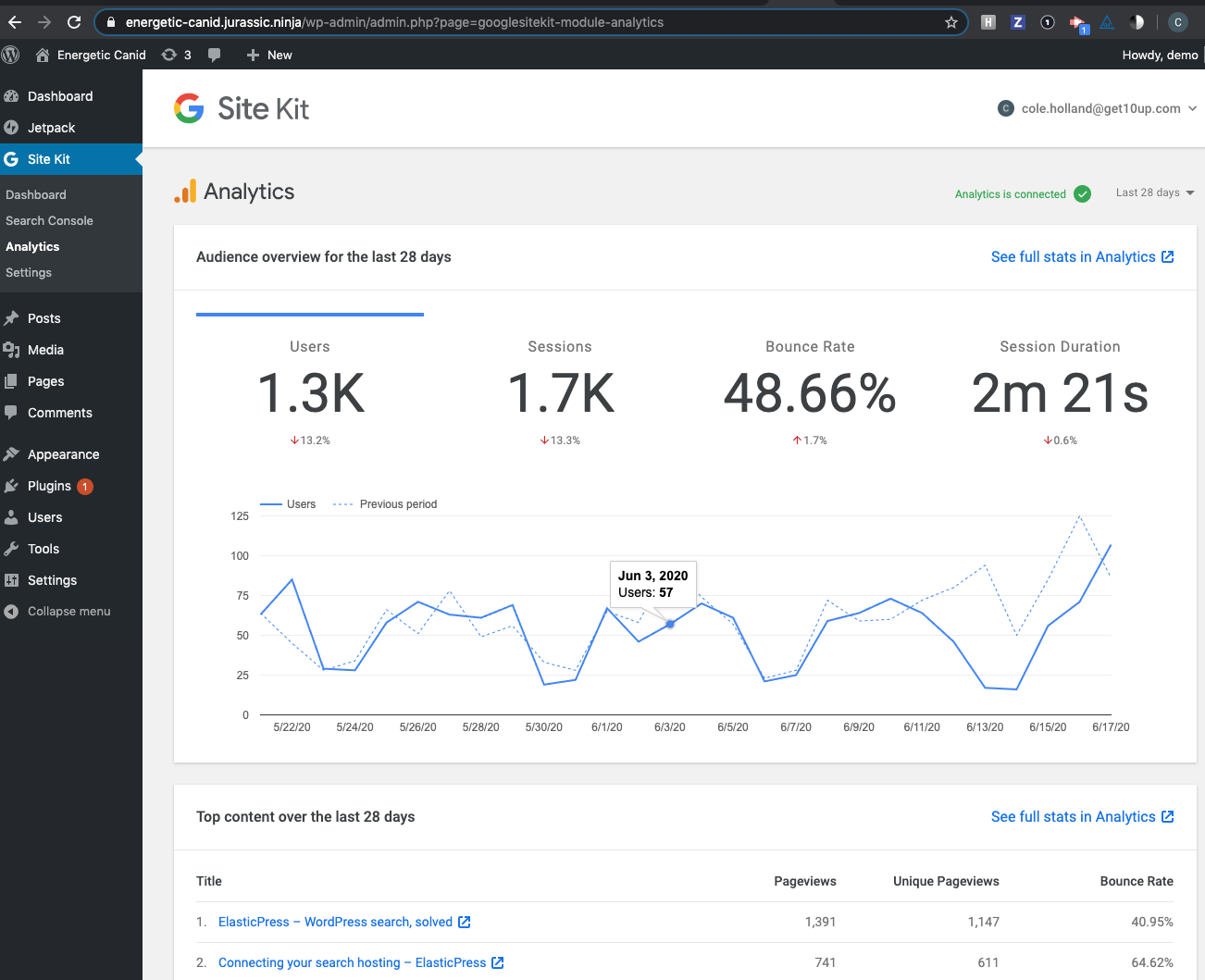
On the Analytics chart, the user count displayed when viewing a single date is actually showing data for the following day.
Additionally, the previous month is showing the same date as the selected range but the data is correct.
The label displayed that represents the previous range doesn't accurately reflect what is actually being seen. Instead of displaying Previous Month, perhaps the label should show the selected range such as Previous 90 Days. Alternatively, we could mirror what is being done in the Analytics UI and use the actual date ranges.
Discovered while investigating #1280.
Steps to reproduce
Off by one data:
- Go to the Analytics screen in Site Kit
- Hover over any date on the blue line to view User count for that day.
- Compare the same date in Analytics account.
Incorrect previous date:
- Go to the Analytics screen in Site Kit
- Hover over any date on the blue line to view User count for that day.
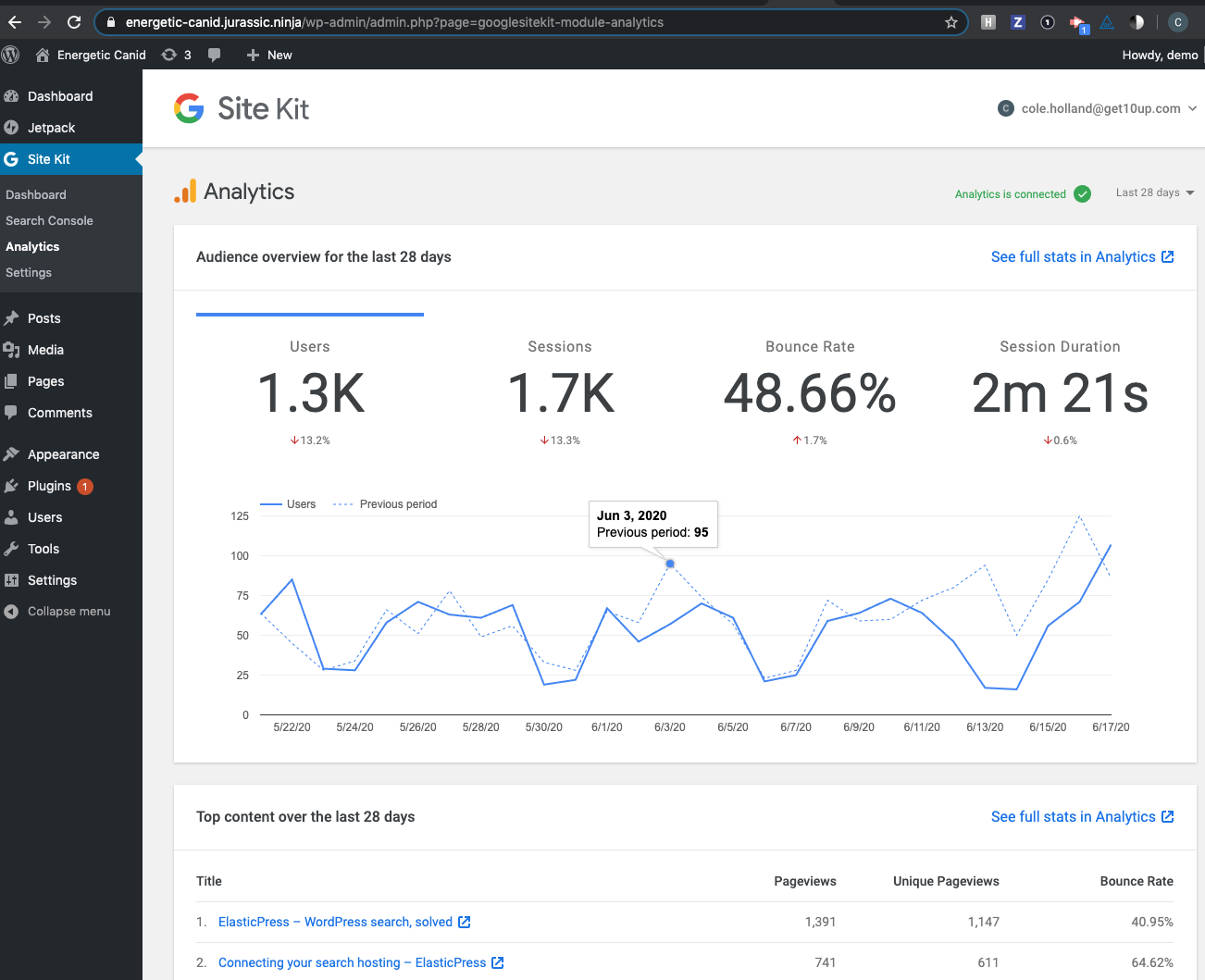
- Hover the same date on the dashed line
- The dates for both ranges are the same but the User count is correctly displayed.
Screenshots
Off by one data

Incorrect previous date:
The previous date should read Apr 2, 2020 here.

Additional Context
- PHP Version: 7.2
- OS: Mac OS
- Browser: Crome
- Plugin Version: develop branch.
- Device: MacBook Pro
_Do not alter or remove anything below. The following sections will be managed by moderators only._
Acceptance criteria
- Analytics statistics should display the correct date-specific value for each date
- The Audience overview chart should label the "Previous month" series as "Previous period" (widget/area titles already have the duration)
- The series referenced when hovering an individual node in the "Previous month" series, should be labeled as "Previous period".
Implementation Brief
In assets/js/modules/analytics/util/index.jsmake the following changes:
- Extract the year, month and day from
dateString - Adjust the month to be zero-indexed.
- Pass the values
new Date( year, month, day)to get the correct date.
- Extract the year, month and day from
- Merge #1395
QA Brief
- Go to the Analytics screen in Site Kit
- Hover over any date on the blue line to view User count for that day.
- Compare the same date in the Analytics account to confirm that the day is displaying the correct User count for that day.
Changelog entry
- Fix Analytics data displayed for Users being partially incorrect due to incorrect date parsing.
 ryanwelcher
All 12 comments
@marrrmarrr let me know if you would prefer anything differently on this one regarding the ACs, or if this sounds good to you.
 aaemnnosttv
on 16 Apr 2020
aaemnnosttv
on 16 Apr 2020
@aaemnnosttv 👍
 marrrmarrr
on 27 Apr 2020
marrrmarrr
on 27 Apr 2020
@ryanwelcher would you please add an IB for this since you're the most familiar with the code here?
aaemnnosttv
on 27 Apr 2020
@ryanwelcher can you elaborate on why this part is necessary?
Change the date separator in
reduceAnalyticsRowDatato use/instead of-
It seems to be able to parse it the same either way
aaemnnosttv
on 30 Apr 2020
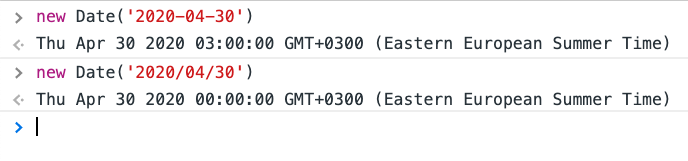
@aaemnnosttv when I run the same in my console, I get the following:

Based on that, I think we should use the / to be sure we're getting consistent output.
ryanwelcher
on 1 May 2020
Oh that's weird 😮
Looking into this a bit more, it has to do with differences in how Date.parse() works.
2020-04-30 is being interpreted as an ISO date string with no time or timezone, so it assumes 00:00 with a timezone of UTC. The value you're seeing is always displayed in your local timezone, which is why it shows a different date even though they represent the same moment in time.
i.e.
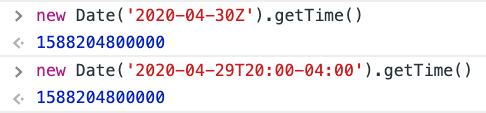
2020/04/30 is not a valid ISO date string so this ends up in the fallback behavior of Date.parse which we shouldn't rely on since there is no standard we can rely on there.
The ECMAScript specification states: If the String does not conform to the standard format the function may fall back to any implementation–specific heuristics or implementation–specific parsing algorithm.
The timestamp for the date in this format is 1588194000000 although this appears to be sensitive to the current timezone as it is 3 hours behind, which for me is GMT+3. This date refers to 00:00 _local time_ so it will likely be a different timestamp for you.
A few takeaways here
- We shouldn't use forward slashes in dates that are parsed because it affects the resulting date in a way which may vary between browsers as it isn't standards-compliant
- We should make sure we're parsing the date with the appropriate timezone - I assume this is likely coming to us as a UTC date but we should make sure. We can always display/format the date in a local timezone, but we shouldn't misinterpret the timestamp.
- The
YYYYMMDDstring that we're parsing is probably only intended to be used as a key for the row (if I recallrowsis an object, not an array?) - we should check to see if there is a better parameter/dimension we can include in the API request to get a valid date string back.
This may make the issue a bit larger to fix, but let's correct any larger issues here if there are any.
aaemnnosttv
on 4 May 2020
@aaemnnosttv the only date-related data that is passed to reducedAnalyticsRowData is the YYYYMMDD string.
I have pushed up a change to that function that converts the Date into seconds and then adds the timezone offset also converted to seconds and then creates the date from that value. Locally I am changing my timezone and things are looking correct so far. I'd love a second set of 👀 if possible though.
ryanwelcher
on 15 May 2020
Related (but I think different): #1099
 felixarntz
on 1 Jun 2020
felixarntz
on 1 Jun 2020
the only date-related data that is passed to
reducedAnalyticsRowDatais theYYYYMMDDstring.
Yeah, I saw that's all it gives you for the ga:date dimension, which is a bit odd.
I took a look at your change. I think we can make it a bit simpler though using alternate arguments to Date.
We can construct it like so:
new Date( fullYear, monthIndex, day )

Note the month is zero-indexed.
This will give us the correct day always in your local timezone. The timezone of the date is only relevant to make sure that the proper date is shown in the UI - the timezone that determines what day the data is actually associated with is set by settings in the view/profile and isn't relevant.
@ryanwelcher would you please verify that using the above works? If so, please update the IB accordingly and we can move this forward 👍
aaemnnosttv
on 2 Jun 2020
@aaemnnosttv IB and PR updated.
ryanwelcher
on 2 Jun 2020
IB ✅
aaemnnosttv
on 3 Jun 2020
Tested
Installed and activated the latest release candidate, activated Analytics module:
Hovered over dotted line and blue line:
Checked GA:
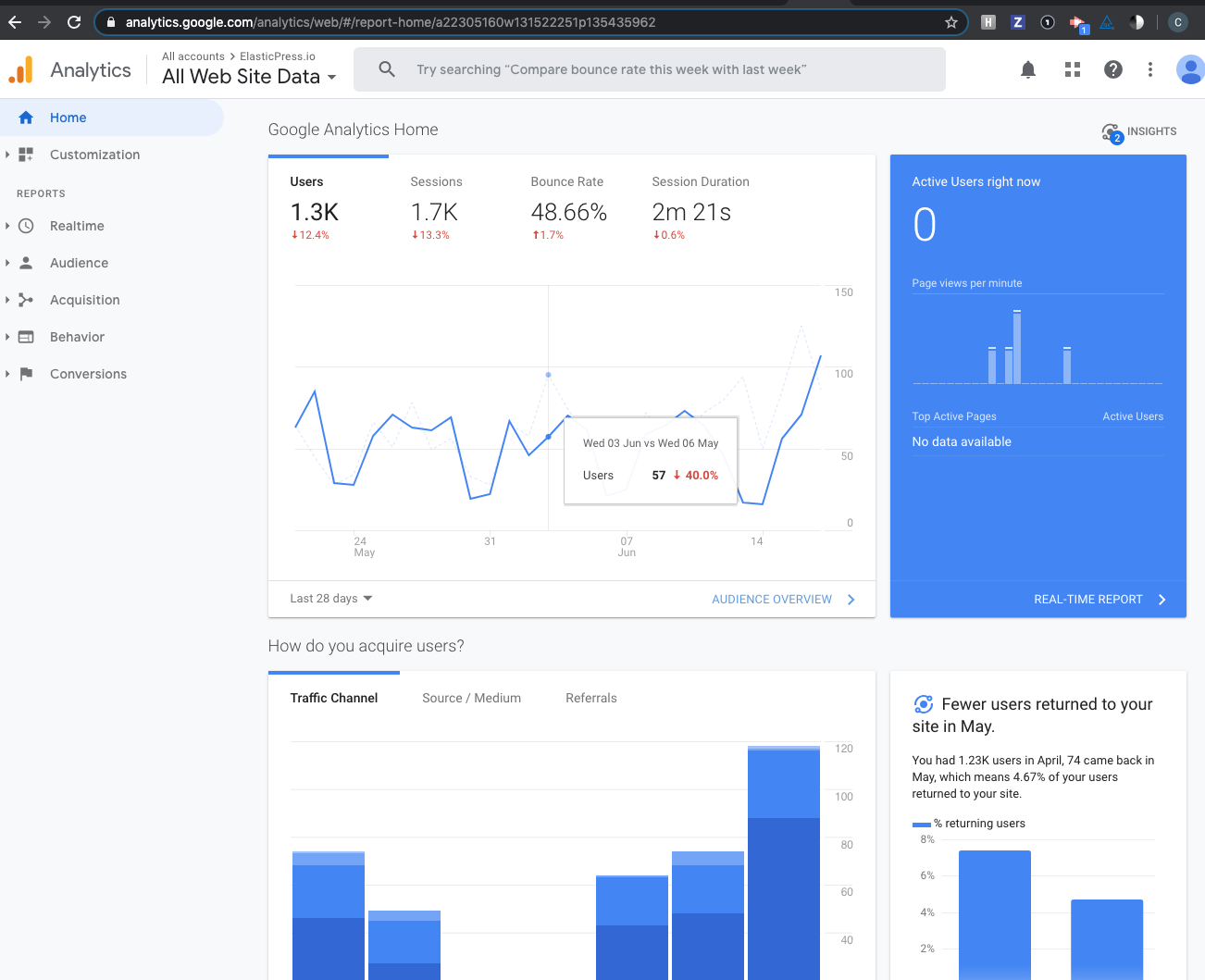
Passed QA ✅
 cole10up
on 18 Jun 2020
cole10up
on 18 Jun 2020
Related issues
 quindo
·
5Comments
quindo
·
5Comments
 jamesozzie
·
3Comments
jamesozzie
·
3Comments
 jsmshay
·
3Comments
aaemnnosttv
·
5Comments
jsmshay
·
3Comments
aaemnnosttv
·
5Comments
 Loganson
·
5Comments
Loganson
·
5Comments