Site-kit-wp: Unknown Error: (access_denied) displayed to users after canceling at the OAuth step during setup
Bug Description
Steps to reproduce
Pre-condition: Have a host with one member having SK setup
- Login
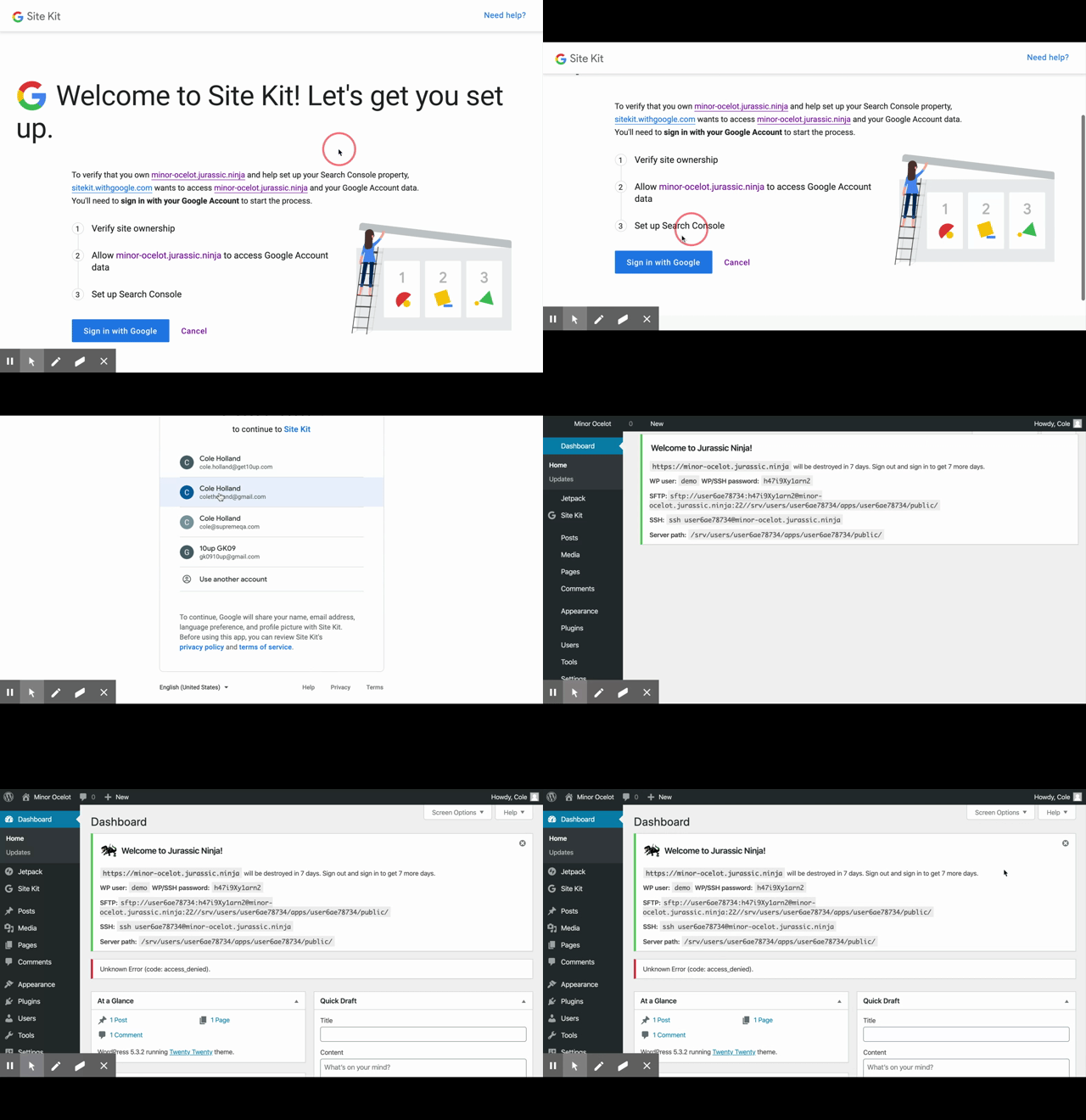
- Click through setup of SK to verify account step
- Click an account and confirm
- Click cancel
Notice: User is taken back to the dashboard and an Unknown Error is displayed:

Additional Context
- PHP Version:
- OS: [e.g. iOS]
- Browser [e.g. chrome, safari]
- Plugin Version [e.g. 22]
- Device: [e.g. iPhone6]
_Do not alter or remove anything below. The following sections will be managed by moderators only._
Acceptance criteria
If the user clicks "cancel" at the API scopes granting step, display an informative error message instead of "Unknown Error (access_denied)":
- Make clear this error is coming from Site Kit's setup
- Make clear what caused the error
- Make clear what action to take next to address it.
For example:
"Site Kit setup was interrupted because you did not grant the necessary API scopes. To resume setup, start here <- link to the landing page:
https://www.example.com/wp-admin/admin.php?page=googlesitekit-splash
Implementation Brief
- In
OAuth_Client::get_error_message(), add a new case foraccess_deniedand return the message "Site Kit setup was interrupted because you did not grant the necessary permissions.". - In
Authentication::get_authentication_oauth_error_notice(), in the else clause where it callsOAuth_Client::get_error_message(), add the following string: "To resume setup, start here.", where "start here" links to the setup screenhttps://www.example.com/wp-admin/admin.php?page=googlesitekit-splash--> this will ensure that link shows for every OAuth error except when you're already on the Site Kit splash screen (no need to link to the current screen)
QA Brief
- Go to the setup flow.
- In the OAuth consent screen, hit Cancel.
- Ensure you see the error message mentioned above, and a link to restart the setup that leads to the setup screen within the plugin.
Changelog entry
- Provide clear error message informing the user when they did not grant the necessary permissions, instead of a generic
access_deniederror code.
 cole10up
All 7 comments
I think this is to be expected when denying access during OAuth, although we could probably improve the experience to be more informative for the user. I also don't think this is specific to the second user - it should happen with the first as well if OAuth scopes are not approved.
 aaemnnosttv
on 2 Mar 2020
aaemnnosttv
on 2 Mar 2020
@felixarntz I think we should avoid displaying error messages on the WP dashboard if we can, indeed for the reasons outlined in the AC. Why not redirect to the splash page and display a better error/notice there? Then the user only needs to click "Start setup" to retry.
aaemnnosttv
on 24 Mar 2020
@aaemnnosttv That's a good point.
Let's keep this issue plain and simple to just add a better error message. However, I'd say we should consistently only link to the splash page if you're not already on the splash page. I'll update the IB.
 felixarntz
on 25 Mar 2020
felixarntz
on 25 Mar 2020
IB ✅
However, I would suggest a variation of that message since API scopes are not something most people will be familiar with:
- Site Kit setup was interrupted because you did not grant the necessary API scopes.
+ Site Kit setup was interrupted because the necessary permissions were not granted.
I'm going to bump the estimate a little as well since this may likely be done by a new engineer.
aaemnnosttv
on 25 Mar 2020
@aaemnnosttv
Let's go with "Site Kit setup was interrupted because you did not grant the necessary permissions." - better to be addressing the user here I think
felixarntz
on 25 Mar 2020
Due to some changes on the proxy (we'll now cause the access_denied error as soon as at least one of the requested scopes is not granted), this is more urgent than before, and we should include this in tomorrow's release. I'll work on a PR.
felixarntz
on 26 Mar 2020
Related issues
 Loganson
·
5Comments
Loganson
·
5Comments
 tunakode
·
4Comments
felixarntz
·
4Comments
tunakode
·
4Comments
felixarntz
·
4Comments
 quindo
·
5Comments
quindo
·
5Comments
 jsmshay
·
3Comments
jsmshay
·
3Comments