Site-kit-wp: Unicode domains have issues with setup
Bug Description
Still exploring the specifics, but it seems unicode domains aren't handled properly by Site Kit.
See:
- https://wordpress.org/support/topic/404-cyrillic-domains/
- https://wordpress.org/support/topic/umlaut-domain/
- https://wordpress.org/support/topic/cannot-get-through-the-setup/#post-12243161
Steps to reproduce
To be determined.
_Do not alter or remove anything below. The following sections will be managed by moderators only._
Acceptance criteria
- Sites that use unicode domains should be able to complete the setup flow.
- The redirect for e.g. site verification should work as expected, not result in a 404 and ending up with the site owner successfully being verified.
- The site should be matched a correct Search Console property, or one should be created, and the same property should be looked up from / used by the plugin afterwards.
Implementation Brief
- Ensure all domain comparisons use the punycode decoded domain name form for all comparisons.
- Adjust domain comparisons in both
Search_Console.phpandSite_Verification.php, usingRequests_IDNAEncoder::encodeon the host part of each domain being compared.
Changelog entry
- Fix problems around comparing domains with unicode characters that could result in blocking the plugin setup.
 tofumatt
All 30 comments
I've added a video of the issue here. There seems to be a false REST API error in addition to the underlying problem:
https://recordit.co/mAa2yrvYqn
A workaround might be to temporarily change the Site Address (URL) by removing any non standard characters during setup.
 jamesozzie
on 6 Nov 2019
jamesozzie
on 6 Nov 2019
I tried changing the Site Address, without result. I don't understand how to remove any non standard characters since I assume that would either break my site or will lock me out of the admin.
Below is just an example URL:
- Setting Site Address to "xn--bcher-kva.example" doesn't work.
- Setting Site Address to "bücher.example" doesn't work either. Instead I can't access the front end anymore since I automatically get redirected to the back end.
 eaglejohn
on 6 Nov 2019
eaglejohn
on 6 Nov 2019
Just installed 1.1.0 and was hoping this got finally fixed. Any news on this bug?
eaglejohn
on 21 Nov 2019
No updates yet, sorry. I've been trying to debug it but the error isn't quite clear to me yet. I will post as soon as I figure anything out in this issue though. 😃
tofumatt
on 22 Nov 2019
The error still exists for me, even after the update.The following happens:
1) Within WordPress I try to activate the setup
2) Then I get redirected to this url:
3) When I click under “1) Verify Siteownership” –> “Proceed” is get redirected back to my wordpress installation:
4) Then nginx tells me: 404 Page does not exist.
https://dachträume.de/xn--dachtrume-02a.de/wp-admin/index.php?googlesitekit_verification_token=051bf0f1af5864cd&googlesitekit_verification_token_type=FILE&googlesitekit_verification_nonce=d0acf82193&googlesitekit_code=sitekit-p96rz49qkyj10u1d
 iamklaus
on 25 Nov 2019
iamklaus
on 25 Nov 2019
We don't yet have a fix for the error, so it will still appear in the plugin. Sorry about that!
tofumatt
on 26 Nov 2019
Any updates on this? It's been months and I still can't connect these kind of sites to Sitekit. I even tried to remove all these properties from Search Console and run the setup again, but without any luck.
eaglejohn
on 8 Feb 2020
+1 in support/need of a fix ☝️
 jonasskafte
on 12 Feb 2020
jonasskafte
on 12 Feb 2020
@eaglejohn Unfortunately we haven't yet been able to triage this one and reproduce it/debug it, but I'll bring it up next time we have an issue planning session. Thanks for checking in on the issue though.
@jonasskafte In the future, please use GitHub's "reaction" feature to thumbs-up any previous comment. It helps maintainers understand others are "+1"ing an issue without adding too much noise to developer notification inboxes/issue history. Thanks 🙂
tofumatt
on 12 Feb 2020
Is this plugin actually developed and maintained by Google, just wondering... I asked about this on the WordPress forums but they avoided my question.
eaglejohn
on 12 Feb 2020
@eaglejohn I provided an answer to your topic here that yes it was. Thanks again for your patience.
 ernee
on 12 Feb 2020
ernee
on 12 Feb 2020
Hi guys,
Hope you've had a good week.
Any chance a fix to this could be included in Sprint 16 or Sprint 17?? 🤞
Thanks and have a lovely weekend!
jonasskafte
on 21 Feb 2020
Hi again @tofumatt, @jamesozzie and @ernee,
Any chance this can be included as a milestone for your next release?
Thanks!
jonasskafte
on 28 Feb 2020
And there was silence...
jonasskafte
on 10 Mar 2020
@adamsilverstein – thanks for having taken a look at this! 👍
@felixarntz – why did you remove it from the 'oh right' milestone?? You probably have a good reason, but just wondering why?
jonasskafte
on 13 Mar 2020
Hi @jonasskafte, we are working on debugging this but don't have any update yet. We will post an update once we make progress on this.
Thanks,
 ThierryA
on 17 Mar 2020
ThierryA
on 17 Mar 2020
I've made some progress debugging this issue.
One problem I discovered is that we store our domains in the service as "punycode" like "http://xn--trkish-3ya.com" while the API we use to check for domains returns the unicode variation: "http://türkish.com/" - I fixed this in the service allowing site verification to complete, however the plugin also does a separate lookup after you complete the setup flow and this is failing to identify the connected site.
I will update here once I have a resolution.
 adamsilverstein
on 18 Mar 2020
adamsilverstein
on 18 Mar 2020
@adamsilverstein Can you write a rough IB about the necessary changes on the plugin side? Since this issue mostly talks about site verification and the current PR #1265 addresses Search Console issues, I wonder whether there's more to it. Although more of the fix is likely needed on our service, which we can discuss separately.
 felixarntz
on 19 Mar 2020
felixarntz
on 19 Mar 2020
@cole10up In order to QA this, I think it's key to have a site with a domain that has unicode characters, and ensure the setup flow completes seamlessly.
Then, specifically also test the setup flow for a site where your Site Address has the unicode version of the URL (e.g. http://türkish.com) while your WordPress Address has the punycode version of the URL (e.g. http://xn--trkish-3ya.com).
felixarntz
on 25 Mar 2020
Tested
This isn't fixed on my end. Reproduced this issue in setup redirecting during site verification:
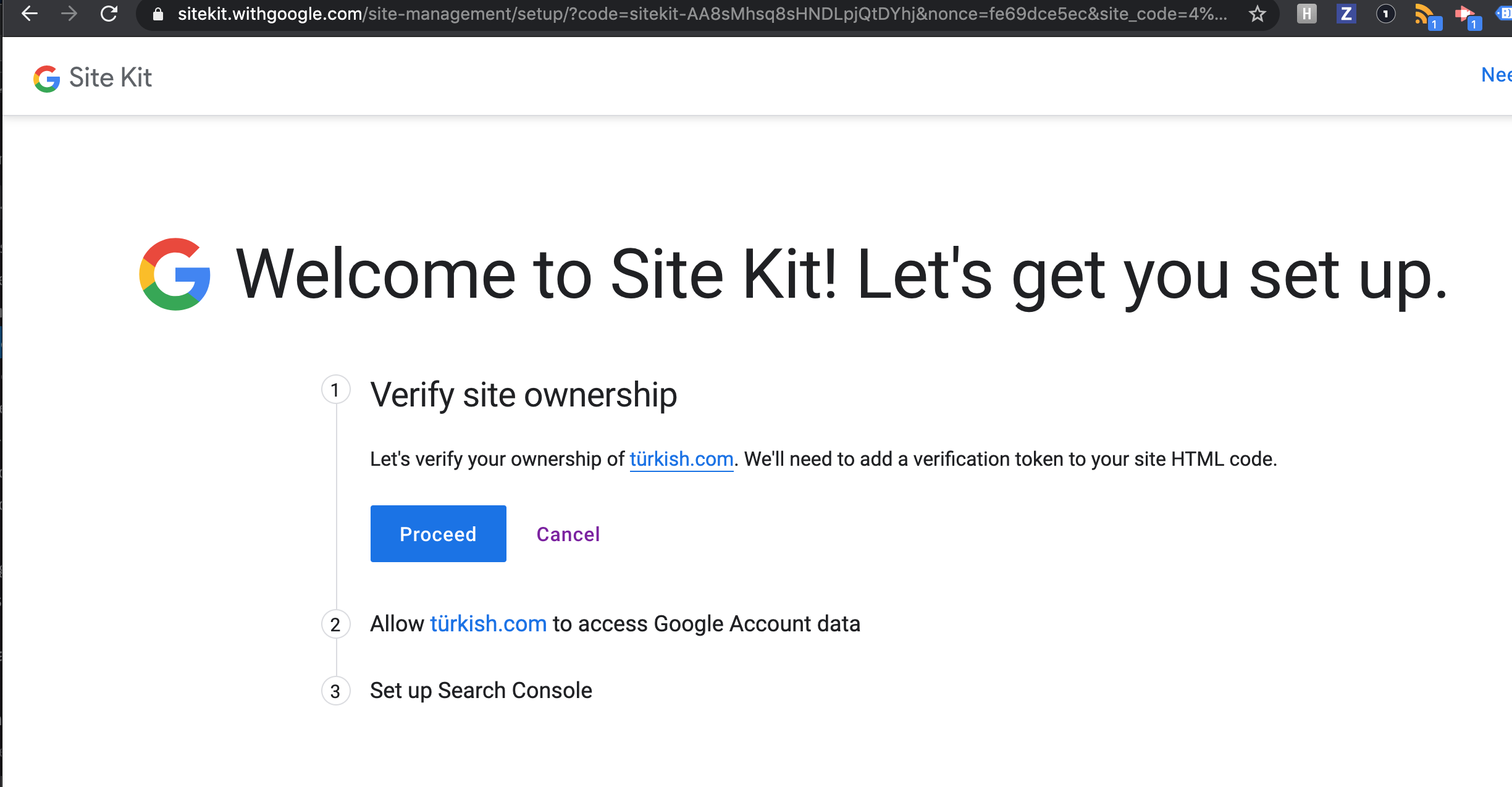
Domain: http://türkish.com
Using the attached zip
google-site-kit-1.6.0.zip
@felixarntz, log into the domain above and try to setup SK. See below:
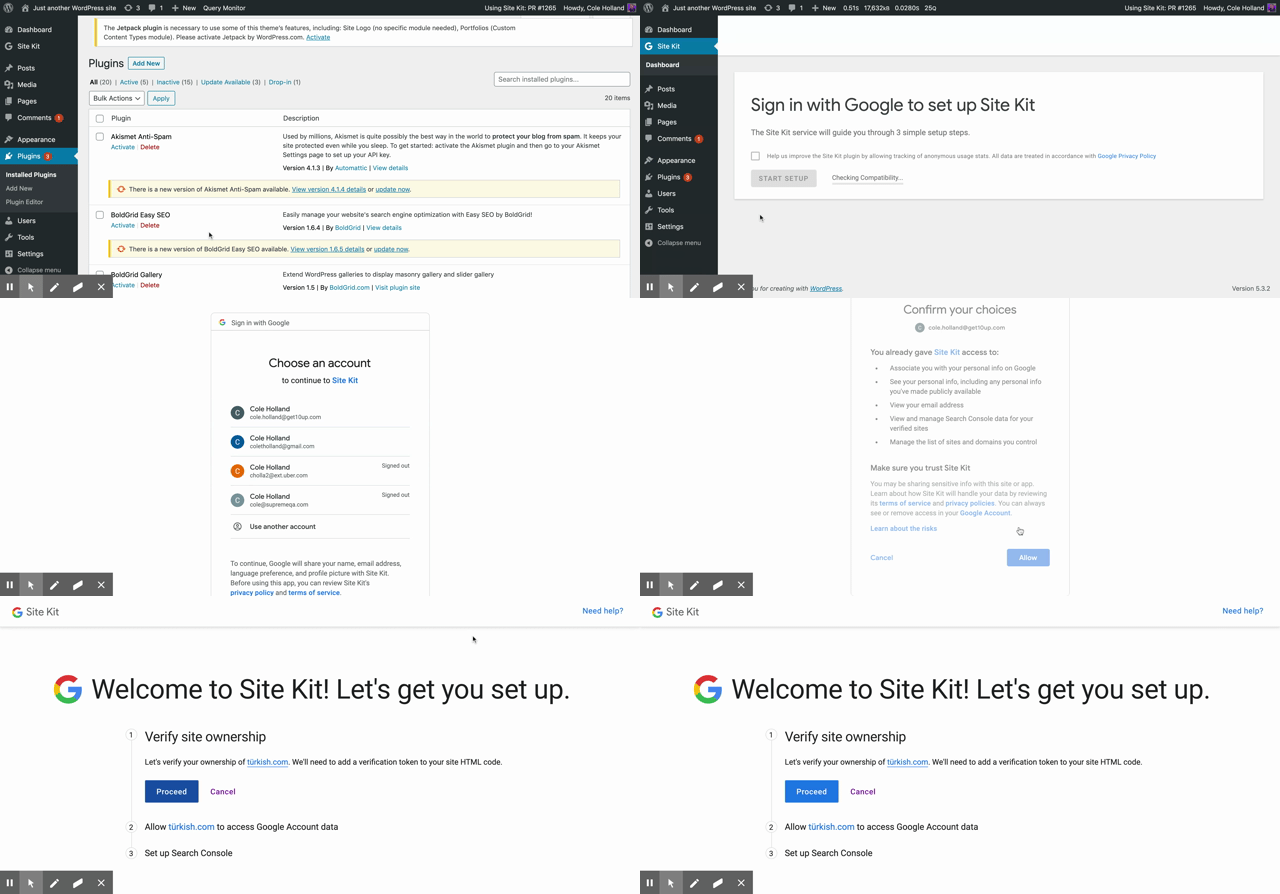
 cole10up
on 26 Mar 2020
cole10up
on 26 Mar 2020
@adamsilverstein let's debug this tomorrow morning and find a fix to include in the release. Potentially it's only on the proxy side, which would be great.
felixarntz
on 26 Mar 2020
@felixarntz this mostly worked for me, but results vary based on how the domain is set in WP.
Using the punycode version of the domain for the home + site URLs, I am able to go to the proxy and back successfully, however I get stuck on the last step of adding the domain to Search Console even though the domain _is_ successfully added.
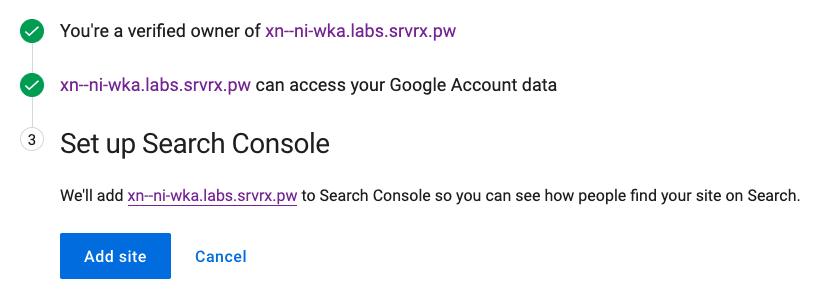
Looking at @cole10up 's example above, it appears that he has the unicode version of the domain for the home & site URLs which seems to be more problematic.
When I change the site to use the unicode version of the domain for home & site URLs, I get stuck on the first step for site verification (even though I am already verified for the domain from the previous attempt). Looking at the network tab, you can see that it is making the request to the site using the punycode version of the domain.
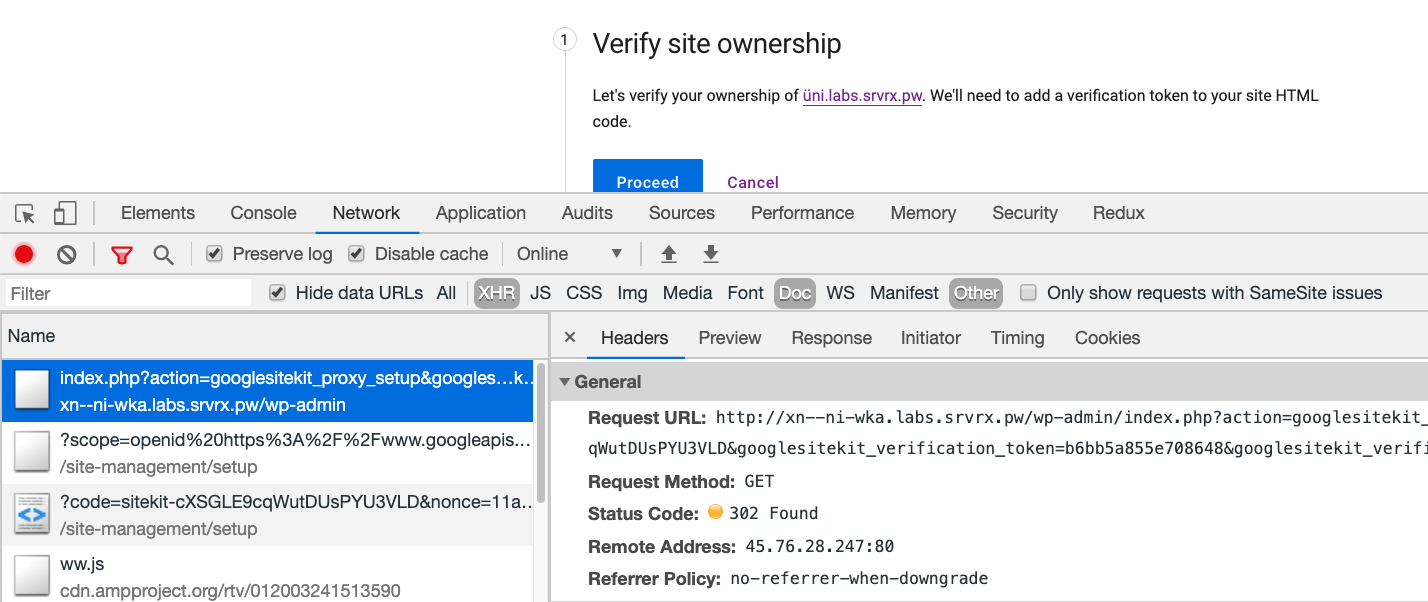
When clicking the Proceed button, the page appears to reload but nothing really happens from the user's experience, with no additional feedback.
 aaemnnosttv
on 26 Mar 2020
aaemnnosttv
on 26 Mar 2020
Thanks for testing @cole10up and @aaemnnosttv - looks like your tests were against the production Site Kit service (sitekit.withgoogle.com) which unfortunately hadn't received the required updates to get this working. Can you please re-test against staging (& ping me if you need help doing that)?
results vary based on how the domain is set in WP.
@aaemnnosttv note that due to a bug in WordPress core, if you set your site up using a unicode (not punycode) domain, the redirect at the end of the process fails and you wind up at the WordPress dashboard instead of the Site Kit dashboard. The connection is still established, and visiting the Site Kit dashboard everything works.
adamsilverstein
on 26 Mar 2020
@aaemnnosttv @cole10up Yeah we forgot to mention, these changes are not yet in production on the proxy, they will be before the release goes out. Can you re-check against staging?
The test site now has the staging plugin and it is currently active. I walked through the setup flow and was able to get both verification and Search Console completed.
felixarntz
on 26 Mar 2020
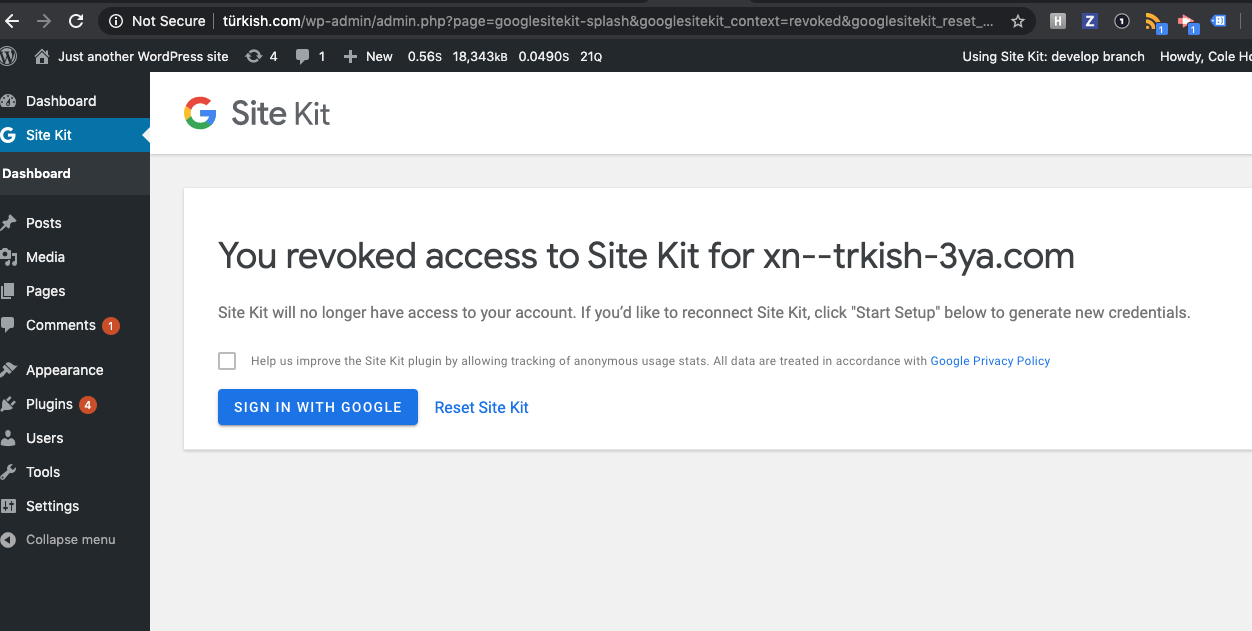
Retested. Was able to setup and reset properly.
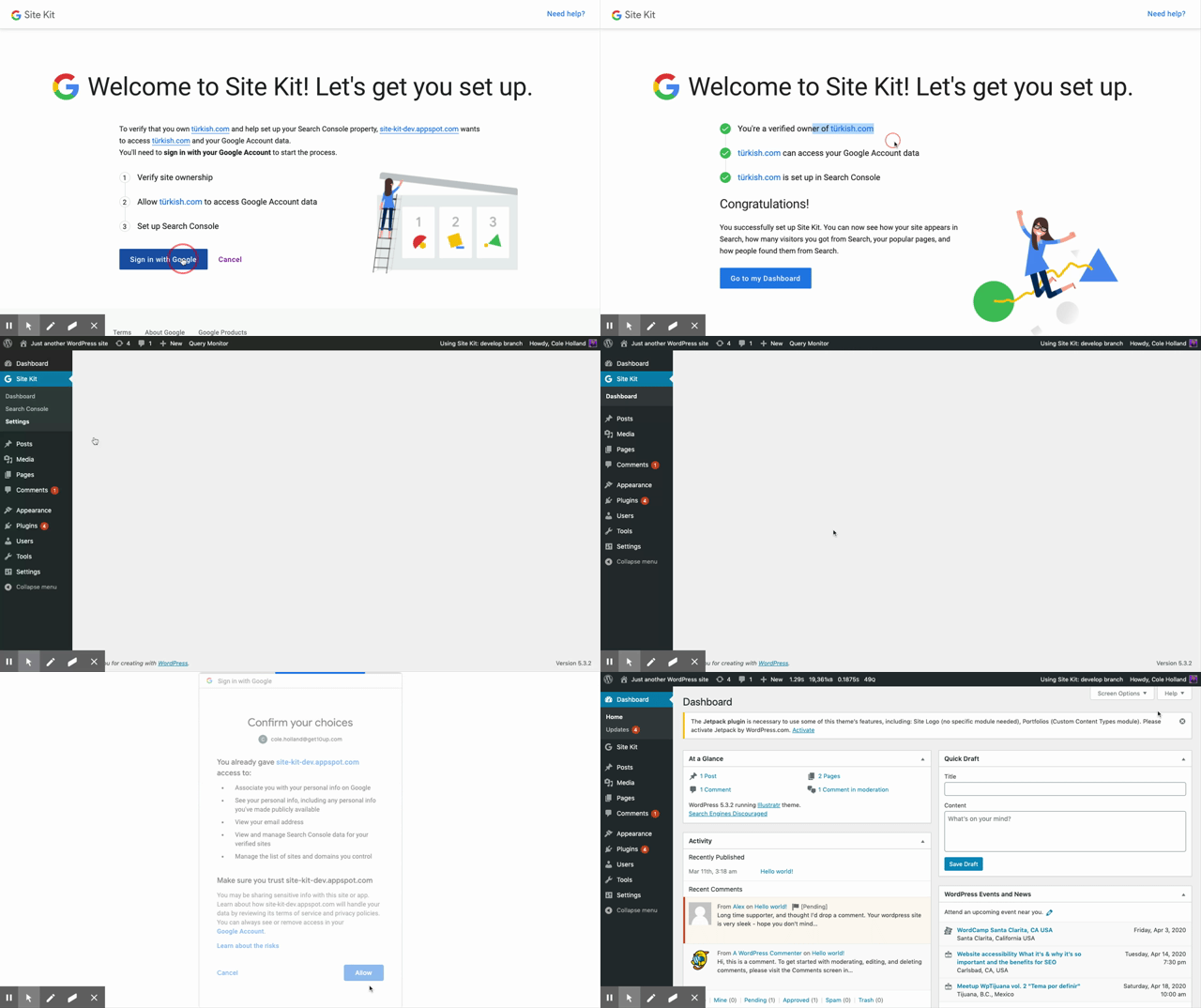
Noticed the punycode URL is displayed upon reset. As an observation
cole10up
on 26 Mar 2020
Tested this as well, and it works as expected, also when you are not verified yet or do not yet have a Search Console property.
felixarntz
on 26 Mar 2020
Added a bug for the punycode URL display on the disconnect screen https://github.com/google/site-kit-wp/issues/1297
cole10up
on 26 Mar 2020
@jonasskafte - Can you please give the latest version of the plugin a test to verify that this issue has been resolved for you?
adamsilverstein
on 30 Mar 2020
@adamsilverstein – Sure! I actually already did, but I forgot to do so here as well. Here's the confirmation I made: https://wordpress.org/support/topic/stock-at-step-3-set-up-search-console/#post-12592380 – I also left a 5-star review 😃 Cheers!
jonasskafte
on 30 Mar 2020
Excellent! Great to hear and thanks for the 5 start review.
adamsilverstein
on 30 Mar 2020
Related issues
tofumatt
·
5Comments
felixarntz
·
4Comments
tofumatt
·
3Comments
aaemnnosttv
·
5Comments
aaemnnosttv
·
3Comments