Site-kit-wp: Odd behavior in AdSense for new site
Bug Description
As I just went through the AdSense setup flow for a new site, something odd happened there. I got shown the following screen, although I (obviously) didn't have this new domain on my AdSense account at all:
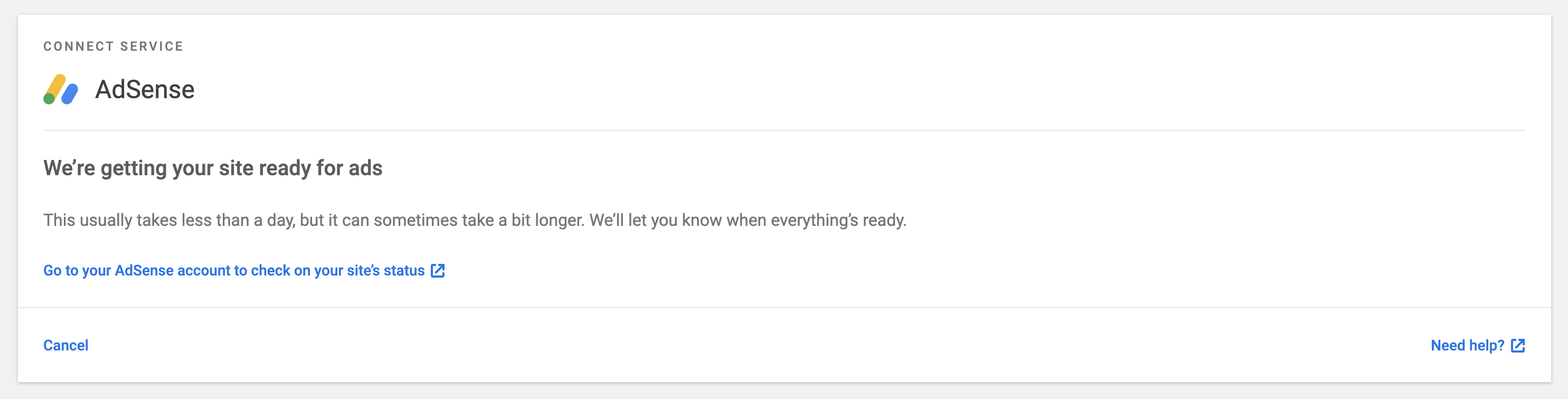
Clicking the blue link took me to AdSense where I was prompted to add that domain to my account. I suspect this screen being shown is a bug - if it is not, this is confusing UX, as the screen looks like I don't need to do anything and just wait for AdSense to update my site's status.
Notably, when cancelling the process from there and accessing the Settings screen, I saw this under AdSense:
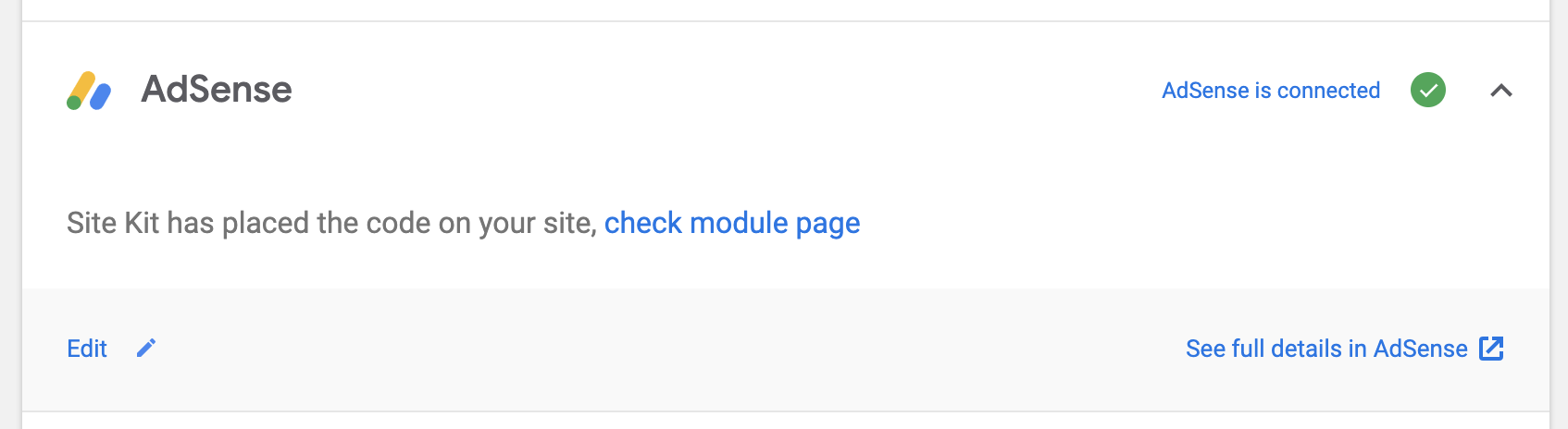
This is simply incorrect at this point, since Site Kit had not placed any AdSense code (again, there isn't even that site/domain in AdSense yet).
cc @marrrmarrr @adamsilverstein
Steps to reproduce
- Use a Google account where you already have an AdSense account (mine is graylisted).
- Use a completely new site (I used one from poopy.life).
- Go through the AdSense setup flow.
- See screen as mentioned
_Do not alter or remove anything below. The following sections will be managed by moderators only._
Acceptance criteria
Implementation Brief
Changelog entry
 felixarntz
All 9 comments
Just noting here that I experienced the same as a new Adsense user.
no _adsbygoogle.js_ snippet inserted in the page. Related to this maybe.
Following the _"Go to your AdSense account to check on your site’s status"_ link leads to instructions to add the snippet manually.
 ernee
on 26 Sep 2019
ernee
on 26 Sep 2019
This is simply incorrect at this point, since Site Kit had not placed any AdSense code (again, there isn't even that site/domain in AdSense yet).
@felixarntz - Can you double check your site to see if this is the case? Check the source code and look for the tag <script async src="//pagead2.googlesyndication.com/pagead/js/adsbygoogle.js"></script>
The plugin will place the tag on your site as soon as it detects a valid client associated with your Google account. That is you have a valid account with a valid AFC ("AdSense For Content") client associated with your account (likely true for your account). We do this because _AdSense uses the tag as part of its domain verification process_.
Following the "Go to your AdSense account to check on your site’s status" link leads to instructions to add the snippet manually.
@ernee - That sounds like a bug, can you provide the URL it took you to?
 adamsilverstein
on 27 Sep 2019
adamsilverstein
on 27 Sep 2019
@adamsilverstein here is the url (pub number obscured): https://www.google.com/adsense/new/u/0/pub-XXXXXXXXXXXXXXXX/home
Screenshot: https://jmp.sh/lyeyRbm
ernee
on 10 Oct 2019
To add, when I visit the site now the _adsbygoogle.js_ script is present, but I am still directed to the URL mentioned above. Tried disconnecting and reconnecting the module in Site Kit, and I cannot find the script immediately (even after clearing browser cache and viewing in an incognito window to be sure). Could this be consistent with:
The plugin will place the tag on your site as soon as it detects a valid client associated with your Google account. That is you have a valid account with a valid AFC ("AdSense For Content") client associated with your account (likely true for your account). We do this because AdSense uses the tag as part of its domain verification process.
ernee
on 10 Oct 2019
Hi @ernee I have some more ideas to try below...
To add, when I visit the site now the adsbygoogle.js script is present
Good, that is the expected behavior. The plugin has identified your account and is trying to verify that the domain you are using is set up correctly in your AdSense account.
It seems you are being sent to the wrong page in AdSense - you don't need to add the snippet, the plugin does that.
Can you try the following:
Check the "Site URL" WordPress is using under Settings->General. You must have this exact domain set up in your AdSense account. Copy this URL.
Visit your AdSense account and verify that the site is in your sites list, follow these instructions to add the site if it is not: https://support.google.com/adsense/answer/9130038
Was the site in the list? If not, adding it should resolve the issue you are seeing - please check back in the Site Kit plugin so see if you get a bit further in the setup (it still may take some time to be completely ready to serve ads).
If this does not resolve your issue, your AdSense account setup may not be complete, please check this document about setting up your account and make sure you have followed all of the steps:
https://support.google.com/adsense/answer/9130038
If you can't activate your account, check these instructions for troubleshooting tips:
https://support.google.com/adsense/answer/81904
I hope this helps, please let us know how it goes!
adamsilverstein
on 10 Oct 2019
As long as the code snippet IS being inserted in this scenario, then everything is working as intended. There is an open issue to improve the language on this screen: https://github.com/google/site-kit-wp/issues/578
 OisinOConnor
on 10 Oct 2019
OisinOConnor
on 10 Oct 2019
Thanks @adamsilverstein for the tips and @OisinOConnor for the update!
Upon review, I might be in a different scenario than the one referenced (and it might matter here):
- I’m starting as a new Adsense user without a fully approved account (no access to Sites list). Using a root domain that is present in _Settings > General_.
- I also used this account on another site, which was not approved. I specified the current site to be considered instead.
Some steps I took (sorry not the cleanest):
1) Went through Site Kit module steps and landed on the screen with link to Adsense to be updated by #578
2) Checked my site at that moment (around two weeks ago), and didn’t see the _adbygoogle.js_ snippet.
3) Checked yesterday and found the _adsbygoogle.js_ snippet and the screen/ link mentioned above.
4) Disconnected and reconnected the module yesterday, and the snippet wasn’t added back.
5) Currently the snippet is not on my site, but I did receive a notice today that my account was not approved due to items I need fix. This is a site I’m currently developing and may not adhere to the content policy currently.
6) Site Kit is displaying this screen, which appears to be correct in my case since I do not have an approved account.
However, the snippet isn’t there. I think the confusing part is why is the snippet added later (or not at all which is to be determined for the second try) rather than immediately? Could this also have an affect on whether or not my account/site is approved?
ernee
on 11 Oct 2019
@felixarntz would be great if you could have a look and close this if it's addressed by the changes you're planning to make.
 marrrmarrr
on 8 Jan 2020
marrrmarrr
on 8 Jan 2020
However, the snippet isn’t there. I think the confusing part is why is the snippet added later (or not at all which is to be determined for the second try) rather than immediately? Could this also have an affect on whether or not my account/site is approved?
It certainly could - the snippet must remain present for AdSense to verify your site. In general Site Kit should add the snippet as soon as it has identified your account, so something seems off if the snippet isn't present. One possible cause is caching - your site may be displaying a cached page that doesn't have the snippet. If the script is still missing, try flushing caches if you can; alternately since most caching is disabled for logged in users, try viewing the source code from a logged in browser.
adamsilverstein
on 14 Jan 2020
Related issues
marrrmarrr
·
5Comments
 aaemnnosttv
·
4Comments
aaemnnosttv
·
5Comments
felixarntz
·
4Comments
aaemnnosttv
·
4Comments
aaemnnosttv
·
5Comments
felixarntz
·
4Comments
 tofumatt
·
5Comments
tofumatt
·
5Comments