Site-kit-wp: Single page stats: don't show empty traffic table alongside CTA when there's no data
Bug Description
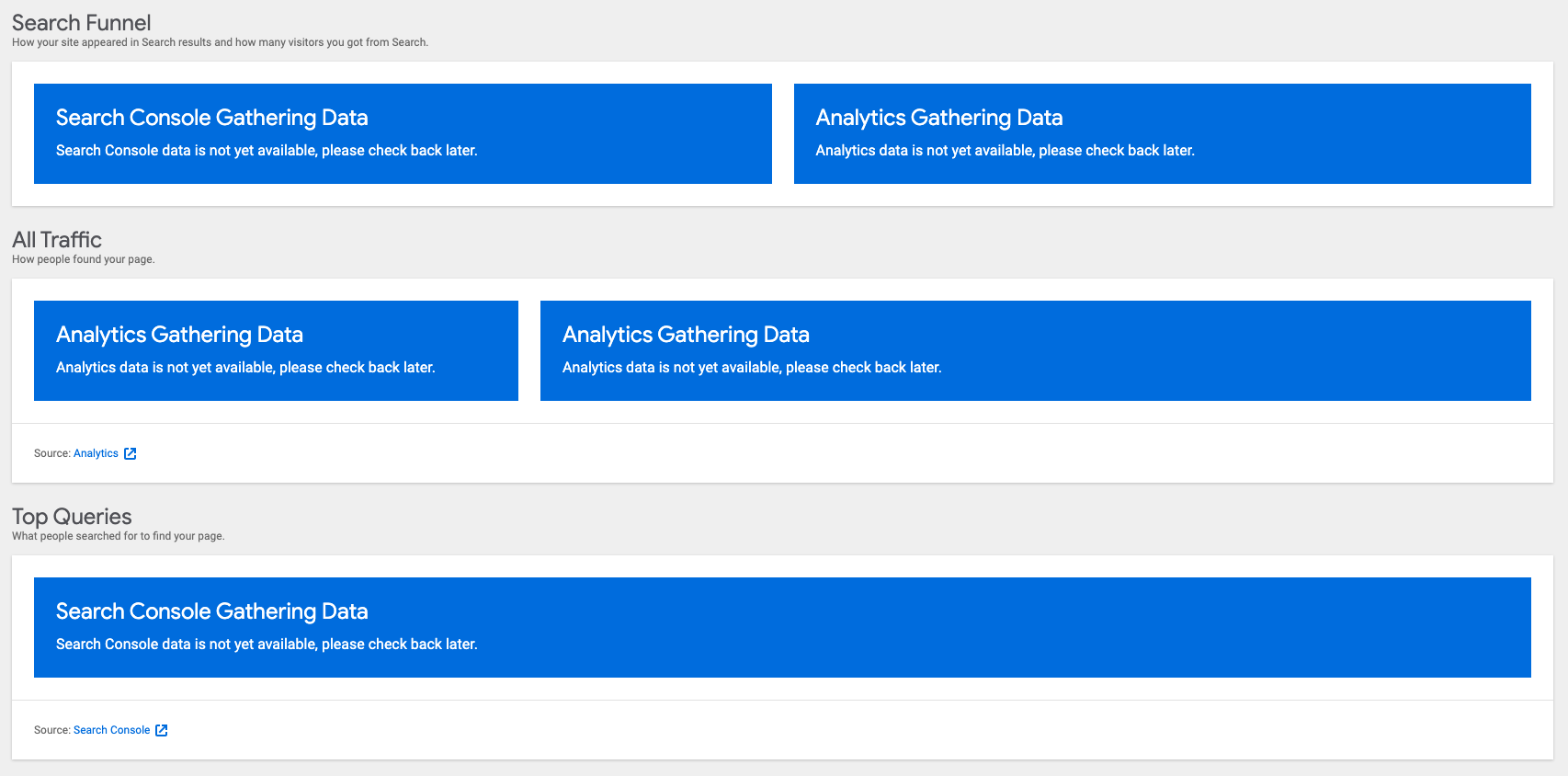
On the dashboard-details screen, the Traffic section ("Acquisition Sources") currently shows an empty data table even though there is no data (already correctly indicated by a blue callout).

_Do not alter or remove anything below. The following sections will be managed by moderators only._
Acceptance criteria
- If there's no data, the "Acquisition Sources" box on the
dashboard-detailsscreen should display a second "Gathering data" notice, and there should not be a data table. - The "Top queries" section should also show "Gathering data" notice if there's no data from Search Console.
Implementation Brief
- Update
assets/js/modules/analytics/dashboard/dashboard-widget-top-acquisition-sources-table.jsto pass the sameisDataZeroForReportingfunction towithDataasDashboardAcquisitionPieChart - Merge #1195
QA Brief
This issue is for testing a zero-data state so the easiest way to replicate that is with a fresh install on a new domain (such as jurassic.ninja).
See the before/after here for the section affected by this issue.
- Set up Site Kit and connect the Analytics module
- From the Site Kit dashboard, use the search to find a local post or page (e.g. "Sample Page" or "Hello World" that come with a clean install of WP but won't have data)
- Select the post and click View Data to load the details view for that post/page
- Ensure the details view looks like this
Changelog entry
- Do not show empty data table in Analytics module screen when there is no data to display.
 felixarntz
All 13 comments
I think this one was pretty straightforward; it looks like the same logic we use to output getNoDataComponent( __( 'Analytics', 'google-site-kit' ), true, true, true ) should be used to output the dashboard components.
 tofumatt
on 3 Sep 2019
tofumatt
on 3 Sep 2019
IB ✅
felixarntz
on 3 Sep 2019
My estimate for this one is that it's small, the only hiccup might be actually _getting_ to the state you posted; I don't know what the clear steps-to-reproduce are for this issue's state.
We can mock the data in development/follow the codepath I recommended in the IB, but aside from STR this one seems straightforward.
tofumatt
on 3 Sep 2019
@tofumatt It should be fairly easy to recreate. If you create a new post, it shouldn't have any Analytics or Search Console data, thus end up in this screen full of blue CTAs (which looks weird, something we need to revisit as a whole in the future).
felixarntz
on 4 Sep 2019
This ticket did not pass QA in my testing.
Testing procedure
- Create a test post on local site: "Test"
- Go to Site Kit -> Dashboard and use the "Search for individual page or post information" input to search for "test" and click View Data
- On the Detailed Page Stats page, verify that the data table is no longer showing and the CTA fills the All Traffic section
FAILED I still see the (empty) table.

I dug into this a tiny bit and found I could get a second CTA to instead of the data table by adding a custom isZeroData handler. _The reason this component shows an empty table here is that it doesn't correctly detect the empty data returned._
Diff to detect empty data: https://gist.github.com/adamsilverstein/ecfb897e5b3d86a6d6f7aa292347fc56
Unfortunately, this looks terrible because it only adds another CTA:
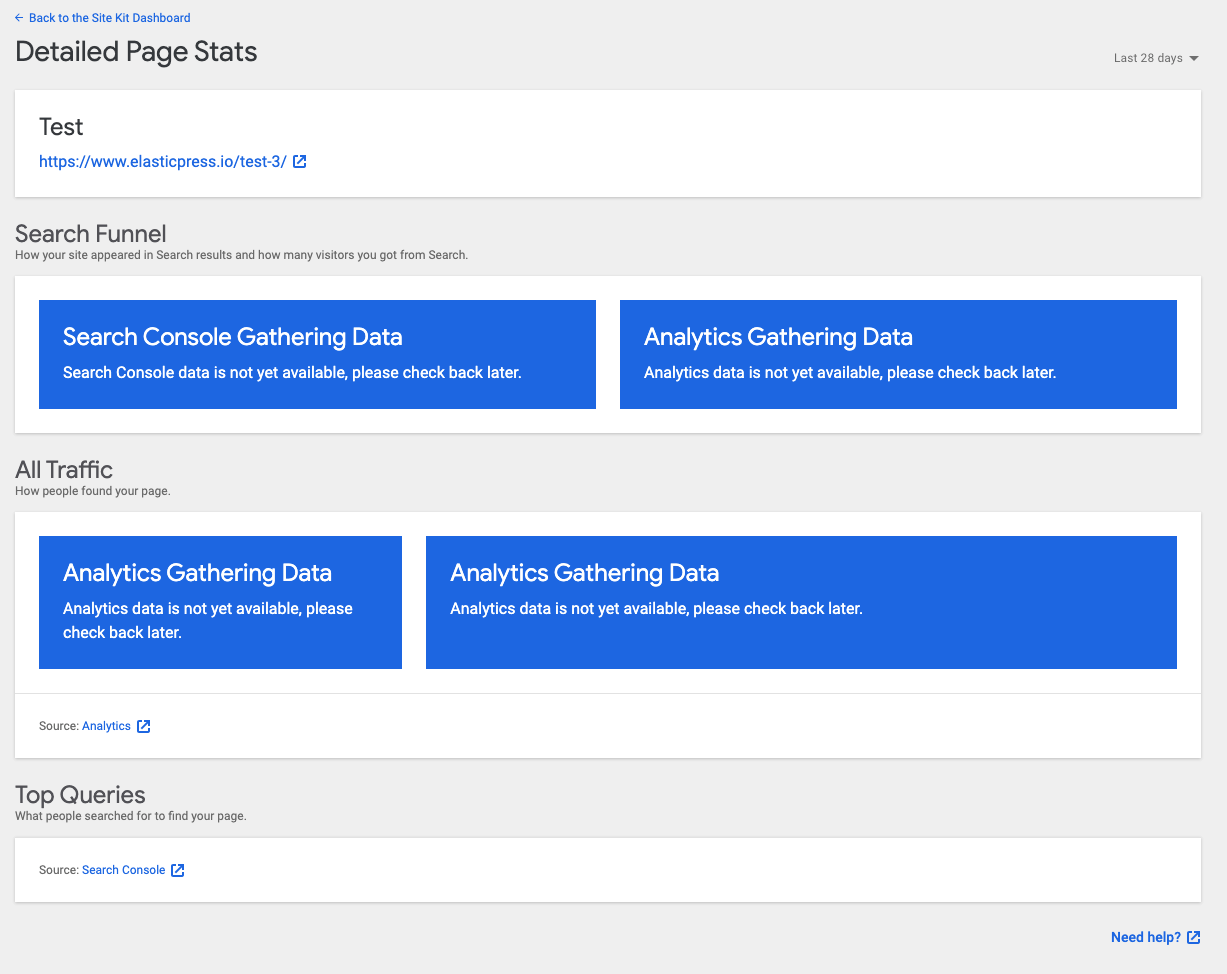
Instead, I would suggest we only show the very first analytics CTA, removing everything else from the page, so it looks something more like this:

Achieving this is a little tricky because data loading is Asynchronous so we don't know if there will be data at page load, so we need to not show some sort of loading indicator and then either the data or the truncated page. We do this already on the module pages, for example on the main analytics pag, using the following approach.
- Show a loading indicator until loading is complete (at least enough that we know we have data to show)
- Use CSS to hide the remaining components, allowing them to do their normal mounting and data loading without being visible yet.
- Have a single component (per module) that determines if that module is getting data. For example for analytics, are there any impressions in the last 30 days - if not, we have "zero data" - likely a new site.
- Once a component detects that data is present (or an error or zero data condition) invoke a passed callback from the parent component
- The parent component can now show correct result, based on which modules have data or errors, showing at most one CTA
This approach has worked well overall and I will work here, though it certainly has room for improvement as we refactor code and I'd love to hear suggestions for alternate approaches that still meet all of the underlying requirements.
My first idea was to use context, however when we tried that previously the filter approach prevented it from working correctly (the filters break context :(). Once the pluggable UI is refactored into a proper registration API, I feel like context would be a more natural choice for passing up the data results from the underlying components.
 adamsilverstein
on 7 Oct 2019
adamsilverstein
on 7 Oct 2019
@felixarntz I just created #634 to revert the initial changes that were merged in this iteration. We should likely create a new ticket based on Adam's findings above as to the new approach if desired.
 aaemnnosttv
on 9 Oct 2019
aaemnnosttv
on 9 Oct 2019
@felixarntz I'm going to move this back to definition as the scope and size of this work has likely changed.
aaemnnosttv
on 13 Oct 2019
@felixarntz and I discussed this -- let's leave all the CTAs in place until the refactoring is done, which will allow us to modify the different tiles more flexibly.
I've updated the ACs to reflect this.
 marrrmarrr
on 21 Jan 2020
marrrmarrr
on 21 Jan 2020
IB ✅
felixarntz
on 5 Mar 2020
Tested
installed 1.5.0 develop. Tried to 'view data'
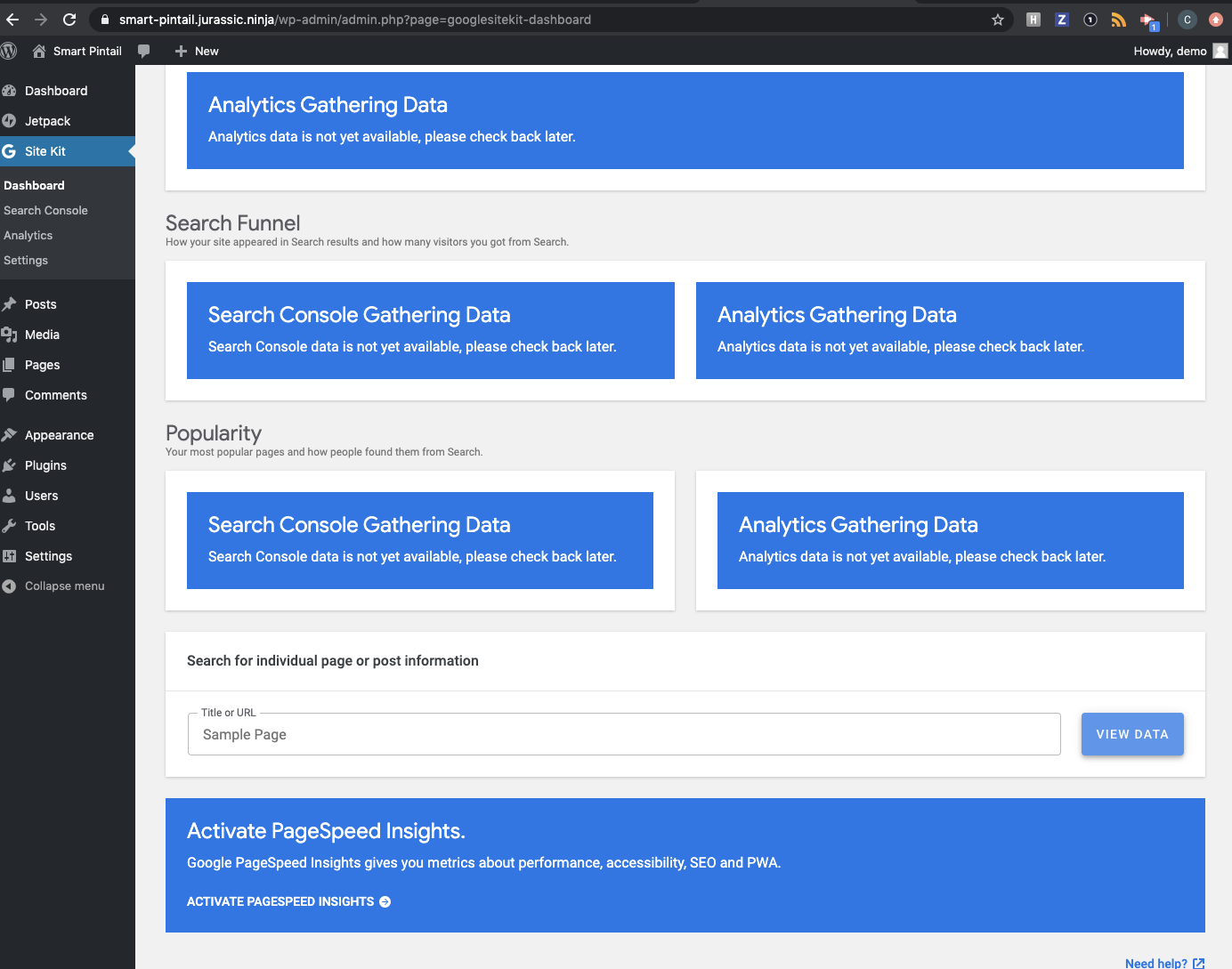
Confirmed we're not seeing empty traffic.
Passed QA ✅
 cole10up
on 11 Mar 2020
cole10up
on 11 Mar 2020
@cole10up Your screenshot is from the main dashboard, but this issue is specific to the details view (aka "dashboard details") for a single post/page. In your screenshot, this is reached by clicking the "View Data" button since the page is already selected there.
Note the title for the section is "All Traffic" (see screenshots here https://github.com/google/site-kit-wp/pull/1195#issue-382460161)
aaemnnosttv
on 11 Mar 2020
Tested
Checked member without an Analytics account on the View Data page for single page stats:
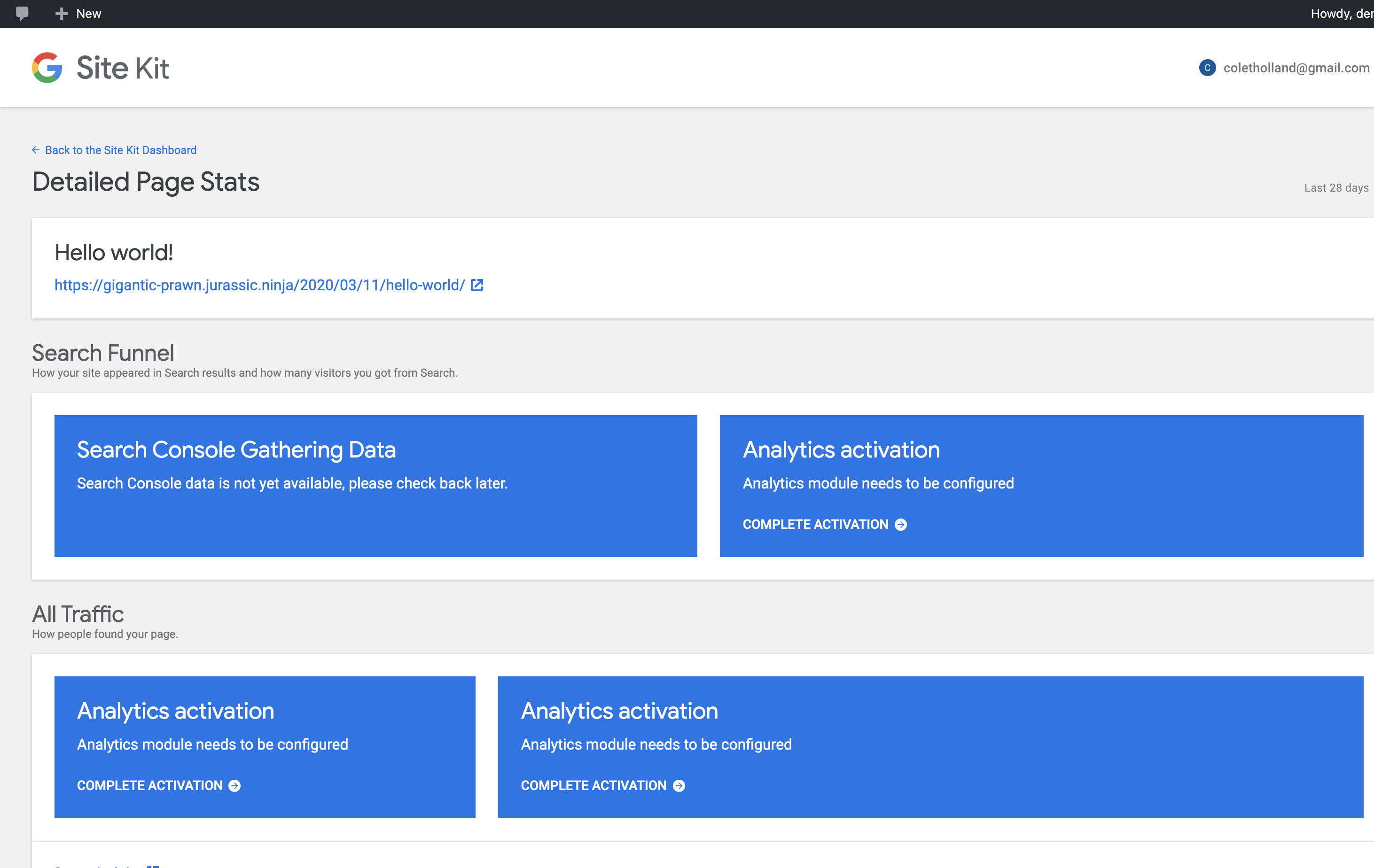
Checked member with Analytics account on the View Data page for single page stats:
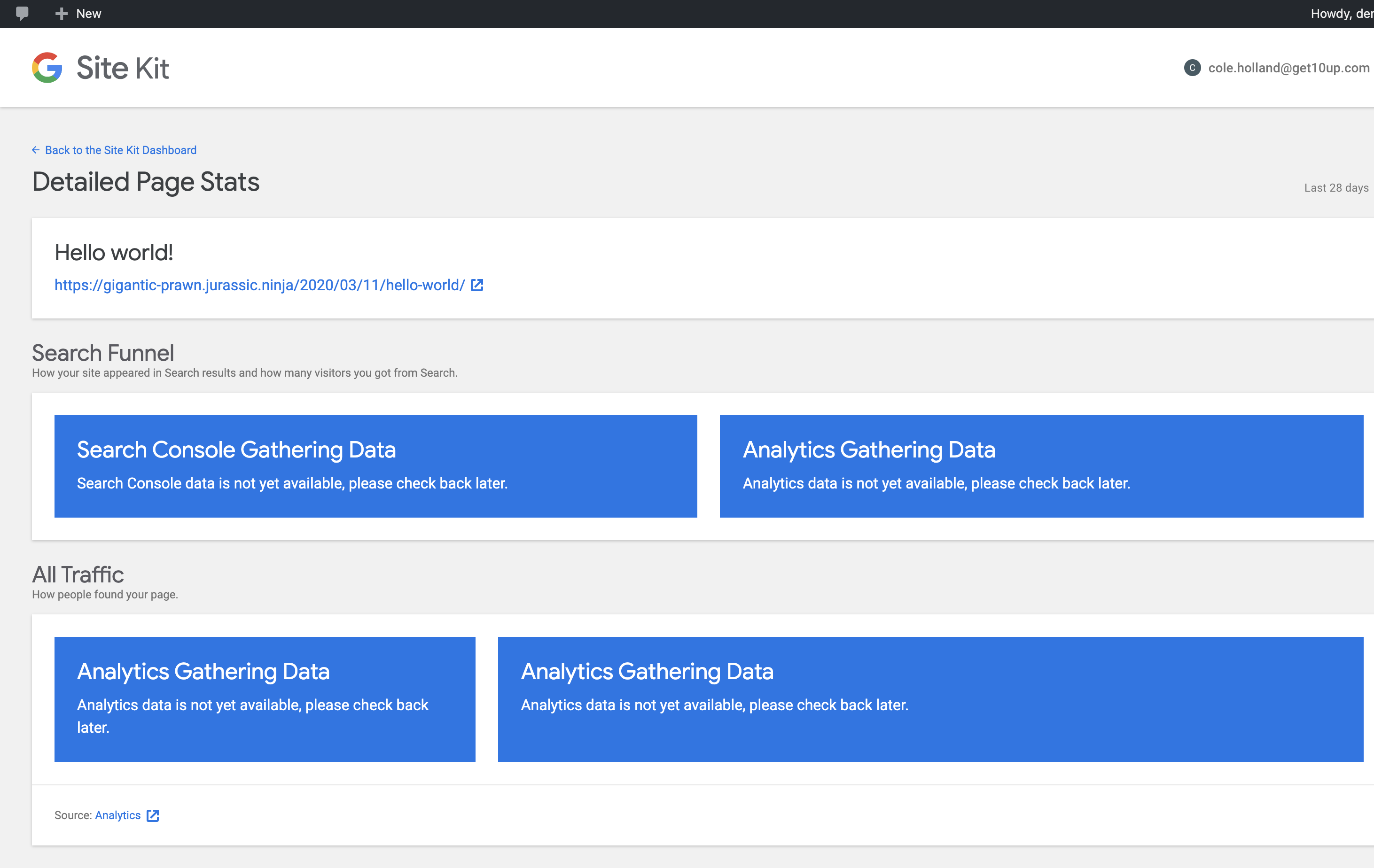
Sorry I missed the screenshots for the scenarios! Thanks for checking @aaemnnosttv
cole10up
on 11 Mar 2020
Verified. LGTM
marrrmarrr
on 12 Mar 2020
Related issues
aaemnnosttv
·
3Comments
 tunakode
·
4Comments
aaemnnosttv
·
5Comments
felixarntz
·
4Comments
tofumatt
·
3Comments
tunakode
·
4Comments
aaemnnosttv
·
5Comments
felixarntz
·
4Comments
tofumatt
·
3Comments