Site-kit-wp: Somewhere to view results for non-post pages (ex Home) within the admin
Related PR https://github.com/google/site-kit-wp/pull/73 as related pull-request where this was touched on.
_Do not alter or remove anything below. The following sections will be managed by moderators only._
Acceptance criteria
- Display a details page for non-post URLs:
- term archives (categories, tags, custom taxonomies)
- date archives (year, month, day)
- author archives
- Display stats in the admin bar for any of the above URLs (as long as there is enough data returned from the API requests for that URL)
Implementation Brief
Refactoring
- Implement new class
Util\Entity_Factorywith static methods (mainly to decouple and reduce code inContextwhich is already large and with the changes here would become significantly larger):
from_context(): Should have the current logic fromContext::get_reference_entity, except the initial part where it looks as thepermaLinkquery parameter, which is specific to Site Kit admin details and furthermore deals with the reference site URL, for which responsibility should be kept withinContext.from_url( $url ): Should have the current logic fromContext::get_reference_entity_from_url, except the initial part where it replaces the reference site URL, for which responsibility should be kept withinContext.- In other words, the new class should only deal with WordPress details, not Site Kit details. The "context" bit in the
from_contextmethod name refers to the actual WordPress context (via WP core functions), not Site Kit'sContextclass.
Context::get_reference_entityshould be reduced accordingly, so that it mostly relies onEntity_Factory::from_context, except for the Site Kit-related tweaks (see above).Context::get_reference_entity_from_urlshould be reduced accordingly, so that it mostly relies onEntity_Factory::from_url, except for the Site Kit-related tweaks (see above).- Modify
Admin_Bar::is_activeso that it relies fully onContext::get_reference_entity:
- Call
Context::get_reference_entity. If return value isnull, don't display. - Modify
Context::get_reference_entityto only return an entity for aWP_Postif its post status is "publish". This is used in the admin bar, but also generally makes sense, since non-published content should not result in a reference entity being found for Site Kit purposes (only published content matters). - If the returned entity type is either "post" or "blog" and has an ID present, use the ID for the
Permissions::VIEW_POST_INSIGHTSpermissions check. In all other cases, for now the permissions check should bePermissions::VIEW_DASHBOARD(admin-only). In the future this can be expanded to e.g. also check term capabilities etc.
- Call
Assets::get_inline_datashould be modified to useContext::get_reference_entity, and then thepermaLinkandpageTitlevalues exposed should be taken from there instead of relying on query parameters.- In JS, the
DashboardDetailsAppcomponent (assets/js/components/dashboard-details/dashboard-details-app.js) should be refactored to use the datastore, relying on thecore/sitestore for dashboard URL as well as entity details (title and permalink). Not strictly necessary here yet, but an easy win. - The
pageTitleshould be removed as a query parameter entirely, in:
assets/js/components/post-searcher.jsassets/js/googlesitekit-adminbar.js
- The
postIDandpostTypequery parameters as well as JS-provided data should be removed since they're essentially unused.
New functionality
- Introduce another utility method
Entity_Factory::from_wp_query( $wp_query ). This will contain all the template tag checks etc and based on that create the correct entity (withurl,type,title, and where applicableid).
- Use WordPress conditionals (basically similar to
get_the_archive_titleto find the entity and settypeandtitle, and where applicableid. Instead of calling the global functions though, rely on the methods (of mostly the same names) on theWP_Queryinstance.
- For any taxonomy archive (including categories and tags), call
get_queried_object, which in this case will be aWP_Term. Take theidfrom there. - For an author archive, call
get_queried_object, which in this case will be aWP_User. Take theidfrom there. - Date, time, and post type archives should not have an
idfor now since there is no numeric "entity ID" for these.
- For any taxonomy archive (including categories and tags), call
- We will be able to use the method in both
Entity_Factory::from_url(passing the customWP_QueryfromWP_Query_Factory::from_url( $url ), see below) andEntity_Factory::from_context(passing the main$wp_queryglobal).
- Use WordPress conditionals (basically similar to
- Introduce class and method
WP_Query_Factory::from_url( $url ), which based on$urlreturns aWP_Queryinstance with the correct query arguments:
- Use core logic from
WP::parse_request()andurl_to_postid()to determine from URL structure what it is for. - This method is quite expensive, but so is
url_to_postid, and we'll only use it in the single page details view in the admin, where this is acceptable. - The method should return a
WP_Query, but it shouldn't run the actual query since that would be an unintended side-effect. The arguments should be provided to the instance viaWP_Query::parse_query, which will only set them up but not run the query.
- Consuming code can use
WP_Query::get_poststo then actually run the query as needed.
- Consuming code can use
- Since the logic is mostly from core's quite obscure "request matching" implementation, this should get a substantial amount of unit tests.
- See #1881 for proof of concept.
- Use core logic from
Entity_Factory::from_contextshould rely onEntity_Factory::from_wp_querywith the$wp_the_queryglobal` to create entities.Entity_Factory::from_url( $url )should callWP_Query_Factory::from_url( $url ), then runWP_Query::get_posts()on the returned query instance, then rely onEntity_Factory::from_wp_queryto create entities, i.e. we'll have a single mechanism that covers both of the two main methods to create entities.
QA Brief
- Use Site Kit on a site which already has a substantial amount of content and which has been using Search Console for a while already. (The more popular the site, the more likely it is to get applicable test results here.)
- _Without_ this enhancement, the Site Kit admin bar menu should only show up for the home page and for single posts (as long as the URLs have Search Console data).
- _With_ this enhancement, the Site Kit admin bar menu should show up for other types of WordPress content too (as long as the URLs have Search Console data), such as:
- category archives
- tag archives
- author archives
- date-based archives
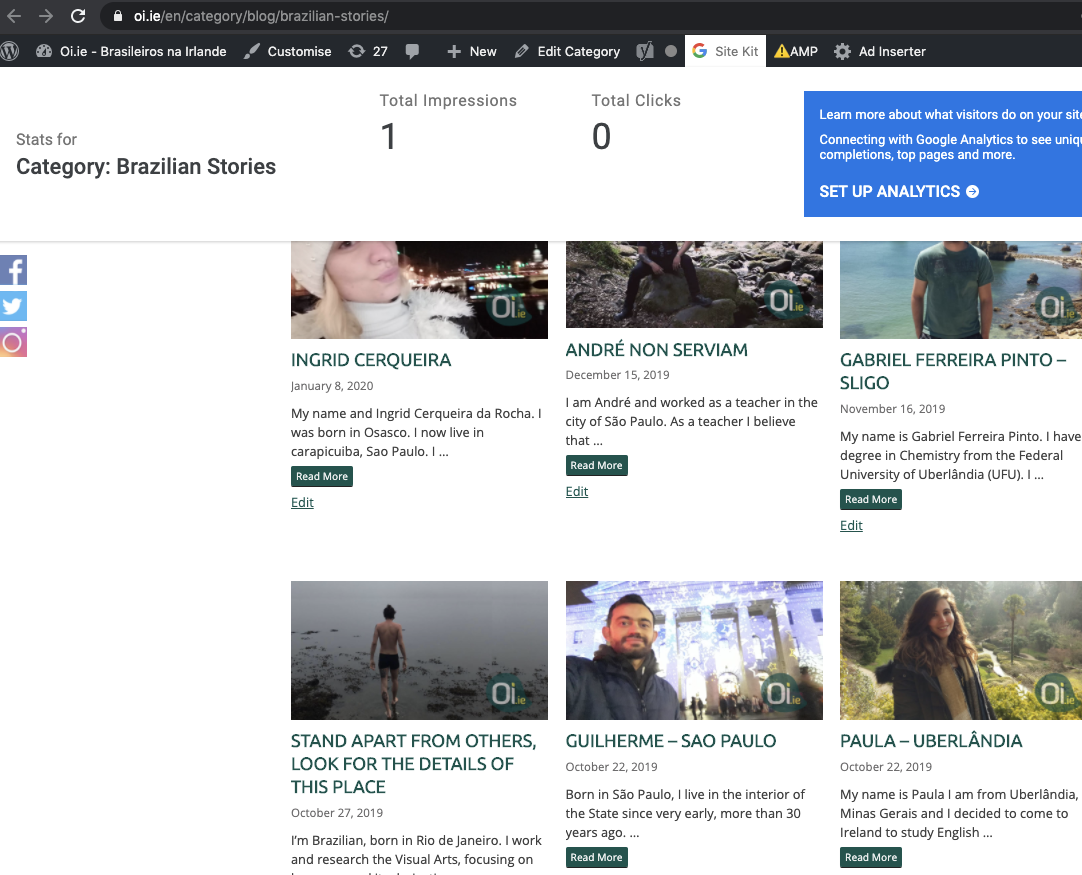
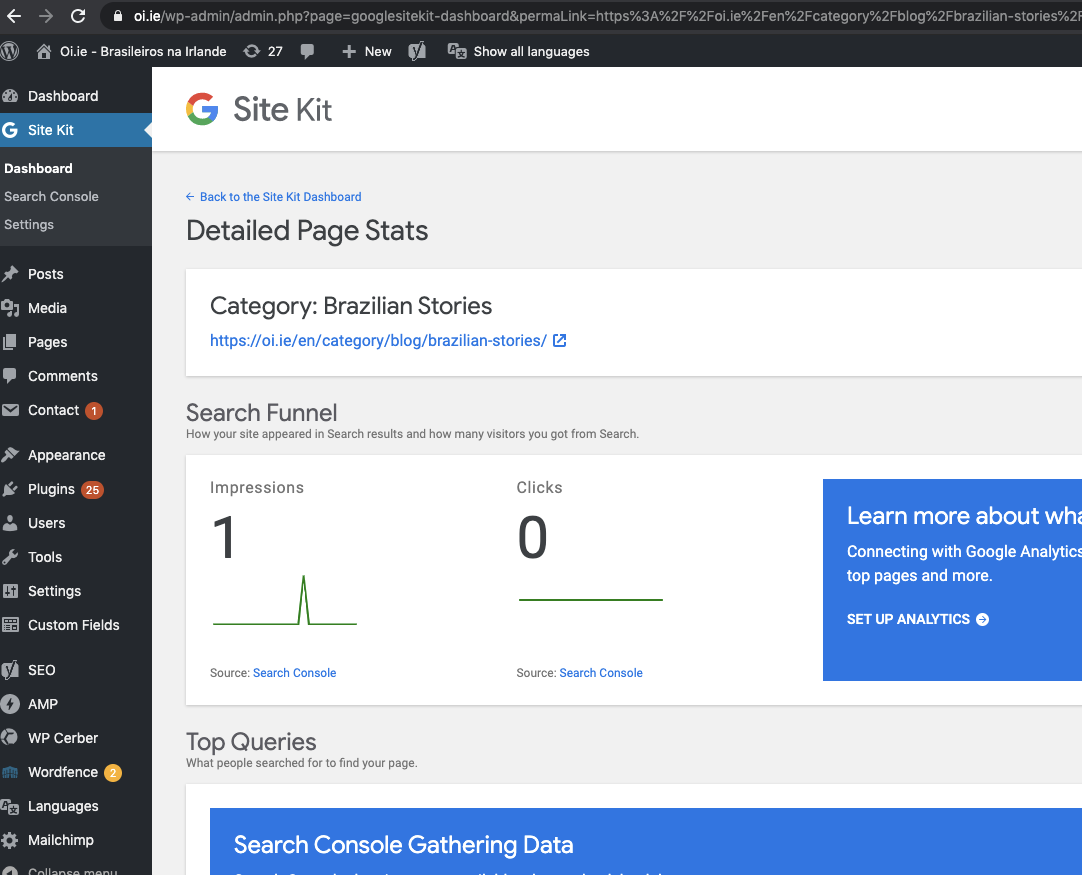
- Anytime the Site Kit admin bar menu is shown, the More Details link should take the user to the respective single URL details view in Site Kit (as already today). The title displayed on top of that page should match the URL, for example:
- "Category: XYZ" for a category archive
- "Tag: XYZ" for a tag archive
- "Author: John Doe" for an author archive
- "Month: August 2020" for a month archive
Changelog entry
- Enable Site Kit admin bar menu and URL details view for any WordPress content beyond single posts, for example category, tag, author, or post type archives.
 bjackson27
All 13 comments
@felixarntz this looks mostly good to me. A few questions for you though:
- The logic in
Entity_Detector::from_contextshould be expanded to cover further non-post content:
- Use WordPress conditionals (basically similar to
get_the_archive_titleto find the entity and settypeandtitle.
- For any taxonomy archive (including categories and tags), call
get_queried_object, which in this case will be aWP_Term. Take theidfrom there.
- For an author archive, call
get_queried_object, which in this case will be aWP_User. Take theidfrom there.
- For a date archive, call
get_the_date(either with "Y", "Ym" or "Ymd", based on the type), and use that value as theid.
What would the type be for each case? Would it be simply term, user (author?) and date?
For a date archive, call
get_the_date(either with "Y", "Ym" or "Ymd", based on the type), and use that value as theid.
- This doesn't include support for a time-based date archive. This probably isn't very common but is a valid date archive type so we should probably include it. Perhaps time could be appended as
@H:i:s? - We should probably format the ID with hyphens between segments to make it easier to parse, or even omit the need to do extra parsing with it.
 aaemnnosttv
on 22 Jul 2020
aaemnnosttv
on 22 Jul 2020
@aaemnnosttv I think the types would be
termuserdatetime(for the one I forgot that you mentioned)
Regarding the IDs, they are numeric (WP post/term/user IDs right now). I was thinking to somehow keep using this field for archives not associated with a WP database table (that's why I thought about making the date IDs fully numeric), but maybe it's better to introduce another identifying field which is a string. Maybe slug? This would e.g. hold Y-m-d H:i:s for date time archive, Y-m-d for day-based date archive. What do you think?
 felixarntz
on 28 Jul 2020
felixarntz
on 28 Jul 2020
Maybe
slug? This would e.g. holdY-m-d H:i:sfor date time archive,Y-m-dfor day-based date archive. What do you think?
@felixarntz I don't think we should refer to a date as a slug as slugs are generally simplified/normalized versions of something unpredictable input like a title or name. If we wanted to cast the string date to a purely numeric ID, I would think strtotime would be a good function to use for that and the timestamp would serve as its ID - the only problem there is that it isn't enough by itself to know what range of time the referenced timestamp refers to (if not a time). So there is a bit of a sub-type which needs to be provided as well. Unlike posts and terms where we can infer the post type or taxonomy from the ID alone (once we query it) we don't have enough information to do that for a date type (time queries are for a specific time so for these it would be enough). We could have a compound type like date:month or date:day perhaps, or we could add an additional parameter to be used for the date range or sub-type.
One other thought regarding Util\Entity_Detector: perhaps Util\Entity_Factory would be more idiomatic? After all, it's just a class for creating/instantiating entities from different sources?
aaemnnosttv
on 28 Jul 2020
@aaemnnosttv
Maybe
slug? This would e.g. holdY-m-d H:i:sfor date time archive,Y-m-dfor day-based date archive. What do you think?@felixarntz I don't think we should refer to a date as a slug as slugs are generally simplified/normalized versions of something unpredictable input like a title or name.
Hmm, a slug in WordPress is something unique, so I'd consider this just another kind of identifier, with the difference that it is not numeric. I'd still would want to keep that separate though from actual IDs, so let's not combine these two. Do you have an alternate naming suggestion? It should be generic so that it could be e.g.:
- a post slug (e.g.
my-post) - a term slug (e.g.
my-term) - an author name (e.g.
admin) - a post type name (e.g.
page) - a date/time archive identifier (e.g.
Y-m-d,Y, ...)
Basically any identifier that is not technically an ID in WordPress. The combination of type and id or type and slug should allow unique identification of the entity and its URL basically.
One other thought regarding
Util\Entity_Detector: perhapsUtil\Entity_Factorywould be more idiomatic? After all, it's just a class for creating/instantiating entities from different sources?
SGTM
felixarntz
on 28 Jul 2020
a
slugin WordPress is something unique [...] The combination oftypeandidortypeandslugshould allow unique identification of the entity and its URL basically.
Not quite - post slugs are not guaranteed to be unique across all posts. Multiple posts can have the same post_name if they are different post types. The slug only has to be unique across its place in the permalink structure. I can create a WC product with a slug of hello-world even though there is a post with the same slug because they don't compete for the same resulting URL. I can't however create a page with the same slug as the Hello World post because even though they are separate post types, they share the same permalink structure so WP will update the post_name of subsequent posts in this case to ensure it is unique.
Instead of passing
permaLink, passtypeandidtodashboard-details
I don't think we should do this as it isn't enough information to generate the same URL that the user may have navigated to the details screen from to see stats for. E.g. things like pagination, search query results, or any other URL that doesn't map directly to a URL for an entity.
Do we want users to be able to see stats for any URL on their site (especially those that don't represent entities), or is this issue specific to only term, date, and author archives? Even if this issue is limited to those specific types, we should consider how supporting stats for other URLs will fit into this. We should at least support pagination though.
Rather than passing URL for the permaLink we can pass the URL minus the origin (i.e. path + query/search) and append it to the reference URL on the server to create the full URL but also prevent using the details page from querying URLs that don't belong to the site.
aaemnnosttv
on 3 Aug 2020
@aaemnnosttv That makes sense. Preferably we would have something like url_to_postid which is generic. I initially thought about that but then dismissed the idea because we'd need to implement it, but maybe this is the way to go even if it means we'll need to write some code that would be more suitable for WordPress core.
A lot of what url_to_postid does is basically what we would need to, just in a bit more flexibility for non-posts as well. I'll look into how feasible that is - thinking about something like url_to_wp_query.
felixarntz
on 6 Aug 2020
@aaemnnosttv I've updated the IB to go with my original idea of determining entities based on URL. It's complex due to how core works, but the code is mostly copied over from there, and it should definitely get thorough unit tests.
felixarntz
on 6 Aug 2020
@felixarntz this looks much better to me now, just a few things left to finalize.
For a date archive, call
get_the_date(either with "Y", "Ym" or "Ymd", based on the type), and use that value as theid.
Unless there's a reason to omit them, I would suggest we use Y, Y-m, and Y-m-d which are easier to parse.
Also, support for time queries/archives doesn't seem to be included. The time could be included as {$qv['hour']}:{$qv['minute']}:{$qv['second']} (where $qv references query vars in WP query) and appended with a @ if is_time(). So the id for a Date entity would still be Y or Y-m-d but a time would be Y-m-d@H:i:s. Since a time query may only have one of the three vars, any empty vars would result in no value between : so that the time could still be parsed into the appropriate values. E.g. @:05: would have empty hour and second vars, but 05 for the minute. I realize that time queries/archives are probably the most edge case of the group but we should still try to support them as best we can.
Use core logic from
WP::parse_request()andurl_to_postid()to determine from URL structure what it is for, via a new utility methodEntity_Factory::url_to_query_args( $url ), which based on$urlreturns the correct query arguments to pass to aWP_Queryinstance.
- Use this method in
Entity_Factory::from_url, then instantiate aWP_Querywith it.
I think this would fit better as a new WP_Query_Factory::from_url( $url ) factory class and public method rather than making this part of the Entity_Factory when that method is entirely independent of Entity logic, but also may be useful elsewhere. It would also separate the tests for Entity creation and Query creation into separate cases as well as further splitting up that big method into other helper methods rather than doing the whole thing in one (we don't need to borrow that part from core too 😉 ). One difference here as well is that WP_Query_Factory::from_url would return a WP_Query instance rather than the query args which are available via the instance as well if needed.
- The logic in
Entity_Factory::from_contextshould be expanded to cover further non-post content:
- Use WordPress conditionals (basically similar to [
get_the_archive_title]
This seems slightly redundant now as written. Would it not be simply returning the value of Entity_Factory::from_wp_query( $wp_query ) using global $wp_query or $GLOBALS['wp_the_query'] for non-admin requests? WordPress conditionals all reference the global $wp_query and call the same methods on that instance, so internally the logic would be the same here, just instead of calling conditional functions, it would call the same methods on the given WP_Query instance.
Apart from that, the estimate seems a little bit on the low side at first glance but then again you've done a lot of the work already in your POC so it should be sufficient to finish the rest 👍
aaemnnosttv
on 6 Aug 2020
@aaemnnosttv I've updated the IB again to cater throughout for the new classes and methods. +1 on using a WP_Query_Factory. I wanted to return a WP_Query first, but then decided for $args because it seemed that you could only instantiate a WP_Query when also running the actual query, which I consider an unintended side-effect that shouldn't happen. However I found there's WP_Query::parse_query which we can use, so 👍
Regarding the date and time archives, let's get rid of the id altogether. That property was originally intended for numeric WP entity IDs (like for posts, terms, users), and I think we should stick to that.
felixarntz
on 6 Aug 2020
IB ✅ 🎉
I'm going to bump the estimate up one though as my spider sense is still telling me it's on the low side and I feel like there is still quite a substantial amount of implementation and tests to write even with the generous head start here.
aaemnnosttv
on 6 Aug 2020
@felixarntz CR ✅ but I haven't merged it yet. Since this is such an old issue it doesn't have a QA Brief section. I'll add an empty one for you fill here and then this should be ready to merge and QA 👍
aaemnnosttv
on 25 Aug 2020
Tested
Installed activated and setup SK on a site with substantial content that has been on search console for a while.
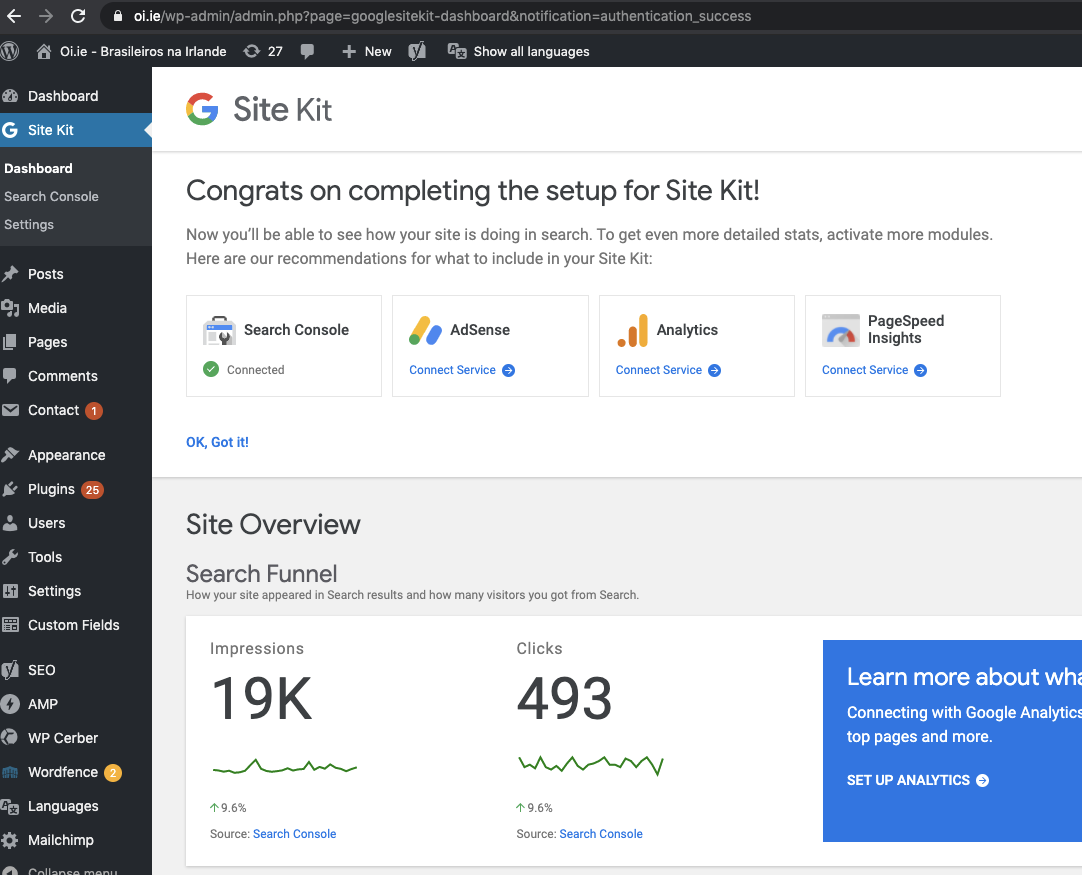
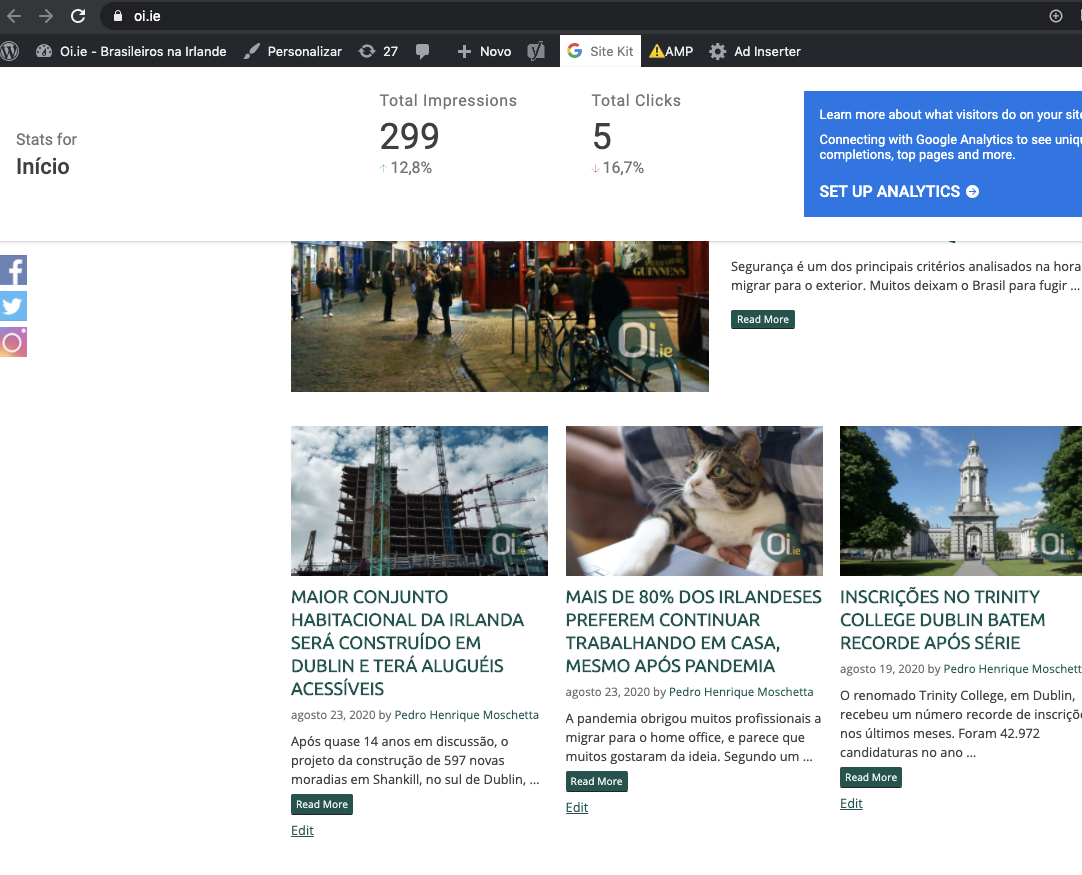
Tested the following admin bar menu on pages:
Home:
Category:
More details link for the above:
Tag:
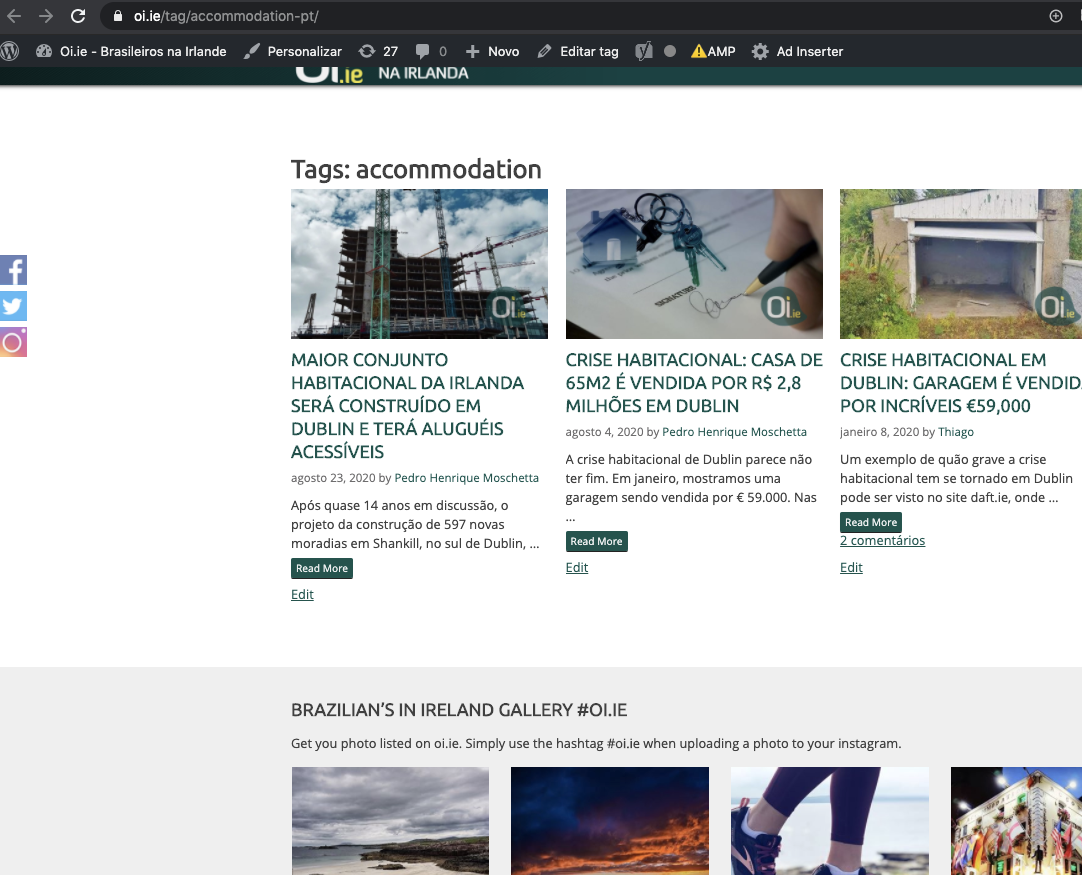
Notice above Tag doesn't have the SK admin bar.
Sending back to CR to check on the tag item not displaying the SK admin bar.
 cole10up
on 27 Aug 2020
cole10up
on 27 Aug 2020
Consulting with @aaemnnosttv I was able to find that the tag I was using's data was appearing way past 6 months prior. I found a more recent impressions on a tag and confirmed.
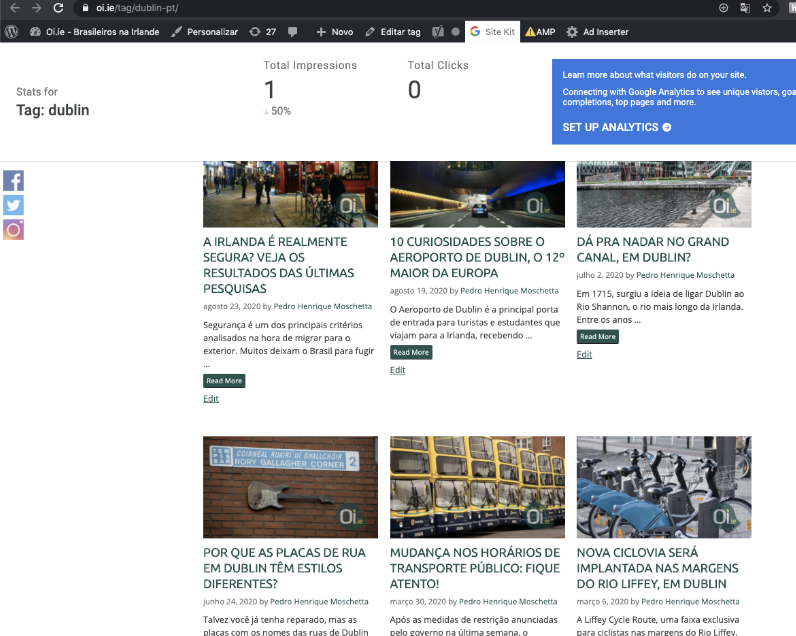
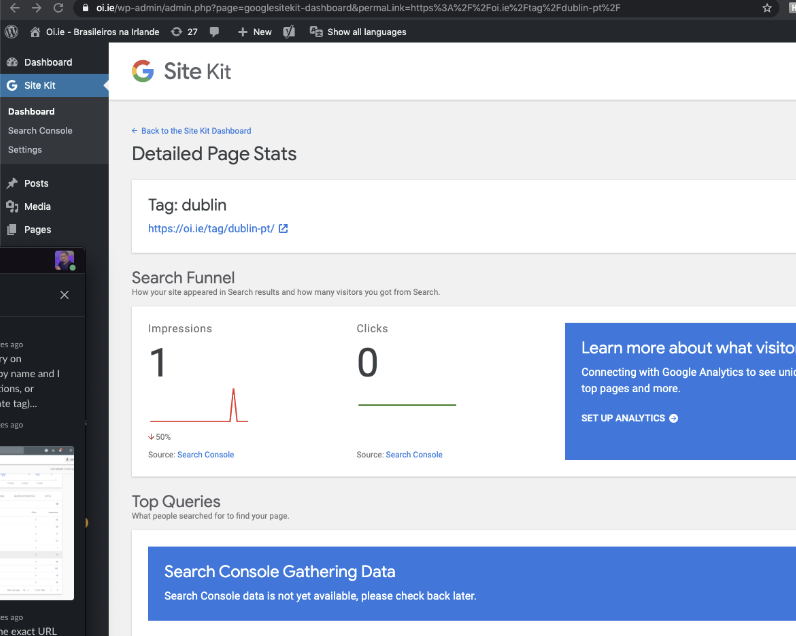
This is verified and Passed QA ✅
cole10up
on 27 Aug 2020
Related issues
 quangbahoa
·
5Comments
aaemnnosttv
·
3Comments
aaemnnosttv
·
5Comments
felixarntz
·
4Comments
quangbahoa
·
5Comments
aaemnnosttv
·
3Comments
aaemnnosttv
·
5Comments
felixarntz
·
4Comments
 marrrmarrr
·
5Comments
marrrmarrr
·
5Comments