Site-kit-wp: Integrate with Site Health Info section
This needs to cover both Status and Info sections of Site Health
WordPress 5.2 introduces Site Health: https://make.wordpress.org/core/2019/04/25/site-health-check-in-5-2/
We can leverage debug_information in the plugin to provide debugging information for user reporting, for example which modules are active/configured, of the status of the adsense setup or authentication status.
_Do not alter or remove anything below. The following sections will be managed by moderators only._
Acceptance criteria
- Site Kit should have a section in the "Site Health Info" (via
debug_informationfilter), with sluggoogle-site-kitand labelSite Kit by Google. - All fields included should properly support a value to display and a debug version to include if copied. Usually these should be the same (in fact, if no debug value is provided, the display value will be used), but if the display value is a user-facing translation string, the debug value should differ to be a non-translatable plain text version of that (see WP core implementation for examples).
- The section should display the following fields (based on the condition mentioned):
- always include the following (i.e. no condition):
- Plugin version: The plugin version number
- Environment: PHP version, WordPress version, AMP mode (“Primary”, “Secondary”, or “No”), and Network mode ("Yes" or "No") --> these four pieces of information should be included as an associative array to render in multiple lines
- Site status: Either “Connected through site credentials” (if using proxy), or “Connected through OAuth client credentials” (if using old flow), or “Not connected” (if site has not been set up yet)
- User status: Either “Authenticated” (if user has access token and refresh token) or “Not authenticated” (if user has not gone through setup flow yet, i.e. not received a token yet)
- Active modules: List of active modules
- Required scopes: List of currently required OAuth scopes
- User scopes: List of OAuth scopes the user has access to
- Search Console property: The Search Console property
- if the Analytics module is active:
- Analytics account ID: The abbreviated Analytics account ID
- Analytics property ID: The abbreviated Analytics property ID
- Analytics profile ID: The abbreviated Analytics profile ID
- Analytics snippet placed: Either “Yes” or “No”
- if the AdSense module is active:
- AdSense account ID: The abbreviated AdSense account ID
- AdSense client ID: The abbreviated AdSense client ID
- AdSense account status: The AdSense account status determined
- AdSense site status: The AdSense site status determined (for now only supports “Added” or “Not added”)
- AdSense snippet placed: Either “Yes” or “No”
- if the Tag Manager module is active:
- Tag Manager account ID: The abbreviated Tag Manager account ID
- Tag Manager container ID: The abbreviated Tag Manager container ID
- Tag Manager AMP container ID: The abbreviated Tag Manager container ID for the AMP version
- Tag Manager snippet placed: Either “Yes” or “No”
- if the Optimize module is active:
- Optimize container ID: The abbreviated Optimize container ID
- always include the following (i.e. no condition):
- For all fields of the above where it says "abbreviated", the following applies: If a value is set, we should display the first 4 characters, with the following characters replaced by asterisks.
- For all fields above that may not have a value set, it should say "None".
Implementation Brief
- Create a new
Core\Util\Debug_Dataclass
- Should accept
Modulesas a constructor dependency registermethod should add a filter ondebug_informationresponsible for adding all debug information for Site Kit
- Adds the top-level definition for Site Kit
$info['google-site-kit']['label'] = __( 'Site Kit by Google' )$info['google-site-kit']['description'] ...$info['google-site-kit']['fields'] ...see below
- Collects and adds core Site Kit fields as the top-level fields
- Iterates over each
Module_With_Debug_Fields(see below) and generates a field definition based on module slug, and name with module-specific data provided by the module itself
- Should accept
- Add a
Module_With_Debug_Fieldstrait
abstract protected function get_debug_fields() : array
Should return an associative array of[ 'value' => $value_assoc, 'debug' => $debug_assoc ]where$value_associs an assoc array of the unredacted values for display and$debug_assocare the redacted, non-translated values which are provided when copiedprotected redact_debug_value( $string, $mask_start = 4 )
Takes a string and replaces every character after the start position with a placeholder character (perhaps bullet would be more appropriate?)
Changelog entry
- Integrate with WordPress Site Health feature to provide contextual Site Kit information for support and troubleshooting.
 bjackson27
All 11 comments
Adding @cole10up on here to help define what would be useful to add to this information.
 aaemnnosttv
on 27 Nov 2019
aaemnnosttv
on 27 Nov 2019
One thing after having a chat with Renee that I am learning is, we do request Site Health site info from members when triaging issues but they seem to be sensitive about where their information is going and don't necessarily approve of pasting it on a public forum.
Just a thought, could we discuss leveraging this ticket to somehow make a call and allow the user to send their info directly to Google support or a place where we can share this information?
Any thoughts are appreciated.
 cole10up
on 27 Nov 2019
cole10up
on 27 Nov 2019
You could always ask users to remove/redact information they didn't want to share publicly - that's probably the _easiest_ solution.
The best solution however might be to set up a Google Form which posts to a private spreadsheet which takes a reference URL (form thread, github issue, etc) and any long form text, where users could paste and submit the site health info. It could also take a name and or email but that stuff could be optional.
aaemnnosttv
on 27 Nov 2019
@felixarntz - debug information also has the concept of private fields which are those that are only displayed in wp-admin, but not copied to the clipboard for sharing. Is there anything we think should be private?
Regarding the module settings, I wonder if these really need to be redacted/abbreviated? Any of the public IDs that will display in the HTML source should be okay to leave unmasked, no?
For those that should be protected (such as account IDs I would imagine), should they perhaps be private instead? I'm not sure that these values are useful for debugging anyways. Maybe they should just have a generic value for what is shared such as "Set" / "Not set" ?
As for some of the "core" fields to add, core already adds fields for PHP version and WP version. Is there any reason why we would want to add them again? Technically the plugin version is also included in the wp-plugins-active info, but I think this is fine to include.
aaemnnosttv
on 18 Feb 2020
@aaemnnosttv
debug information also has the concept of
privatefields which are those that are only displayed in wp-admin, but not copied to the clipboard for sharing. Is there anything we think should be private?
I don't think we need it. What would be useful is for the admin to display the full value of the IDs (see below) while exporting should only give the abbreviated result (via redacted values).
Regarding the module settings, I wonder if these really need to be redacted/abbreviated? Any of the public IDs that will display in the HTML source should be okay to leave unmasked, no?
Theoretically yes, this information is public, but sharing it all in one together with the other data makes it more privacy-sensitive. We've discussed this internally and decided to abbreviate.
For those that should be protected (such as account IDs I would imagine), should they perhaps be
privateinstead? I'm not sure that these values are useful for debugging anyways. Maybe they should just have a generic value for what is shared such as "Set" / "Not set" ?
That would be an alternative, but I think it's more useful to have a grasp of the values set in the exported data so we could see whether something completely irregular is in there for example.
As for some of the "core" fields to add, core already adds fields for PHP version and WP version. Is there any reason why we would want to add them again? Technically the plugin version is also included in the
wp-plugins-activeinfo, but I think this is fine to include.
That is true, but I think it makes sense to include that here too, just so we have it at a glance with all the relevant data for Site Kit. Not a big deal to get to this information programmatically anyway.
IB ✅
Let's use Core\Util\Debug_Data instead of Core\Debug_Data for the class. Using a bullet as mask character is fine with me.
 felixarntz
on 18 Feb 2020
felixarntz
on 18 Feb 2020
@felixarntz we should probably add a few fields for:
- Dev Settings plugin installed: Y / N
- Custom URL
- Client ID (redacted)
- Client Secret (redacted)
What do you think?
aaemnnosttv
on 21 Feb 2020
@aaemnnosttv I don't think we should include information specific to the Dev Settings plugin for now. But I like the idea to include specifically the "Custom URL", however it should be coming from the Site Kit side: Let's always include it as "Reference Site URL", via Context::get_reference_site_url(). This will also work for sites that manually added a filter or so.
Client ID and secret (or site ID and secret in most cases for us) I would rather not include (even redacted), as these are truly sensitive data. All the other IDs are still public information, while these are not.
felixarntz
on 21 Feb 2020
@felixarntz This one is just about ready, I'm only not sure about how we should be displaying the account and site statuses for AdSense.
Account status is saved in the module settings, but I'm not 100% sure how how we should display it. My first thought would be to use statusHeadline from propsFromAccountStatus but this is a bit vague on its own in some cases. Should we curate a new (more concise) translatable description of each status for this purpose? The debug value can of course be the raw value but for display purposes this is a bit challenging as it is.
Regarding site status, this is not saved in the settings unlike all the other module info exposed via Site Health. Does this require we do some kind of data request at the time of Site health info collection to determine or can we infer it from another setting perhaps?
aaemnnosttv
on 24 Feb 2020
@aaemnnosttv Good point. Let's just use the account status as is for now without translation. The available account statuses will partly change via #1014 anyway. Site status is also something that's going to be introduced by that issue, so I think we can omit it for now.
felixarntz
on 24 Feb 2020
Tested
Installed and activated latest version of SK. Setup all services, checking Site Health info after
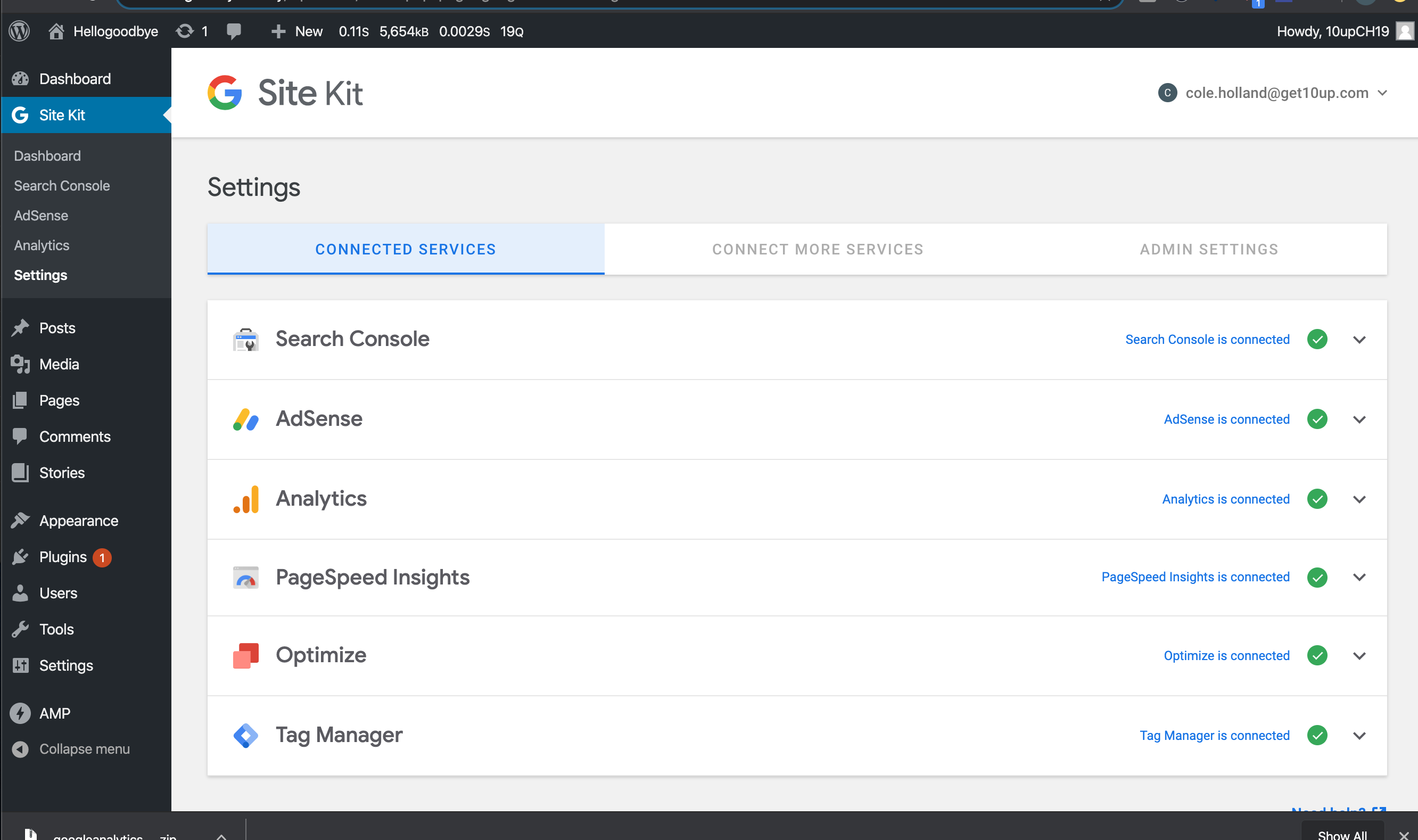

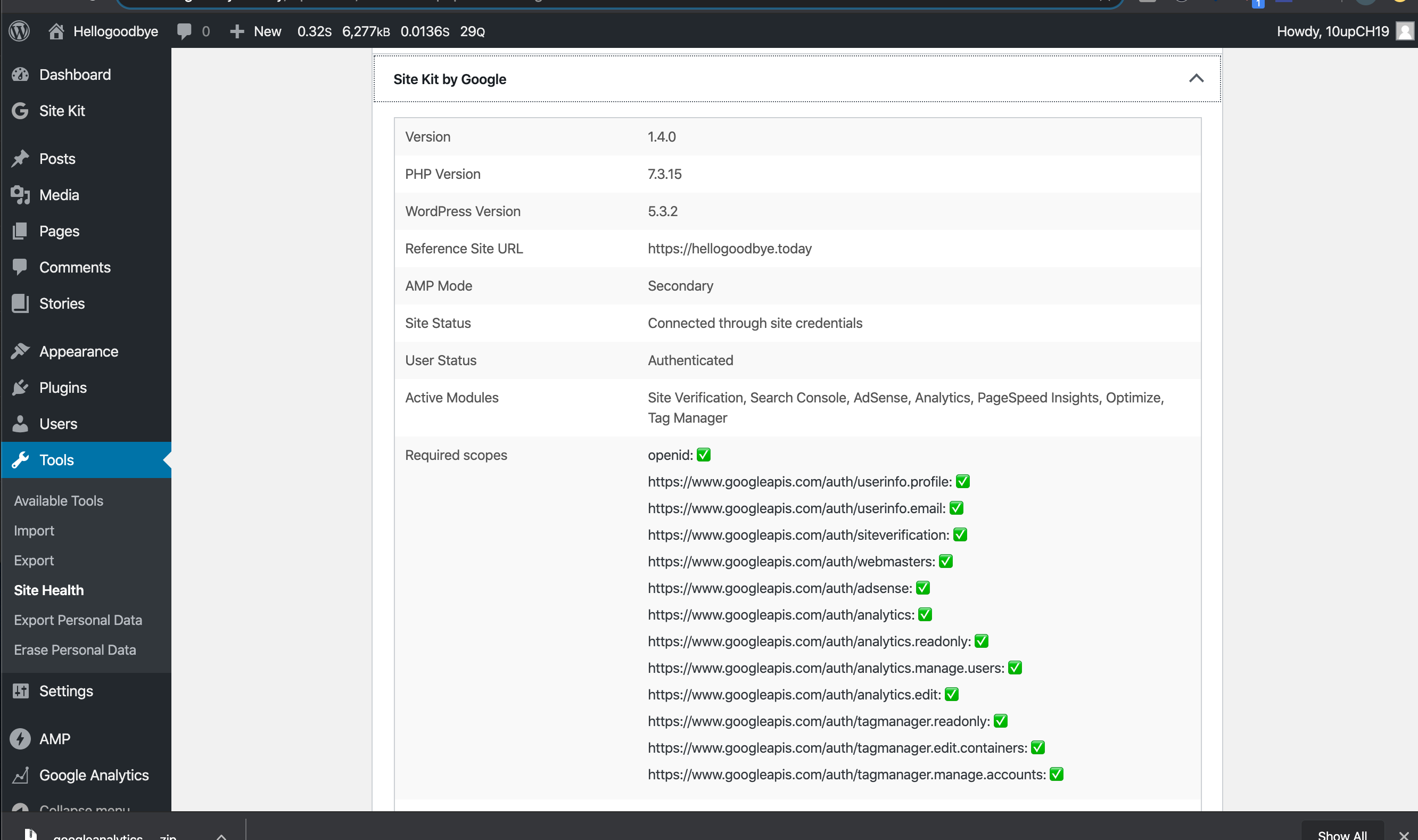
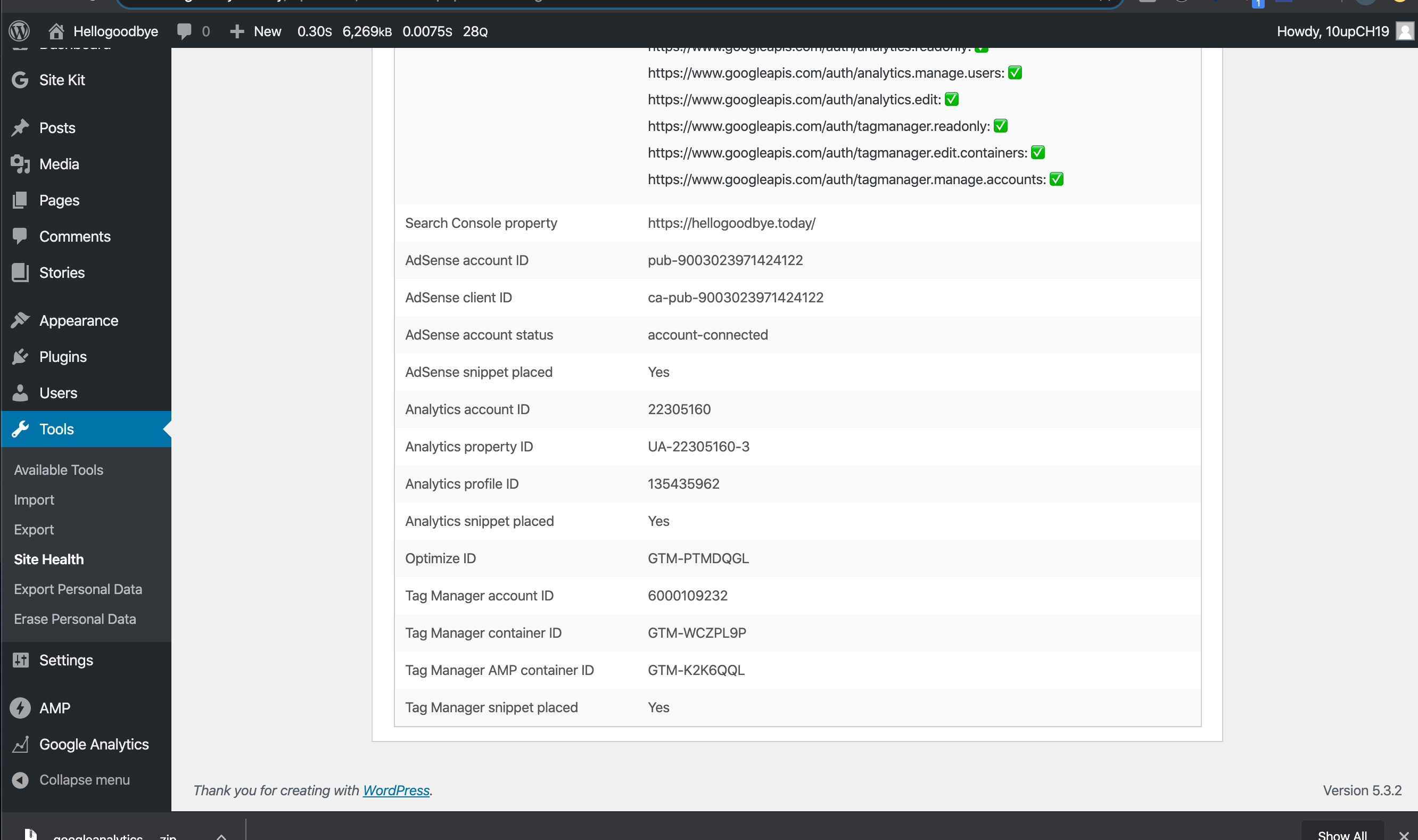
Confirmed removing services unpopulates the list according to the removed service.
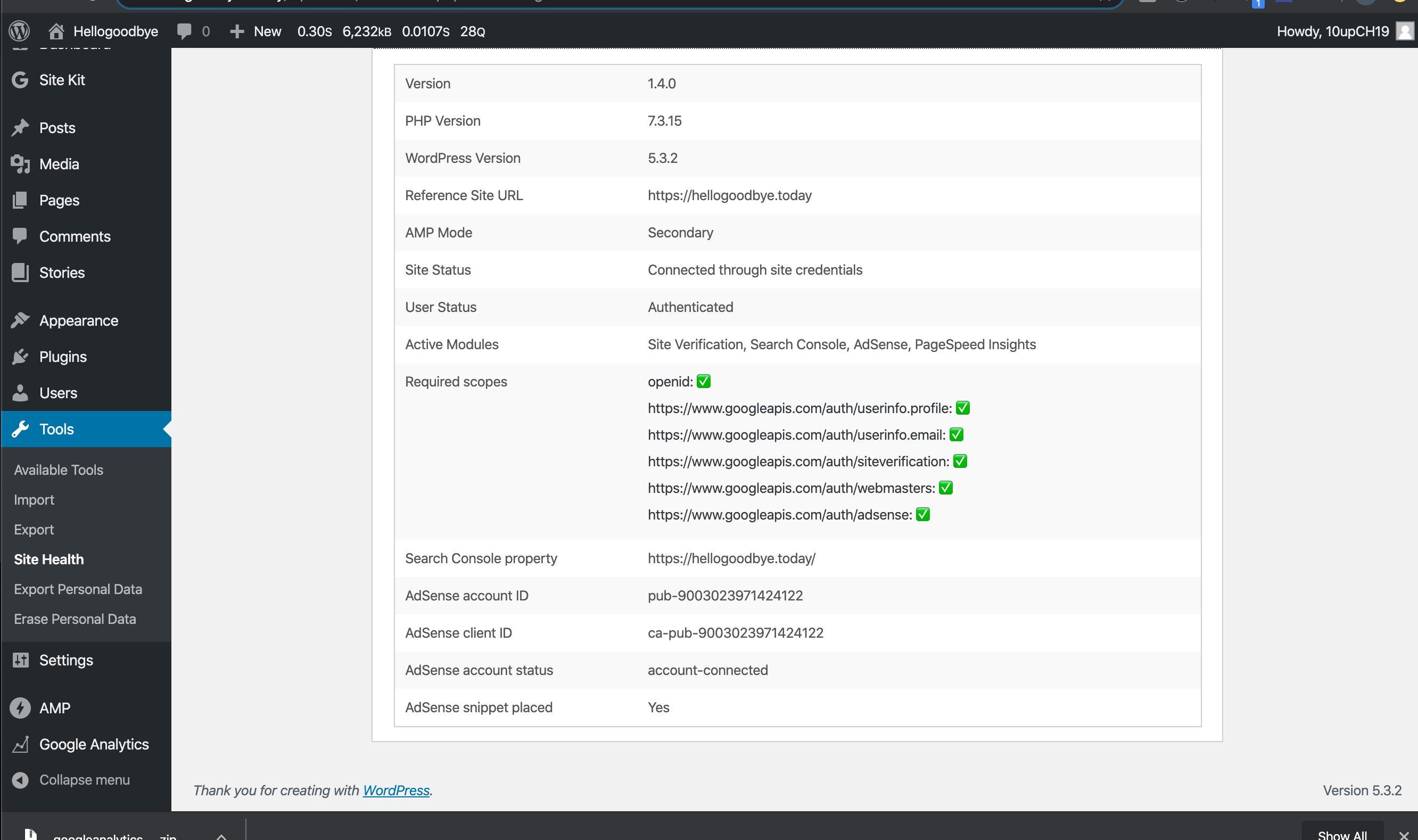
Checked prior versions, disconnected my user and caused this issue: https://github.com/google/site-kit-wp/issues/1237
Tried a separate session and disconnect worked and displayed proper content.
Passed QA ✅
cole10up
on 10 Mar 2020
Looks good.
 marrrmarrr
on 12 Mar 2020
marrrmarrr
on 12 Mar 2020
Related issues
 jamesozzie
·
3Comments
jamesozzie
·
3Comments
 quangbahoa
·
5Comments
felixarntz
·
4Comments
quangbahoa
·
5Comments
felixarntz
·
4Comments
 tunakode
·
4Comments
felixarntz
·
4Comments
tunakode
·
4Comments
felixarntz
·
4Comments