Site-kit-wp: Analytics setup missing verification of user's access to existing tag found through front end request
Bug Description
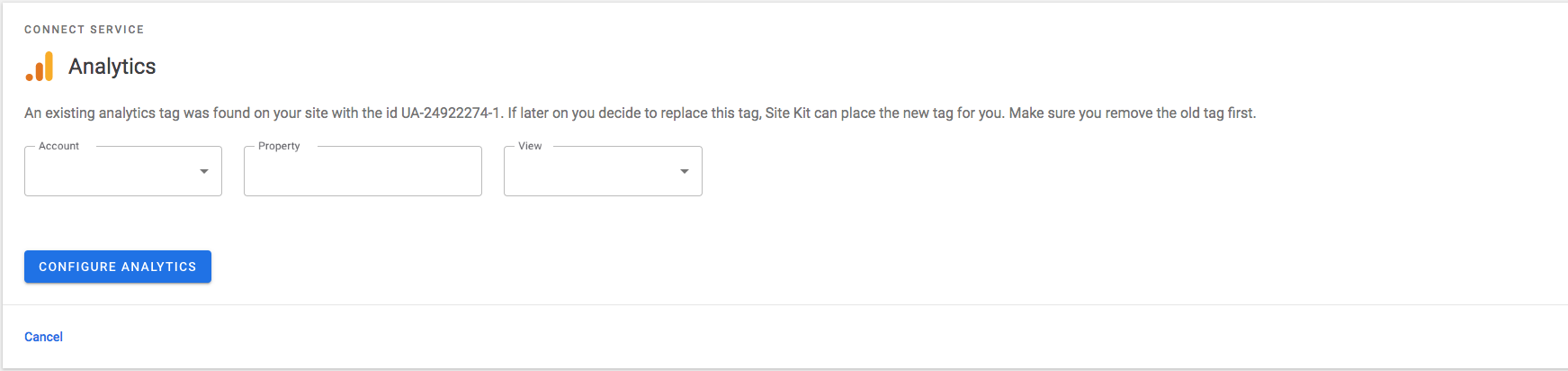
During analytics setup flow when existing tag is found the plugin only verifies the user's access to the property when found through wp_head hook and not through the front end request.
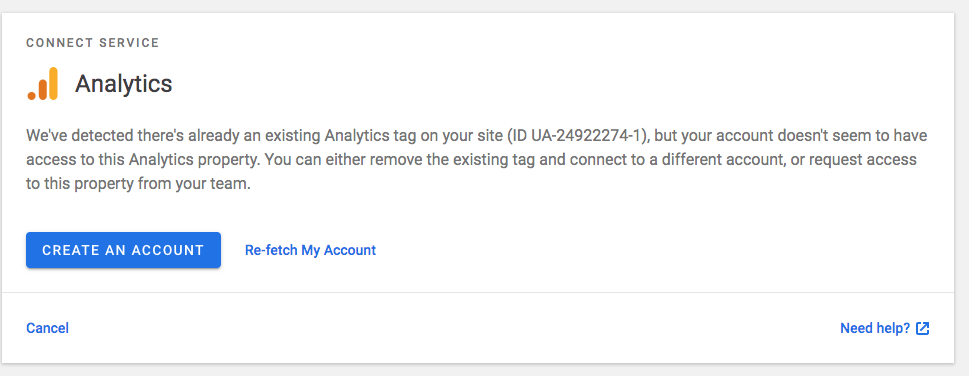
The user should be blocked from continuing Analytics configuration if hasn't got access to the property found.
Steps to reproduce
- Add Analytics tag in the theme header.php, make sure you don't have access to the property.
- Go to Settings > Connect More Services
- Click on Analytics setup link.
- User gets warned an existing tag was found but no warning about restricted access and not blocked from configuring Analytics.
Screenshots
Expected:
Additional Context
- PHP Version: 7.1
- OS: mac
- Browser: chrome (all)
- Plugin Version: Developer beta
- Device: macbook
_Do not alter or remove anything below. The following sections will be managed by moderators only._
Acceptance criteria
- Users who don't have access to an already existing property on the site should see a notification why that's the case and possible next steps.
- Do not show drop-downs if the user can't in fact select anything.
Implementation Brief
Note: Work done previously on other issue and then split into new issue with opened PR https://github.com/google/site-kit-wp/pull/310
Add new datapoint tag-permission to make request in the case existing tag is found https://github.com/google/site-kit-wp/blob/develop/assets/js/modules/analytics/setup.js#L95
On the request to tag-permission check if user has access to the property and return response or
return WP_Error with expected message in the case the user has no permissions.
Changelog entry
- Improve user access verification when encountering existing Analytics tags.
 lucymtc
All 10 comments
@ThierryA @marrrmarrr adding this to the definition board and noting that we already have a PR ready for this on.
 bjackson27
on 11 Jul 2019
bjackson27
on 11 Jul 2019
@bjackson27 Which PR are you referring to?
 felixarntz
on 17 Jul 2019
felixarntz
on 17 Jul 2019
@felixarntz the opened PR https://github.com/google/site-kit-wp/pull/310
lucymtc
on 18 Jul 2019
Implementation brief looks good. Would generally be great to have more detail on how access is checked, but since there's already a PR that clarifies that, it's okay this time.
felixarntz
on 18 Jul 2019
This is what I see when I output a tracking code in wp_head for a property that my user does not have access to:
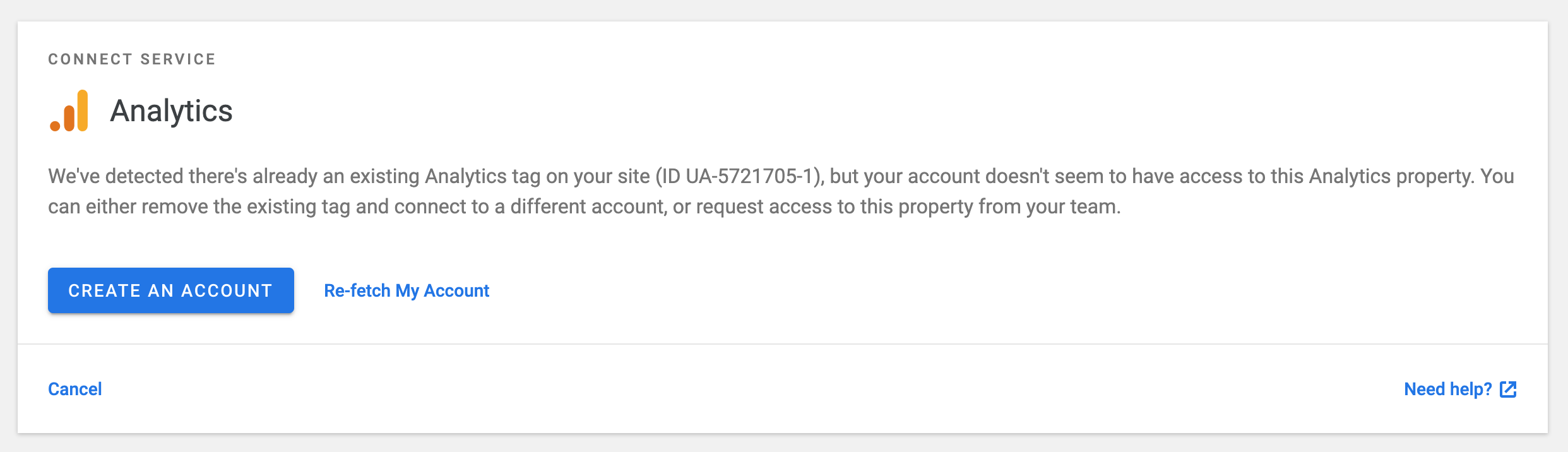
@lucymtc This seems to be consistent with the acceptance criteria; has this been already fixed as a byproduct of another issue?
Using develop @ 5ba7ab9
 aaemnnosttv
on 22 Jul 2019
aaemnnosttv
on 22 Jul 2019
@aaemnnosttv this issue is for when tag is hardcoded in the theme and not added through wp_head
lucymtc
on 22 Jul 2019
@aaemnnosttv @swissspidy @lucymtc let's make sure Changelog entry is added on this issue.
 ThierryA
on 23 Jul 2019
ThierryA
on 23 Jul 2019
Added a suggested changelog entry to the the issue:
Improved user access verification when encountering existing Analytics tags.
 swissspidy
on 26 Jul 2019
swissspidy
on 26 Jul 2019
QA approved!
felixarntz
on 30 Jul 2019
LGTM
 marrrmarrr
on 31 Jul 2019
marrrmarrr
on 31 Jul 2019
Related issues
 tofumatt
·
3Comments
felixarntz
·
4Comments
tofumatt
·
3Comments
felixarntz
·
4Comments
 jamesozzie
·
3Comments
jamesozzie
·
3Comments
 Loganson
·
5Comments
Loganson
·
5Comments
 quangbahoa
·
5Comments
quangbahoa
·
5Comments