Site-kit-wp: Missing view in Google Analytics connection process
Bug Description
Google Analytics Views are missing on the connection screen: Connect Service -> Analytics.
Steps to reproduce
- Go to 'Admin > Site Kit > Dashboard'
- Click on 'Set Up Analytics'
- See a message "An existing analytics tag was found on your site with the id UA-123456-7. If later on you decide to replace this tag, Site Kit can place the new tag for you. Make sure you remove the old tag first."
- 'Account' and 'Property' dropdowns show correct values.
- The 'View' dropdown does not contain correct available views. It only shows one and even that one is from another 'Property'.
Expected behavior
The 'View' dropdown should display Views from the pre-selected 'Property'.
Additional Context
- PHP Version: 7.0.27-1~dotdeb+8.1
- OS: MacOS Mojave 10.14.5
- Browser: chrome
- Plugin Version: 1.0.0-beta.1
- Device: MacBook Pro (13-inch, 2019, Four Thunderbolt 3 ports)
_Do not alter or remove anything below. The following sections will be managed by moderators only._
Acceptance criteria
- Views should be retrieved for the property matching the site URL or the existing tag property in the case it has been found, regardless of the position of the property in the properties response from the API.
- Account and property should be preselected in the drop downs accordingly regardless of the position of the property in the properties response from the API.
Implementation Brief
This issue is not specific to exiting tag found. It is also reproducible when tag is not found.
We are relying on the property being the first index of the properties array in these lines https://github.com/google/site-kit-wp/blob/eeec310f16421555f3c9ce8b46daed2e3858b049/includes/Modules/Analytics.php#L1137-L1138
We do not need to account for property of existing tag in server side as we are removing wp_head tag detection in https://github.com/google/site-kit-wp/issues/83
We need to filter the properties array to find the matching one comparing websiteUrl value against the site url instead of retrieving the account id and property id from index 0
Also make sure to reindex $url_matches as it will return index other than 0 if property is not the first one in the list, therefor won't be found in https://github.com/google/site-kit-wp/blob/develop/assets/js/modules/analytics/setup.js#L278
https://github.com/google/site-kit-wp/blob/develop/includes/Modules/Analytics.php#1060 should be $matched_property = array_values( $url_matches );
Dependecies
Depends on https://github.com/google/site-kit-wp/issues/83 to remove wp_head tag detection. #83 (merged)
Changelog entry
- Ensure that available Analytics profiles are exposed in dropdown, correctly based on the property.
 martinkrcho
All 22 comments
@martinkrcho Thanks for reporting this. Can you confirm that there are no restrictions under "User Management" section of the view (from within your Analytics dashboard). Also please let me know if it is a shared Google analytics account or for a single user.
If you can try resetting Site Kit and installing again from an incognito window please check if the same issue arises.
 jamesozzie
on 1 Jul 2019
jamesozzie
on 1 Jul 2019
@jamesozzie, I tried resetting Site Kite and a fresh setup in incognito window. Unfortunately, I get the same problem as before.
The Google Analytics view is shared with multiple users, but the user I am using to setup Site Kit has got all available permissions:
- Edit
- Collaborate
- Read & Analyze
- Manage Users
Any ideas what else could be the problem? Perhaps a bug in function AnalyticsSetup::processPropertyChange?
martinkrcho
on 2 Jul 2019
@martinkrcho Thanks for checking. I can't replicate it myself but we get this assigned and looked into.
jamesozzie
on 2 Jul 2019
Thanks, @jamesozzie. I'll be looking forward to an update and hopefully a fix for this.
martinkrcho
on 9 Jul 2019
ready for Implementation Brief review
 lucymtc
on 11 Jul 2019
lucymtc
on 11 Jul 2019
@lucymtc
We should filter the properties array to find the matching one comparing websiteUrl value against the site url instead of retrieving the account id and property id from index 0
Could we instead rely on the property ID identified by the existing tag? That sounds like a more accurate solution to me. We already do this lookup in get-accounts (via has_access_to_property()). Maybe in this route we could internally force-set the account-id and property-id values because that's what these values should be set to under these circumstances anyway. The get-properties route would then automatically work by relying on the logic in lines https://github.com/google/site-kit-wp/blob/develop/includes/Modules/Analytics.php#L1100 and following. Let me know your thoughts on this.
 felixarntz
on 12 Jul 2019
felixarntz
on 12 Jul 2019
Could we instead rely on the property ID identified by the existing tag?
@felixarntz this issue is not specific to existing tag, get-properties is called while retrieving data inside get-accounts regardless of existing tag found https://github.com/google/site-kit-wp/blob/develop/includes/Modules/Analytics.php#L1071
I believe we still need to filter by websiteUrl in this case, although one improvement to prevent unnecessary calls to get-properties would be to save the properties found in https://github.com/google/site-kit-wp/blob/develop/includes/Modules/Analytics.php#L1048 if $url_matches so it's not called again in line 1071
lucymtc
on 15 Jul 2019
@felixarntz I have updated the Implementation brief.
Maybe we need to change Acceptance criteria as the fix applies regardless of existing tag found. Let me know what you think.
lucymtc
on 15 Jul 2019
@lucymtc
this issue is not specific to existing tag
As you noticed, the acceptance criteria are incorrect given your findings, so this issue needs to go back to defining acceptance criteria, rather than retrofitting acceptance criteria to another implementation brief. It would be great if you could add your findings on why it is not only relevant for an existing tag, so that @marrrmarrr can update them accordingly. Feel free to provide a concrete suggestion for AC as well. After the ACs have been updated, this can go back to work on the implementation brief. Please flag issues with the ACs in the future as soon as you notice them (before working on implementation brief).
get-propertiesis called while retrieving data insideget-accountsregardless of existing tag found
I understand, however adding filtering by site URL to lines https://github.com/google/site-kit-wp/blob/develop/includes/Modules/Analytics.php#L1109-L1110 is just one part of the problem. I think the other one would be:
- https://github.com/google/site-kit-wp/blob/develop/includes/Modules/Analytics.php#L1098 looks for the property ID set.
- If an existing tag is found, this value should be "force-set" (that could happen in the else clause in https://github.com/google/site-kit-wp/blob/develop/includes/Modules/Analytics.php#L1030, which will have access to the property ID).
- By setting the property ID there, the following
get-propertiescall would be faster as it would already know the correct property ID.
one improvement to prevent unnecessary calls to
get-propertieswould be to save the properties found
Makes sense, although that is unrelated to the actual issue. Let's focus on fixing the underlying problem, especially since adding this extra logic would likely overcomplicate the code even further.
felixarntz
on 15 Jul 2019
@marrrmarrr This issue is not specific to exiting tag found.
We are relying on the property being the first index of the properties array in these lines https://github.com/google/site-kit-wp/blob/develop/includes/Modules/Analytics.php#L1109-L1110
If the matching property is the second in the list of properties, views are being retrieved for the first one in the list, therefor ending up with views from a different property.
We will also not have preselected values in the drop downs when there is no existing tag found as we also rely on index 0 here https://github.com/google/site-kit-wp/blob/develop/assets/js/modules/analytics/setup.js#L278, we need to re-index the array $url_matches https://github.com/google/site-kit-wp/blob/develop/includes/Modules/Analytics.php#1060 before returning the response
I have updated acceptance criteria and cleared implementation brief to be re-worked on with latest comments and findings once moved into IP column.
lucymtc
on 15 Jul 2019
Awesome, new implementation brief looks great.
felixarntz
on 18 Jul 2019
This might need an update after #83. cc @lucymtc
felixarntz
on 18 Jul 2019
@lucymtc
Force set data for account id and property id so no need to go through the array filtering in next get-properties call
https://github.com/google/site-kit-wp/blob/develop/includes/Modules/Analytics.php#L1031
I believe this is no longer relevant following #83. Could you update the implementation brief accordingly?
felixarntz
on 18 Jul 2019
Implementation brief looks good.
felixarntz
on 29 Jul 2019
@lucymtc Just noticed this is issues says it's dependent on #83. Apologies for not reviewing the IB on that one yet, but if that issue is in fact required, we can't work on this yet. Alternatively if you have an approach that also works without #83 done, I'm open to that as well. Can you provide your thoughts on this?
felixarntz
on 19 Aug 2019
Moving this issue to the backlog and removing it from sprint 5 as discussed, in order to prioritise https://github.com/google/site-kit-wp/issues/83
lucymtc
on 19 Aug 2019
Removing from this sprint as it likely won't be unblocked in time. Blocked by dependency on #83
 aaemnnosttv
on 21 Aug 2019
aaemnnosttv
on 21 Aug 2019
@felixarntz this part of IB can be removed as it has been addressed in other way in #83
Also make sure to reindex $url_matches as it will return index other than 0 if property is not the first one in the list, therefor won't be found in https://github.com/google/site-kit-wp/blob/develop/assets/js/modules/analytics/setup.js#L278
https://github.com/google/site-kit-wp/blob/develop/includes/Modules/Analytics.php#1060 should be $matched_property = array_values( $url_matches );
Should this issue go back to IB column for any updates?
lucymtc
on 28 Aug 2019
Also make sure to reindex
$url_matchesas it will return index other than 0 if property is not the first one in the list, therefor won't be found in https://github.com/google/site-kit-wp/blob/develop/assets/js/modules/analytics/setup.js#L278
https://github.com/google/site-kit-wp/blob/develop/includes/Modules/Analytics.php#1060 should be$matched_property = array_values( $url_matches );
This part of the IB no longer appears to be relevant as of this commit (https://github.com/google/site-kit-wp/commit/b733ba1190b879b286a22c0435a72fdaa4a98343) which was part of #83 (#434).
matchedProperty now references a single site object, (no longer an array).
aaemnnosttv
on 16 Sep 2019
This worked well in my testing, moving to Acceptance. I did note a few small issues that may not be related to this PR. cc: @aaemnnosttv @felixarntz -
Testing steps
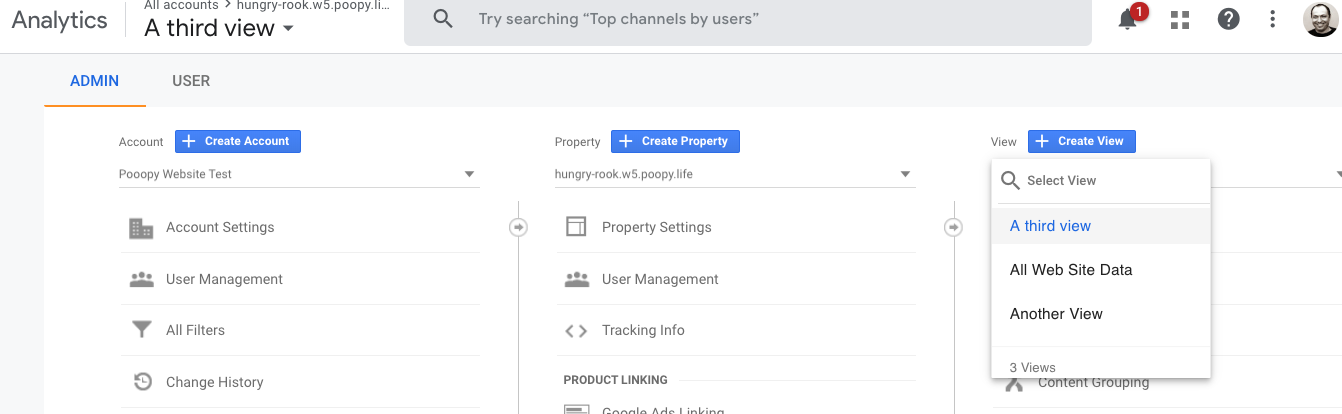
- In analytics account, i created several test views tied to a test domain:
hungry-rook.w5.poopy.life
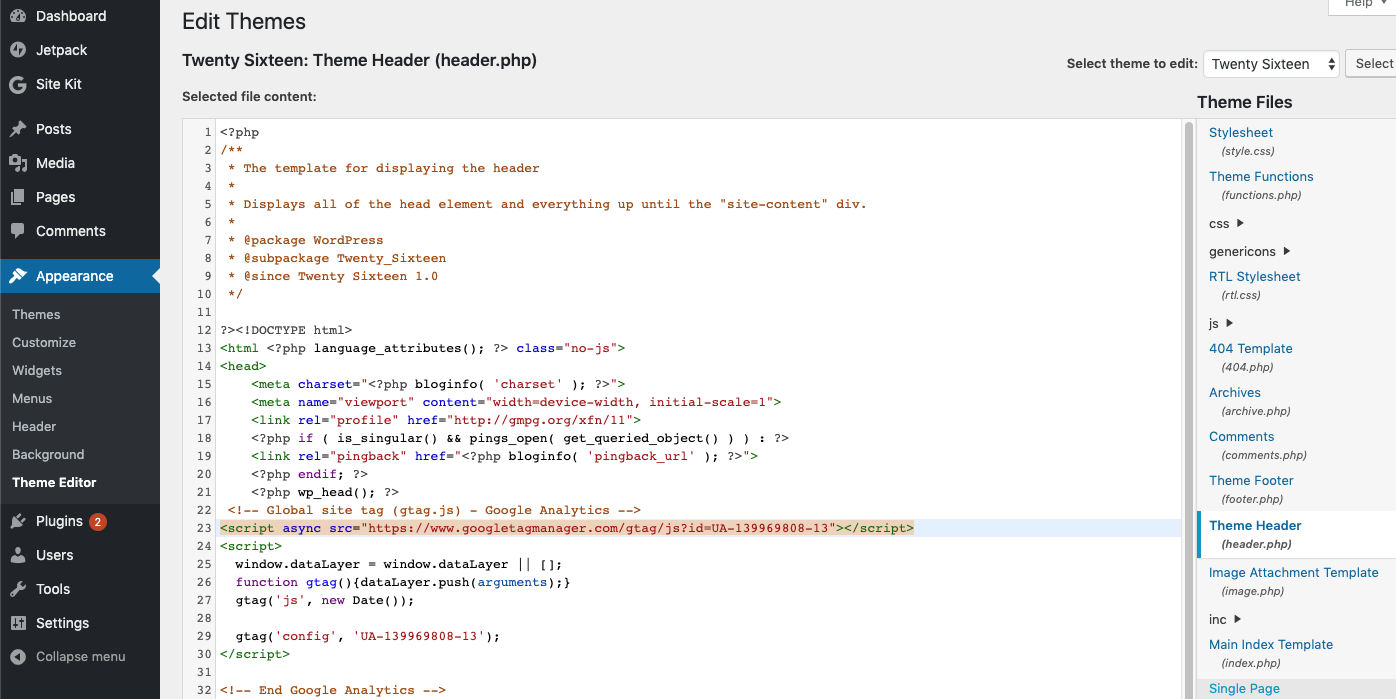
- Edit theme, adding script tag from test property in header
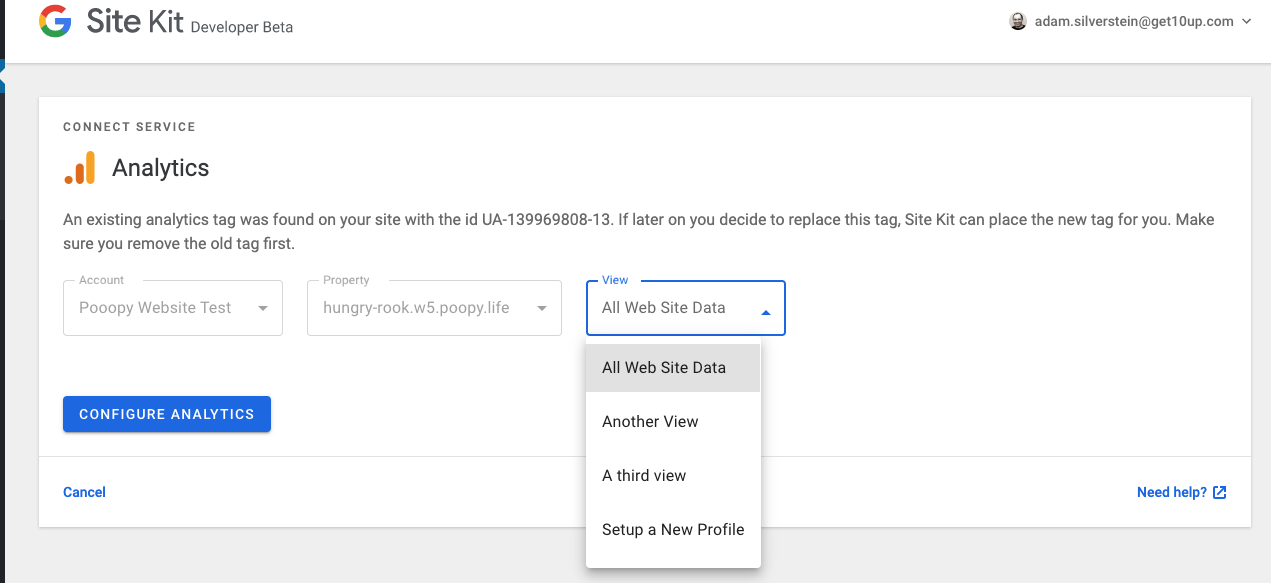
Reset site kit, set up analytics
Verify the correct property is selected, and cannot be changed, and that the correct available Views are showing in the view dropdown:
- Repeat the test with Chrome & Firefox.
Issues Noted
one thing I noticed here is the presence of a Setup a New Profile link at the bottom of the view menu - should that say Setup a New View?
Also this may be unrelated to this PR however noting i don't see a setup new account option in the accounts dropdown at all (there was one previously, was that removed?),
 adamsilverstein
on 24 Sep 2019
adamsilverstein
on 24 Sep 2019
@adamsilverstein
one thing I noticed here is the presence of a
Setup a New Profilelink at the bottom of the view menu - should that saySetup a New View?
We should decide on one naming convention - The thing is that Google uses "profile" internally mostly, but "view" in user-facing context. So we should probably align with that. Deferring to @marrrmarrr
Also this may be unrelated to this PR however noting i don't see a
setup new accountoption in the accounts dropdown at all (there was one previously, was that removed?),
I don't think there ever was one, but there is #198 to address this. Should probably prioritized as an enhancement soon, because right now you can't create another account from the plugin if you already have one or more.
felixarntz
on 26 Sep 2019
This works well in my testing too - approved!
felixarntz
on 26 Sep 2019
Related issues
 jsmshay
·
3Comments
jsmshay
·
3Comments
 quangbahoa
·
5Comments
jamesozzie
·
3Comments
aaemnnosttv
·
4Comments
quangbahoa
·
5Comments
jamesozzie
·
3Comments
aaemnnosttv
·
4Comments
 quindo
·
5Comments
quindo
·
5Comments