Sinon: Add a "PubSub" description to document
For example, "spies" does not describe "PubSub" in document.
Please add a description
 Simmyoungsub
All 12 comments
Why?
 mroderick
on 5 Jun 2019
mroderick
on 5 Jun 2019
Hmm ... Quite a bare issue report, but _I assume_ this is related to the docs for spies, where there is an example using a PubSub object.
@Simmyoungsub Please fill out the issue template the next time, so we don't have to guess.
@mroderick I can understand why he asks (assuming I'm right about the topic), as fresh programmrers don't necessarily know what a pub-sub system is, so they don't see it as a hypothetical implementation, but an actual global object. And this trips them up when trying out the examples. I'm sure this could be elaborated a _little bit_ for clarity.
 fatso83
on 5 Jun 2019
fatso83
on 5 Jun 2019
Perhaps we can improve the documentation by using other examples?
mroderick
on 6 Jun 2019
I think we can keep it brief if we just embed the full picture as a runnable example for the user to play with: https://runkit.com/docs/embed
fatso83
on 7 Jun 2019
This issue has been automatically marked as stale because it has not had recent activity. It will be closed if no further activity occurs. Thank you for your contributions.
![stale[bot] picture](https://avatars.githubusercontent.com/in/1724?v=4&s=40) stale[bot]
on 7 Aug 2019
stale[bot]
on 7 Aug 2019
Hi @fatso83 , is this good enough as a runnable example?
 adhyapranata
on 4 Oct 2019
adhyapranata
on 4 Oct 2019
@adhyapranata That's great! But we can do even better, by actually putting it in a test harness that people are used to, so I forked it: https://runkit.com/fatso83/sinon-runkit-spy-demo
It's using a minimal implementation of the Mocha API to make it look familiar.
It would be cool if you could make a test on how this embeddding would look in our docs. To replace our current static examples, you can basically take the contents of my fork and use the programmatic API to make a script block that renders where the current example is.
That's good enough for a test!
If this works fine, we'll need to refine it a bit
- put the javascript file into some
examplesdirectory, so that we can run the examples as a test step to ensure it's always runnable - Dynamically inject the file content into the generated README
- etc
But that's for later. If you could make a simple demo PR, that would be awesome!
fatso83
on 4 Oct 2019
@fatso83 It would look like this (see image below). I use atom-dark for the theme and set the font-size to the same one as the static code example. What do you think?

adhyapranata
on 4 Oct 2019
@adhyapranata Wow, that looks awesome! It actually looks better than I would expect, so a good thing to style it inline with what we have.
I think a mix of Jekyll relative Includes (like {% include_relative examples/some.file %}) and using page attributes that one can loop through should get us exactly where we want to be.
Maybe you have a different/better suggestion on how to do this, but I would do it like this:
- Extract the example script (done) into a separate file (like
example/spies-1-pubsub.js). - Add a custom field to the
spies.mdheader :
examples:
- "spies-1-pubsub"
- Add
<div data-example-id="spies-1-pubsub"></div>to where you want the example embedded {% include embed-scripts.html %}(this file must be created :-) )- Create the
_includes/embed-scripts.htmlfile with some content like
{% for example in page.examples %}
{% assign filename = 'examples/' | example | append: '.js' %}
<template data-example-script="{{example}}">{% include_relative {{filename}} %}</template>
<script>
(function(){
    // get script example div
    var element = document.querySelector("[data-example-id={{ example }}]"),

    // get script example source from the template
    var scriptTemplate = document.querySelector("[data-example-script={{ example }}]"),

    var notebook = RunKit.createNotebook({
    // the parent element for the new notebook
        element: element,
        // specify the source of the notebook
        source: scriptTemplate.content
    })
})(); // IIFE - to avoid leaking variables
</script>
{% endfor %}
@fatso83 That's just simply magnificent! Thank you for your detail guidance. I have updated the PR based on this. Please kindly have a look.
adhyapranata
on 4 Oct 2019
A suggestion regarding code snippets via runkit:
Since website theme is light, I think dark theme in code snippets does not look good. You can use a theme like in the express docs.
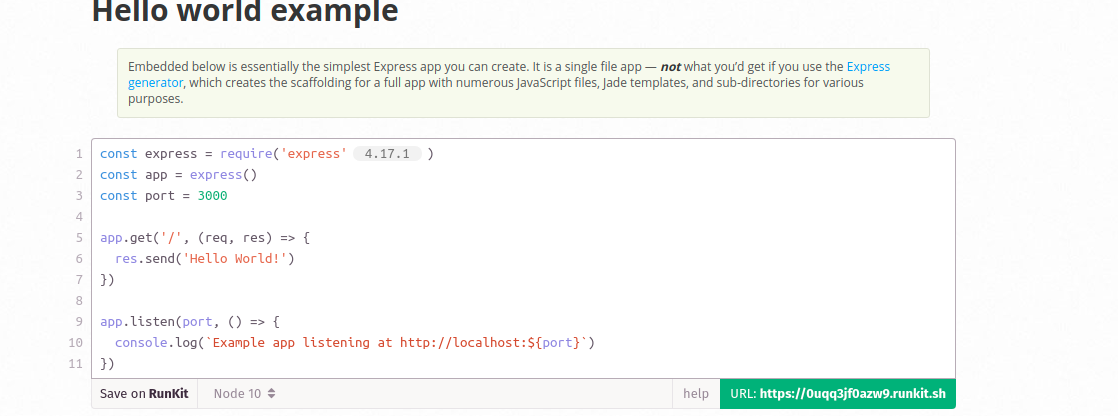
 srknzl
on 17 Apr 2021
srknzl
on 17 Apr 2021
@srknzl thank you for sharing your idea. Would you mind opening a new issue for this, so it can be discussed on its own merits?
mroderick
on 17 Apr 2021
Related issues
 fearphage
·
3Comments
fearphage
·
3Comments
 ljian3377
·
3Comments
ljian3377
·
3Comments
 brettz9
·
3Comments
brettz9
·
3Comments
 stevenmusumeche
·
3Comments
stevenmusumeche
·
3Comments
 OscarF
·
4Comments
OscarF
·
4Comments