Hi
I am unable to fully compile version 2.4 using GCC 6.3.0 on Centos 6 machine. It's being added using Spack.
Here's the error:
make[3]: *** [mount] Error 1
mv -f util/.deps/start_suid-fork.Tpo util/.deps/start_suid-fork.Po
mv -f util/.deps/start_suid-daemon.Tpo util/.deps/start_suid-daemon.Po
mv -f util/.deps/start_suid-privilege.Tpo util/.deps/start_suid-privilege.Po
mv -f .deps/mount_suid-mount.Tpo .deps/mount_suid-mount.Po
mv -f util/.deps/mount_suid-suid.Tpo util/.deps/mount_suid-suid.Po
mv -f util/.deps/mount_suid-registry.Tpo util/.deps/mount_suid-registry.Po
libtool: link:
/pbtech_mounts/homes027/user/repos/spack/lib/spack/env/gcc/gcc -Wall -fpie
-fPIC -Wl,-rpath
-Wl,/pbtech_mounts/homes027/user/repos/spack/opt/spack/linux-rhel6-x86_64/gcc-6.3.0/singularity-2.4-lldc7gswbaklmzwolhkfpybzliqayjst/lib
-o action-suid action_suid-action.o util/action_suid-util.o
util/action_suid-file.o util/action_suid-registry.o
util/action_suid-privilege.o util/action_suid-sessiondir.o
util/action_suid-suid.o util/action_suid-cleanupd.o util/action_suid-daemon.o
lib/image/.libs/libsingularity-image.a
lib/runtime/.libs/libsingularity-runtime.a action-lib/.libs/libinternal.a
libtool: link:
/pbtech_mounts/homes027/user/repos/spack/lib/spack/env/gcc/gcc -Wall -fpie
-fPIC -pie -Wl,-rpath
-Wl,/pbtech_mounts/homes027/user/repos/spack/opt/spack/linux-rhel6-x86_64/gcc-6.3.0/singularity-2.4-lldc7gswbaklmzwolhkfpybzliqayjst/lib
-o .libs/start start-start.o util/start-util.o util/start-file.o
util/start-registry.o util/start-privilege.o util/start-sessiondir.o
util/start-suid.o util/start-cleanupd.o util/start-fork.o util/start-daemon.o
util/start-signal.o  lib/image/.libs/libsingularity-image.so
lib/runtime/.libs/libsingularity-runtime.so action-lib/.libs/libinternal.a
-Wl,-rpath
-Wl,/pbtech_mounts/homes027/user/repos/spack/opt/spack/linux-rhel6-x86_64/gcc-6.3.0/singularity-2.4-lldc7gswbaklmzwolhkfpybzliqayjst/lib/singularity
mv -f util/.deps/mount_suid-util.Tpo util/.deps/mount_suid-util.Po
mv -f util/.deps/mount_suid-file.Tpo util/.deps/mount_suid-file.Po
mv -f util/.deps/mount_suid-privilege.Tpo util/.deps/mount_suid-privilege.Po
lib/runtime/.libs/libsingularity-runtime.so: undefined reference to `setns'
collect2: error: ld returned 1 exit status
lib/runtime/.libs/libsingularity-runtime.a(pid.o): In function
`_singularity_runtime_ns_pid_join':
pid.c:(.text+0x186): undefined reference to `setns'
lib/runtime/.libs/libsingularity-runtime.a(ipc.o): In function
`_singularity_runtime_ns_ipc_join':
ipc.c:(.text+0x26d): undefined reference to `setns'
lib/runtime/.libs/libsingularity-runtime.a(mnt.o): In function
`_singularity_runtime_ns_mnt_join':
mnt.c:(.text+0x397): undefined reference to `setns'
lib/runtime/.libs/libsingularity-runtime.a(net.o): In function
`_singularity_runtime_ns_net_join':
net.c:(.text+0x3b4): undefined reference to `setns'
collect2: error: ld returned 1 exit status
make[3]: *** [start] Error 1
make[3]: *** [action-suid] Error 1
make[3]: Leaving directory
`/tmp/user/spack-stage/spack-stage-2tMLEm/singularity-2.4/src'
make[2]: *** [all-recursive] Error 1
make[2]: Leaving directory
`/tmp/user/spack-stage/spack-stage-2tMLEm/singularity-2.4/src'
make[1]: *** [all] Error 2
make[1]: Leaving directory
`/tmp/user/spack-stage/spack-stage-2tMLEm/singularity-2.4/src'
make: *** [all-recursive] Error 1
Version 2.3.1 compiled fine using the same options.
Thanks for the help!
 ifelsefi
All 30 comments
Hmm. I've never used spack. Does it run with sudo privs?
 GodloveD
on 13 Oct 2017
GodloveD
on 13 Oct 2017
You can install it in your home directory, which is what I do before submitting new pull request to the Spack project, but we have a root-owned version exported over NFS for users on our clusters.
We are now providing Singularity 2.3.1 through Spack as that way we don't need to put an rpm on each compute node. I want to do that as well for 2.4 since it has so many improvements.
ifelsefi
on 13 Oct 2017
Sorry, my question is this:
When spack goes through the ./autogen, ./configure, make, sudo make install routine, does it execute the last command with sudo?
GodloveD
on 13 Oct 2017
No. It runs autotools as the user who did "spack install singularity." It does this because everything Spack installs exists within self-contained prefix owned by the user who runs Spack. Nothing's added in root-owned system areas.
ifelsefi
on 13 Oct 2017
Here's the configure and build log
ifelsefi
on 13 Oct 2017
Thanks for the log file. It looks like make is running multithreaded (-j32). Am I reading that right? Can you configure so that it runs a single thread instead?
GodloveD
on 13 Oct 2017
Yes, that's correct. By default Spack will use all cores. I can tell it to use only 1:
spack install -j 1 singularity %[email protected]
However, that did not seem to help :(
ifelsefi
on 13 Oct 2017
That's too bad. OK. I want to take spack out of the equation for a minute and see if it has anything to do with the error. Can you deny or confirm that the following commands will run on your system without error please?
mkdir ~/test4DCG
cd ~/test4DCG
wget https://github.com/singularityware/singularity/releases/download/2.4/singularity-2.4.tar.gz
tar xvf singularity-2.4.tar.gz
cd singularity-2.4
./autogen.sh
./configure --prefix=/home/$USER/test4DCG/sing-2.4
make
make install
~/test4DCG/sing-2.4/bin/singularity --version
cd
rm -rf ~/test4DCG
@GodloveD @JusticeForMikeBrown Check out #896 #902, Where it appears like we've already seen the issue that the build is failing at. @GodloveD I don't think the issue is with the permissions being used to run the compile/install, but rather Centos 6 appears to have an issue with not having the setns() system call defined. Cedric did submit a patch supposed to fix it (#902), but it's not working here for some reason.
 bauerm97
on 13 Oct 2017
bauerm97
on 13 Oct 2017
Could you manually run
./autogen.sh
./configure --prefix=/usr/local
And paste me the output? The configure script should tell us some information about your system and give us some insight onto with the setns patch isn't working right for you. Thanks
bauerm97
on 13 Oct 2017
Hi @bauerm97 @GodloveD
I am getting the same error when installing locally outside Spack. Configure shows this regarding setns:
checking for setns... no
checking for setns syscall support... no
checking for overlayfs... no
checking for python... yes
More things about the node:
Linux node117.panda 2.6.32-279.el6.x86_64 #1 SMP Wed Jun 13 18:24:36 EDT 2012 x86_64 x86_64 x86_64 GNU/Linux
glibc-2.12-1.80.el6.x86_64
glibc-2.12-1.80.el6.i686
Thanks for the quick response, hopefully we can get to the bottom of this. If you're willing to do a bit of hacking, could you edit configure.ac at line 246 from:
AC_MSG_CHECKING([for setns syscall support])
if test -d "/proc/self/ns"; then
    SINGULARITY_DEFINES="$SINGULARITY_DEFINES -DSINGULARITY_SETNS_SYSCALL"
    SETNS_SYSCALL=1
    AC_MSG_RESULT([yes])
else
    AC_MSG_RESULT([no])
fi
AC_SUBST(SETNS_SYSCALL)
to
AC_MSG_CHECKING([for setns syscall support])
if test -d "/proc/self/ns"; then
    SINGULARITY_DEFINES="$SINGULARITY_DEFINES -DSINGULARITY_SETNS_SYSCALL"
    SETNS_SYSCALL=1
    AC_MSG_RESULT([yes])
else
    SINGULARITY_DEFINES="$SINGULARITY_DEFINES -DSINGULARITY_SETNS_SYSCALL"
    SETNS_SYSCALL=1
    AC_MSG_RESULT([yes])
fi
AC_SUBST(SETNS_SYSCALL)
And then attempt to reconfigure, and compile. This should trick the util/setns.h into thinking that your system does have a setns system call (which it should), and then we can see if that works. If that works, then we know that checking if /proc/self/ns directory exists is not a sufficient check for whether or not the host supports the setns() call.
bauerm97
on 13 Oct 2017
It does not work!
I edit teh file:
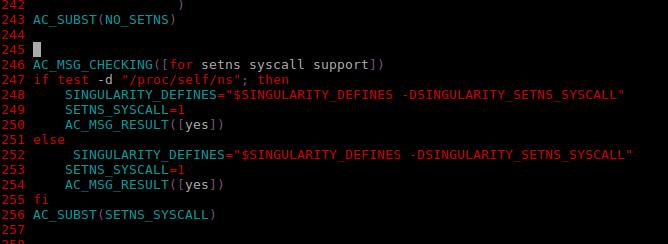
configure:
checking for setns... no
checking for setns syscall support... no
make:
/bin/sh ../libtool --tag=CC   --mode=link gcc -Wall -fpie -fPIC -g -O2 -pie -Wl,-rpath -Wl,/tmp/lib -o action action-action.o util/action-util.o util/action-file.o util/action-registry.o util/action-privilege.o util/action-sessiondir.o util/action-suid.o util/action-cleanupd.o util/action-daemon.o lib/image/libsingularity-image.la lib/runtime/libsingularity-runtime.la action-lib/libinternal.la
libtool: link: gcc -Wall -fpie -fPIC -g -O2 -pie -Wl,-rpath -Wl,/tmp/lib -o .libs/action action-action.o util/action-util.o util/action-file.o util/action-registry.o util/action-privilege.o util/action-sessiondir.o util/action-suid.o util/action-cleanupd.o util/action-daemon.o  lib/image/.libs/libsingularity-image.so lib/runtime/.libs/libsingularity-runtime.so action-lib/.libs/libinternal.a -Wl,-rpath -Wl,/tmp/lib/singularity
lib/runtime/.libs/libsingularity-runtime.so: undefined reference to `setns
Good times. Let's keep trying!
ifelsefi
on 13 Oct 2017
@JusticeForMikeBrown You need to execute ./autogen.sh, seems changes are not applied:
checking for setns syscall support... no
With @bauerm97 hack it should always say yes
 cclerget
on 13 Oct 2017
cclerget
on 13 Oct 2017
After I ran autogen.sh the configure.ac has old settings:
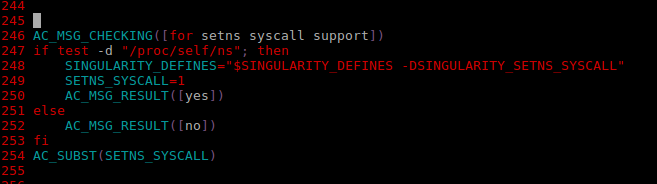
configure still thus does not see setnss and make fails...
ifelsefi
on 13 Oct 2017
Never mind...
After doing make clean, modifying the configure.ac, running configure, then make and make install, singularity does seem to work:
sysadmin@node117[~/test4DCG/singularity-2.4]$ cat /etc/redhat-release
Red Hat Enterprise Linux Server release 6.3 (Santiago)

sysadmin@node117[~/test4DCG/singularity-2.4]$ /tmp/bin/singularity --version
2.4-dist
Just to confirm that everything is working as expected, can you run
singularity instance.start docker://centos test_instance
singularity -d exec instance://test_instance ps auxf
And post the full output of the second command (debug output and output of ps auxf)? Thanks!
bauerm97
on 13 Oct 2017
Sadly no.
It seems to hang at 0%
me@node117[/tmp/bin]$ ./singularity instance.start docker://centos test_instance
Docker image path: index.docker.io/library/centos:latest
Cache folder set to /pbtech_mounts/homes027/me/.singularity/docker
[1/1] ||----------------------------------|   0.0%
Hmmm, that should be entirely unrelated and is probably a problem caused by dockerhub. If you happen to have a different singularity image laying around, can you try using that one instead?
bauerm97
on 13 Oct 2017
Yes and it works!
Truncated output:
DEBUG   [U=0,P=1]          main()                                    Attempting to chdir to CWD: /tmp/bin
DEBUG   [U=0,P=1]          singularity_registry_get()                Returning value from registry: 'COMMAND' = 'exec'
DEBUG   [U=0,P=1]          envar_set()                               Setting environment variable: 'SINGULARITY_CONTAINER' = 'topiary-ubuntu-xenial.img'
DEBUG   [U=0,P=1]          envar_set()                               Setting environment variable: 'SINGULARITY_NAME' = 'topiary-ubuntu-xenial.img'
DEBUG   [U=0,P=1]          singularity_registry_get()                Returning NULL on 'SHELL'
DEBUG   [U=0,P=1]          envar_set()                               Unsetting environment variable: SINGULARITY_SHELL
DEBUG   [U=0,P=1]          singularity_registry_get()                Returning NULL on 'APPNAME'
DEBUG   [U=0,P=1]          envar_set()                               Unsetting environment variable: SINGULARITY_APPNAME
DEBUG   [U=0,P=1]          singularity_registry_get()                Returning value from registry: 'COMMAND' = 'exec'
LOG     [U=0,P=1]          main()                                    USER=root, IMAGE='topiary-ubuntu-xenial.img', COMMAND='exec'
DEBUG   [U=0,P=1]          action_exec()                             Checking for: /.singularity.d/actions/exec
DEBUG   [U=0,P=1]          action_exec()                             Checking for: /.exec
VERBOSE [U=0,P=1]          action_exec()                             Exec'ing /.exec


USER       PID %CPU %MEM    VSZ   RSS TTY      STAT START   TIME COMMAND
root         1  0.0  0.0  25916  1344 pts/1    R+   20:33   0:00 ps auxf
DEBUG   [U=0,P=24537]      wait_child()                              SIGCHLD raised, parent is exiting

me@node117[/tmp/bin]$
Did you run the exec command using the singularity exec instance://instance_name ps auxf syntax? The reason I ask is because it looks like you just did an exec without first starting an instance (since the ps auxf process is PID 1). The setns() call will only be used when attaching a process to a running instances namespace, so in order to know if we've really fixed the problem we need to check that out. Thanks for your patience
bauerm97
on 13 Oct 2017
I might be doing it wrong
[root@node117 bin]# ps aux | grep topiary
root     24889  0.0  0.0  11528   844 ?        Ss   16:43   0:00 singularity-instance: root [topiary]


[root@node117 bin]# ./singularity exec /pbtech_mounts/ipm_scratch_athena/users/user/topiary-ubuntu-xenial.img ps auxf

USER       PID %CPU %MEM    VSZ   RSS TTY      STAT START   TIME COMMAND
root         1  0.0  0.0  25916  1344 pts/1    R+   20:43   0:00 ps auxf
Yep your syntax is slightly off. Try running that second command like this instead:
./singularity exec instance://topiary ps auxf
I guess this means the hack was not actually a fix:
[root@node117 bin]# ./singularity exec instance://topiary ps auxf
ERROR  : Unable to open ns directory of PID in daemon file: No such file or directory
ABORT  : Retval = 255
OK great. So this seems to be working now right? I'm going to go ahead and close, but if you have any more trouble don't hesitate to re-open or open a new issue.
GodloveD
on 13 Oct 2017
just for the record, the 2.4 builds fine on the current CentOS-6.9 version (gcc-4.4.7-18.el6.x86_64/glibc-2.12-1.209.el6_9.2.x86_64/kernel-2.6.32-696.13.2.el6.x86_64)
wget https://github.com/singularityware/singularity/releases/download/2.4/singularity-2.4.tar.gz && \
rpmbuild -ta singularity-2.4.tar.gz
it also build fine with the gcc 6.3.1 from the devtoolset-6 (centos-sclo-rh repository).
 truatpasteurdotfr
on 14 Oct 2017
truatpasteurdotfr
on 14 Oct 2017
Will someone add changes to configure.ac that makes this work with older centos / rhel hosts? Otherwise this bug will occur for other users.
We do not want to use the RPMs. We are using Spack to provide Singularity because it allows us to have multiple versions of a single program exported from one NFS share. Users can then choose their version using module.
Spack also makes compiling programs from source as easy as using rpm or yum.
Finally, does this indicate that Singularity built properly:
root     24889  0.0  0.0  11528   844 ?        Ss   Oct13   0:00 singularity-instance: root [topiary]

[root@node117 bin]# ./singularity exec instance://topiary ps auxf
ERROR  : Unable to open ns directory of PID in daemon file: No such file or directory
ABORT  : Retval = 255
The exit code is not 0...
ifelsefi
on 16 Oct 2017
@GodloveD please reopen this issue as the problem isn't resolved.
ifelsefi
on 16 Oct 2017
Just to make sure I understand the issue:
- old CentOS-6/RHEL kernel (2.6.32-279.el6.x86_64)
- spack built singularity, hosted over NFS with root suid executables ok
- singularity 2.3.2 ok
- pristine singularity 2.4 build with gcc 6.3.0 failing with ns error
- tentative patched version building fine by failing at runtime
truatpasteurdotfr
on 19 Oct 2017
Hey
This works using master.
I added it to Spack rather than using the tarball.
ifelsefi
on 8 Dec 2017
Related issues
 Amir-Arsalan
·
3Comments
Amir-Arsalan
·
3Comments
 al3x609
·
4Comments
al3x609
·
4Comments
 MInner
·
5Comments
MInner
·
5Comments
 rhattersley
·
4Comments
rhattersley
·
4Comments
 mr-c
·
4Comments
mr-c
·
4Comments
Most helpful comment
Thanks for the quick response, hopefully we can get to the bottom of this. If you're willing to do a bit of hacking, could you edit
configure.acat line 246 from:to
And then attempt to reconfigure, and compile. This should trick the
util/setns.hinto thinking that your system does have a setns system call (which it should), and then we can see if that works. If that works, then we know that checking if/proc/self/nsdirectory exists is not a sufficient check for whether or not the host supports thesetns()call.