Simulator: Is launching Autoware.ai with LGSVL instructions missing?
Hi folks,
I have joined you for a few days ago.
There is a messy and unsufficient information about using autoware.ai and LGSVL together. I have followed the instructions here but could not achieve autonomous driving. Although I don't know anything about simulation of autoware in LGSVL, but I can feel that this documentation is missing. I have following questions if anyone can address them:
My environment:
- NVIDIA GTX1070
- 32 gb RAM
- 8 core CPU
- Ubuntu 18.04
1) I am running latest LGSVL and autoware 1.12.0. Is it possible to run 1.13.0 ? I am asking that because autoware.ai 1.12 gui is flickering too much. I cannot see the gui normally.
2) Isn't there any detailed solid documentation or a video for explaining how autonomous driving simulation can be implemented at first? For example, what are the complete settings for Map, Sensing, Computing tabs etc. How is it possible to grasp the idea of LGSVL and autoware.ai together if there isn't any basic but certain information so that we can contribute further. It is really headache. Thanks in advance.
 earcz
earcz
All 8 comments
@earcz Welcome to the LGSVL Simulator. We are always trying to improve our documentation on each release. Is your issue running Autoware,ai, Unity or the simulator? What do you mean, "complete settings"? Have you gone over the documentation for autoware.ai here? I understand that this technology is not documented completely, I myself am learning new things everyday. We are working to create training videos for AD stacks that we work with and hope to release those as soon as we can. In the meantime, please let us know what issues you are having running the simulator. I will add our autoware.ai expert @hadiTab to point you in the right direction on autoware issues
 EricBoiseLGSVL
on 16 Jun 2020
EricBoiseLGSVL
on 16 Jun 2020
@EricBoiseLGSVL thanks for the quick reponse. Let me explain my questions in more detailed way.
Is your issue running Autoware,ai, Unity or the simulator?
I am struggling with running autonomous driving in simulator. I go over the documentation that you provided. I implemented instructions step-by-step in the documentation but I got never chance to see an autonomous driving in simulator.
What do you mean, "complete settings"?
I was trying to say that what will I set under the tab of Setup, Map, Sensing and Computing (see the image below please) for autonomous driving simulation by following waypoints or vector map. Because I have followed both this instruction and this instruction. But the car never started to drive autonomously. I think there are another settings for Map section and/or Sensing section (for example, uploading point cloud and/or turning on TF button).
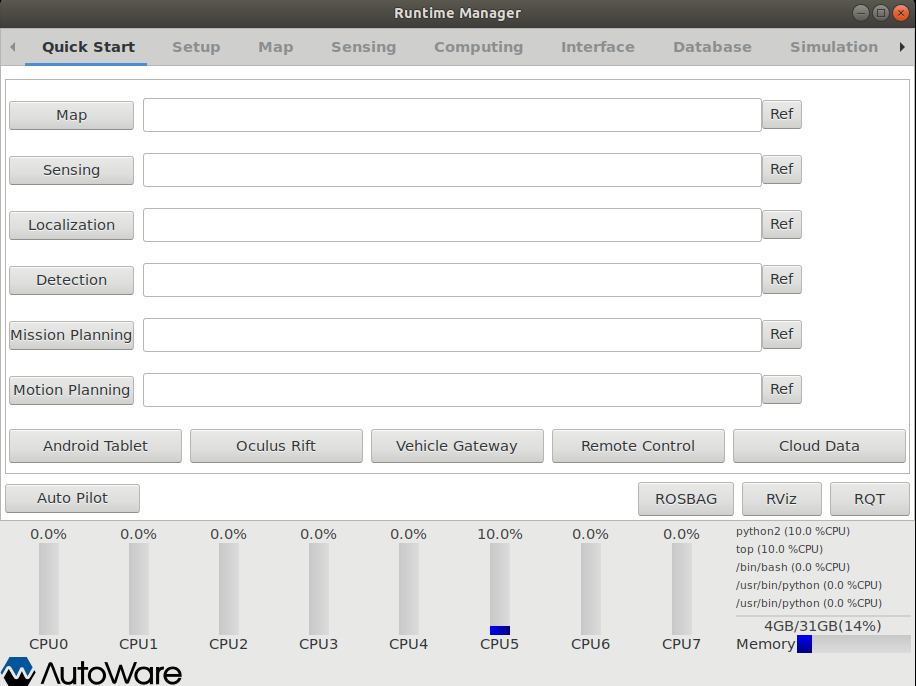
Also, as soon as I launch my_map.launch under the Quick Start tab, GUI starts flickering as in the image below (bottom of image). So, CPU monitoring becomes impossible to see. Other tabs (map, sensing and so on) always blinks (comes and goes, comes and goes...).
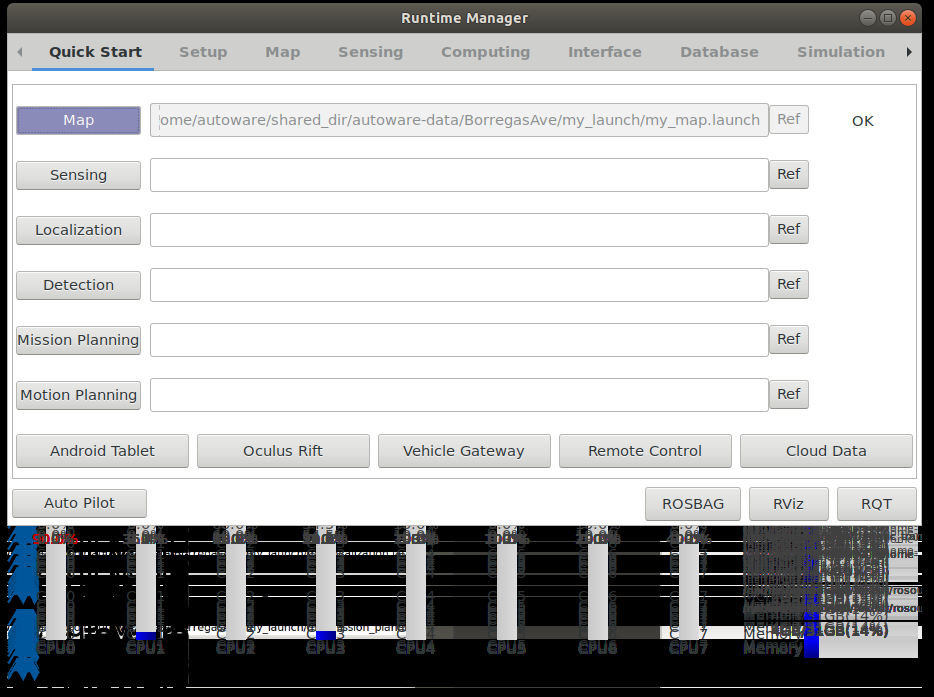
I understand that this technology is not documented completely, I myself am learning new things everyday.
If somebody supports me to get rid of running problems for simulation system, I can take steps further like you said. After that, I truly want to contribute. But need to learn at first. Thanks in advance.
I can share the steps with screenshots that I am implementing @hadiTab.
earcz
on 16 Jun 2020
@earcz Thanks for the clarification, this is helpful for us and anyone that has the same issue. I have also added @lemketron who is working through Autoware documentation currently. Are you running release 2020.05 or master?
EricBoiseLGSVL
on 16 Jun 2020
Dear @EricBoiseLGSVL,
Are you running release 2020.05 or master?
I downloaded lgsvlsimulator-linux64-2020.05.zip
under 2020.05 release from https://github.com/lgsvl/simulator/releases/tag/2020.05
earcz
on 16 Jun 2020
@earcz I will look into this and get back with some better instructions. Thanks.
 hadiTab
on 16 Jun 2020
hadiTab
on 16 Jun 2020
@hadiTab Thanks, I will look forward to hear from you.
earcz
on 16 Jun 2020
Replying to this on the ROS discourse.
hadiTab
on 17 Jun 2020
I can work with @hadiTab to get the Autoware.AI instructions updated as needed once the issues are resolved; I see that the conversation has moved to the ROS discourse.
 lemketron
on 26 Jun 2020
lemketron
on 26 Jun 2020
Related issues
 eyadshak
·
5Comments
eyadshak
·
5Comments
 ntutangyun
·
4Comments
ntutangyun
·
4Comments
 AlexandrZabolotny
·
4Comments
AlexandrZabolotny
·
4Comments
 jonghl9
·
4Comments
jonghl9
·
4Comments
 qwetqwe
·
6Comments
qwetqwe
·
6Comments
Most helpful comment
@earcz I will look into this and get back with some better instructions. Thanks.