Simplewall: How to allow Windows Defender to update?
Hello
I like simplewall whitelisting, I want to allow windows defender to get new definitions, how to do it?
Thanks
 subaru22b
All 21 comments
Try to add "svchost.exe" to the whitelist.
 perdolka
on 25 Mar 2019
perdolka
on 25 Mar 2019
But with svchost you open a barn door for all kind of window's unwanted communication
(See also @pwn0r answer in #347).
And then: MSE on Win7 updates definitions although I blocked svchost.
Meanwhile there seems a lot quite obscure at this "simplewall".
Best way to scare off potential users.
 nji9nji9
on 26 Mar 2019
nji9nji9
on 26 Mar 2019
@nji9nji9
i agree opening up svchost is a big problem. I would have to manually download the update.
Thanks everyone!
subaru22b
on 28 Mar 2019
3.0.1 can allow Microsoft apps/update servers in-built!
 henrypp
on 23 May 2019
henrypp
on 23 May 2019
@henrypp what is the procedure to allow Microsoft defender updating its virus definition automatically. I am on 3.0.1, but the defender is still not updating automatically?
 PunnyBoi
on 9 Jun 2019
PunnyBoi
on 9 Jun 2019
@PunnyBoi
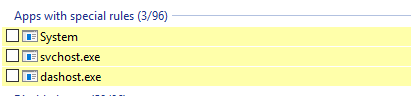
I have two rules for allowing this:
1

Remote string:
*.prod.do.dsp.mp.microsoft.com;*.windowsupdate.com;*.dl.delivery.mp.microsoft.com;*.update.microsoft.com;*.delivery.mp.microsoft.com;tsfe.trafficshaping.dsp.mp.microsoft.com;ctldl.windowsupdate.com;80;433
2

Checkbox must be unchecked:
perdolka
on 9 Jun 2019
@PunnyBoi 3.0.1 have in-built rule sets for that (Open settings -> Rules -> Blocklist and set allow checkboxes on).
@perdolka,
sorry bro, your rule sets is pointless:
1) domain (and other) masks are not supported, so mask for hosts (*) have no reason.
2) ctldl.windowsupdate.com;80;433 it will open port 80 and 443 not for specified sites, but just open ports (i hope you will do something like this ctldl.windowsupdate.com:80;ctldl.windowsupdate.com:433, or just simple ctldl.windowsupdate.com is enough)
3) local rule is not portable at all - local address can change at any time, so write mask like this is good for ya 192.168.0.0/16
henrypp
on 10 Jun 2019
@henrypp Thanks for your explanation. 👍
Simplewall didn't show syntax error when I created the rule with masks " * "
so I mistakenly decided that the mask " * " is supported but not documented in the wiki/Rules-editor
perdolka
on 10 Jun 2019
UPD
Strange, but my rules not working if I delete masks " * ".
If I replace
*.prod.do.dsp.mp.microsoft.com;*.windowsupdate.com;*.dl.delivery.mp.microsoft.com;*.update.microsoft.com;*.delivery.mp.microsoft.com;tsfe.trafficshaping.dsp.mp.microsoft.com;ctldl.windowsupdate.com
with
prod.do.dsp.mp.microsoft.com; windowsupdate.com; dl.delivery.mp.microsoft.com; update.microsoft.com; delivery.mp.microsoft.com; tsfe.trafficshaping.dsp.mp.microsoft.com; ctldl.windowsupdate.com
Defender updates are blocked.
perdolka
on 10 Jun 2019
@perdolka
Your previous rule is incorrect and pass all svchost traffic, thats why. I tell you again - 3.0.1 have in-built rule sets for that, no need for adds another rules to allow WU servers, just enable tick in settings.
henrypp
on 10 Jun 2019
@henrypp
If all svchost traffic would be passed, then Defender updates shouldn't be blocked (as @perdolka wrote).
Probably they are blocked because of the disabled in-built rule?
Also I agree with perdolka that an invalid rule should give an error message.
Under no circumstances an invalid rule should cause an all-pass.
What do you think?
nji9nji9
on 10 Jun 2019
I don't know why, but my Defender doesn't get updates, even if these settings enabled:
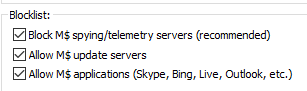 .
.
That's why I create custom rules.
Windows 10 x64, ver 1809 (Build 17763.437)
Simplewall 3.0.1
Also, if I create rule with "Remote" string:
prod.do.dsp.mp.microsoft.com; windowsupdate.com; dl.delivery.mp.microsoft.com; update.microsoft.com; delivery.mp.microsoft.com; tsfe.trafficshaping.dsp.mp.microsoft.com; ctldl.windowsupdate.com
the rule is marked red, as invalid:

perdolka
on 10 Jun 2019
When I turned off the option 'Allow M$ update servers' and clicked on check for update in the defender, it showed an error. But when I turned on the option, the defender didn't give an error this time (although it didn't update so maybe I have the latest security update). So, I think that the option is working.
Also, @henrypp could you tell us what are the other consequences of enabling the option 'Allow M$ update servers'? Does it allow only defender update or it opens a gate for other (privacy related) things too? Should I be concerned about something after enabling this option?
PunnyBoi
on 10 Jun 2019
so maybe I have the latest security update
I think you will get a new update if you try to temporarily allow svchost and push "check for update" again.
In my case the Defender isn't showing error but also not download an update.
SW Log shows a lot of blocked outbound connections of svchost (when I force defender to check for update).
perdolka
on 10 Jun 2019
@henrypp
A question that arose to me:
What happens if I do different settings in the blocklist versus own rules?
For example: Do not allow M$ applications in blocklist, but allow as application/ create a rule for say M$ live?
And vice versa.
Another thing:
Blocklist should list items in a consistent way (ALL Block or ALL Allow, but not mixed).
My serious proposal to build an usable up-to-date description/ doc how everything is meant.
There wouldn't be all the same questions, and by writing the doc you maybe come to the one
and other inconsistency for yourself.
nji9nji9
on 10 Jun 2019
I think you will get a new update if you try to temporarily allow svchost and push "check for update"
@perdolka yes you are correct. I allowed svchost and try to update the defender and it got a new update. I was wrong when I said that I may have the latest security update.
PunnyBoi
on 10 Jun 2019
However manually temporarily ... is no solution for automatic events (like updates) ...
nji9nji9
on 10 Jun 2019
Hi @henrypp, would you mind re-opening this issue again. The defender is still not updating automatically. Till now, I am downloading the definitions from the website manually in order to update the defender.
PunnyBoi
on 11 Dec 2019
Hi @henrypp, would you mind re-opening this issue again. The defender is still not updating automatically. Till now, I am downloading the definitions from the website manually in order to update the defender.
i have the same problem with a STOCK profile
 Janaue
on 2 Feb 2020
Janaue
on 2 Feb 2020
so the way to get updates now is to allow svhost for 2minutes AND remove the default enabled block list.
Janaue
on 6 Feb 2020
Experienced same problem with defender updates, but I have different question, this "Allow MS application servers (Skype, Bing, Live, Outlook, etc" block list... does it include MS Office/Defender? "etc" part is bothering me :)
P.S. I really like your firewall, keep up the good work.
 Fixer-007
on 7 Feb 2020
Fixer-007
on 7 Feb 2020
Related issues
 pwn0r
·
3Comments
pwn0r
·
3Comments
 Jtasiu
·
4Comments
Jtasiu
·
4Comments
 geonanorch
·
3Comments
geonanorch
·
3Comments
 gameb0y
·
3Comments
gameb0y
·
3Comments
 ltGuillaume
·
3Comments
ltGuillaume
·
3Comments