Simplewall: Gonna try this one more time: "Block for now" implemented correctly
So, the "Always block" adds a rule to block AND adds "Disable notifications". Good.
The option "Block for now and ask me later" in the popup, however, still adds a rule for the executable to the list. Why should it? Why not just block it and then discard the executable completely?
Temporary executables unnecessarily keep cluttering the list like this. "Purge invalid apps" is not a valid option when executables are only present in a certain location when another executable is run (e.g. with self-extracting executables).
It also doesn't actually do what is says it will: "do nothing". It does do something, namely add the executable to the rules list.
 ltGuillaume
All 20 comments
The option "Block for now and ask me later" in the popup, however, still adds a rule for the executable to the list. Why should it? Why not just block it and then discard the executable completely?
No, simplewall does not add any new rule when "Block for now and ask me later", it just added blocked app to the llist to store latest notification timestamp and do not add him later, thats why it "does nothing"!
 henrypp
on 11 Mar 2019
henrypp
on 11 Mar 2019
I meant "adds to the (rules) list": it still adds the executable to the list, so all of the above applies. But looking it like that, you could even argue that simplewall implies/acts like there now is a firewall rule for that executable (because it is listed).
ltGuillaume
on 11 Mar 2019
Yes, it have some missunderstanding, but, anyway, it works as designed!
henrypp
on 17 Mar 2019
Then I ask you kindly to reconsider the current design in order to get rid of the confusion, actually do what it says it does. This could for instance be taken care of by an an option to hide items that do not have a firewall rule attached from the list in the application window or just saving the data for notification timestamps in a completely different storage (my preference would be the latter).
ltGuillaume
on 17 Mar 2019
@henrypp I just tried v3.0.4. There doesn't seem to be any way to discard a notification anymore.
Many times I just want to be informed of whether an application's connection was blocked, then discard the notification. There's no way whatsoever to do this now. You either block the connection forever (and disable notifications) or allow the connection...
Could you please bring back a button to discard the notification?
ltGuillaume
on 23 Jul 2019
Do I understand the problem correctly:
"Block for now and ask me later" blocks the request, adds the program to the list and never asks again (even though it says it should)?
 cloudgreen
on 3 Aug 2019
cloudgreen
on 3 Aug 2019
No, I meant the following.
My goal is quite simple: I just want to be able to discard notification, without being forced to create a rule for it right then and there. Sounds logical, right?
Before v2.x, there was an option to discard the message. Perfect!
In v2.x, there was the _Block for now and ask me later_, but that also created an item for the application in simplewall's list. I opted that simplewall shouldn't create that item for the application in its list, since that implied that there was an actual firewall rule created for the application (which was not true).
In v3.x, the _Block for now and ask me later_ is gone, which is fine, __IF__ there was any way to discard a notification. There is not. You either create a rule to block the application forever, or create a rule to allow connections temporarily/forever. There's no other way.
Together with the new handling of WindowsSpyBlocker's blocklists, resulting in that there is no way to (temporarily) allow certain IP's on the list, it makes simplewall v3.x unusable to me...
ltGuillaume
on 3 Aug 2019
In v2.x, there was the Block for now and ask me later, but that also created an item for the application in simplewall's list. I opted that simplewall shouldn't create that item for the application in its list, since that implied that there was an actual firewall rule created for the application (which was not true).
Only checked items in simplewall list does have filters, right?
1) someapp trying to connect inet
2) simplewall catch'em and add to list (no filter was created)
3) popup notifications let's you make a choice: allow/timer and apply existing or create new user rule, this actions have designed to set filter for app, opposite them has the block button it only removes app from notifications pool and set disable notification for app - no filters are set in this case, is that right?
without being forced to create a rule for it right then and there
Block button does not set any filters, it's only switch off notifications for the app. Sounds logical, right?
henrypp
on 6 Aug 2019
I know 1/2/3 are the case, and that no actual filters are set in the filtering platform, but this behavior still implies there actually _are_ rules set. It needlessly clutters the list in simplewall with items that do not have firewall rules, and implies they do. It's confusing for end users.
without being forced to create a rule for it right then and there
Block button does not set any filters, it's only switch off notifications for the app. Sounds logical, right?
Yes, and in that case I understand listing the application in simplewall. A rule in simplewall (no filter, but a behavior rule) is actually created for it.
But there are lots of times I want to keep being informed if an application tries to connect to the internet. In those cases, I don't want to set a rule to allow it, but I also don't want to disable notifications for the blocked connections. This is simply not possible anymore in v3. This needs a "Discard" button that removes the notification, does _not_ disable notifications for the application and ideally does not even create an item for the application in simplewall's list, so users shouldn't constantly need to clean up the list.
ltGuillaume
on 6 Aug 2019
Ok, I just tried v3 for the first time today. There are now just two main buttons: Allow and Block. What @ltGuillaume is saying is that we also need a "Block once" button as well, and I agree.
Block button does not set any filters, it's only switch off notifications for the app. Sounds logical, right?
@henrypp I just clicked "Block" on Firefox with v3.0.5 and Firefox was put in the "Disabled apps" list. Firefox has now no access to the internet and Simplewall does not ask again the next time Firefox tries to access the internet. I don't know if a "block rule" has been created behind the scenes but it doesn't matter: if no new notifications appear then _the effect is the same_.
So I very much agree with @ltGuillaume, it would be extremely useful with a "Block once" button. So that the next time the application tries to access the internet, there will be a new popup.
I just wanna end by saying: keep up the amazing work, Simplewall is really cool and v3.0 looks really good! :D
cloudgreen
on 7 Aug 2019
For v3.x, the way I see it you can discard a notification by simply closing the popup dialog, although it still adds an entry in the "Disabled apps" list.
Edit: I get what you mean now, agree that there should be a block once button.
 nnyj
on 8 Aug 2019
nnyj
on 8 Aug 2019
No, you can not.
- After clicking the close button, the notification will reappear every time you get another notification or when you hover te tray icon.
- If there were multiple notifications, a Discard button would jump to the next new notification, not close the window.
Edit: I get what you mean now, agree that there should be a block once button.
Cool! 👍
ltGuillaume
on 8 Aug 2019
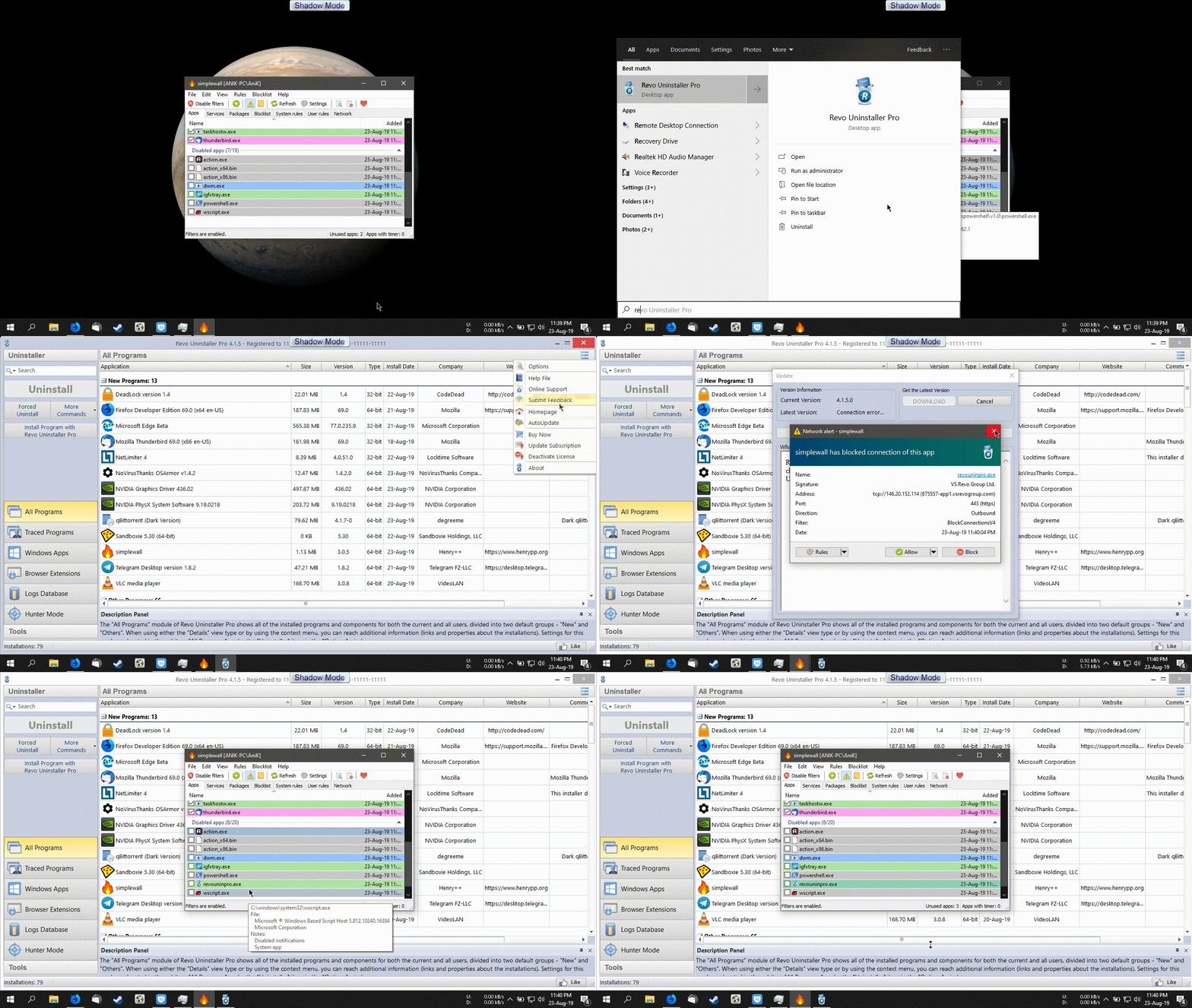
This is the problem. Even after clicking close button the app is automatially added to the Disabled app list.
Version: 3.0.5 beta.
 SeriousHoax
on 23 Aug 2019
SeriousHoax
on 23 Aug 2019
@SeriousHoax That is part of the problem, yes. Behavior has been like this since v2 and I think it would be better if programs should not automatically be added to the list.
The other part is that since v3, you cannot discard a notification, unless you permanently block, or permanently allow connections for the application. Clicking the dialog's cross to close will not discard the notification: it will pop up again when you hover the tray icon, or it will still be in the "notifications stack" when another notification is created.
P.S. That is a 7.5MB GIF, wow :-P
ltGuillaume
on 23 Aug 2019
Great GIF, @SeriousHoax! :)
Any change you might fix this behavior, @henrypp, and add a "Block once"? Or is there anyone else participating in this GitHub project who could assist?
Apart from this, I was very impressed with all the new features that v3 brought to the table. Only thing I missed was a "Bytes transferred" column on the Network tab. :) This is gonna be an awesome version!
cloudgreen
on 23 Aug 2019
@ltGuillaume Ow I see. Actually this is first time I'm trying the program so didn't know this is an ongoing behavior. But this definitely feels weird to see the name of the app on the list.
Also didn't notice that hovering mouse to the tray icon shows the ignored popup. This behavior might be useful in some scenario if you ignored a notification by mistake so that you can get that back by hovering the moue on the tray icon. But if it doesn't go away even after closing the program then this could become an annoyance now and then.
P.S. Yes :D Actually I recorded the video using Action which was 11mb in size then converted to GIF via ffmpeg. The quality isn't that good but was enough for this occasion.
SeriousHoax
on 23 Aug 2019
Thanks @cloudgreen :)
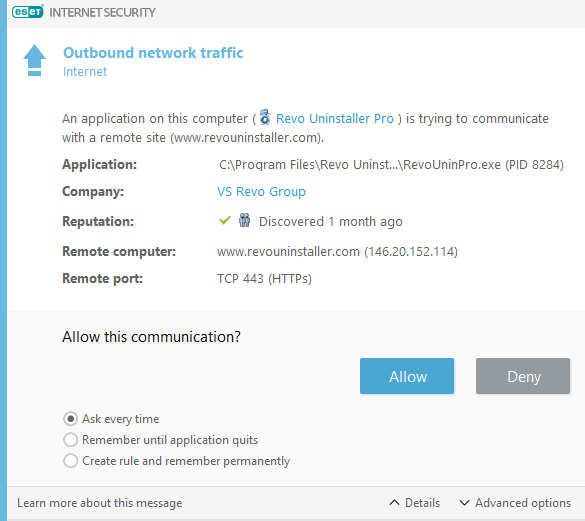
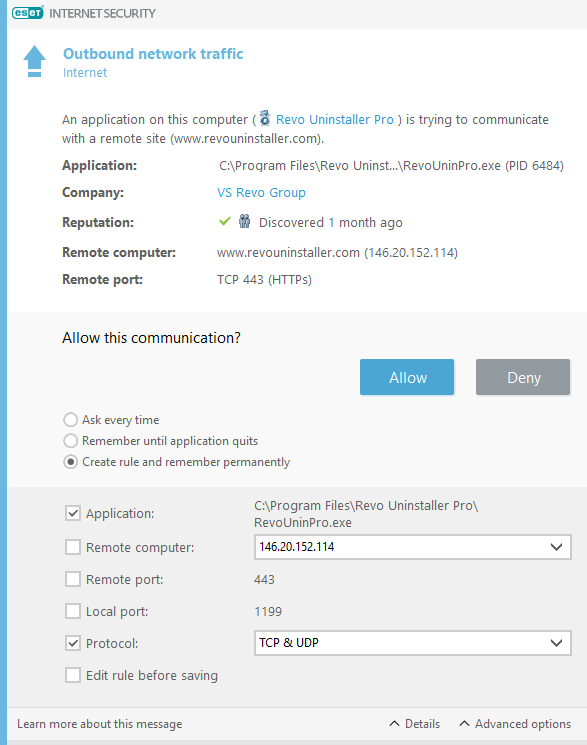
I'm new into this app. I just tried both version 2 & 3. It seems in version 2 the "Block for now" keeps blocking the app until you close and run the app again. Similar to the Interactive Firewall mode of ESET Internet Security which I currently use but planning to move to Windows Defender after my license expires.
Hello @henrypp you may wanna implement it similarly. ESET gives three option, One is for saving the rule permanently and other two are "Ask every time", "Remember until application quits". I think here the message is clean and easy to understand.
Also, I kind of like version 2's notification more. The design looks modern there but that's just a personal preference so not important.
SeriousHoax
on 23 Aug 2019
This behavior might be useful in some scenario if you ignored a notification by mistake so that you can get that back by hovering the moue on the tray icon.
True, that's why the current behavior when clicking the X close button is fine, but an additional button to discard/ignore the notification should be added, I think.
It seems in version 2 the "Block for now" keeps blocking the app until you close and run the app again.
No, it works better than that: the same sort of connection attempts would trigger a new notification, _if_ the attempt would be after the " Timeout between similar notifications" (in Settings).
Also, I kind of like version 2's notification more.
I completely agree: the Windows Vista blue-green background is not exactly of this time.
ltGuillaume
on 23 Aug 2019
True, that's why the current behavior when clicking the X close button is fine, but an additional button to discard/ignore the notification should be added, I think.
I agree, this would be perfect.
No, it works better than that: the same sort of connection attempts would trigger a new notification, if the attempt would be after the " Timeout between similar notifications" (in Settings).
Ow I see, that's nice. Didn't notice the notification timeout option before.
I completely agree: the Windows Vista blue-green background is not exactly of this time.
I was thinking where did I saw this design before but couldn't remember. You just reminded me now. Yes, it's like it was in Windows Vista. Version 2's notification is much better looking. Simple yet modern.
SeriousHoax
on 23 Aug 2019
v3.0.6: Thank you so so much for reintroducing the "Ignore and ask me later" button!
It may still add these executables to the list under "Disabled apps", but at least we can get rid of the notifications again 😁
ltGuillaume
on 21 Oct 2019
Related issues
 pwn0r
·
3Comments
pwn0r
·
3Comments
 Jtasiu
·
4Comments
Jtasiu
·
4Comments
Jtasiu
·
4Comments
Jtasiu
·
4Comments
 UNDEFINED-BEHAVIOR
·
4Comments
UNDEFINED-BEHAVIOR
·
4Comments
 c-rilaun
·
3Comments
c-rilaun
·
3Comments
Most helpful comment
No, you can not.
Cool! 👍