Simplewall: Boot time filters not working
Boot time filters are not working. Filters start to work after some time of loading of simplewall. I tried this by blocking all apps including simplewall.
I am even able to detect this in resource monitor, simplewall itself is able to check for updates.
I am on windows 10 laptop.
 TontyTon
All 21 comments
@henrypp What about this?
TontyTon
on 25 Jan 2019
- simplewall filters are working even simplewall is not running, because filters are processed by
bfeservice. - boot time filters is managed to prevent leaks before system started up (before logon ui displayed) and it is working if you enable this option.
i can not answer any other your question, because idk how you are configured simplewall.
 henrypp
on 25 Jan 2019
henrypp
on 25 Jan 2019
These are my settings
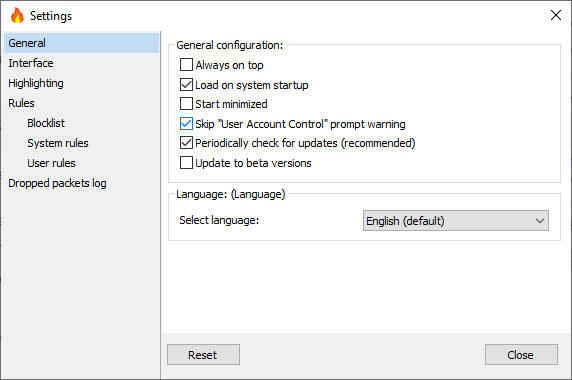
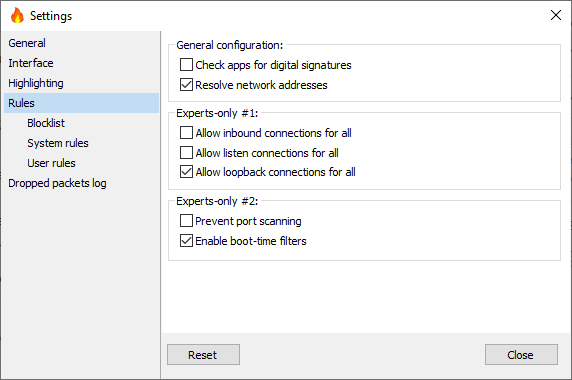
Filtering enabled with 'Whitelist(Allow Selected)' and no apps are selected.
Disabled all 'System rules' and 'User rules'. Except 'DNS' in 'System rules'
These are all the settings. According to these settings, internet access of all apps is disabled.
After these settings, I restarted my computer and saw that apps were able to connect to the internet.
They were able to connect till some time of start of Simplewall.
After that everything works correctly. Even after closing of SW.
TontyTon
on 25 Jan 2019
maybe WFP/windows bug?
 sun-shine-boy
on 30 Jan 2019
sun-shine-boy
on 30 Jan 2019
yes, may be.
someone should also check this on their system.
Can you @sun-shine-boy ??
Steps
- Enable filtering with 'Whitelist(Allow Selected)' and no apps are selected.
- Disable all 'System rules' and 'User rules'. Except 'DNS' in 'System rules'
- Enable 'boot time filters', 'load on system startup' and 'skip uac prompt warning'.
- restart system. (ensure if it is connected to internet or don't require any authentication or something else. Result should be that your computer connects to the internet much before the start of SW)
- start 'resource monitor' as soon as possible and check if anything is able to connect to the internet.
You can also use 'Live TCP UDP Watch'(but remember it shows both connected and disabled apps, you have to check through 'Connections Count'). It will help know that if the apps were denied access or not.
TontyTon
on 30 Jan 2019
Can't reproduce this issue here. I'm on admin Acc+UAC is completely disabled.
are you on standard acc? if yes have you UAC enabled? try with admin acc and UAC disabled.
sun-shine-boy
on 31 Jan 2019
Thanks for testing, I am on admin acc but have not disabled UAC, its risky. But will disable it and then try.
TontyTon
on 31 Jan 2019
Result should be that your computer connects to the internet much before the start of SW)
Any proof? Like Process Hacker establised network connections screenshot
henrypp
on 31 Jan 2019
I tested with Windows Time service:
Changed Time (try at least 10 min to see immediate results).
- Blocked W32Time in simplewall - w32tm /resync error.
- Allowed W32Time - w32tm /resync changed clock.
Changed Time again. Blocked W32Time in simplewall. Boot Time Filters on. Reboot.
Expected result: Still wrong time after reboot.
But: Time is synced - so Boot Time Filters cannot work.
 DivAB
on 31 Jan 2019
DivAB
on 31 Jan 2019
@henrypp Its not possible, because till we take screenshot simplewall has started.
TontyTon
on 31 Jan 2019
@DivAB Did you also block the "Windows Time" service?
 ltGuillaume
on 31 Jan 2019
ltGuillaume
on 31 Jan 2019
@DivAB
....Boot Time Filters on.
i do not understand why boot time filters are tied up with w32time service, because i explained what boot-time filters is for.
@TontyTon
Its not possible, because till we take screenshot simplewall has started.
this is i can not understand too, why you could not turn off "load at system startup" option.
and no one can provide any proof which any connection established (screenshot as example or logs)
henrypp
on 31 Jan 2019
I didn't tried turning it off because thought that may be then there may be some different mechanism,but I tried just now. AND problem still persists.
Screenshot is from app 'Live TCP UDP watch'. It shows all connections(connected or dis-connected) for the time it is kept open. I opened the app just after my laptop(old piece) started responding, (nearly a minute after desktop is shown).
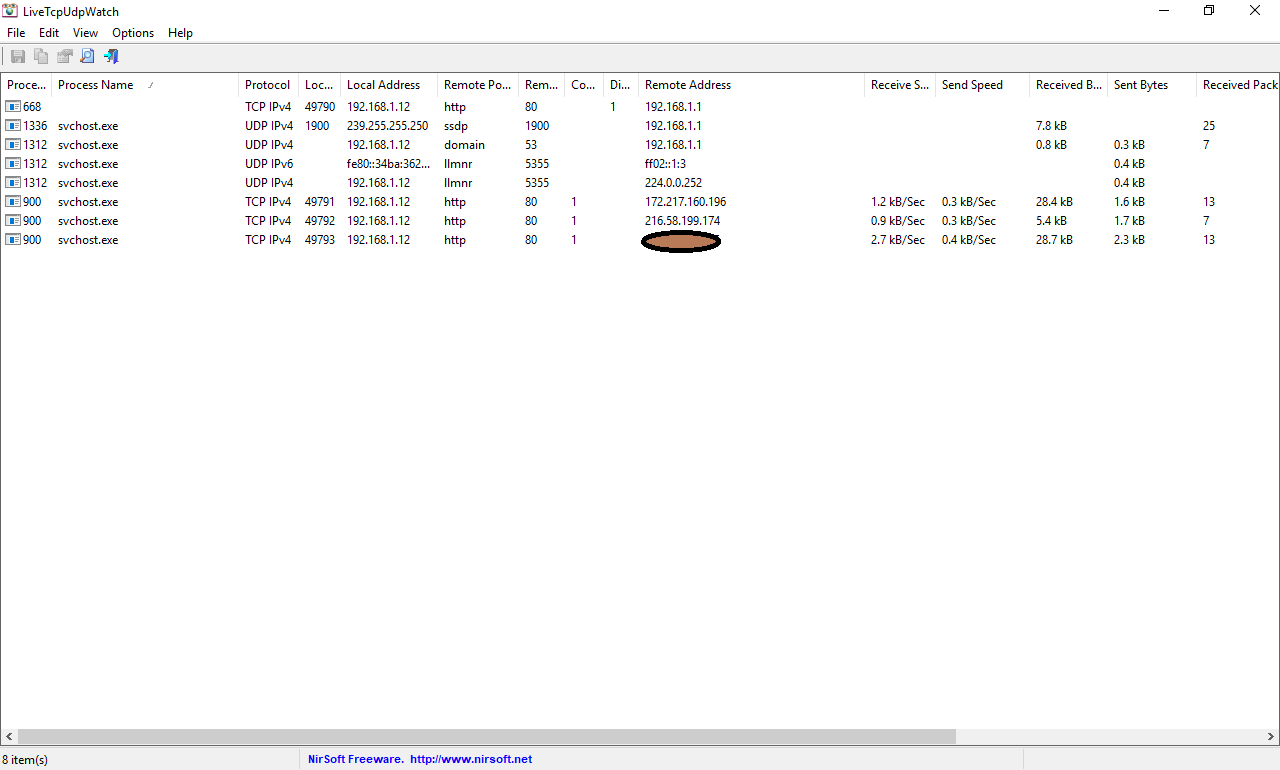
2 ips belong to Google and third one to my isp(Google cache server)
TontyTon
on 31 Jan 2019
@ltGuillaume: I stoped testing. I am in a network domain AD environment, so I cannot test to simply block all. But I tested on a VM Win10 and I could not reproduce it. If everything is blocked there is no time sync, also after reboot.
What I found out is, that if BFE service is not started for any reason (of course) the filters are not set, but simplewall still shows "filters enabled" - so you will not realise that they are not set. My BFE service was set to "manual" and simplewall (autostarts after reboot) does not start the service and it took me a while to realise that the filters are not set. Simplewall even logs this as an error in its logfile: FwpmEngineOpen(),0x000006d9,
It would be an improvement if simplewall would display a warning if the filters are not set and change its status to "filters disabled" or even better (if possible) to block all network connections until the BFE service is started and the filters are set.
DivAB
on 1 Feb 2019
What I found out is, that if BFE service is not started for any reason (of course) the filters are not set, but simplewall still shows "filters enabled" - so you will not realise that they are not set. My BFE service was set to "manual" and simplewall (autostarts after reboot) does not start the service and it took me a while to realise that the filters are not set. Simplewall even logs this as an error in its logfile: FwpmEngineOpen(),0x000006d9,,2.3.13 but does not display a warning or change the status to "filters disabled". This will also happen if the services stops for any reason or crashes. You will not realise it, the filters are just gone.
That is a good find and should be addressed indeed @henrypp
ltGuillaume
on 1 Feb 2019
So as per DivAB's finding, I think that delay in filter application is not due to delay in SW startup but in delay of BFE startup.
TontyTon
on 2 Feb 2019
@TontyTon Yes, simplewall.exe is just the GUI, the filters are not depending on it running or not. This is already known, _but_ it is exactly why the boot-time filters exist.
ltGuillaume
on 2 Feb 2019
According to henrypp
boot time filters is managed to prevent leaks before system started up (before logon ui displayed)
_Now should I close this issue as it's not in control of SW_ or _Continue the issue to find the solution of leak before bfe service start_
TontyTon
on 2 Feb 2019
Well apparently it's not solved, is it? The boot-time filters aren't worth much _if_ your findings hold.
ltGuillaume
on 2 Feb 2019
Since, before the start of bfe service filters are not at work and pc is able to connect to the internet.
The problem is not solved, as suggested by DivAB
(if possible) block all network connections until the BFE service is started and the filters are set.
But I doubt the possiblity, as MS's Tracking needs.
TontyTon
on 2 Feb 2019
First of all I would suggest that SW does not just log critical errors silenty, but displays a message and changes its status from "filters enabled" to "filters disabled" because that is the actual condition.
Second suggestion: SW disables internet access completely untill all filters are set and running, eg by registry or setting a proxy server to a non existing address until the conditions are met (or whatever better method). Of course this would mean that SW needs to be running (no portable mode) prob. as a service to check the conditions.
DivAB
on 4 Feb 2019
Related issues
TontyTon
·
3Comments
 p-groarke
·
4Comments
p-groarke
·
4Comments
 UNDEFINED-BEHAVIOR
·
4Comments
UNDEFINED-BEHAVIOR
·
4Comments
 c-rilaun
·
3Comments
c-rilaun
·
3Comments
 shiftyshady
·
4Comments
shiftyshady
·
4Comments