I commonly see simplewall taking huge amounts of RAM, by huge I mean more than 3 GB of RAM. After I've seen that I restarted simplewall just to see that after about 4mins of runtime it's again heading towards 3 gigs of ram usage.

I don't know if this is normal, but it seems a bit odd to take this amount of ram for it's normal usage.
(simplewall v2.2.12 x64)
 tokariu
All 16 comments
What rules/apps configured?
 henrypp
on 12 Jun 2018
henrypp
on 12 Jun 2018
seems I can narrow the leak to a certain process/game right now. I was playing Tomb Raider 4, and i think it asked to connect to the internet (notification) and I blocked it and dismissed further notifications. I think the notification process was rundll32.exe. After that the memory usage of simplewall.exe exploded literally to almost 4GB of ram over a short amount of time.
rundll32.exe *32 | C:\Windows\system32\rundll32.exe C:\Windows\system32\gameux.dll,GameUXShim {8bc9195c.....806fba};C:\games\Tomb4\tomb4.exe,8824
tokariu
on 12 Jun 2018
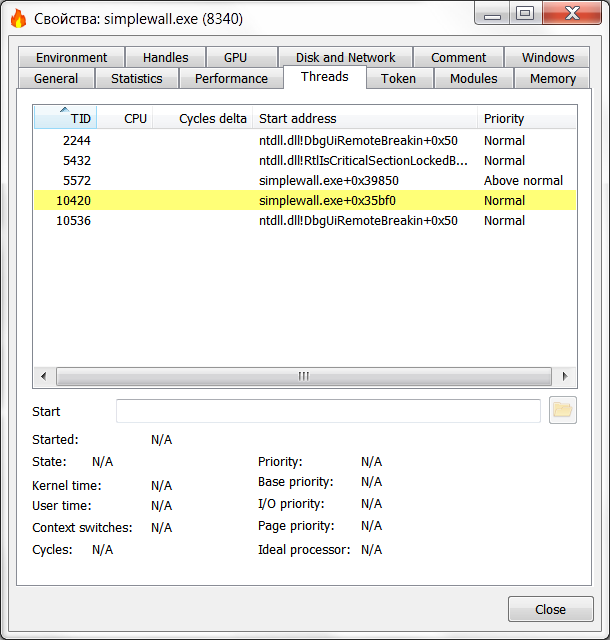
Can you have Process Hacker? If you please open simplewall.exe process properties and go to Threads tab. Take a picture please.
henrypp
on 12 Jun 2018
here it is:

tokariu
on 13 Jun 2018
hey, check this binaries, it's pre-2.3 beta (but named 2.2.666 LOL)
i hope some misstakes and critical bugs described here was fixed.
https://www.henrypp.org/files/r/
ps: all worked as well, except hosts does not worked and new rules editor does not finished.
ps2: please be patient and use portable version in different directory, new version can change 2.2.x xml profile files.
ps3: @tokariu so old PH - less info displayed.
henrypp
on 13 Jun 2018
ps3: @tokariu so old PH - less info displayed.
Not version PH. He needs to set necessary settings. https://wj32.org/processhacker/faq.php
Options PH > Symbols Tab >
C:\Windows\system32\dbghelp.dll
srv*http://msdl.microsoft.com/download/symbols
 ProNoobGH
on 13 Jun 2018
ProNoobGH
on 13 Jun 2018
[v2.2.x] Memory leak when calling "Refresh F5" function.
ProNoobGH
on 13 Jun 2018
@ProNoobGH, fixed, check build 667
henrypp
on 13 Jun 2018
666 was indeed evil: upon minimize or close, the tray icon disappeard :-P 667 works.
What's more, I got this the first time it started, although I get this often since any v2.2 version.
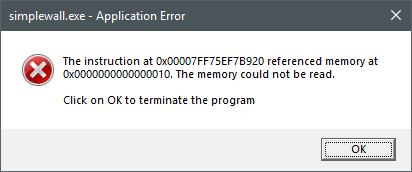
I'll be on the look-out for any memory leaks.
 ltGuillaume
on 13 Jun 2018
ltGuillaume
on 13 Jun 2018
@ltGuillaume
What's more, I got this the first time it started, although I get this often since any v2.2 version.
let me see your rules_custom.xml file
henrypp
on 13 Jun 2018
There you go (link expires in a month): https://bin.disroot.org/?e5c9b56c5832d514#uUK+PSp7xZI9/bM7o9vuM2V5/hNT9exwcP43iZ4xiuw=
(a couple of rules are just to try out stuff previously and don't do anything, such as "Outlook" and 204.xx.xxx.xxx, since the blocklist has priority over custom rules).
ltGuillaume
on 14 Jun 2018
@tokariu @ltGuillaume memory leak was fixed, but how about notifications? #154 still missing?
henrypp
on 14 Jun 2018
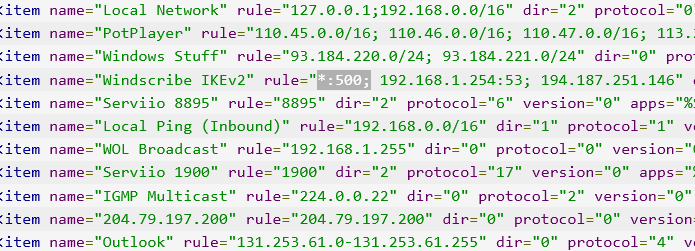
@@ltGuillaume this rule is not being worked.
henrypp
on 14 Jun 2018
Hi!
There is opened Telegram channel to discuss about new hotfix 2.3 pre-release.
New pre-release versions will be published on this channel, no official beta testing will be, only Telegram discussion.
Please follow:
https://t.me/simplewall_beta (language English/Russian)
henrypp
on 14 Jun 2018
@henrypp Yeah, not using that anyway. Basically I'd like to have a custom rule that allows Windows' IKEv2 VPN traffic, without allowing any other Windows services' traffic to seep through.
But does it have to do with the crash? As seen, it's not enabled?
ltGuillaume
on 15 Jun 2018
Memory leaks (2) was fixed in 2.3
henrypp
on 19 Jun 2018
Related issues
 shiftyshady
·
4Comments
shiftyshady
·
4Comments
 c-rilaun
·
3Comments
c-rilaun
·
3Comments
 Jtasiu
·
4Comments
ltGuillaume
·
3Comments
ltGuillaume
·
3Comments
Jtasiu
·
4Comments
ltGuillaume
·
3Comments
ltGuillaume
·
3Comments
Most helpful comment
Memory leaks (2) was fixed in 2.3