Simpletransformers: ValueError: too many dimensions 'str'
To Reproduce
Steps to reproduce the behavior:
Here is my Colab Notebook you can run to to see the error
https://gist.github.com/lenyabloko/adcb84ac04e5e10b7391d49b5bd0539c
ValueError                                Traceback (most recent call last)
<ipython-input-9-0b9dcdf94c77> in <module>()
     71
     72 # Train the model
---> 73 model.train_model(train_df)
     74
     75 # Evaluate the model

1 frames
/usr/local/lib/python3.6/dist-packages/simpletransformers/classification/classification_model.py in train_model(self, train_df, multi_label, output_dir, show_running_loss, args, eval_df, verbose, **kwargs)
    261             ]
    262
--> 263         train_dataset = self.load_and_cache_examples(train_examples, verbose=verbose)
    264
    265         os.makedirs(output_dir, exist_ok=True)

/usr/local/lib/python3.6/dist-packages/simpletransformers/classification/classification_model.py in load_and_cache_examples(self, examples, evaluate, no_cache, multi_label, verbose, silent)
    757
    758         if output_mode == "classification":
--> 759             all_label_ids = torch.tensor([f.label_id for f in features], dtype=torch.long)
    760         elif output_mode == "regression":
    761             all_label_ids = torch.tensor([f.label_id for f in features], dtype=torch.float)

ValueError: too many dimensions 'str'
The problem arises when using
from simpletransformers.classification import ClassificationModel

import pandas as pd
prefix = '/content/'
train_df = pd.read_csv(prefix + 'train.csv', header=None)
train_df=train_df.drop(index=0)

model = ClassificationModel('roberta', 'roberta-base')

model.train_model(train_df)
 lenyabloko
All 30 comments
The colab notebook you linked is locked.
Can you show your train.csv file?
 ThilinaRajapakse
on 17 Feb 2020
ThilinaRajapakse
on 17 Feb 2020
id labels alpha text
1 100000 1 a Goodfellow's theory has been questioned, howev...
2 100001 1 a However, both campaigners and pro-People's Vot...
3 100002 1 a Things could have been even better if the whol...
4 100003 0 a The new request, if approved, would keep the m...
5 100004 0 a Companies in financial difficulty can currentl...
lenyabloko
on 17 Feb 2020
Can you try it in a fresh directory or with "reprocess_input_data": True? In case some cached features are causing the issue.
ThilinaRajapakse
on 17 Feb 2020
Tried, that didnt work. Here is a public gist https://gist.github.com/lenyabloko/adcb84ac04e5e10b7391d49b5bd0539c
lenyabloko
on 18 Feb 2020
Features loaded from cache at cache_dir/cached_train_roberta_128_2_13000
Looks like you forgot to pass the args to the model.
Should be
model = ClassificationModel('roberta', 'roberta-base', arg=args)
ThilinaRajapakse
on 18 Feb 2020
Changed to
model = ClassificationModel('roberta', 'roberta-base', args=args)
Still the same error!
lenyabloko
on 19 Feb 2020
I think I had a similar issue a few weeks ago:
The problem was that the classification model expected the labels to start with 0 and move up from there, so I had to replace my labels. Not sure though if that was the solution or just a part of it.
 tsavinho
on 19 Feb 2020
tsavinho
on 19 Feb 2020
@lenyabloko Is the error fixed now or is it still buggy?
ThilinaRajapakse
on 21 Feb 2020
I haven't tested it since I have no time to manipulate data. It should work for any label range.
lenyabloko
on 29 Feb 2020
It doesn't work for any label range. It has to start from 0 and go up to n for n labels.
ThilinaRajapakse
on 29 Feb 2020
Ok, I converted my row Id to range from 0 to n:
id labels alpha text
0 1 a Goodfellow's theory has been questioned, howev...
1 1 a However, both campaigners and pro-People's Vot...
2 1 a Things could have been even better if the whol...
3 0 a The new request, if approved, would keep the m...
4 0 a Companies in financial difficulty can currentl...
I get the same error still.
100% 13000/13000 [00:10<00:00, 1275.02it/s]

---------------------------------------------------------------------------
ValueError                                Traceback (most recent call last)
<ipython-input-52-db7808d1b770> in <module>()
     37
     38 # Train the model
---> 39 model.train_model(train_df)
     40
     41 # Evaluate the model
I figure it out, it comes from train_df["label"], if you look closer you have actually a list (of list) of str, and not a list (of list) of int.
So you have to convert every line with this code :
train_df["label"] = train_df["label"].apply(lambda x: list(map(int, x)))
 Benarl
on 3 Mar 2020
Benarl
on 3 Mar 2020
May be I have a similar question: when I use the package 'torchtext' to process the data(ner data), the train example:TEXT: ['海', '钓', '比', '赛', '地', '点', '在', '厦', '门', '与', '金', '门', '之', '间', '的', '海', '域', '。'];LABEL: ['O', 'O', 'O', 'O', 'O', 'O', 'O', 'B-LOC', 'I-LOC', 'O', 'B-LOC', 'I-LOC', 'O', 'O', 'O', 'O', 'O', 'O'],when generate the batch data and input to model(Bi_LSTM+CRF),it do not work,the error:ValueError: too many dimensions 'str'
- The problem arises when using:
train_iter, val_iter, test_iter, vocab_text, label_num = data_iter(train_path, valid_path, test_path, TEXT, LABEL)
for epoch, batch in enumerate(train_iter):
 Mrxiexianzhao
on 26 Apr 2020
Mrxiexianzhao
on 26 Apr 2020
I am also facing the same error. Any solution ?
 MrYelameli
on 11 May 2020
MrYelameli
on 11 May 2020
It doesn't work for any label range. It has to start from 0 and go up to n for n labels.
I tried this... did not workout. Any other solution?
MrYelameli
on 11 May 2020
The likely reason is that the data contains some text that cannot be handled by the tokenizer. Also, make sure the labels are ints and not strings.
ThilinaRajapakse
on 11 May 2020
The likely reason is that the data contains some text that cannot be handled by the tokenizer. Also, make sure the labels are ints and not strings.
Thank you for your reply
There were some other language text such as japanese french etc.. I removed it (cleaned the data), now it is only English text, but still getting the same error. What text cannot handled by tokenizer? Any reference? i am new to nlp.
MrYelameli
on 12 May 2020
The likely reason is that the data contains some text that cannot be handled by the tokenizer. Also, make sure the labels are ints and not strings.
BTW, I could figure out what was the mistake, I was making mistake while concatenating two csv files, with two headers, so it was giving that error.
Thank you.
MrYelameli
on 12 May 2020
Same problem, but solved by using all_labels = torch.tensor([int(f.label) for f in features], dtype=torch.long) in my case.
 Chenyu-Tsai
on 14 May 2020
Chenyu-Tsai
on 14 May 2020
For anyone else running into this. this is usually due to having strings in the labels column.
ThilinaRajapakse
on 14 May 2020
I figure it out, it comes from train_df["label"], if you look closer you have actually a list (of list) of str, and not a list (of list) of int.
So you have to convert every line with this code :
train_df["label"] = train_df["label"].apply(lambda x: list(map(int, x)))
thanks it solved issue in my case too
 mathieuchateau
on 22 May 2020
mathieuchateau
on 22 May 2020
I have the same error in simpletransformers-0.34.1. When I have a signle text column it works fine, but this error pops up when I add a second text column.
Basically, I can't reproduce your example https://simpletransformers.ai/docs/sentence-pair-classification/
Out of the box it gives error
AttributeError: 'InputExample' object has no attribute 'tokens_b'
and when I change model.train_model(train_df) to model.train_model(pd.DataFrame(train_df.values.tolist()[:10])) it gives the error we discuss here: ValueError: too many dimensions 'str'
Then, if I keep only one text column, it's fine: model.train_model(pd.DataFrame(train_df[['text_a','labels']].values.tolist()[:10]))
Update: there's no error in v0.32.3. I go for it.
 klimentij
on 12 Jun 2020
klimentij
on 12 Jun 2020
I have the same error in simpletransformers-0.34.1. When I have a signle text column it works fine, but this error pops up when I add a second text column.
Basically, I can't reproduce your example https://simpletransformers.ai/docs/sentence-pair-classification/
Out of the box it gives error
AttributeError: 'InputExample' object has no attribute 'tokens_b'
Yeah, I just discovered this. But, it's not related to the error discussed in this thread. This particular problem was introduced in v0.33.2.
Regardless, it should be fixed now in v0.34.2.
ThilinaRajapakse
on 12 Jun 2020
This issue has been automatically marked as stale because it has not had recent activity. It will be closed if no further activity occurs. Thank you for your contributions.
![stale[bot] picture](https://avatars.githubusercontent.com/in/1724?v=4&s=40) stale[bot]
on 12 Aug 2020
stale[bot]
on 12 Aug 2020

 m-and-ms
on 5 Sep 2020
m-and-ms
on 5 Sep 2020
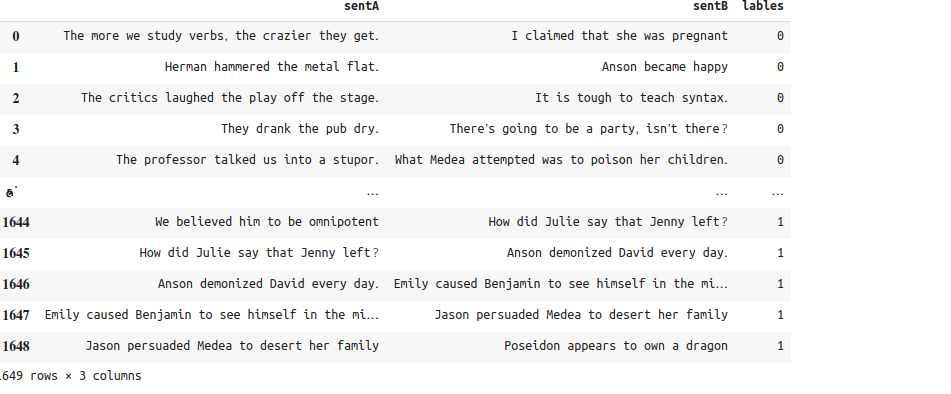
dataframe :-1:
m-and-ms
on 5 Sep 2020
You can't use a Dataframe when using lazy loading. Docs.
ThilinaRajapakse
on 6 Sep 2020
Found the problem in my case, multi-class-multi-label classification is not currently supported. Even though the label codification was right... it is not supported, it also issues the error 'too many dimensions'.
 ghost
on 14 Dec 2020
ghost
on 14 Dec 2020
I'm having the same problem while trying to loop through batches in an iterator. I used torchtext, I used one-hot to encode the label and map the vocabulary with Glove. I tried everything but none worked so far.
 nguyenngoctongan
on 19 Mar 2021
nguyenngoctongan
on 19 Mar 2021
I'm having the same problem while trying to loop through batches in an iterator. I used torchtext, I used one-hot to encode the label and map the vocabulary with Glove. I tried everything but none worked so far.
In my case, I manually coded the labels. I transformed each unique register in a column into different columns and if that register appears on the row X then it is 1 otherwise it is 0, this way I'm doing multi-class / multi-label by transforming the problem into just multi-label.
For the multiple features that I had I didn't have too much choice, I needed to concatenate them. Generally speaking, if your problem is really complex like the one I had (which had more problems than I'm describing here), go to the raw implementation instead of using third-level abstractions like this module (PyTorch -> Huggingface -> Simple Transformers)
Another thing is that I would rethink the Glove, cause if you see how the Transformer architecture deals with encoding, be it the positional or the multi-head attention, it already makes the embed of your sentence - in a different way, but it does. It's just one though, not sure if you really need to use co-occurrence from Glove... Also take a look at the embedding methods from Huggingface, which is built using Pytorch and can simplify what you're trying to achieve
ghost
on 19 Mar 2021
Related issues
 QAQOAO
·
5Comments
QAQOAO
·
5Comments
 caprone
·
5Comments
caprone
·
5Comments
 codeninja
·
8Comments
codeninja
·
8Comments
 hassant4
·
8Comments
hassant4
·
8Comments
 mineshmathew
·
9Comments
mineshmathew
·
9Comments
Most helpful comment
I figure it out, it comes from train_df["label"], if you look closer you have actually a list (of list) of str, and not a list (of list) of int.
So you have to convert every line with this code :
train_df["label"] = train_df["label"].apply(lambda x: list(map(int, x)))