Simplenote-electron: Install Error: @paulcbetts/[email protected] , node-gyp rebuild
Expected
expected to install simplenote
Observed
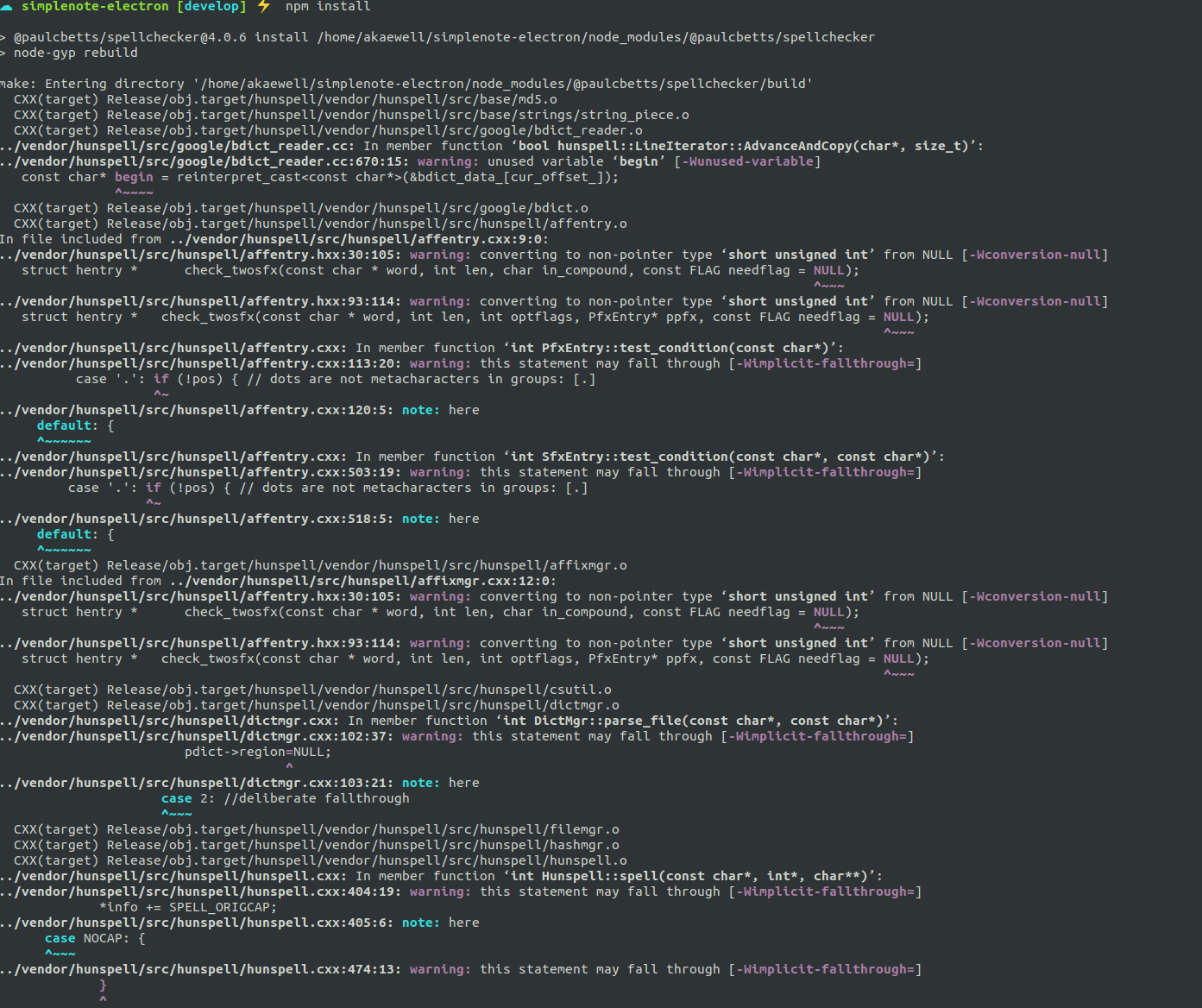
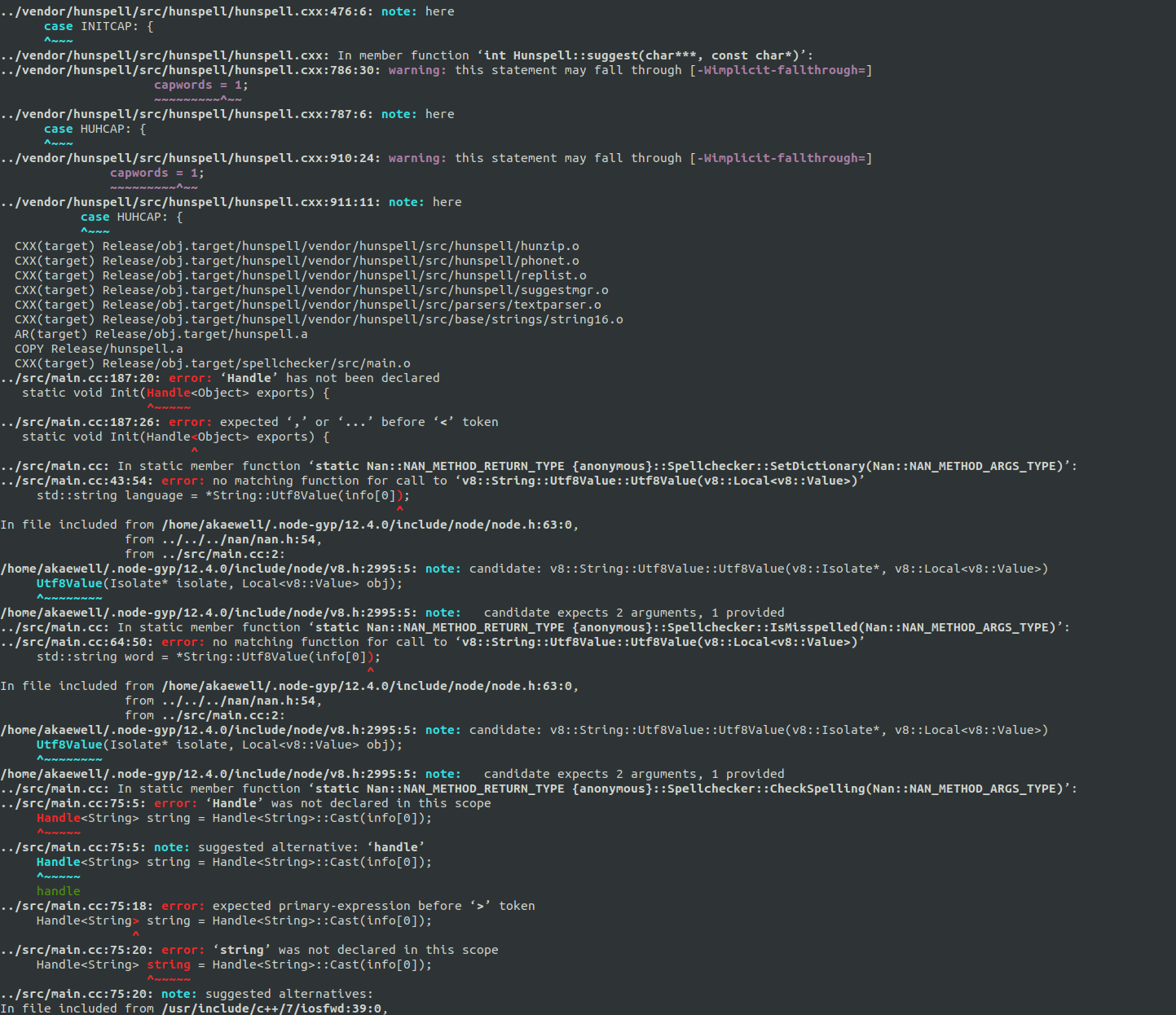
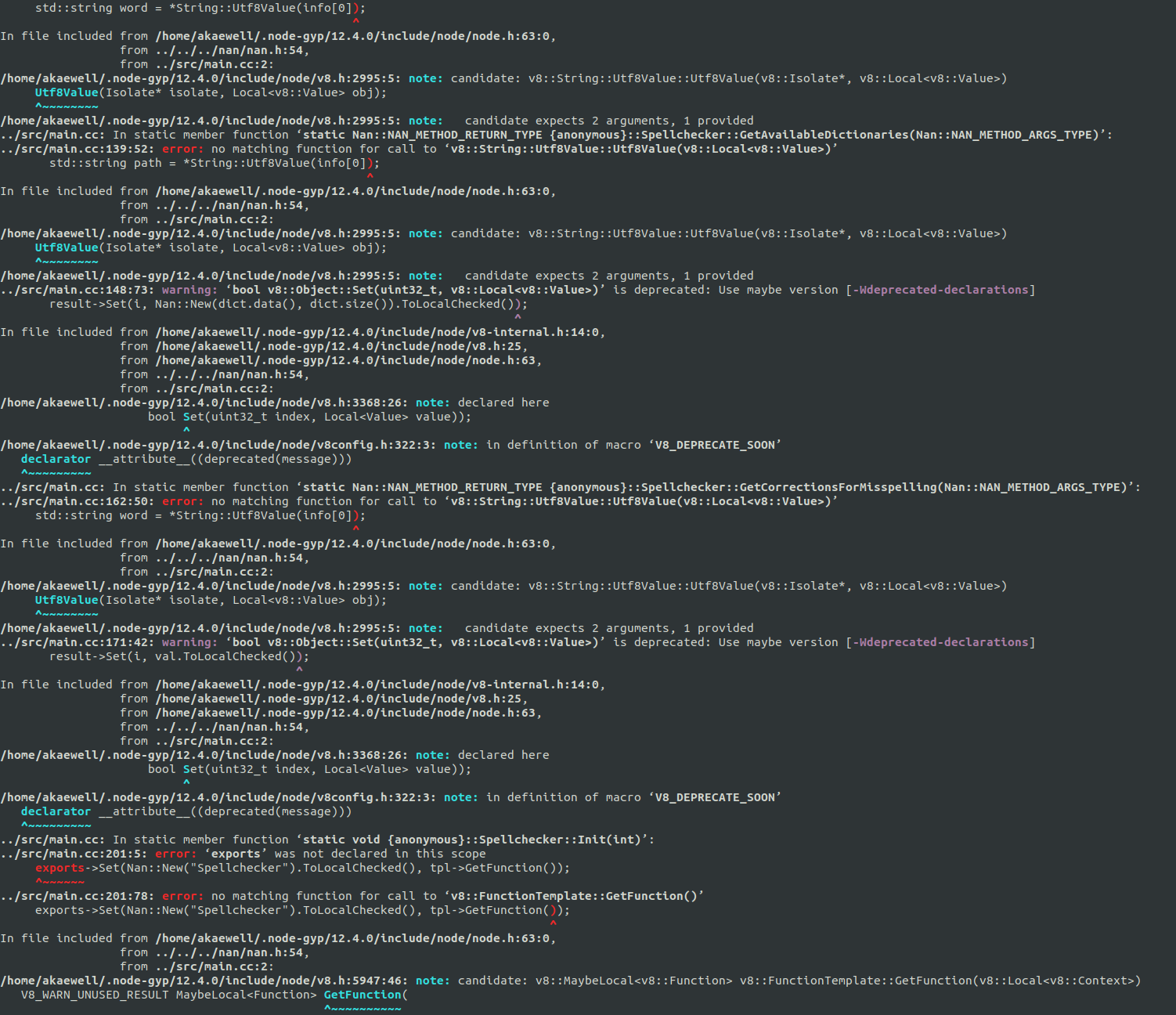
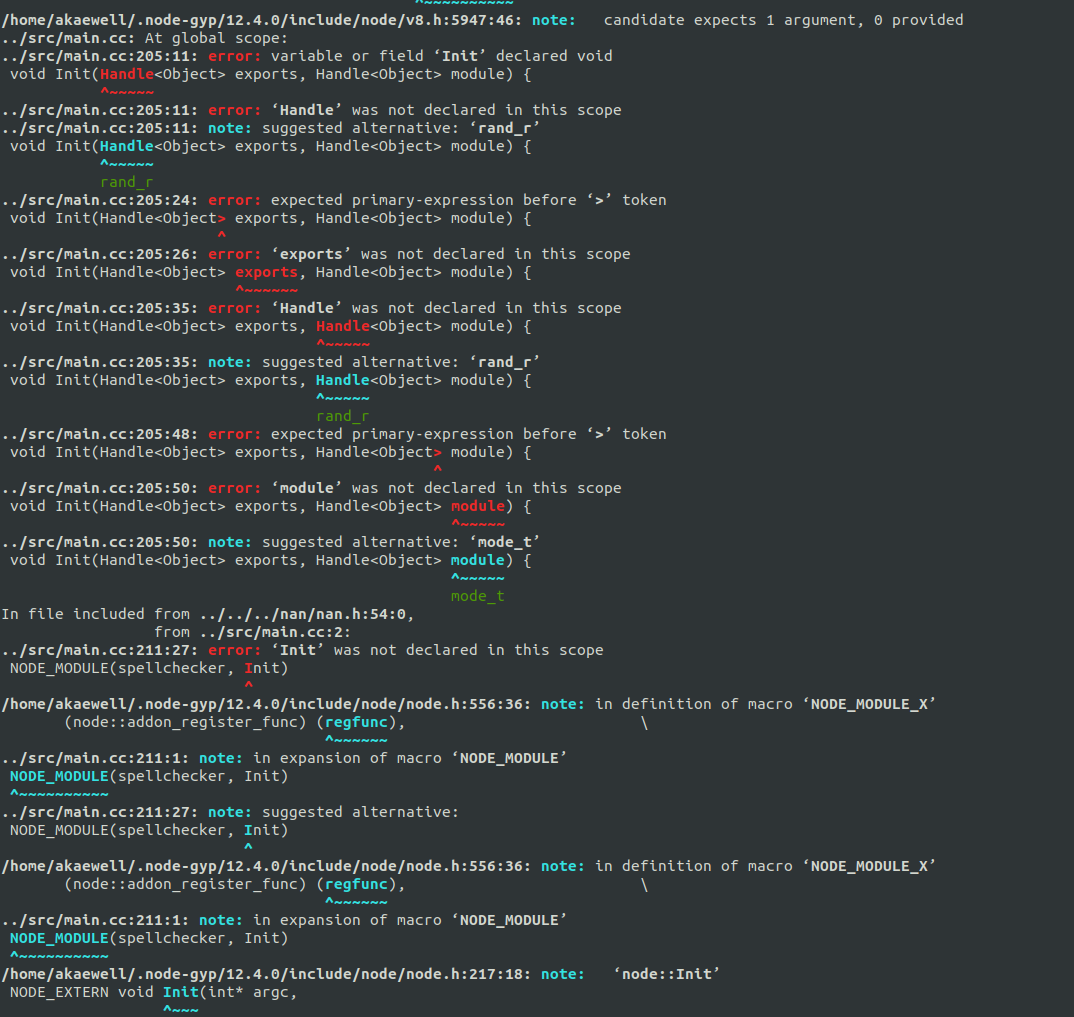
spellchecker.target.mk:123: recipe for target 'Release/obj.target/spellchecker/src/main.o' failed
make: *** [Release/obj.target/spellchecker/src/main.o] Error 1
make: Leaving directory '/home/akaewell/simplenote-electron/node_modules/@paulcbetts/spellchecker/build'
gyp ERR! build error
gyp ERR! stack Error: `make` failed with exit code: 2
gyp ERR! stack     at ChildProcess.onExit (/usr/lib/node_modules/npm/node_modules/node-gyp/lib/build.js:262:23)
gyp ERR! stack     at ChildProcess.emit (events.js:200:13)
gyp ERR! stack     at Process.ChildProcess._handle.onexit (internal/child_process.js:272:12)
gyp ERR! System Linux 4.18.0-22-generic
gyp ERR! command "/usr/bin/node" "/usr/lib/node_modules/npm/node_modules/node-gyp/bin/node-gyp.js" "rebuild"
gyp ERR! cwd /home/akaewell/simplenote-electron/node_modules/@paulcbetts/spellchecker
gyp ERR! node -v v12.4.0
gyp ERR! node-gyp -v v3.8.0
gyp ERR! not ok
npm WARN optional SKIPPING OPTIONAL DEPENDENCY: [email protected] (node_modules/fsevents):
npm WARN notsup SKIPPING OPTIONAL DEPENDENCY: Unsupported platform for [email protected]: wanted {"os":"darwin","arch":"any"} (current: {"os":"linux","arch":"x64"})

npm ERR! code ELIFECYCLE
npm ERR! errno 1
npm ERR! @paulcbetts/[email protected] install: `node-gyp rebuild`
npm ERR! Exit status 1
npm ERR!
npm ERR! Failed at the @paulcbetts/[email protected] install script.
npm ERR! This is probably not a problem with npm. There is likely additional logging output above.
Reproduced
git clone https://github.com/Automattic/simplenote-electron.gitcd simplenote-electronnpm install

From the log file attached:
34115 warn optional SKIPPING OPTIONAL DEPENDENCY: [email protected] (node_modules/fsevents):
34116 warn notsup SKIPPING OPTIONAL DEPENDENCY: Unsupported platform for [email protected]: wanted {"os":"darwin","arch":"any"} (current: {"os":"linux","arch":"x64"})
34117 verbose notsup SKIPPING OPTIONAL DEPENDENCY: Valid OS:    darwin
34117 verbose notsup SKIPPING OPTIONAL DEPENDENCY: Valid Arch:  any
34117 verbose notsup SKIPPING OPTIONAL DEPENDENCY: Actual OS:   linux
34117 verbose notsup SKIPPING OPTIONAL DEPENDENCY: Actual Arch: x64
34118 verbose stack Error: @paulcbetts/[email protected] install: `node-gyp rebuild`
34118 verbose stack Exit status 1
34118 verbose stack     at EventEmitter.<anonymous> (/usr/lib/node_modules/npm/node_modules/npm-lifecycle/index.js:301:16)
34118 verbose stack     at EventEmitter.emit (events.js:200:13)
34118 verbose stack     at ChildProcess.<anonymous> (/usr/lib/node_modules/npm/node_modules/npm-lifecycle/lib/spawn.js:55:14)
34118 verbose stack     at ChildProcess.emit (events.js:200:13)
34118 verbose stack     at maybeClose (internal/child_process.js:1021:16)
34118 verbose stack     at Process.ChildProcess._handle.onexit (internal/child_process.js:283:5)
34119 verbose pkgid @paulcbetts/[email protected]
34120 verbose cwd /home/akaewell/simplenote-electron
34121 verbose Linux 4.18.0-22-generic
34122 verbose argv "/usr/bin/node" "/usr/bin/npm" "install"
34123 verbose node v12.4.0
34124 verbose npm  v6.9.0
34125 error code ELIFECYCLE
34126 error errno 1
34127 error @paulcbetts/[email protected] install: `node-gyp rebuild`
34127 error Exit status 1
34128 error Failed at the @paulcbetts/[email protected] install script.
34128 error This is probably not a problem with npm. There is likely additional logging output above.
34129 verbose exit [ 1, true ]
(Optional) Lenovo Thinkpad , Ubuntu 18.04.2 LTS
 a2k11
a2k11
All 6 comments
Hi, @a2k11!
I'm facing the same problem.
I suspect it might be due to an unexpected interaction between node, electron-spellchecker v1 and Linux, as I'm running Manjaro 18.0.4 (kernell 5.2.8-1).
A quick workaround is to edit package.json and update the dependency to "electron-spellchecker": "^2.2.0" .
"Funnily" enough, there is an update pull request opened by the renovate bot which seems to have failed to install in macOS; so I would downgrade back to ^1.1.2 before submitting until someone fixes/checks that.
 gerardobot
on 28 Aug 2019
gerardobot
on 28 Aug 2019
I am having the same issue as well. @gerardobot , your workaround ended up working for me though!
 enricotj
on 30 Sep 2019
enricotj
on 30 Sep 2019
Same issue,
i did update the dependency to "electron-spellchecker": "^2.2.0"
then
npm install
then i get the bellow error:
@felixrieseberg/[email protected] install /home/cedric/simple_note_application/node_modules/@felixrieseberg/spellchecker
node-gyp rebuild
gyp ERR! build error
gyp ERR! stack Error: not found: make
gyp ERR! stack at getNotFoundError (/usr/lib/node_modules/npm/node_modules/which/which.js:13:12)
gyp ERR! stack at F (/usr/lib/node_modules/npm/node_modules/which/which.js:68:19)
gyp ERR! stack at E (/usr/lib/node_modules/npm/node_modules/which/which.js:80:29)
gyp ERR! stack at /usr/lib/node_modules/npm/node_modules/which/which.js:89:16
gyp ERR! stack at /usr/lib/node_modules/npm/node_modules/isexe/index.js:42:5
gyp ERR! stack at /usr/lib/node_modules/npm/node_modules/isexe/mode.js:8:5
gyp ERR! stack at FSReqWrap.oncomplete (fs.js:153:21)
gyp ERR! System Linux 5.0.0-31-generic
gyp ERR! command "/usr/bin/node" "/usr/lib/node_modules/npm/node_modules/node-gyp/bin/node-gyp.js" "rebuild"
gyp ERR! cwd /home/cedric/simple_note_application/node_modules/@felixrieseberg/spellchecker
gyp ERR! node -v v10.16.3
gyp ERR! node-gyp -v v3.8.0
gyp ERR! not ok
npm WARN [email protected] requires a peer of acorn@^6.0.0 || ^7.0.0 but none is installed. You must install peer dependencies yourself.
npm WARN [email protected] requires a peer of core-js-bundle@^3.1.3 but none is installed. You must install peer dependencies yourself.
npm WARN [email protected] requires a peer of sass@^1.3.0 but none is installed. You must install peer dependencies yourself.
npm WARN [email protected] requires a peer of fibers@>= 3.1.0 but none is installed. You must install peer dependencies yourself.
npm WARN [email protected] requires a peer of core-js-bundle@^3.1.3 but none is installed. You must install peer dependencies yourself.
npm WARN optional SKIPPING OPTIONAL DEPENDENCY: [email protected] (node_modules/fsevents):
npm WARN notsup SKIPPING OPTIONAL DEPENDENCY: Unsupported platform for [email protected]: wanted {"os":"darwin","arch":"any"} (current: {"os":"linux","arch":"x64"})
npm ERR! code ELIFECYCLE
npm ERR! errno 1
npm ERR! @felixrieseberg/[email protected] install: node-gyp rebuild
npm ERR! Exit status 1
npm ERR!
npm ERR! Failed at the @felixrieseberg/[email protected] install script.
npm ERR! This is probably not a problem with npm. There is likely additional logging output above.
npm ERR! A complete log of this run can be found in:
npm ERR! /home/cedric/.npm/_logs/2019-10-09T14_50_26_585Z-debug.log
 leodesignDukstra
on 9 Oct 2019
leodesignDukstra
on 9 Oct 2019
I'm having the same issue when I try to build on linux. Does anyone know any workaround of this? And what is the cause of this?
Below is stack trace
`> [email protected] install /home/abdul/workspace/npm/simplenote-electron/node_modules/keyboard-layout
node-gyp rebuild
make: Entering directory '/home/abdul/workspace/npm/simplenote-electron/node_modules/keyboard-layout/build'
CXX(target) Release/obj.target/keyboard-layout-manager/src/keyboard-layout-manager.o
CXX(target) Release/obj.target/keyboard-layout-manager/src/keyboard-layout-manager-linux.o
../src/keyboard-layout-manager-linux.cc:5:10: fatal error: X11/extensions/XKBrules.h: No such file or directory
#include
^~~~~~~
compilation terminated.
keyboard-layout-manager.target.mk:104: recipe for target 'Release/obj.target/keyboard-layout-manager/src/keyboard-layout-manager-linux.o' failed
make: * [Release/obj.target/keyboard-layout-manager/src/keyboard-layout-manager-linux.o] Error 1
make: Leaving directory '/home/abdul/workspace/npm/simplenote-electron/node_modules/keyboard-layout/build'
gyp ERR! build error
gyp ERR! stack Error: make failed with exit code: 2
gyp ERR! stack at ChildProcess.onExit (/usr/local/lib/node_modules/npm/node_modules/node-gyp/lib/build.js:262:23)
gyp ERR! stack at ChildProcess.emit (events.js:189:13)
gyp ERR! stack at Process.ChildProcess._handle.onexit (internal/child_process.js:248:12)
gyp ERR! System Linux 4.15.0-70-generic
gyp ERR! command "/usr/local/bin/node" "/usr/local/lib/node_modules/npm/node_modules/node-gyp/bin/node-gyp.js" "rebuild"
gyp ERR! cwd /home/abdul/workspace/npm/simplenote-electron/node_modules/keyboard-layout
gyp ERR! node -v v10.15.3
gyp ERR! node-gyp -v v3.8.0
gyp ERR! not ok
npm WARN [email protected] requires a peer of acorn@^6.0.0 || ^7.0.0 but none is installed. You must install peer dependencies yourself.
npm WARN [email protected] requires a peer of core-js-bundle@^3.1.3 but none is installed. You must install peer dependencies yourself.
npm WARN [email protected] requires a peer of sass@^1.3.0 but none is installed. You must install peer dependencies yourself.
npm WARN [email protected] requires a peer of fibers@>= 3.1.0 but none is installed. You must install peer dependencies yourself.
npm WARN [email protected] requires a peer of typescript@>=2.8.0 || >= 3.2.0-dev || >= 3.3.0-dev || >= 3.4.0-dev || >= 3.5.0-dev || >= 3.6.0-dev || >= 3.6.0-beta || >= 3.7.0-dev || >= 3.7.0-beta but none is installed. You must install peer dependencies yourself.
npm WARN [email protected] requires a peer of core-js-bundle@^3.1.3 but none is installed. You must install peer dependencies yourself.
npm WARN optional SKIPPING OPTIONAL DEPENDENCY: [email protected] (node_modules/fsevents):
npm WARN notsup SKIPPING OPTIONAL DEPENDENCY: Unsupported platform for [email protected]: wanted {"os":"darwin","arch":"any"} (current: {"os":"linux","arch":"x64"})
npm ERR! code ELIFECYCLE
npm ERR! errno 1
npm ERR! [email protected] install: node-gyp rebuild
npm ERR! Exit status 1
npm ERR!
npm ERR! Failed at the [email protected] install script.
npm ERR! This is probably not a problem with npm. There is likely additional logging output above.
npm ERR! A complete log of this run can be found in:
npm ERR! /home/abdul/.npm/_logs/2019-11-20T12_33_45_839Z-debug.log
`
 arkniazi
on 20 Nov 2019
arkniazi
on 20 Nov 2019
Looks like ya'll might be using Node 12.
Take a look at this PR to see what's going on to get the app running in Node 12: https://github.com/Automattic/simplenote-electron/pull/1739
Note, that branch is experimental. It uses a branch on a fork of websocket
Also, why are you building the app?
 belcherj
on 26 Nov 2019
belcherj
on 26 Nov 2019
Will be resolved by https://github.com/Automattic/simplenote-electron/pull/2102
belcherj
on 15 Jun 2020
Related issues
 hindsholm
·
4Comments
hindsholm
·
4Comments
 gubrist
·
4Comments
gubrist
·
4Comments
 abhijithvijayan
·
4Comments
abhijithvijayan
·
4Comments
 rbreaves
·
3Comments
rbreaves
·
3Comments
 tavilla61
·
4Comments
tavilla61
·
4Comments
Most helpful comment
Hi, @a2k11!
I'm facing the same problem.
I suspect it might be due to an unexpected interaction between node, electron-spellchecker v1 and Linux, as I'm running Manjaro 18.0.4 (kernell 5.2.8-1).
A quick workaround is to edit
package.jsonand update the dependency to"electron-spellchecker": "^2.2.0"."Funnily" enough, there is an update pull request opened by the renovate bot which seems to have failed to install in macOS; so I would downgrade back to
^1.1.2before submitting until someone fixes/checks that.