Simplenote-electron: Shortcut Documentation
Shortcut documentation is outdated (especially for Linux/Windows).
See simplenote.com/help/#shortcuts. There is also a mismatch in FAQ headers.
IMHO shortcuts are absolutely necessary for productivity apps and documenting them is a necessary step to _make them consistent_.
 AntonioFasano
All 15 comments
TODO
- [x] comb through the code and figure out what all the shortcuts are @rakhi2104
- [x] sort them into groups (Navigation, Views, Note, etc.) @rakhi2104
- [ ] design a keyboard shortcut cheatsheet (modal dialog) to add in the app
- [ ] cheatsheet should be smart about platform-specific shortcuts
- [ ] add it under the Help menu (we’ll only need it in Electron for now)
- [ ] remove the shortcut documentation at simplenote.com/help/#shortcuts
- [x] add mouse-over hints to UI buttons that have shortcuts #1214
 mirka
on 11 Oct 2018
mirka
on 11 Oct 2018
I'm taking this up :1st_place_medal:
 rakhi2104
on 11 Oct 2018
rakhi2104
on 11 Oct 2018
@rakhi2104 Awesome! Even partial help with the first one or two tasks would be appreciated. You can post the results in this thread 🙂
mirka
on 11 Oct 2018
Definitely :sunglasses:
Don't know why the third one is also so attractive :drooling_face:
rakhi2104
on 11 Oct 2018
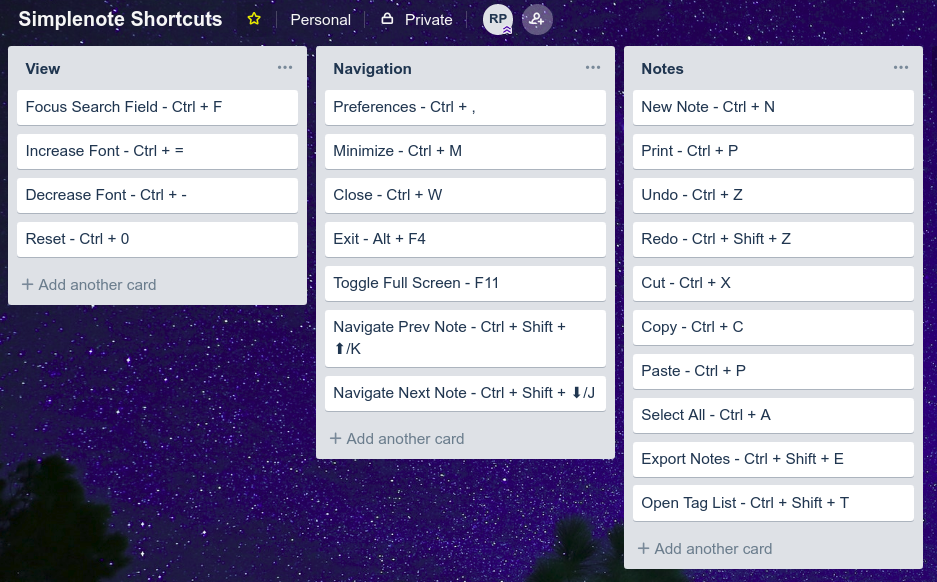
Hey @mirka, I made a board of shortcuts to classify between different categories.
Any changes to be made ?
rakhi2104
on 20 Oct 2018
Yay, thank you @rakhi2104 ! 😂
For the documentation, let's remove some of the ones that are not really specific to our app. So remove Minimize, Close, Exit, and Undo, Redo, Cut, Copy, Paste, Select All, Print.
Previous note, Next note
I'm planning on removing the Ctrl+Shift+Up/Down shortcuts for this, as per #798. So let's keep just the J/K ones.
We also seem to have
Navigation:
- Ctrl+T - Tag field
Note:
- Ctrl+Shift+P - Toggle Markdown preview
mirka
on 22 Oct 2018
Oh, thanks ! Will make those changes.
rakhi2104
on 24 Oct 2018
Adding Alt + Ctrl + C for Insert Checklist
mirka
on 31 Jan 2019
Thanks for the good work!
A couple of suggestions:
1) The FAQ entry still says only:
What are the keyboard shortcuts for the Mac app?
2) As I understand, Open Tag List: Ctrl+Shisft+T, should probably be Toggle Tag List.
3) I note that when I toggle the Tag List view, the note panel dims, suggesting I can't type there, while I can. Instead, I can do nothing on tags with the keyboard, apart toggling them out. It would be nice to be able to select them.
AntonioFasano
on 28 Feb 2019
@rakhi2104 Do you need any help with this?
 binyamin
on 21 Jul 2019
binyamin
on 21 Jul 2019
See http://simp.ly/p/rsnDV7 for a list (I don't know the architecture of the code well, so it may be incomplete)
binyamin
on 30 Jul 2019
See http://simp.ly/p/rsnDV7 for a list (I don't know the architecture of the code well, so it may be incomplete)
How to move to the next/previous note?
AntonioFasano
on 16 Aug 2019
I don't think you can right now. Good suggestion, though. Open an issue for that, I guess.
binyamin
on 16 Aug 2019
@mirka what's the status on this? I think that adding a shortcut page on the website with an updated list of would be easy and quick.
binyamin
on 1 Apr 2020
Thanks so much @rakhi2104 for the chart - I adopted its layout in #1983
 dmsnell
on 2 Apr 2020
dmsnell
on 2 Apr 2020
Related issues
 gubrist
·
4Comments
gubrist
·
4Comments
 danielh-official
·
4Comments
danielh-official
·
4Comments
 segeeslice
·
3Comments
segeeslice
·
3Comments
 swalladge
·
3Comments
swalladge
·
3Comments
 Sushubh
·
4Comments
Sushubh
·
4Comments