Simple-tab-groups: Backups should not be saved to downloads
Describe the bug
Despite closed #284 automatic backups are saved to /path/to/Downloads/STG-backups-FF-<Firefox version>/ directory while they should be placed in Mozilla profile.
To Reproduce
Steps to reproduce the behavior:
- Go to add-on settings.
- Go to backups tab.
- Enable automatic backups.
- Check your
/path/to/Downloads/directory in a while.
Expected behavior
Downloads directory should be empty but it is flooded with backups.
Desktop (please complete the following information):
- OS and version: Windows 10
- Firefox version: 85.0.2
- Simple Tab Groups version: 4.7
 baterflyrity
All 19 comments
flooded
One directory (folder) per version of Firefox. Are things not filed in that way for you?
https://github.com/Drive4ik/simple-tab-groups/commit/7b63c795445514063bbfc6132a0946f28c32efaa#diff-5635b9ed75e6466995bcf7dc6eab586a9a05e1264d452f6fe04de6fae2b9527eR92
 grahamperrin
on 20 Feb 2021
grahamperrin
on 20 Feb 2021
@grahamperrin according to #284 this folder should be saved in another path. So I always see random folders with random files in my downloads which are obviously for downloaded data but configuration one. Hence all my environment, scripts and workflow is balked at this point.
baterflyrity
on 20 Feb 2021
https://github.com/Drive4ik/simple-tab-groups/issues/284#issuecomment-456161552 refers to https://github.com/Drive4ik/simple-tab-groups/issues/314, which was fixed by https://github.com/Drive4ik/simple-tab-groups/commit/7b63c795445514063bbfc6132a0946f28c32efaa (2019-01-21) involving three files, each of which has a more recent edition:
- https://github.com/Drive4ik/simple-tab-groups/blob/master/addon/src/js/constants.js
- https://github.com/Drive4ik/simple-tab-groups/blob/master/addon/src/js/file.js
- https://github.com/Drive4ik/simple-tab-groups/blob/master/addon/src/options/Options.vue
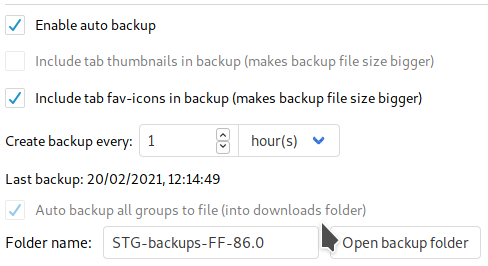
For automated backups, _downloads_ is the expected location for each version-specific backup folder:
grahamperrin
on 20 Feb 2021
@grahamperrin ,
I partially fixed this issue in #314 , and fix failed downloads in #313
Read carefully, only the smallest part of the problem has been fixed. But main idea of changing directory has been just ignored and closed?! Well... its at least not serious approach.
baterflyrity
on 20 Feb 2021
https://github.com/Drive4ik/simple-tab-groups/issues/284#issuecomment-435845493
Webextension does not allow you to change the folder for downloading
Has Mozilla altered the restriction?
grahamperrin
on 21 Feb 2021
@grahamperrin I dont know. What about IndexedDB file storage library? Nevertheless, the problem is still persistent.
baterflyrity
on 21 Feb 2021
From https://developer.mozilla.org/en-US/docs/Mozilla/Add-ons/WebExtensions/API/downloads/download for filename:
… relative to the default downloads directory … Absolute paths, … and paths containing back-references (../) will cause an error. …
grahamperrin
on 22 Feb 2021
IndexedDB file storage library
Would that allow each backup file to be found (without Firefox) by a file manager?
grahamperrin
on 22 Feb 2021
IndexedDB file storage library
Would that allow each backup file to be found (without Firefox) by a file manager?
In profile directory each add-on has its own directory with sqlite base and other cached items. I didnt investigate availability to reuse this files manually.
baterflyrity
on 22 Feb 2021
I agree, saving the backups in the download folder is irritating (especially as it took me some time to realize that STG = this firefox addon I'd installed a few weeks ago). I think, storage.local is meant for this purpose: https://developer.mozilla.org/en-US/docs/Mozilla/Add-ons/WebExtensions/API/storage
 tobiasdiez
on 28 Feb 2021
tobiasdiez
on 28 Feb 2021
Current naming convention completely ignores users with multiple profiles. By default user profile name should be used as a part of backup folder name, I think.
 R-Usher
on 26 Mar 2021
R-Usher
on 26 Mar 2021
Current naming convention completely ignores users with multiple profiles.
I use multiple profiles.
The path to the profile includes the name; this is by Mozilla's design.
grahamperrin
on 26 Mar 2021
It's misunderstanding.
A single Windows user has only one Download folder. If STG keeps its backups in the Download folder, then it will systematically overwrite a backup created for just closed Firefox profile with a backup created for another, freshly open Firefox profile. I DID test it before posting a message.
R-Usher
on 28 Mar 2021
Ah, thanks for the clarification. I never encountered overwrite, maybe because I prefer hourly backups; each backup is distinctively named, for example:
grahamperrin
on 28 Mar 2021
Hourly backup is neither set by default nor perfect. Users have to open backups and guess which backup comes from which Firefox profile.
R-Usher
on 29 Mar 2021
May I point again towards storage.local, which would fix this name conflicts as well.
tobiasdiez
on 29 Mar 2021
Hi folks,
Personally, as a user, I'm not losing sleep at the existence of the "STG-backups" folder (whose name is configurable anyway) in my Downloads folder, and if I really cared about not visually seeing it in that folder, I could make it a hidden folder...
If you really care deeply about this particular issue, as you seem to know what can/cannot be done by web extensions in terms of storage, at this point now it might be a good idea for one of you to help the maintainer by offering a patch / pull request for this.
 nekohayo
on 21 Apr 2021
nekohayo
on 21 Apr 2021
@nekohayo , hi. Unfortunately i dont know storage api so cant push fix.
Also you suggestion to hide directory is not so bad, thanks, but hide problem != solve problem.
Moreover want to notice that when #284 was closed the problem was not solved. So the maintainer just ignored community without further designation :( Hence please instead of writting _f*ck off_ politely just dont write such community offensive statements at all.
p.s.
Please dont take offense.
baterflyrity
on 21 Apr 2021
In addition to @nekohayo solution as an alternative temporary one i can suggest disabling whole backup system.
baterflyrity
on 21 Apr 2021
Related issues
 tur-ium
·
3Comments
tur-ium
·
3Comments
 tomaszkane
·
3Comments
tomaszkane
·
3Comments
 Sophia10
·
4Comments
Sophia10
·
4Comments
 HASJ
·
6Comments
HASJ
·
6Comments
 ericwbailey
·
6Comments
ericwbailey
·
6Comments
Most helpful comment
May I point again towards
storage.local, which would fix this name conflicts as well.