Simple-tab-groups: Empty tabs instead of page content
Describe the bug
Opening up a new tab and entering any URL results in a new empty tab instead of loading the target URL.
After entering the URL in the new tab, the page is then loaded.
To Reproduce
Steps to reproduce the behaviour:
- Have a group with following settings:
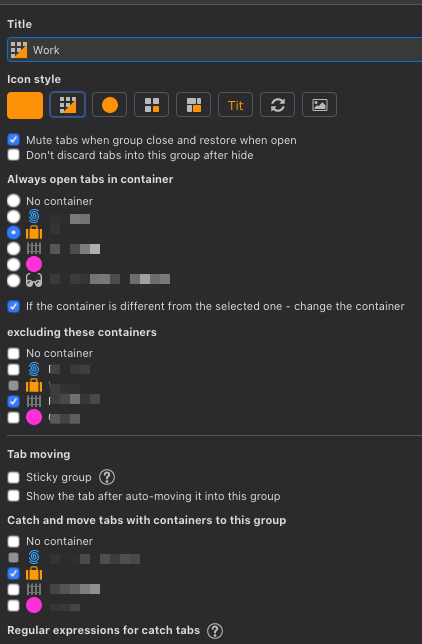
- Open a new tab
- Enter any target URL (e.g. https://github.com/drive4ik/simple-tab-groups)
Expected behaviour
Instead of a new tab the target URL should be loaded.
Screenshots
If applicable, add screenshots to help explain your problem.
Desktop (please complete the following information):
- OS and version: Mac
- Firefox version: 82.0.2 (64-bit)
- Simple Tab Groups version: [4.5.5
 omares
All 6 comments
fixed, please wait 4.5.5.1 version (under review)
 Drive4ik
on 4 Nov 2020
Drive4ik
on 4 Nov 2020
I'll leave this ticket open for now so other users can see it.
Drive4ik
on 4 Nov 2020
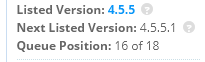
@Drive4ik When will the 4.5.5.1 release on the addons.mozilla.org? I checked update but the latest version is still 4.5.5
 v3470
on 5 Nov 2020
v3470
on 5 Nov 2020
@v3470
🤷
Drive4ik
on 5 Nov 2020
Just got the update, can confirm the issue is fixed, but somehow the tab behaviour is weird, but i am not able to pin down the issue.
Does the new tab get closed a new one is opened with the target container?
omares
on 5 Nov 2020
@omares Yes, the logic of work has not changed. The new tab is closed and the tab with the desired container opens. Hot change of containers on the tab without closing it is not yet possible.
Drive4ik
on 6 Nov 2020
Related issues
 ddTech
·
4Comments
ddTech
·
4Comments
 tomaszkane
·
3Comments
tomaszkane
·
3Comments
 Sophia10
·
4Comments
Sophia10
·
4Comments
 mzelyony
·
6Comments
mzelyony
·
6Comments
 kstev99
·
4Comments
kstev99
·
4Comments
Most helpful comment
fixed, please wait 4.5.5.1 version (under review)