Simple-tab-groups: Streamlined backup
Current routine
Extension version 4.5:
- click the toolbar icon
- click the preferences icon
- click the _Backup …_ tab
- click _Create backup_
- in the dialogue, double-click the required folder
- click _Save_.
I typically perform a manual backup before every quit of Firefox.
Feature request
I'd like single-click backup.
Realistically: there's nothing (no separate toolbar icon) on which a single click can be effective. Instead, maybe:
- add context menu functionality to the toolbar icon
- have Backup as a menu option.
Background
36
To the best of my knowledge, no session manager extension is compatible with Simple Tab Groups.
 grahamperrin
All 7 comments
If you select the backup option to the file once a day in the add-on settings, in this (and only this) case, the addon will backup every 2 hours and overwrite the file by the current date. You have a fresh backup with an interval of 2 hours.
To the best of my knowledge, no session manager extension is compatible with Simple Tab Groups.
If you need to restore a session or something else, disable the STG addon, restore the session and enable the STG addon. Otherwise, the connection between the group and the tab will be lost, since it is in session, and the addon has no idea that another addon will now restore or close the tabs. That is the problem.
 Drive4ik
on 5 May 2020
Drive4ik
on 5 May 2020
Thanks, the intention is to have a streamlined backup on demand (in addition to scheduled backups).
I once had a corrupt session, resulting from a kernel panic, recovery from which quite painful.
I already have auto-backup set to one hour so (for example) 204 files in STG-backups-FF-76.0 and 41 so far in STG-backups-FF-76.0.1. I'll occasionally manually weed most of the oldest backups.
grahamperrin
on 14 May 2020
I added a backup hotkey. #602
It will not call the save file window, it will just backup based on the backup settings of the addon. Will it be okay?
Drive4ik
on 18 May 2020
Sorry, I only just read your comment.
I don't see the feature:
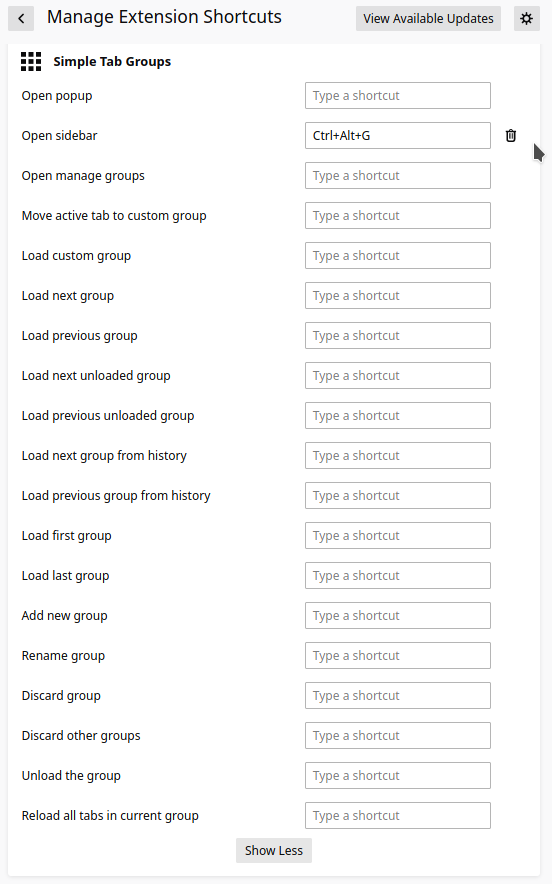
grahamperrin
on 1 Oct 2020
@grahamperrin
Sorry for the long absence, I made changes but I haven't released the new version yet. There will be a new version soon and will include this change.
Drive4ik
on 2 Oct 2020
Found (thank you).
For now, I choose Control-Alt-B.
From https://github.com/Drive4ik/simple-tab-groups/issues/621#issuecomment-782992080:
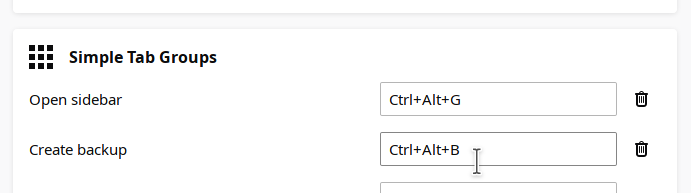
– result:
A repeat of the shortcut, on the same day, will overwrite the backup. This is reasonable; it avoids proliferation.
grahamperrin
on 20 Feb 2021
PS
Sorry for the long absence
No need to apologise!
grahamperrin
on 27 Feb 2021
Related issues
 stinos
·
4Comments
stinos
·
4Comments
 jtagcat
·
5Comments
jtagcat
·
5Comments
 tur-ium
·
3Comments
tur-ium
·
3Comments
 kstev99
·
4Comments
kstev99
·
4Comments
 ajvsol
·
6Comments
ajvsol
·
6Comments
Most helpful comment
I added a backup hotkey. #602
It will not call the save file window, it will just backup based on the backup settings of the addon. Will it be okay?