Simple-tab-groups: STG completely broken after upgrade to Firefox 71
Describe the bug
I upgraded to Firefox 31 today and STG is completely broken. The toolbar icon just shows an orange triangle, and I can't switch groups or display the list, nothing. In the extension preferences, I can save an error log. Here it is:
{
    "info": {
        "version": "4.3.6.1",
        "upTime": "179654ms",
        "browserInfo": {
            "name": "Firefox",
            "vendor": "Mozilla",
            "version": "71.0",
            "buildID": "20191203065433"
        },
        "platformInfo": {
            "os": "linux",
            "arch": "x86-64"
        },
        "permissions": {
            "bookmarks": false
        },
        "options": {
            "discardTabsAfterHide": false,
            "closePopupAfterChangeGroup": true,
            "openGroupAfterChange": true,
            "prependGroupTitleToWindowTitle": false,
            "createNewGroupWhenOpenNewWindow": false,
            "showNotificationAfterMoveTab": true,
            "openManageGroupsInTab": true,
            "showConfirmDialogBeforeGroupDelete": true,
            "showNotificationAfterGroupDelete": true,
            "showContextMenuOnTabs": true,
            "showContextMenuOnLinks": false,
            "exportGroupToMainBookmarkFolder": true,
            "showExtendGroupsPopupWithActiveTabs": false,
            "showTabsWithThumbnailsInManageGroups": false,
            "autoBackupEnable": true,
            "autoBackupIncludeTabThumbnails": false,
            "autoBackupIncludeTabFavIcons": false,
            "autoBackupGroupsToBookmarks": false,
            "autoBackupGroupsToFile": true,
            "enableDarkTheme": false,
            "hotkeys": [
                {
                    "ctrlKey": true,
                    "shiftKey": false,
                    "altKey": false,
                    "metaKey": false,
                    "key": "`",
                    "keyCode": 192,
                    "action": "load-next-group",
                    "groupId": 0
                },
                {
                    "ctrlKey": true,
                    "shiftKey": true,
                    "altKey": false,
                    "metaKey": false,
                    "key": "`",
                    "keyCode": 192,
                    "action": "load-prev-group",
                    "groupId": 0
                },
                {
                    "ctrlKey": false,
                    "shiftKey": true,
                    "altKey": false,
                    "metaKey": false,
                    "key": "F2",
                    "keyCode": 113,
                    "action": "move-active-tab-to-custom-group",
                    "groupId": 0
                }
            ],
            "defaultBookmarksParent": "toolbar_____",
            "defaultGroupIconViewType": "main-squares",
            "defaultGroupIconColor": "",
            "autoBackupLastBackupTimeStamp": 1575367066,
            "autoBackupIntervalKey": "hours",
            "autoBackupIntervalValue": 6,
            "autoBackupFolderName": "STG-backups",
            "autoBackupBookmarksFolderName": "STG bookmarks"
        }
    },
    "logs": [
        {
            "version": "4.3.6.1",
            "date": "12/4/2019, 10:14:08 AM",
            "message": "An unexpected error occurred",
            "lineNumber": 0,
            "stack": [
                ""
            ]
        },
        {
            "date": "8/22/2019, 3:42:44 PM",
            "message": "filename must not contain illegal characters",
            "lineNumber": 0,
            "stack": [
                ""
            ]
        },
        {
            "date": "8/22/2019, 3:35:19 PM",
            "message": "filename must not contain illegal characters",
            "lineNumber": 0,
            "stack": [
                ""
            ]
        },
        {
            "date": "8/22/2019, 1:55:08 PM",
            "message": "filename must not contain illegal characters",
            "lineNumber": 0,
            "stack": [
                ""
            ]
        },
        {
            "date": "8/22/2019, 1:51:44 PM",
            "message": "filename must not contain illegal characters",
            "lineNumber": 0,
            "stack": [
                ""
            ]
        },
        {
            "date": "8/22/2019, 1:51:25 PM",
            "message": "filename must not contain illegal characters",
            "lineNumber": 0,
            "stack": [
                ""
            ]
        },
        {
            "date": "8/22/2019, 1:50:48 PM",
            "message": "filename must not contain illegal characters",
            "lineNumber": 0,
            "stack": [
                ""
            ]
        }
    ]
}
I thought this could be related to auto-backup, so I tried to disable auto-backup, but when I restart the browser, the auto-backup feature is still enabled, so I can't disable it. I was able to enable debug logging in STG preferences, but the new log after restart doesn't seem to have any debug information, even though it looks a bit different:
{
    "info": {
        "version": "4.3.6.1",
        "upTime": "23783ms",
        "browserInfo": {
            "name": "Firefox",
            "vendor": "Mozilla",
            "version": "71.0",
            "buildID": "20191203065433"
        },
        "platformInfo": {
            "os": "linux",
            "arch": "x86-64"
        },
        "permissions": {
            "bookmarks": false
        },
        "options": {
            "discardTabsAfterHide": false,
            "closePopupAfterChangeGroup": true,
            "openGroupAfterChange": true,
            "prependGroupTitleToWindowTitle": false,
            "createNewGroupWhenOpenNewWindow": false,
            "showNotificationAfterMoveTab": true,
            "openManageGroupsInTab": true,
            "showConfirmDialogBeforeGroupDelete": true,
            "showNotificationAfterGroupDelete": true,
            "showContextMenuOnTabs": true,
            "showContextMenuOnLinks": false,
            "exportGroupToMainBookmarkFolder": true,
            "showExtendGroupsPopupWithActiveTabs": false,
            "showTabsWithThumbnailsInManageGroups": false,
            "autoBackupEnable": true,
            "autoBackupIncludeTabThumbnails": false,
            "autoBackupIncludeTabFavIcons": false,
            "autoBackupGroupsToBookmarks": false,
            "autoBackupGroupsToFile": true,
            "enableDarkTheme": false,
            "hotkeys": [
                {
                    "ctrlKey": true,
                    "shiftKey": false,
                    "altKey": false,
                    "metaKey": false,
                    "key": "`",
                    "keyCode": 192,
                    "action": "load-next-group",
                    "groupId": 0
                },
                {
                    "ctrlKey": true,
                    "shiftKey": true,
                    "altKey": false,
                    "metaKey": false,
                    "key": "`",
                    "keyCode": 192,
                    "action": "load-prev-group",
                    "groupId": 0
                },
                {
                    "ctrlKey": false,
                    "shiftKey": true,
                    "altKey": false,
                    "metaKey": false,
                    "key": "F2",
                    "keyCode": 113,
                    "action": "move-active-tab-to-custom-group",
                    "groupId": 0
                }
            ],
            "defaultBookmarksParent": "toolbar_____",
            "defaultGroupIconViewType": "main-squares",
            "defaultGroupIconColor": "",
            "autoBackupLastBackupTimeStamp": 1575367066,
            "autoBackupIntervalKey": "hours",
            "autoBackupIntervalValue": 6,
            "autoBackupFolderName": "STG-backups",
            "autoBackupBookmarksFolderName": "STG bookmarks"
        }
    },
    "logs": [
        {
            "version": "4.3.6.1",
            "date": "12/4/2019, 10:32:32 AM",
            "message": "An unexpected error occurred",
            "lineNumber": 0,
            "stack": [
                ""
            ]
        },
        {
            "version": "4.3.6.1",
            "date": "12/4/2019, 10:32:28 AM",
            "message": "An unexpected error occurred",
            "lineNumber": 0,
            "stack": [
                ""
            ]
        },
        {
            "version": "4.3.6.1",
            "date": "12/4/2019, 10:30:18 AM",
            "message": "An unexpected error occurred",
            "lineNumber": 0,
            "stack": [
                ""
            ]
        },
        {
            "version": "4.3.6.1",
            "date": "12/4/2019, 10:26:09 AM",
            "message": "An unexpected error occurred",
            "lineNumber": 0,
            "stack": [
                ""
            ]
        },
        {
            "version": "4.3.6.1",
            "date": "12/4/2019, 10:25:57 AM",
            "message": "An unexpected error occurred",
            "lineNumber": 0,
            "stack": [
                ""
            ]
        },
        {
            "version": "4.3.6.1",
            "date": "12/4/2019, 10:25:46 AM",
            "message": "An unexpected error occurred",
            "lineNumber": 0,
            "stack": [
                ""
            ]
        },
        {
            "version": "4.3.6.1",
            "date": "12/4/2019, 10:14:08 AM",
            "message": "An unexpected error occurred",
            "lineNumber": 0,
            "stack": [
                ""
            ]
        },
        {
            "date": "8/22/2019, 3:42:44 PM",
            "message": "filename must not contain illegal characters",
            "lineNumber": 0,
            "stack": [
                ""
            ]
        },
        {
            "date": "8/22/2019, 3:35:19 PM",
            "message": "filename must not contain illegal characters",
            "lineNumber": 0,
            "stack": [
                ""
            ]
        },
        {
            "date": "8/22/2019, 1:55:08 PM",
            "message": "filename must not contain illegal characters",
            "lineNumber": 0,
            "stack": [
                ""
            ]
        },
        {
            "date": "8/22/2019, 1:51:44 PM",
            "message": "filename must not contain illegal characters",
            "lineNumber": 0,
            "stack": [
                ""
            ]
        },
        {
            "date": "8/22/2019, 1:51:25 PM",
            "message": "filename must not contain illegal characters",
            "lineNumber": 0,
            "stack": [
                ""
            ]
        },
        {
            "date": "8/22/2019, 1:50:48 PM",
            "message": "filename must not contain illegal characters",
            "lineNumber": 0,
            "stack": [
                ""
            ]
        }
    ]
}
I had to downgrade to Firefox 70, STG works fine there. Please advise what to do and how to debug this further. I'm staying away from Firefox 71 at the moment.
To Reproduce
Steps to reproduce the behavior:
- Upgrade to Firefox 71
Desktop (please complete the following information):
- OS and version: Fedora 31
- Firefox version: 71
- Simple Tab Groups version: 4.3.6.1
 kparal
All 16 comments
This might be related to #499.
kparal
on 4 Dec 2019
Hi! Thanks for logs!
Can you enable debug mode (in addon settings) and record logs with this error?
How to start record logs
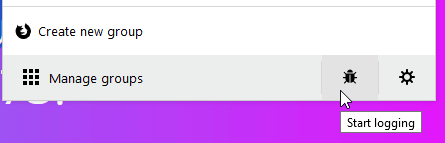
I need to understand exactly where the error occurs, but I just can not do it, and Firefox does not give a detailed log ...
Already a bunch of letters in my mail with this problem, but I can not understand because of what it is.
Can you help me?
You can make a copy of your Firefox profile, launch Firefox in this profile copy, delete all personal data, such as cache, passwords, browser history, tabs, etc. And send this profile to me, for debug. I have no error on Windows...
Thanks anyway!
 Drive4ik
on 4 Dec 2019
Drive4ik
on 4 Dec 2019
Hi! I found the cause of the breakdown. Firefox 71 on linux cannot save data in IDBDatabase.
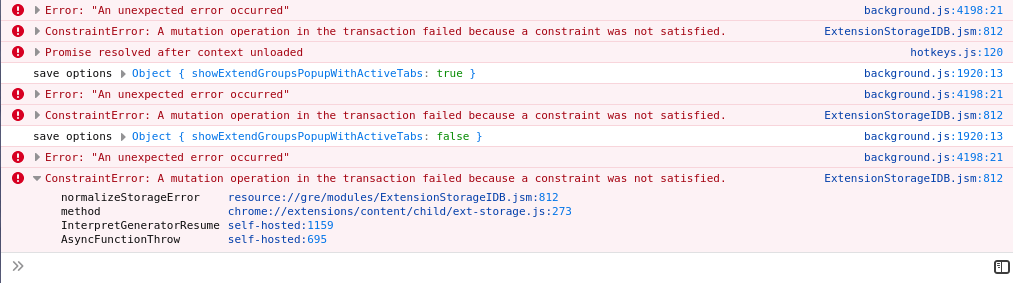
https://developer.mozilla.org/en-US/docs/Web/API/IDBDatabaseException
CONSTRAINT_ERR: _A mutation operation in the transaction failed because a constraint was not satisfied_. For example, an object, such as an object store or index, already exists and a request attempted to create a new one.
I managed to save the data only by clearing the storage, maybe there is an error related to the indexes in the database.
This is less stable, but at least it works ....
4cd553f437a5eab250586e7f7122761374d0bc86
please, wait for version 4.3.6.2 or above, bug fixed in it
Drive4ik
on 4 Dec 2019
I create bug in bugzilla for this issue
https://bugzilla.mozilla.org/show_bug.cgi?id=1601365
Drive4ik
on 4 Dec 2019
I'm running Firefox 71.0.1 on Archlinux and it works fine.
Tested with the my main FF profile that was running in an older FF version before (upgrade path) and in a newly created test profile (STG installed directly on FF 71). Both work as expected.
Also in the inspect view of STG I can use browser.storage.local.set without problems.
 Tobsic
on 5 Dec 2019
Tobsic
on 5 Dec 2019
Thanks for the quick fix!
How long does it take usually for the update to propagate to the addon repos?
Any temp workaround that could be used in the meantime?
 320x200
on 5 Dec 2019
320x200
on 5 Dec 2019
This is less stable, but at least it works ....
So it's a fix or a workaround?
 532910
on 5 Dec 2019
532910
on 5 Dec 2019
@320x200 You can downgrade to Firefox v70 and everything should work.
Drive4ik
on 5 Dec 2019
@532910 this is workaround.
Drive4ik
on 5 Dec 2019
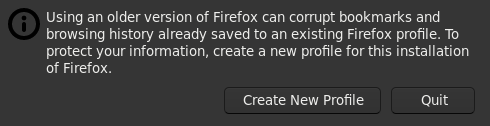
You can downgrade
NO, you can not:
532910
on 5 Dec 2019
@532910 Revert your profile to what it was prior to updating to Firefox 71.
 kssi
on 8 Dec 2019
kssi
on 8 Dec 2019
At least in Fedora 31, this should be resolved by this update:
https://bodhi.fedoraproject.org/updates/FEDORA-2019-ab3dab5ba6
The issue was a combination of Firefox source code and a compiler. Extensions can now write to local storage once again.
kparal
on 12 Dec 2019
Firefox 71.0-2 have workaround for this issue.
https://metadata.ftp-master.debian.org/changelogs/main/f/firefox/unstable_changelog
(Other distros also should have it.)
This issue should be closed and 4cd553f reverted.
532910
on 22 Dec 2019
Has anyone tested this to be working with Firefox 72? Looking at https://bugzilla.mozilla.org/show_bug.cgi?id=1601707 it doesn't sound like the fix made it there, only for the (not yet released) 73 version.
 nekohayo
on 16 Jan 2020
nekohayo
on 16 Jan 2020
Individual Linux distributions need to carry the fix themselves until the fix is included in upstream Firefox (yes, probably 73).
kparal
on 16 Jan 2020
@532910 I will not roll back because many more users now have Firefox 68 and 69.
This fix does not break the addon, I’ll delete it somewhere after half a year, when Firefox ~75 is released
Drive4ik
on 22 Jan 2020
Related issues
 ericwbailey
·
6Comments
ericwbailey
·
6Comments
 Sophia10
·
4Comments
Sophia10
·
4Comments
 victoriastuart
·
5Comments
victoriastuart
·
5Comments
 falolaf
·
4Comments
falolaf
·
4Comments
 imwhynowhy
·
5Comments
imwhynowhy
·
5Comments
Most helpful comment
I create bug in bugzilla for this issue
https://bugzilla.mozilla.org/show_bug.cgi?id=1601365