Simple-tab-groups: Tabs are detached from groups when turning off computer (sometimes)
Describe the bug
It is not clear exactly what must be in place for this to happen. But whenever I leave for the day, I turn off my computer, and the next day when I turn it on and open firefox, the tabs of the last tab group that I had open are displayed, but they do not belong to any of the groups I have made, and all of the other tabs have now become hidden tabs that do not belong to any group anymore. I have to manually re-fetch these tabs and assign them to the correct group.
To Reproduce
Unfortunately I am not able to consistently reproduce this; restarting the computer doesn't seem to consistently reproduce it, neither does opening or closing FF. However, it does happen both on my Windows and my Ubuntu computer.
Expected behavior
I expect all the tabs to be assigned to the groups they were assigned to when I shut down the computer.
Desktop (please complete the following information):
- Windows 10 and Ubuntu 18.04
- FF version 68.0.2 64-bit
- Simple Tab Groups version: 4.0.1.2
 eirikgje
All 16 comments
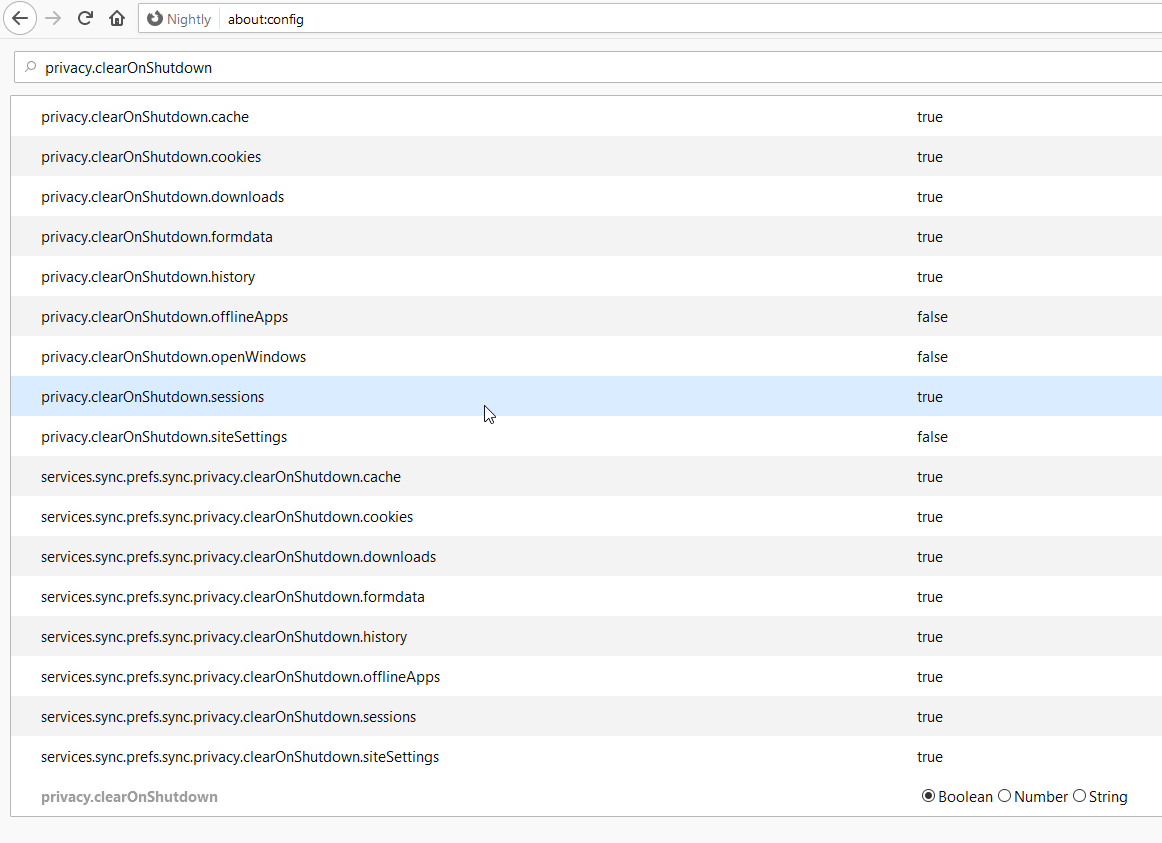
Hi! Please, can you take screenshot this pagewith filter privacy.clearOnShutdown ?
And one more question. Do you close Firefox before shutting down your computer? Are you waiting for its complete closure? Or just turn off the computer with all the programs running?
 Drive4ik
on 30 Aug 2019
Drive4ik
on 30 Aug 2019

I just turn off the computer without closing firefox, yes. Which I would like to continue doing, if possible :) But if for whatever reason it's not compatible with tab groups, then of course a solution is to just properly close firefox before turning off the computer.
eirikgje
on 2 Sep 2019
I am facing the same problem. I also had this issue after installing firefox update or after system restart but having firefox closed properly before.
 hohwille
on 16 Sep 2019
hohwille
on 16 Sep 2019
For what it's worth, this has not been a problem for me for the last week or so perhaps.
eirikgje
on 19 Sep 2019
I have seen the same issue, though for me it might in part be due to how Mac OS works - closing the browser window doesn't exit Firefox, just closes the window. I'll have to test on Linux too. Once I figured that out default settings even with FF clearing history and sessions on shutdown it still worked, at least on Mac.
NOTE: Apparently that is the expected behavior of MacOS and applications... very annoying though and leads to use-cases like this being problematic. I still can't speak to Windows/Linux though.
 BenjamenMeyer
on 31 Oct 2019
BenjamenMeyer
on 31 Oct 2019
I am having the same issue on windows. And it seems to happen every time FF is closed. Once opened again all groups are empty and the tabs are in the "Other tabs" section.
 g3rain1
on 6 Nov 2019
g3rain1
on 6 Nov 2019
Guys, I want to clarify again a little.
All tabs and their relationship with groups since version 4 is stored in a browser session, not an addon. If the tabs disappeared and did not remain in the session, then this is a mistake (possibly) in the browser itself. The addon saves only groups, and tabs save the group identifier.
Therefore, if all the tabs suddenly ceased to be in groups, then the problem is with browser sessions. Try to repeat the same steps only on the new clean Firefox profile.
I understand the situation with the browser on mac, but so far I can’t figure out how to resolve it (this cannot happen with windows - there is no running process in the background after closing the last window). After all, when you close the window, all the tabs really and truly close, only my addon then in the background creates them again already hidden in the main browser window, but if there is none, then there is nowhere to create tabs ...
Also, I don’t have a mac to somehow find a solution and test ...
Drive4ik
on 7 Nov 2019
@Drive4ik I'm not sure there's a good solution for the Mac unless you track the windows and make that more independent...but even then, it might just not be possible to fully solve the broken application model on Mac.
Just saying - even as Mac user (not by choice) - I wouldn't put any significant effort into it. Perhaps the community - someone always on the Mac - could do a PR for it if they can find a good solution - so may be open an Issue for Mac with a "Help Wanted" notice. $0.02 FWIW
BenjamenMeyer
on 8 Nov 2019
Wow. People really manually shutdown their computer w/o closing apps and think it's not causing issues? Maybe they should suspend or hibernate, instead.
 wwp
on 24 Dec 2019
wwp
on 24 Dec 2019
@wwp sometimes you don't get a choice. Windows, Linux, and Mac all notify the applications about a pending shutdown and even allow applications to cancel the shutdown if they're unable to close.
I've observed Firefox will terminate the shutdown if you don't confirm closing the tabs.
There's multiple reasons why this scenarios may come up. It shouldn't corrupt the state on disk prior, and things should be able to gracefully recover.
BenjamenMeyer
on 2 Jan 2020
Hey, guys! Please wait for version 4.4.2 (under review) or above and check it out. I tried to fix this problem, but I can't test it.
Drive4ik
on 24 Feb 2020
I'm jumping in here because this appears to be related to the same issue I'm having. I am running Firefox 68 under Debian linux, and it appears that STG 4.4.2.5 is what is currently installed here.
I have noticed that every time firefox crashes it completely trashes my tab groups. After a crash today (working on tinkercad.com and something went horribly wrong), 8 of my 15 tab groups were completely empty. Now if I were a normal user it wouldn't be so bad to just move the tabs back to their respective group, but I'm one of those crazies who pushes things to the extreme... I had 1055 tabs open, and 896 of them were no longer in groups. I wasted my entire afternoon trying to sort out the mess.
One thing that would be extremely helpful from the 'manage tabs' window is if it respected the normal operating system shortcuts of holding down the shift or ctrl keys to select multiple entries. Since most of my tabs are in order by the group they belong in, it would have been great it I could simply shift-click to select hundreds of tabs at a time and drop them in their proper group.
It was mentioned above that this is a problem with sessions. I would like to note that my session windows always restore properly after a crash, but the tab groups always have problems?
 Shdwdrgn
on 23 Mar 2020
Shdwdrgn
on 23 Mar 2020
@Shdwdrgn
First of all, I want to advise you to update your browser to the latest version. I also want to ask, did you try to restore the necessary groups from backup? It will also turn out faster.
Selecting tabs with the Ctrl or Shift keys pressed works both in the popup window and in manage groups. But I want to admit that shift + click works incorrectly in manage groups, this is a bug, I already fixed it, there will be a release soon.
It was mentioned above that this is a problem with sessions. I would like to note that my session windows always restore properly after a crash, but the tab groups always have problems?
The browser can successfully restore its tabs, but there may be a problem in the session between the browser and the addon. Sorry, but a browser crash may not always restore everything.
Drive4ik
on 23 Mar 2020
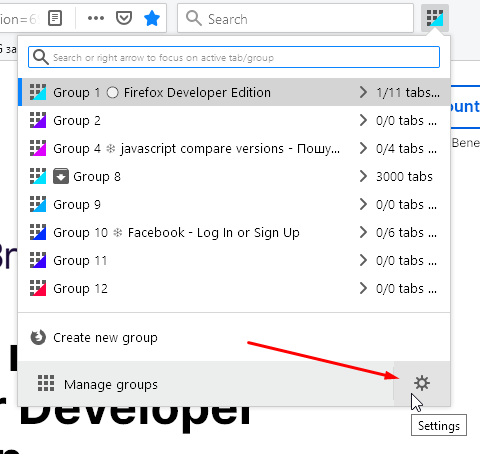
How do you restore tab groups from backup? I haven't seen any options under the manager window and apparently firefox no longer has the option to save and restore sessions. Yes it certainly would have made this process much easier.
Shdwdrgn
on 23 Mar 2020
Drive4ik
on 23 Mar 2020
https://github.com/Drive4ik/simple-tab-groups/issues/448#issuecomment-551891361
… not sure there's a good solution for the Mac …
Defocusing from macOS
With _any_ system that allows Firefox to continue running after all windows are closed, the extension mentioned here can help to prevent losses of group context:
 grahamperrin
on 25 Feb 2021
grahamperrin
on 25 Feb 2021
Related issues
 Sophia10
·
4Comments
Sophia10
·
4Comments
 ericwbailey
·
6Comments
ericwbailey
·
6Comments
 mzelyony
·
6Comments
mzelyony
·
6Comments
 tomaszkane
·
3Comments
tomaszkane
·
3Comments
 kstev99
·
4Comments
kstev99
·
4Comments
Most helpful comment
@Drive4ik I'm not sure there's a good solution for the Mac unless you track the windows and make that more independent...but even then, it might just not be possible to fully solve the broken application model on Mac.
Just saying - even as Mac user (not by choice) - I wouldn't put any significant effort into it. Perhaps the community - someone always on the Mac - could do a PR for it if they can find a good solution - so may be open an Issue for Mac with a "Help Wanted" notice. $0.02 FWIW