Simple-tab-groups: Can't disable incognito mode for addon
Describe the bug
The addon doesn't load, in the tab bar there is a yellow warning sign where the addon icon usually is (picture 1).
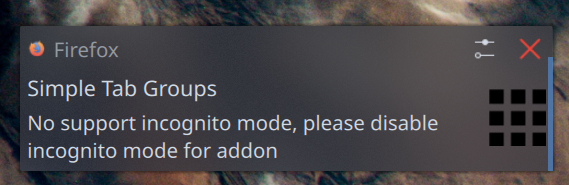
When I click it, firefox sends a notification to disable incognito mode (picture 2).
When I open the addon settings (picture 3), there is no option to toggle the incognito mode for the addon, it seems to be locked to disabled, the text reads
Not Allowed in Private Windows
This extension does not run while private browsing. Learn more
To Reproduce
Steps to reproduce the behavior:
- Start firefox with addon version 4.0
- Click on the yellow warning sign
- Read notification to disable incognito mode
- Go to addon settings for Simple Tab Groups
- There is no option to disable the addon in incognito mode.
Expected behavior
A toggle option like in other addons to disable the incognito mode for this addon.
Screenshots
Picture 1: Warning sign in tab bar

Picture 2: Notification
Picture 3: No option to toggle Private Window mode

Desktop (please complete the following information):
- OS: Linux
- Firefox version: 68.0.1
- Simple Tab Groups version: 4.0
Additional context
Add any other context about the problem here.
 fireglow
All 30 comments
Same here.
 Andandaran
on 6 Aug 2019
Andandaran
on 6 Aug 2019
Yep, addon v4.0 does not load at all.
I'm also on Linux if that means anything
OS: Linux
Firefox version: 68.0.1
Simple Tab Groups version: 4.0
 techsy730
on 6 Aug 2019
techsy730
on 6 Aug 2019
Same problem.
OS: Windows 10
Firefox version: 68.0.1
Simple Tab Groups version: 4.0
 CazeW
on 6 Aug 2019
CazeW
on 6 Aug 2019
Hi all. Sorry for this issue, I thought Firefox auto disable incognito mode, because I set
"incognito": "not_allowed",
into manifest.json. But Firefox did not consider it..
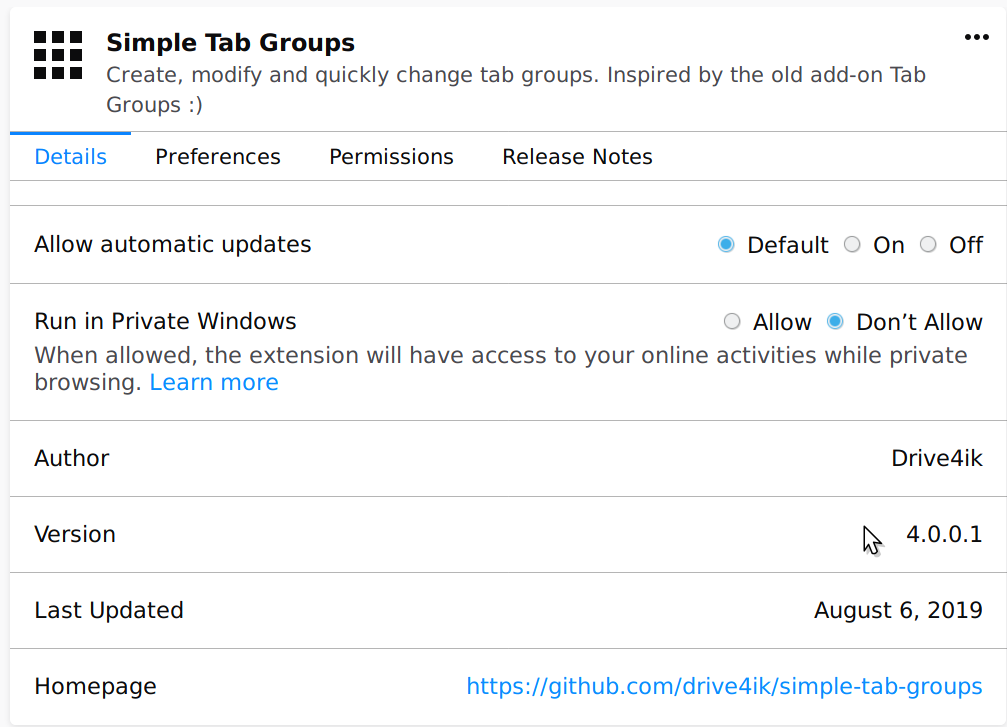
Please update addon to v4.0.0.1 and then you have to disable incognito mode for addon in about:addons page:

 Drive4ik
on 6 Aug 2019
Drive4ik
on 6 Aug 2019
Sadly, 4.0.0.1 still doesn't fix it
techsy730
on 6 Aug 2019
@techsy730 I don’t quite understand you ...
Drive4ik
on 6 Aug 2019
4.0.0.1 solved the problem for me on Linux, FF69.0b9
 ZackBoe
on 6 Aug 2019
ZackBoe
on 6 Aug 2019
Refresh about:addons page
Drive4ik
on 6 Aug 2019
Sorry, messed up my description. Anyways, what I was trying to say is that I'm on 4.0.0.1 but it still is broken the same way for me.
techsy730
on 6 Aug 2019
@techsy730 Do you refresh about:addons page or restart browser?
Drive4ik
on 6 Aug 2019
Yes to both.
But I got it working.
You have to explicitly deny it permission to run in private windows. Enabling it to be able to run in in private windows breaks it as described in this bug even when not in a private window. Thanks Firefox...:unamused:
Anyways, that is now technically a new bug, or at least a supported workaround is now in. Anyways, thanks for the quick turnaround. :smiley:
techsy730
on 6 Aug 2019
@Drive4ik Thank you, Version 4.0.0.1 solved the issue for me, there now is an option to toggle the Incognito Window mode:
fireglow
on 6 Aug 2019
Please let the problem still be open to those who may have the same problem.
Drive4ik
on 6 Aug 2019
Oh, of course! Sorry
fireglow
on 6 Aug 2019
Had same issue. This fixed it, however I lost the saved tabs associated with about 7 tab groups for some reason. The group names are still there, but number of tabs is 0. The majority of the tab groups were not impacted.
I am not worried about recovering, this is just an FYI for @Drive4ik.
 suntzuisafterU
on 6 Aug 2019
suntzuisafterU
on 6 Aug 2019
4.0.0.1 fixed for me on OS X El Capitan, Firefox 68.0.1
Andandaran
on 6 Aug 2019
Having the same issue on Firefox 68.0.1 on win 7. I don't have any options to disable/enable incognito mode though.
 MickCasanova
on 7 Aug 2019
MickCasanova
on 7 Aug 2019
@MickCasanova Update the addon. Restart firefox, and/or do Ctrl+Shift+A, then refresh that page with Ctrl+Shift+R and click Check for updates.
fireglow
on 7 Aug 2019
Thanks, got it working. Although I have to redo my groups.. Not a problem though. THanks again.
MickCasanova
on 7 Aug 2019
This should be reported as a firefox bug, firefox shouldn't be enabling incognito by default and certainly not when it's set disabled by the extension.
I'd do it but they want to change my github password, which they shouldn't have any access to, so, nah... and I can't report that to bugzilla, because they use the same system.
 PaulBags
on 7 Aug 2019
PaulBags
on 7 Aug 2019
Thanks!
Note that the "_extensions.allowPrivateBrowsingByDefault_" option (in _about: config_) must be set to false. Otherwise, the "_Run in private window_" option will not be available.
 im314
on 7 Aug 2019
im314
on 7 Aug 2019
Still cannot make it work on Firefox + Windows. What other info do you need to debug?
EDIT: Did not find first that I had to manually update to 4.0.0.1.
Working again. Thanks for quick help!
 bloodmandarin
on 7 Aug 2019
bloodmandarin
on 7 Aug 2019
I had the same bug:
The addon doesn't load, in the tab bar there is a yellow warning sign where the addon icon usually is.
When I click it, firefox sends a notification to disable incognito mode.
I successfully disabled the incofnito mode.
Now, after each restart of Firefox, a new tab is automatically opened.
Tab URL:
moz-extension://f2adffc3-e768-4ee4-8e90-ea7fde3dc20c/help/welcome-v4.html
Tab contents:
Welcome to Simple Tab Groups v4
Please enable "Restore previous session" in browser settings:
[screenshot]
OS: Windows 10 1903 Professional
Firefox version: 69.0b11
Simple Tab Groups Version: 4.0.0.2
I use about 3 different firefox profiles simultaneously. For each of the profiles I have a different STG backup folder.
 eyalarg
on 9 Aug 2019
eyalarg
on 9 Aug 2019
SAME SITUATION HERE IN FIREFOX 68.0.1 ON WINDOWS 10, STG - 4.0.0.2
ALSO WHEN CLICK ON "STG" YELLOW TRIANGLE SHIELD ALONG WITH "SOMETHING WENT WRONG" MESSAGE,
FIREFOX HANGS AND I HAVE TO RESTART,
ALSO THERE HAS BEEN NO "STG" BACKUPS FOR 3 DAYS SINCE THIS ISSUE STARTED...
ADDITIONALLY, THE RIGHT CLICK ON A TAB DOES NOT GIVE ANY STG OPTIONS TO SEND TO AN STG FOLDER...
 SHELDITA
on 9 Aug 2019
SHELDITA
on 9 Aug 2019
@eyalarg Hi. Do you have enable restore prev session checkbox on all three profiles?
The fact is that this welcome page is shown only once when updating data from version 3 to version 4.
Restoring from v3 backup will also show this page.
If it is displayed at each start of the browser, it means the browser does not save the add-on data.
Drive4ik
on 9 Aug 2019
@eyalarg Hi. Do you have enable
restore prev sessioncheckbox on all three profiles?
The fact is that this welcome page is shown only once when updating data from version 3 to version 4.
Restoring from v3 backup will also show this page.
If it is displayed at each start of the browser, it means the browser does not save the add-on data.
Hello,
The restore prev session checkbox was set on (at all Firefox profiles) way before the STG 4.0 version was published, and is still set on. Anyhow, I did find something interesting. The problem does not occur in the default Firefox profile. So, I set a non-default profile as the default one. The problem persists in the newly set-as-default Firefox profile. To remove any doubt that another add-on causes the problem, I have disabled all add-ons except STG. The problem persists. Every time I re-start a problematic profile, the reminder to set the restore prev session is re-generated.
I see that the browser DOES save the add-on data. It does make STG daily backups and restores the correct set of tabs that were visible/hidden just before closing the browser.
eyalarg
on 10 Aug 2019
@eyalarg Hey. Something I don’t quite understand how this can happen... You have enabled restore prev session checkbox in your browser settings, and when you load this profile, as I understand, run it from with the --profile "c:/" paramter, each when launched, it opens the welcome tab v4. Right?
Sorry for my bad English
Drive4ik
on 12 Aug 2019
@eyalarg Hey. Something I don’t quite understand how this can happen... You have enabled
restore prev sessioncheckbox in your browser settings, and when you load this profile, as I understand, run it from with the--profile "c:/"paramter, each when launched, it opens the welcome tab v4. Right?
Sorry for my bad English
Hello Drive4ik
You got me right. You understand me correctly. The first profile is launched by:
"C:\Program Files\Mozilla Firefox\firefox.exe"
The other profiles are launched by:
"%ProgramFiles%\Mozilla Firefox\firefox.exe" -P ProfileName -no-remote
I did some testing:
I created a blank new profile, installed STG on it. created a new group and opened some tabs.
restarted the browser. No welcome tab v4 showed up.
Then, I imported a backup from a "bad" profile with about 120 tabs in 5 groups.
The problem occurred after restarting the browser with the new profile (it opened the welcome tab v4).
Then, I thought , maybe this is related to the tabs and groups that I imported.
I deleted all groups and closed all tabs. Manually I created a new group with some new different tabs (that did not exist in the deleted groups),
Restarted the browser. Problem occurred, as if my Firefox profile is now "infected".
To be sure that my tabs are not what is causing the problem, I did the following test:
I deleted the contents of both
AppData\Roaming\Mozilla\Firefox\Profiles\ProfileFolder
and
AppData\Local\Mozilla\Firefox\Profiles\ProfileFolder
Tested my now-blank profile- It is OK.
Installed STG- Still OK.
Imported as bookmarks all the tabs from the "bad" profile.
Manually created the 5 tab groups and opened the tabs from the bookmarks in each corresponding group.
Still everything is OK.
My assumption:
There is some kind of a problem which causes the Firefox profile to be "infected". Once the profile has been "infected", even if the cause is removed, the "infection" persists.
The only remedy is to delete the profile and re-build it, and to open the groups and tabs from the bookmarks library instead of the backup file.
eyalarg
on 13 Aug 2019
@eyalarg Hey. Something I don’t quite understand how this can happen... You have enabled
restore prev sessioncheckbox in your browser settings, and when you load this profile, as I understand, run it from with the--profile "c:/"paramter, each when launched, it opens the welcome tab v4. Right?
Sorry for my bad English
Hello Drive4ik again,
I have some good news. The add-on on my PC was automatically updated to version 4.0.1.1.
In this new version I successfully applied a new procedure which I did not try on the precious version:
1) Backup all groups as bookmarks.
2) Remove the add-on from Firefox.
3) Close all the tabs.
4) Restart Firefox and create 2 new tabs refering to some http/https sites. Maybe one tab could have been enough.
5) Re-install the STG add-on.
6) Create a new group. Move the 2 tabs from step 4 to that group.
7) Restart Firefox. Make sure that all the tabs (the two of them) are in the newly created group.
8) Restore the first group from the bookmarks to the current Group. Close the unnecessary tabs that created in step 4.
8) Manually create a group for each of the backed-up groups. Visit (open) each of the newly-created groups.
9) Restore the tabs to each group from the bookmarks. Close the "new tab" that was automatically created when you first visited the newly-created group.
10) Restart Firefox. The welcome v4 tab does not re-created. Problem solved.
I did not try to restore the tabs from a file. Now I suspect that the welcome v4 tab is generated when the add-on is not initialized in a way it expects to., especially if it is installed and immediately gets populated with new groups and tabs from a backup.
eyalarg
on 14 Aug 2019
@eyalarg Hi! now welcome page show on install addon or update from version which <4.0
Drive4ik
on 25 Sep 2019
Related issues
 ddTech
·
4Comments
ddTech
·
4Comments
 HASJ
·
6Comments
HASJ
·
6Comments
 ACB1337
·
5Comments
ACB1337
·
5Comments
 mzelyony
·
6Comments
mzelyony
·
6Comments
 jtagcat
·
5Comments
jtagcat
·
5Comments
Most helpful comment
Yes to both.
But I got it working.
You have to explicitly deny it permission to run in private windows. Enabling it to be able to run in in private windows breaks it as described in this bug even when not in a private window. Thanks Firefox...:unamused:
Anyways, that is now technically a new bug, or at least a supported workaround is now in. Anyways, thanks for the quick turnaround. :smiley: