Simple_form: Disable and Readonly attributes not working properly for Selects
I am using Simple Form with Bootstrap. I have the following select field:
= f.association :judge, collection: User.judges, label_method: :full_name, value_method: :id, required: true, disabled: true, selected: current_user.id
When using disabled: true, the input is indeed disabled. But when submitting the form, its value is not passed to the controller, even when I have pre-selected a value already as shown above. The input actually shows this value in the input.
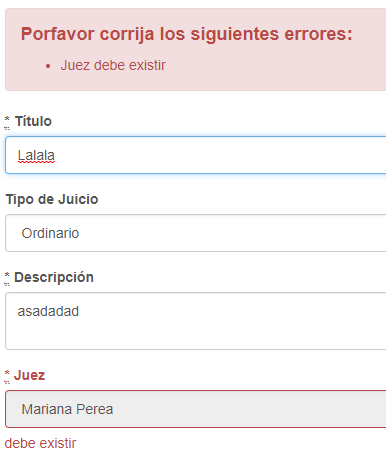
Moreover, when using the readonly: true attribute instead. The value is passed to the controller, but it can be changed from the select field, even when it appears to be disabled. Defeating the whole purpose of a read-only input.

 aalvrz
All 4 comments
@BigChief45
It is not the issue of simple_form, just because HTML doesn't support.
Solution 1
<%= f.input :gender, disabled: true, collection: gender_value = enum_collection(User.genders), include_blank: "select your sex" %>
<%= f.input :gender, as: :hidden, input_html: {value: gender_value[0][0]} %>
Solution 2
<%
cannot_select = {
  onfocus: "this.defaultIndex=this.selectedIndex;",
  onchange: "this.selectedIndex=this.defaultIndex;"
}
%>
<%= f.input :gender, readonly: true, collection:  enum_collection(User.genders), include_blank: "select your sex", input_html: {}.merge(cannot_select) %>
Other Solutions ……
 shootingfly
on 16 Oct 2017
shootingfly
on 16 Oct 2017
@shootingfly Thank you. I think I figured it out soon after. Closing.
aalvrz
on 16 Oct 2017
@shootingfly is it possible to use readonly: true conditional. Please let me know if you have any idea.
 jaswinder-proptiger
on 8 Jun 2018
jaswinder-proptiger
on 8 Jun 2018
You can use CSS to mimic the disabled property.
Just create the class and add it conditionally.
.disable {
  pointer-events:none;background: #f2f2f2;
}
 pavan-itd
on 21 Aug 2020
pavan-itd
on 21 Aug 2020
Related issues
 frankyston
·
4Comments
frankyston
·
4Comments
 mameier
·
3Comments
mameier
·
3Comments
 victorbstan
·
4Comments
victorbstan
·
4Comments
 JanStevens
·
5Comments
JanStevens
·
5Comments
 rottingcorpse
·
5Comments
rottingcorpse
·
5Comments
Most helpful comment
@BigChief45
It is not the issue of simple_form, just because HTML doesn't support.
Solution 1
Solution 2
Other Solutions ……