Silverstripe-framework: [SECURITY] Bad UX for lost password / password reset
Upon successful reset of password through lost password email, ChangePasswordForm will redirect you to whatever location happens to be stored in Session::get('BackURL'). This may be desired in some cases but I think it leads to a a bad user experience on two counts
- Unpredictability about what page the user will end up on
- No feedback / success message for the user may leave them in doubt as to whether the password reset was successful
Think it would be better to ignore the BackURL and instead redirect people back to the change password form every time with a success message. Also think it's a bad idea to ever store a BackURL in Session with no context. If a user starts a process that causes this value to be set but doesn't finish it, then that value could be picked up much later and create an unpredictable/undesirable result, in the same process or a completely unrelated one.
Related: https://github.com/silverstripe/silverstripe-framework/issues/3757 (As of SS4, the result of resetting your password and successfully logging in is an offer to log in as someone else, with no way to get back to the page you were trying to log in to.)
Edit - improvements being pitched:
- Upon successful password change, drop instant redirect and replace with confirmation message step which includes a link to continue to the redirect destination.
- Alternative idea: Redirect + Toast notification. Could work for /admin destinations but not other protected URLs
- Alternative idea: Warning a user in the form that they're going to be redirected after the change. This is better than nothing but not as good as an explicit success message.
- Ensure that
BackURL,default_reset_password_dest, anddefault_login_destare persisted and respected in this workflow.
 jonom
jonom
All 32 comments
Agreed. The entire password reset function is a bit of a pain from a user point of view
 dhensby
on 18 Mar 2016
dhensby
on 18 Mar 2016
I would not redirect back to the change password form. I personally hate to see the form again, after submitting. It somehow feels like I did something wrong.
Suggestion:
Create a "your password has been reset" page, with a text explaining what happened, and a link saying something like "Go back to where you were before resetting your password", which obviously would point to the BackURL.
 Firesphere
on 21 Mar 2016
Firesphere
on 21 Mar 2016
If the ChangePasswordForm set a ChangePasswordBackURL the first time it's seen (when it knows the referrer), and redirects them back when it's successfully changed.
The only issue is that it wouldn't always work (e.g. this form is used when the user's password has expired, which is set whenever the user logs in and their password has expired, so you can't take them back to the login form as that's pointless too.
 madmatt
on 25 Mar 2016
madmatt
on 25 Mar 2016
I would not redirect back to the change password form. I personally hate to see the form again, after submitting.
I'm not attached to showing them the form again, the important thing to me is that we give users a success message, not blindly throw them to some location they may or may not want to go to with no indication of whether or not the password change was successful.
@dhensby do you have any thoughts about SemVer on this one? I'd like to fix this in 3.x but is this a broken enough behaviour that we can stop redirecting people and not consider it a breaking change? I guess it could be an opt-in fix with a config variable but seems convoluted.
jonom
on 31 Mar 2016
So I whipped up a change that redirects users back to the form (for now, because it's easy) and displays a confirmation message, but also shows a link to the BackURL if available, which I thought might be a nice compromise.
But then I wondered if this could be a security vulnerability, because the BackURL is posted in via the form so that could be manipulated and maybe cause this page to display some undesirable HTML instead of a valid URL?

jonom
on 5 Apr 2016
As long as you validate that it's a site url, and it's properly encoded, then it's fine.
 tractorcow
on 6 Apr 2016
tractorcow
on 6 Apr 2016
@jonom you could make the form redirect to that URL after x seconds (if it is valid).
Validate URLs by doing Director::is_site_url()
dhensby
on 6 Apr 2016
In terms of SemVer: I think the best process here is to use deduction..
is it a patch: No
is it a new feature: yes
is it a breaking change: maybe?
So, it's definitely not the 3.3 branch, it might be 3 branch if we think that this doesn't "break" an API
I think it's reasonable that a unit test would assert that this step moves a user on to the BackURL, so I think, unfortunately, this is a 4.x change.
What we could do is add this to 3.x with a config option to turn it on and then just enable it in 4
If you PR against 4, please add it to the changelog/upgrade notes
dhensby
on 6 Apr 2016
There's already a check against Director::is_site_url() but I don't think that's sufficient at all... it falls back on this function:
public static function is_relative_url($url) {
    return (!Director::is_absolute_url($url));
}
So it looks to me like you can pass any string at all to Director::is_site_url(), and if it's not specifically detected as an external URL, you'll get a :+1:. It's not validating that this is actually a URL we're dealing with and safe for attribute insertion.
Yeah I had a feeling it would be a 4 thing. I'm not sure it's worth doing an opt-in change for 3.
@Firesphere is this overlapping with work you're already doing? I might leave it to you if it is so we're not double handling this issue. have left some thoughts in your dev list post.
jonom
on 6 Apr 2016
It's not validating that this is actually a URL we're dealing with and safe for attribute insertion.
I guess that comes down to casting in the template, then?
dhensby
on 8 Apr 2016
Yeah I guess I would just have to make sure it ends up getting escaped properly and still works properly as a link. Probably a way easier problem than I've made it out to be in my head.
I'm going to pause exploring this until I see what @Firesphere comes up with. @dhensby feel free to close this issue if you see it as more of a feature request than a bug.
jonom
on 12 Apr 2016
You're free to comment and/or help. I've created a separate repository, with a framework version minus security (almost).
And a separate Security module here: https://github.com/Firesphere/silverstripe-security
My current implementation, is showing a text saying password is changed and the user is logged in, and can follow a link to go back wherever they came from (backurl from session)
Also done massive restructuring/refactoring, so feedback on there is very welcome :+1:
I added ZenHub to the Security repository. I don't know if it'll work out, I just wanted to try it.
Firesphere
on 12 Apr 2016
@Firesphere is that going through an RFC process? Does "Security" include Members?
If security is pulled out, wouldn't the whole admin have to be pulled out too?
dhensby
on 12 Apr 2016
Pulling Security out doesn't quite sounds feasible so interested to see how it turns out. Does seem like RFC territory, but I have to say based on RFC-2 that if I'd put my energy in to building a proof of concept I could demonstrate instead of writing and defending a theoretical proposal it would probably be all done ages ago. So it's probably a good idea to do some experimenting first but then maybe write an RFC once you're confident about the general form your solution will take?
jonom
on 12 Apr 2016
@dhensby I am not pulling it out really. I separated it to make it easier to work on and keep track of issues etc. not to be a separate module.
Once done, it can be put back in quite easily.
Firesphere
on 13 Apr 2016
ah, ok
dhensby
on 12 May 2016
The password reset form has substantially changed since we introduced the MFA module which now ships by default with the installer. I've recorded what it looks like: https://youtu.be/V1woJiKHaWk
I guess we could have a toast notification when you successfully access the CMS after changing your password. But otherwise the flow looks pretty good to me.
@silverstripeux Maybe have a glance at the video and make call on if it's something you would like improved.
 maxime-rainville
on 10 Aug 2020
maxime-rainville
on 10 Aug 2020
Please, no toast notification, they're useless to the end user, it doesn't help them at all, because it's a tiny notification in the corner of the screen, a proper notification is a lot more useful.
Firesphere
on 10 Aug 2020
For the most part the experience seems good. Yup, missing some sort of notification, but I would think a toast notification is ideal in this situation. The user already knows its worked as they have entered the CMS interface. Toast notifications are used when things happen as the user would expect, e.g. continue, everything is good. I think this is a good example of what they have been designed for IMHO.
 clarkepaul
on 11 Aug 2020
clarkepaul
on 11 Aug 2020
I watched the video (thanks @maxime-rainville), it certainly looks prettier than before but I'm not sure it anything has changed apart from a re-skin? No idea if my thoughts on Session::get('BackURL') are relevant today (or were 4 years ago) but I'd personally still like to see some kind of explicit confirmation that the password change was successful.
What happens if you were trying to access a restricted page rather than the CMS? Do you still get redirected there immediately? Depending on the design of the site I'd still argue that users might be left unsure whether the password change worked in some circumstances (particularly since a toast notification not really an option in that context out-of-the-box), so I think my original suggestion of showing a success message with a link you can click to go to the location you were trying to log in to (rather than redirecting immediately) is still a decent idea.
jonom
on 13 Aug 2020
If you're trying to access a restricted page, it seems you still get redirected to that page after resetting your password. That's what it looks like. https://youtu.be/FjgovT_iwX8
maxime-rainville
on 13 Aug 2020
@maxime-rainville it's not terrible but if we kept the redirect behaviour I think it would be nice if the password reset form at least told you what was going to happen. Like _'Please enter a new password'_ could become _'Enter a new password, then we'll take you straight to /admin.'_
BTW should that password reset email have some more meat to it? Here's an example from Slack:
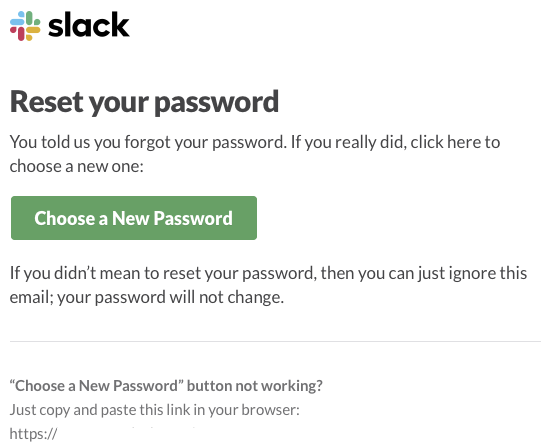
@sminnee mentioned the design aspect, would be great to see that cleaned up.
jonom
on 13 Aug 2020
Being lazy I didn't read the all the threads... having a success message prior to moving into the CMS also works.
clarkepaul
on 14 Aug 2020
I left a comment very relevant to this issue here: https://github.com/silverstripe/silverstripe-framework/issues/3757#issuecomment-683987939. TLDR; The result of resetting your password and successfully logging in is an offer to log in as someone else, with no way to get back to the page you were trying to log in to, or the default_login_dest as set by the developer. That sucks a lot.

jonom
on 31 Aug 2020
clarkepaul
on 31 Aug 2020
'Enter a new password, then we'll take you straight to /admin.'
That literally gives away unwanted information. I would personally not like it if I'd see something like that.
It would work for non-admin URLs, but for admin URLs, I would not like to see that.
Firesphere
on 1 Sep 2020
gives away unwanted information
@Firesphere Can you clarify what you mean by unwanted information - do you mean that it's cryptic / unhelpful? I just think that if we keep the immediate redirect behaviour (no success message displayed to user) then we should inform the user that that is going to happen.
My preferred UX which I outlined here (sorry for the fragmentation) would be to not immediately redirect the user and instead display a success message on a new action like Security/passwordchanged. Then instead of displaying the exact location we could just say 'Continue' or similar vague action on a link that take you to whichever is applicable of BackURL, default_reset_password_dest or default_login_dest.
Example:

jonom
on 1 Sep 2020
@Firesphere Can you clarify what you mean by unwanted information - do you mean that it's cryptic / unhelpful? I just think that if we keep the immediate redirect behaviour (no success message displayed to user) then we should inform the user that that is going to happen.
It gives information that's not wanted, e.g. giving away the next endpoint
Firesphere
on 1 Sep 2020
Is it sensitive information? I guess I was focused on BackURL and assumed we'd just be displaying the URL they were trying to access in the first place (i.e. already known to them). But I suppose that wouldn't always be the case. Maybe it could just say something like _"Enter a new password, then we'll take you straight to your destination"_ instead (if we stick with the redirect behaviour).
jonom
on 1 Sep 2020
Yeah so putting /admin in the message is a low level security vulnerability in that you're disclosing the admin URL. Our implementation of a configurable admin URL is half baked and doesn't actually work, but we should still aim not to perpetuate these issues.
We can say 'Enter a new password, then we'll take you straight to the CMS.' (or "the admin area" if the CMS module isn't installed), then we're avoiding that problem.
 robbieaverill
on 1 Sep 2020
robbieaverill
on 1 Sep 2020
Just discovered there is a
Security::$default_reset_password_destconfig setting which _does_ work. I still think that showing a success message at/Security/passwordchangedis a good idea, and the Continue button should take you to whichever is not null in this order:
BackURLdefault_reset_password_destdefault_login_destEdit: oops messed up the order, BackURL should be first 😅
https://github.com/silverstripe/silverstripe-framework/issues/3757#issuecomment-684007503
maxime-rainville
on 2 Sep 2020
Yeah so putting /admin in the message is a low level security vulnerability in that you're disclosing the admin URL
Yeah I was assuming that the destination (could be /admin or any other restricted page or URL) was already known to the user because typically you end up at a login screen because you've tried to access that URL. E.g. if you're trying to access the CMS, the workflow would be user tries to access /admin -> user is redirected to /Security/login.
We can say 'Enter a new password, then we'll take you straight to the CMS.' (or "the admin area" if the CMS module isn't installed), then we're avoiding that problem.
I would rather have a 'friendly name' than a URL (e.g. "the CMS" as you suggested) but a restricted URL on a SilverStripe app could be anything and isn't necessarily going to be easily resolvable to a nice name as is the case with the CMS. Also, if you did give away the name then presumably that's a form of the same security vulnerability being discussed - namely revealing that the endpoint does exist (and by the way, here's a friendly title for it...)
Ultimately for simplicity probably just saying something vague like "we'll take you straight to the URL you were trying to access" (preparing users to expect a redirect) would be fine. It's a moot point though if we do the better fix which (as @Firesphere originally suggested) is to ditch the redirect and instead display a confirmation message with a link to whatever the redirect destination would have been.
jonom
on 3 Sep 2020
Related issues
maxime-rainville
·
6Comments
 zanderwar
·
6Comments
zanderwar
·
6Comments
 Cheddam
·
3Comments
Cheddam
·
3Comments
 icecaster
·
3Comments
icecaster
·
3Comments
 dnsl48
·
6Comments
dnsl48
·
6Comments