Silent-hill-2-enhancements: [Silent Hill 2] Porting audio from PS2 build to PC
_From @Polymega on August 17, 2017 22:26_
Hi @elishacloud !
This is a branch/continuation of our discussion found here accompanied with input by @AeroWidescreen:
https://github.com/crosire/d3d8to9/issues/24
While Silent Hill 2 for the PC is being wonderfully fixed by the fine folks over at Widescreen Fix, in addition to your's and Crosire's work with ReShade D3D8to9, there are still a few lingering issues left for the PC version that put it behind its PS2 counterpart. Most notable is the audio/sound issues and lack of soft shadows for the PC iteration.
First, if/when you have a spare 25 minutes I'd strongly recommend watching this video that breaks down the differences between the main releases of SH2 for various platforms:
https://www.youtube.com/watch?v=nna2yt1c9gI
In regards to the audio:
All versions of SH2 except for the PS2 version have compressed the audio files into a lossy format. This is further explained here:
https://www.youtube.com/watch?v=nna2yt1c9gI&t=403
And while this situation is less than ideal the tone and pitches for the audio files have also changed during the conversion. You can hear this in action here:
https://www.youtube.com/watch?v=8E5Nt8ahZRk
So while typically only audiophiles will be able to hear the reduced bitrate of the compressed audio files everyone can pick up on these tone/pitch differences. It's equal parts strange and silly this happened.
The solution-in-theory then is to somehow extract the sound libraries from the PS2 disc and convert/transpose those files to the PC version. In a perfect world the libraries would have the same naming/file structure conventions so it would hopefully be a straight-foward process of replacing the files. But I don't know if that's the case as I have yet to find a definitive piece of software to extract content like this from a PS2 disc.
But ultimately the end goal here would be to find a way to transplant the PS2 game's sound files into the PC game's folder.
From your knowledge and past experiences do you think such as task if feasible?
In regards to the shadows:
Both the PS2 and Xbox versions of the game utilize soft shadows in the game's world whereas the PC version uses simple, hard edge volumes which results in razor-sharp shadow lines. This reduction in shadow quality not only looks less than desirable but also hurts the game's atmosphere.
You can learn more about the PC's shadows vs. consoles here:
https://www.youtube.com/watch?v=nna2yt1c9gI&t=836
And in the same video they discuss more about the soft shadows being used in the PS2/Xbox versions here:
https://www.youtube.com/watch?v=nna2yt1c9gI&t=353
And here:
https://www.youtube.com/watch?v=nna2yt1c9gI&t=701
Do you think implementing soft shadows would ever be feasible for this game and something within your skill set to do? If you think it is, let me know and if you'd be interested in looking into this as I would spread the word around about what you'd be trying to do and get other fans to donate to your cause. This would probably be one of, if not the, hardest mods to do for the game so compensation is absolutely a requirement for such a major task/time commitment.
_Copied from original issue: elishacloud/dxwrapper#6_
 elishacloud
All 139 comments
_From @Polymega on August 17, 2017 23:42_
In regards to the sound files; this is all Greek to me:
https://hcs64.com/mboard/forumlong.php?showthread=36833
elishacloud
on 8 Jul 2018
Shadows:
It looks like there are three main ways to implement soft shadows in Direct3D8/Direct3D9.
- Enable Anti-Aliasing:
I tried this and it does not seem to give the effect that we want. Attached is a sample dll you can try for yourself. The overall graphics does seem slightly better with this enabled but it does not give us the shadows we want.
- Add additional light sources:
If Silent Hill 2 uses Shadow Volumes the the only option we have is to add additional light sources. This will give us a "jittered" sample for the shadowed region, which is the best we can do if Silent Hill 2 uses Shadow Volumes. So far I don't think Silent Hill 2 is using Shadow Volumes because it does not seem to call LightEnable or any other equivalent API so this option may not work.
- Using Pixel and Vertex Shaders:
If Silent Hill 2 is using PixelShaders and/or VertexShaders for the lighting then the only way to make the edges soft is to update the shader code. Most likely we would need to add all new shaders into the game for this. From my tests so far I think this may be what we need to do. The good news is that this option can give us the best looking shadow effect but it is also likely the hardest to implement (without the original source code).
Ref: https://www.gamedev.net/articles/programming/graphics/soft-edged-shadows-r2193
Ref: http://developer.download.nvidia.com/whitepapers/2008/PCSS_Integration.pdf
Audio:
Updating the audio may not be as easy as it sounds. From the HCS Forum it appears that Silent Hill 2 uses dynamic tracks so it is likely not as simple as replacing the PC tracks with the PS2 tracks (re-encoded for the PC). We might also need to update how Silent Hill 2 chooses the tracks. I will need to look at this in more detail.
elishacloud
on 8 Jul 2018
_From @Polymega on August 20, 2017 18:42_
- Enable Anti-Aliasing:
You're right it doesn't enhance the shadows in any way but you may have stumbled across a big deal for something else, Elisha: If you refer to my Installation Guide for SH2 PC with enhancements you'll find that Nvidia users CANNOT have anti-aliasing while using the enhancements. This is because WineD3D For Windows prevents GPUs from using forced AA through their GPU control panel (the game will crash if they try to do so when WineD3D is in use).
For AMD users this isn't an issue: They can use injectSMAA instead of WineD3D (refer to the "Troubleshooting" portion of my installation guide) to achieve AA while fixing the universal "black lines of faces" issue because they do not experience all the other issues Nvidia cards have.
But your attached D3D8 file? This is something special... When I used it (in conjunction with the WSF + WineD3D For Windows' D3D9 files) on my Nvidia PC it not only allowed WineD3D's D3D9 files to still work (thus fixing all of Nvidia's visual problems) but ALSO allowed AA.
And while I haven't done a full play through to test your attached D3D8 file thoroughly I did find one immediate bug:
https://youtu.be/UKQLmj9jdZo
This happens whenever you pause the game.
But in a nutshell: In order to use WineD3D's D3D9 fixes (for Nvidia users) they have to rename the WSF's dinput8.dll file to d3d8.dll then activate ReShade's D3D8to9 converter within it to use WineD3D's D3D9 files. Problem is injectSMAA also requires itself to be named d3d9.dll and you can't have two d3d9.dll files in the same directory. But your attached D3D8 file seems to achieve AA while also putting the game in a D3D9 wrapper? This new way I renamed WSF's dinput8.dll file to dsound.dll, used your attached d3d8.dll, and used WineD3D's d3d9.dll + wine3d.dll + libwine.dll with it.
- Using Pixel and Vertex Shaders: [...] From my tests so far I think this may be what we need to do.
After some more continued research you just let me know if this seems like a viable undertaking and I will help you through other means the best of my ability. :)
PS - I have both a Win 7/Nvidia and Win 10/AMD computer if you ever need me to test things on certain OS' or GPUs.
elishacloud
on 8 Jul 2018
_From @Polymega on August 20, 2017 19:23_
Looks like cutscenes that use depth-of-field have the same issue with the AA d3d8.dll file:
https://www.youtube.com/watch?v=Lavp1cyA8PU
Anyway, this AA revelation for Nvidia users--and the issues I've recorded--are low priority. The thought of achieving soft shadows in the game is so high on the list it's not even funny; it's been one of the longest requested enhancements for the game by so many.
elishacloud
on 8 Jul 2018
_From @RenoFriends on August 20, 2017 20:50_
This thread is so interesting... In SH2 and SH3 the shadows are so hard and would be great to have softer ones, as well as the audio in SH2, that as I read is more difficult to acomplish that it sounds in first place...
elishacloud
on 8 Jul 2018
_From @mirh on August 20, 2017 21:5_
Post-processing AA isn't true AA.
And wineD3D's D3D9 fixes is quite possibly related to #5
elishacloud
on 8 Jul 2018
_From @AeroWidescreen on August 20, 2017 21:21_
@jdkubiak I don't have any problems with the d3d8.dll anti-aliasing, but I don't use wineD3D or d3d8to9. Maybe there's a conflict with one of those.
@RenoFriends In SH3 they look hard because of shadow resolution. Use a lower value and it'll look soft like the PS2 version, although more pixelated.
elishacloud
on 8 Jul 2018
_From @Polymega on August 20, 2017 21:23_
To be honest I've never been invested in the debate of "true" vs. post-processing AA. So long as the results look good/comparable and don't greatly impact performance that's all that really matters at the end of the day.
@AeroWidescreen yeah WineD3D does wonders for fixing the Nvidia bugs but apparently does not play nice with other fixes.
But again this is low priority compared to implementing soft shadows in the game.
elishacloud
on 8 Jul 2018
_From @mirh on August 20, 2017 23:57_
To be honest I've never been invested in the debate of "true" vs. post-processing AA.
The thing is, there might be some specific incompatibility here or there, but there's really no reason at all why post-processing AA should require special attention by anyone.
You could literally just apply it to an already rendered picture, and the result would be the same.
If, on the other hand, you are calling for "technical expertise" and all, proper one has to be the point.
elishacloud
on 8 Jul 2018
And while I haven't done a full play through to test your attached D3D8 file thoroughly I did find one immediate bug:
https://youtu.be/UKQLmj9jdZo
This only happens when you use the "No CD" Version. I am using a different version here (requires a CD or a mounted ISO) and this issue does not happen. I might be able to just create a new "No CD" Version. I have created several "No CD" patches for other games (see here and here). Looks like who ever created this version did more than was intended.
Also, I am using the "North American PC" version without any issues. So we may be able to fix several of these issues at once by creating a new "No CD" Version and adding anti-aliasing directly into d3d8to9.
One more item I noticed is that WineD3D only allows for MultiSampling level 1, whereas without WineD3D I can get MultiSampling up to level 8, which is much better quality. It would be really nice to fix the issues directly in d3d8to9 so that WineD3D is no longer needed.
I realize the soft shadows item is the highest priority. However, I need more time to continue my research. I never even knew about PixelSaders or VertexShaders before a few months ago.
Edit: I was able to get MultiSampling to work pretty good with WineD3D (once I removed some of the old WineD3D registry keys I added a long time ago). It seems like we just need an updated "No CD" Version to fix the issue with anti-aliasing.
Edit 2: Once I removed the WineD3D registry keys I see the same issue with the version I am using. I must be getting tired!
elishacloud
on 8 Jul 2018
_From @mirh on August 21, 2017 11:27_
SecuROM isn't exactly the same cakewalk that a stupid cd check is (speaking of which, I have always wondered the address to tinker with for Omikron retail exe)
[gamecopyworld reports drm might have been removed with 1.1 patch though then..]
UnSecuromNT might do it anyway.
elishacloud
on 8 Jul 2018
_From @Polymega on August 21, 2017 12:30_
Looks like who ever created this version did more than was intended.
Very true. Funny timing as someone had an issue with another version of a No CD exe found here:
https://github.com/ThirteenAG/WidescreenFixesPack/issues/316#issuecomment-323610023
It would be nice to have a "definitive" No CD exe to use as there are several of them floating around.
But that brings up a question/concern:
For our European friends (and American folks like myself who are using the Director's Cut version) would there be any issue with installing the Director's Cut version but then using a North American No CD exe? (I'd be happy to test this out in the future.)
Edit: I also have my original, unmodified Director's Cut exe I can send you as well?
Also, I am using the "North American PC" version without any issues.
Interesting. To confirm: Are you also using the Widescreen Fix package with it? And still no issues (such as, you can still see the intro screen/menu)?
creating a new "No CD" Version and adding anti-aliasing directly into d3d8to9.
That's an excellent idea. The only thing I'd recommend is having a customizable option in an ini or similar so people can choose what level of MSAA they'd like to use? (Such as 0, 1, 2, 4, 8.) User-selected configuration is always welcomed and appreciated by the player.
It would be really nice to fix the issues directly in d3d8to9 so that WineD3D is no longer needed.
That would be pretty cool! As mentioned WineD3D For Windows is the only fix package discovered that alleviates all of the Nvidia bugs but it can also not play nice with other packages.
Here are a list of bugs that WineD3D _fixes_. If anyone can think of other bugs I missed/forgot please chime in:
Nvidia-specific bugs:
- [ ] [White shaders/textures that should be black](https://youtu.be/878F2cbLAXo?t=2m39s)
- [ ] [Missing fog effects at the game's beginning; outside at the Observation Deck.](https://youtu.be/878F2cbLAXo?t=19s) (The fog can be seen in this clip around the tree line.)
- [ ] [Missing graphical overlays such as the closet door bars once James is inside the closet.](https://youtu.be/g2DEdVLz0EA?t=1m2s) (Video quality is low but you can see the closet bars at the top and bottom in this clip.)
Universal bugs (not GPU specific):
- [ ] [Faint black lines on character's faces ](https://youtu.be/878F2cbLAXo?t=2m20s)
Bonus add-ons:
- [ ] A form of anti-aliasing?
Here is a list of bugs that ReShade D3D8to9 _causes_:
Integrated GPU-specific bugs:
- [ ] [Red-tinted FMVs](https://github.com/crosire/d3d8to9/issues/42#issue-252455438)
elishacloud
on 8 Jul 2018
@jdkubiak, I created a simple ASI file that loads the WineD3D dll's from the 'scripts' folder. This way you can load a different d3d9.dll file (or no d3d9.dll file) from the Silent Hill 2 folder. This allows injectSMAA to work on any graphics card (even Nvidia) while still taking advantage of the WineD3D fixes.
How to install:
- Download the ASI file here and unzip it into the 'scripts' folder.
- Move the WineD3D dll's (d3d9.dll + wine3d.dll + libwine.dll) into the 'scripts' folder.
- Now you can add the injectSMAA files into the Silent Hill 2 folder.
This is not quite as good as eliminating the need for WineD3D but it is the next best thing.
Are you also using the Widescreen Fix package with it? And still no issues (such as, you can still see the intro screen/menu)?
Yes. I am using the "North American PC" version with the Widescreen Fix package and all the other fixes in the Installation Guide (including injectSMAA and WineD3D) on an Nvidia video card without any issues. The intro screen and menu works fine. However I did notice two things:
- The one thing I did notice is that one of the movies had a different name compared with what was in the Installation Guide. "ending.bik" was called "end.bik" on my install.
- After copying the "No CD" version from the Installation Guide the intro screen and menu looks different than it did.
Here is the North American patched version I am running:

Here is the No CD version from the Installation Guide:

elishacloud
on 8 Jul 2018
_From @Polymega on August 23, 2017 12:39_
How awesome! I can't wait to give this a try tonight after work!! Thank you!
This is not quite as good as eliminating the need for WineD3D but it is the next best thing.
But no need to completely re-invent the wheel if the wheel can be slightly adjusted as you've done to roll along nicely with the other wheels. :) (Horrible analogy, I know...)
Here is the North American patched version I am running:
I may be missing something but that's the Director's Cut (European) exe? Or I believe you're saying you installed the NA version then used a patched EU exe and are showing it working here without issue?
The one thing I did notice is that one of the movies had a different name compared with what was in the Installation Guide. "ending.bik" was called "end.bik" on my install.
Probably not related but I wonder if that's a difference between the NA and EU versions when it installs?
https://pcgamingwiki.com/wiki/Silent_Hill_2:_Director's_Cut#.22Insert_a_disc.22_message_in_the_ending
If both NA and EU versions will work I can simply make a note to rename that file in the guide for its next update.
I have a NA copy of SH2 PC myself somewhere and ought to install it on my laptop to also help compare these things...
After copying the "No CD" version from the Installation Guide the intro screen and menu looks different than it did.
Someone had text/visual issues with their EU exe version (seen here, notice how razor sharp their text is) and said the exe from the Installation Guide fixed that problem.
Now, as you said, whoever made the No CD exe found on the guide probably modified who knows what else in it. But I'm curious if this person also modified the menu fonts as well or if there are truly two different retail exe's with the different font styles as shown in your image above for the Director's Cut version.
If there really are two default, vanilla versions out there it may be worth patching the one that uses the "thicker" fonts as it seems to also alleviate the razor sharp fonts in the menus and such?
I'll boot up my original exe tonight with disc inside and see if I may have the "thicker font" version. But there's always the chance this was something modified by the guy who made the No CD hack...
^ Ignore the strikethrough, Aero confirmed the person had his example shots mixed up. The PS2 version has the razor-sharp text, not the PC version.
elishacloud
on 8 Jul 2018
_From @Saavas on August 23, 2017 15:2_
That's great news, although I'd like to point out that unfortunately while WineD3D fixes some issues, it also introduces others and I know of at least one that happened to me and one user in the youtube comment section (https://www.youtube.com/watch?v=JTKaWGpZg14) - the flashlight bug returns but only during the turning on/off of the flashlight. I wonder if it would be possible to eliminate the need for WineD3D or if I should try to report this to WidescreenPatch guys and hope for a fix for users of both packages.
elishacloud
on 8 Jul 2018
_From @Polymega on August 23, 2017 15:13_
@elishacloud fixed this issue and it should be implemented into the Widescreen Fix once @Crosire updates ReShade then @ThirteenAG over at the Widescreen Fix updates the submodule for ReShade in his Ultimate ASI Loader.
(They may have already updated their respective projects at the time of this posting.)
elishacloud
on 8 Jul 2018
_From @Saavas on August 23, 2017 15:14_
That's amazing, thanks for the info, I really hope the SH2 PC port can become the ultimate version of the game with all those seemingly impossible fixes being made.
elishacloud
on 8 Jul 2018
_From @Polymega on August 23, 2017 15:16_
There are a lot of wonderful and smart people on these GitHub boards who can do some serious magic.
Once I've confirmed ReShade/UAL has been updated, along with the current anti-aliasing/patched EXE work done by Elisha here, I'll update the Installation Guide accordingly. Just holding off until all the packages are updated and I can run a few tests myself first.
elishacloud
on 8 Jul 2018
_From @AeroWidescreen on August 23, 2017 15:46_
@jdkubiak
Someone had text/visual issues with their EU exe version (seen here, notice how razor sharp their text is) and said the exe from the Installation Guide fixed that problem.
I think @RenoFriends mixed up the screenshots. The first one (sharp text) is the PS2 version, and the second one is the PC version. I can tell because I can see soft shadows from the status screen, the brighter inventory icons, and the fact that the options menu is labeled as "option", not "options". I'm not sure what his problem with the text was, but he claims the new exe is somehow better. We'd need comparison screenshots between the old and new exe he's using to be sure.
elishacloud
on 8 Jul 2018
_From @Polymega on August 23, 2017 15:54_
I envy your eagle eyes, sir. So probably scratch my early statement then Elisha; it seems just the fonts for the main menu/pause screen are different which isn't a big deal then.
I'll still boot up my original Director's Cut exe (CD required) tonight and see if I have the skinnier fonts on the title screen. If so, I can probably tell you if the fonts within the game are still the same or not.
@AeroWidescreen and/or @elishacloud : I'm trying to get better/more familiarized with GitHub and its interface/terms. What is a sure-fire way to know when a project has been updated?
Let's use this as an example: If something has been "commited" does that mean it's now been implemented into the master project/file(s)? Or does it need to say, "_____ merged commit # into ___:master" for it to then be implemented?
elishacloud
on 8 Jul 2018
_From @mirh on August 23, 2017 15:56_
Just Watch it.
And "merged" commits have no functional value.
And I'll stress again that all this specific SH2-internal breakage should have its own project home.
elishacloud
on 8 Jul 2018
_From @Polymega on August 23, 2017 16:12_
Just Watch it.
But doesn't Watch notify you of all conversations/issues/etc and not just when releases come out?
elishacloud
on 8 Jul 2018
_From @mirh on August 23, 2017 17:43_
Well, not like projects have a rss feed
...
MFW they actually have
https://github.com/crosire/d3d8to9/commits/master.atom
elishacloud
on 8 Jul 2018
_From @Saavas on August 23, 2017 17:50_
@jdkubiak I'm not exactly familiar with all the technical details, but the .dll in the post you linked fixes the issue only partially for me - now the 3d models are NOT lighting up until the flashlight reaches full light power. If the problem will be solved after all the remaining packages get updated, then disregard this post, but I'm just pointing it out in case the problem still persists. Unless it works this way on PS2 as well, I have no clue because PC version is sadly the only one I had opportunity to play
elishacloud
on 8 Jul 2018
_From @Polymega on August 23, 2017 18:3_
Try this in the meantime:
- Rename Widescreen Fix's dinput8.dll to dsound.dll. This file may have been renamed to d3d8.dll from the Installation Guide. If so, still rename it to dsound.dll.
- In the scripts\ folder remove the global.ini file if you have one there. (I just rename it global.ini.bak)
- Back in the game's main directory use Elisha's d3d8.dll file here.
- Keep the WineD3D For Windows files in the game's directory.
That _should_ work. And if not, yes, please hold tight until these fine folks make further progress with edits.
elishacloud
on 8 Jul 2018
_From @Saavas on August 23, 2017 18:17_
My folder has a bit different structure, it's due to me following pcgamingwiki instructions rather than your guide that I had no knowledge of when I was installing the game. My dinput.dll seems to be from xinputplus. Regardless, I don't need the fix right now - I finished the game earlier today and I'm done with it until the town calls for me again :) I just want to help fix the game to make it definitive version since I admire Team Silent's work and a gem like this cannot be allowed to be lost in the past. Thanks for the tip though :)
elishacloud
on 8 Jul 2018
_From @Polymega on August 23, 2017 22:55_
Alright, I used the CD + original exe and have the same looking intro screen as your's. I never used the original exe before for the Director's Cut version so I believe the only visual change is the font for the main menu. Fonts elsewhere (inventory, pause, options, etc.) appear to be the same as the North American version.

And as @AeroWidescreen wagered and was correct with: The menu fonts are nice and pseudo-anti-aliased for a more pleasing look. So all is good with the vanilla exe in that regard.
I created a simple ASI file that loads the WineD3D dll's from the 'scripts' folder. This way you can load a different d3d9.dll file (or no d3d9.dll file) from the Silent Hill 2 folder. This allows injectSMAA to work on any graphics card (even Nvidia) while still taking advantage of the WineD3D fixes.
Great stuff! All files worked together without issue. The only thing I noticed is injectSMAA doesn't anti-alias as strong when working alongside WineD3D. Check out the top-right of James' hair for a good example. The AA was set to "ultra" for both shots. (Click to make bigger.)

This way you can load a different d3d9.dll file (or no d3d9.dll file) from the Silent Hill 2 folder.
Nothing critical but I couldn't get WineD3D's files to work without another d3d9.dll file in the main directory. I had WSF's dinput8.dll file renamed to d3d8.dll, activated ReShade D3D8to9 within it (via global.ini in the "scripts" folder), then placed WineD3D's files + your WineD3D Loader in the "scripts" folder and didn't use any injectSMAA files for this test.
elishacloud
on 8 Jul 2018
The only thing I noticed is injectSMAA doesn't anti-alias as strong when working alongside WineD3D.
This is likely to do with how WineD3D interprets the calls from injectSMAA. Not much we can do about this as long as we continue use WineD3D. Anyways the difference is minor and we can probably live with it for now. I would like to remove our dependency on WineD3D at some point, but that is a long way down the road.
Nothing critical but I couldn't get WineD3D's files to work without another d3d9.dll file in the main directory.
I fixed this already. The download I gave you above was just a really quick program I whipped up to prove it out. Now that is looks good I have created a whole new project for this. It supports all the WineD3D dll's (not just d3d9.dll) and I fixed the issue you mentioned as well.
Other comments from this thread:
1. LoadWineD3D ASI
Please check out the new LoadWineD3D ASI project. I uploaded my code and created a new release there.
2. No CD Version
I am not completely sure what version I am using (North American, European or some other version). However when I read the Installation Guide I notice that the startup screen on my version looks like the image of the "North American PC" version. So I assume it is that one.
As far as the menu I like the menu from the original exe better than the No CD one from the Installation Guide. When I get a little time I will try and create a new No CD version for you. I think it will be better than the one you have now.
3. FMV Enhancement Pack
As I mentioned above my copy has a different name for one of the FMV files ("ending.bik" vs. "end.bik"). I recommend you include both files in the "FMV Enhancement Pack" so that the movies work no matter which version of the game the user has. Since the files are zipped it should not take much more space.
4. Porting Audio from PS2
I was able to get virtually all of the audio files from the PS2 disk from this link here. Based on information from the forum I should be able to convert them into a usable format for the PC. I may need a bit of hand holding on this since I have never played Silent Hill 2 and have no idea where to go to hear the audio.
5. Soft Shadows
This one is certainly the hardest thing to do here (at least for me). I need to spend time to understand each of the shaders in Silent Hill 2 and what they do before I will be able to implement new code to make the shadows soft. There are over 80 shaders and it could take me a day or two for each one. My knowledge of shaders is very rudimentary. I will keep you posted on my progress.
BTW: If there is anyone around here with good knowledge of shaders I would love to talk to you! :-)
elishacloud
on 8 Jul 2018
_From @mirh on August 24, 2017 9:5_
Showerthought: if wined3d code is subpar.. Why not contributing to it? 😄
Also, at this point why not making the game able to also load the original FMVs in the first place (so, no need for the conversion - for as much well-done)? Or if not any the perfect originals, a remuxed file.
elishacloud
on 8 Jul 2018
_From @Polymega on August 24, 2017 12:22_
1. LoadWineD3D ASI: Please check out the new LoadWineD3D ASI project. I uploaded my code and created a new release there
Excellent. Bookmarked and will do!
3. FMV Enhancement Pack: I recommend you include both files in the "FMV Enhancement Pack" so that the movies work no matter which version of the game the user has.
Not a problem. I'll have that video saved twice as "end" and "ending" and load up a save file at the final boss to trigger the ending. If nothing acts weird/crashes from doing that (it shouldn't) I'll update my guide's packaged file for this and also the PC Gaming Wiki link for it.
4. Porting Audio from PS2: I was able to get virtually all of the audio files from the PS2 disk from this link here. Based on information from the forum I should be able to convert them into a usable format for the PC. I may need a bit of hand holding on this since I have never played Silent Hill 2 and have no idea where to go to hear the audio.
Which PS2 version did you rip from? SH2 or SH2 Greatest Hits? I ask because the Greatest Hits version includes all the bonus content that is also found in the PC version. I'd only be fearful that ripping from the original run of SH2 PS2 will have you missing many audio files which could run you into a snag down the line.
These PS2 versions all include the bonus content also found in the PC version:

I'm not sure if this would help/be specifically relevant to what we're trying to accomplish but you can try this out:
http://alchemillahospital.net/silent-hill-resource-editor/
I haven't used it in a while so I don't know if it will open all audio files/formats but you can use it to preview audio/sound from the PC version. Just click the AFS or AIX Explorer tabs and go from there.
And yes, if you're comfortable with the idea, let us help you in any way we can with this task. It's the least any of us can do to help with what you're doing.
5. Soft Shadows: This one is certainly the hardest thing to do here (at least for me). I need to spend time to understand each of the shaders in Silent Hill 2 and what they do before I will be able to implement new code to make the shadows soft. There are over 80 shaders and it could take me a day or two for each one. My knowledge of shaders is very rudimentary. I will keep you posted on my progress.
Please consider sharing your PayPal address or making a PayPal donation link. Or, at the very least, your email for me to send you a gift card?
2. No CD Version: I notice that the startup screen on my version looks like the image of the "North American PC" version. So I assume it is that one.
Ah, I see. The splash screen (below) is on both (NA & EU) PC versions.

So I believe you're also using the European version then if your vanilla exe looks like the one on the right:
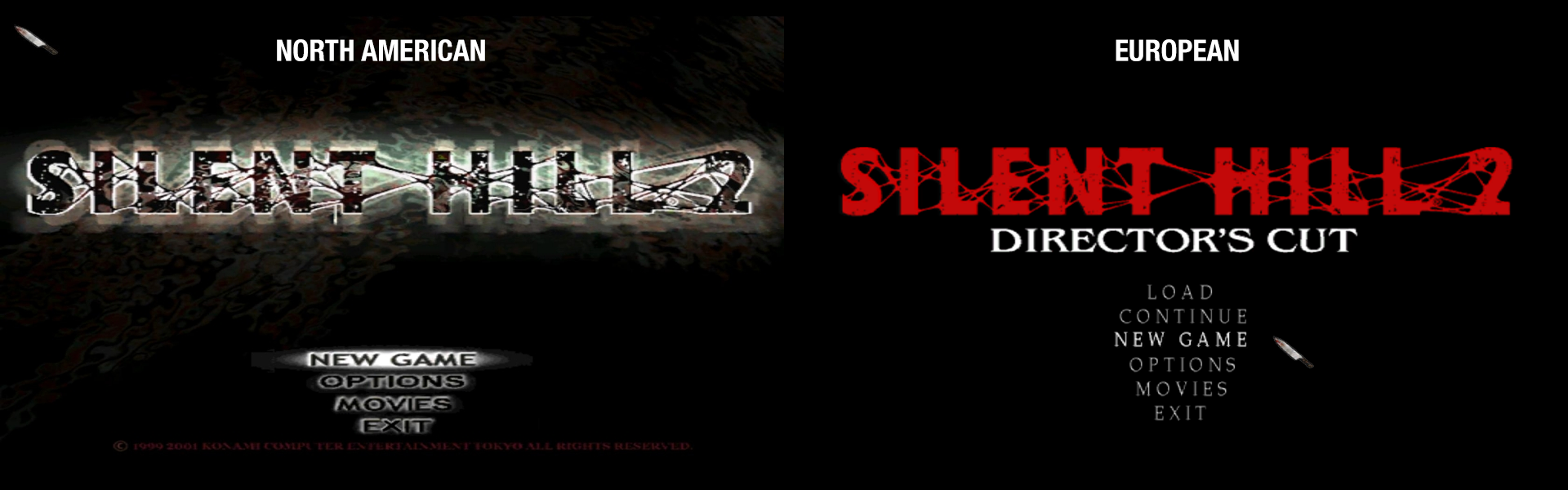
As we progress further I'll install my NA copy on my laptop to see if all these packages will work with that version.
elishacloud
on 8 Jul 2018
_From @mirh on August 24, 2017 14:27_
I'll update my guide's packaged file for this and also the PC Gaming Wiki link for it.
Trivia: the file linked on PCGW is half-assed because we have problems with IP Board.
I have it wasting space on my hdd (and taken down on MEGA) since almost 3 years.
SHA-1 for contents (not the file itself, since I prefer my repackaged 7z) is BF3B2CBE07453C67DAAA13DBDD22A49295C78369
Then, for as much as good is the conversion made by angular graphics, originals would be top notch.
elishacloud
on 8 Jul 2018
_From @AeroWidescreen on August 24, 2017 17:27_
@elishacloud
Please consider sharing your PayPal address or making a PayPal donation link. Or, at the very least, your email for me to send you a gift card?
I'm willing to donate a few bucks too. What you're doing for SH2 is huge for many of us. The PC port could truly be the new definitive version by the end of all this; no one could say otherwise. Thank you again.
elishacloud
on 8 Jul 2018
_From @RenoFriends on August 24, 2017 20:23_
Wow, so much new thing to read about!
I think @RenoFriends mixed up the screenshots. The first one (sharp text) is the PS2 version, and the second one is the PC version. I can tell because I can see soft shadows from the status screen, the brighter inventory icons, and the fact that the options menu is labeled as "option", not "options". I'm not sure what his problem with the text was, but he claims the new exe is somehow better. We'd need comparison screenshots between the old and new exe he's using to be sure.
Yes, I was mistaken, it's totally the opposite in my screenshot, the bottom one is from PC instead of PS2... sorry!
elishacloud
on 8 Jul 2018
if wined3d code is subpar.. Why not contributing to it?
I don't know if WineD3D is subpar or not. But I think that most of the folks working on that project are coding at a level far above me. But I have leveraged code from WineD3D in DxWrapper.
at this point why not making the game able to also load the original FMVs in the first place
We are already using higher quality FMVs. I am not sure why anyone would want to use the lower quality ones shipped with the PC. The higher quality ones we have in the FMV Enhancement Pack are taken from the original FMVs in PS2. PS2 is the only platform with the original FMVs unless you use the FMV Enhancement Pack, which gives you access to the original FMVs even on the PC
Which PS2 version did you rip from? SH2 or SH2 Greatest Hits?
I did not actually do the porting. But it appears to be taken from this version:

So I believe you're also using the European version then if your vanilla exe looks like the one on the right
Yes, it looks like I am using the European version on my PC.
at the very least, your email
It may be good to communicate offline in email because I will need help testing each audio file one-by-one. I will need to communicate with you to figure out where each (or at least a good number) of the audio files can be found in the game.
If I am able to get some of the larger issues complete (Enhanced Audio Pack or soft shadows) we can talk about me posting my PayPal account. Until then I would feel bad to get any donations in case I find out later that I cannot actually complete the work.
elishacloud
on 8 Jul 2018
_From @Polymega on August 24, 2017 20:43_
We are already using higher quality FMVs. I am not sure why anyone would want to use the lower quality ones shipped with the PC. The higher quality ones we have in the FMV Enhancement Pack are taken from the original FMVs in PS2. PS2 is the only platform with the original FMVs unless you use the FMV Enhancement Pack, which gives you access to the original FMVs even on the PC
I wrote about this too in my previous response and removed it. @mirh wants to use the _actual_ PS2 movie file formats (directly ripped from the PS2 disc), or remux its format, and able to be played on the PC version. I also don't see the purpose of this as angular graphic's Enhanced FMVs look virtually indistinguishable from the PS2's version (because he directly recorded the PS2's version in a digital (not analog), loseless format and converted them to the PC's format).
I won't disclose which one's which in the examples below:


It may be good to communicate offline in email because I will need help testing each audio file one-by-one. I will need to communicate with you to figure out where each (or at least a good number) of the audio files can be found in the game.
Absolutely.
Until then I would feel bad to get any donations in case I find out later that I cannot actually complete the work.
You shouldn't feel bad! Even if we hit an inpassable road block it doesn't negate the time, work, and research you've already put into it!
elishacloud
on 8 Jul 2018
Issued Moved from dxwrapper / Porting audio from PS2 build to PC
Everyone, I am moved this issue from the dxwrapper project. Not all of the comments get moved.
You can reference any of the old comments here.
@Polymega
@RenoFriends
@mirh
@AeroWidescreen
@Saavas
@Storm3000
@Nisto
@FrozenFish24
@Stronglime
@brunibunny
@seagull
@ThirteenAG
@vrubleg
@Ripper69
@SiarMortal
@DeanoC
@Bigmanjapan
@nutrients
@matthewmcgrath
@Alybaba75
elishacloud
on 8 Jul 2018
The siren track is now fixed and will play indefinitely during the end of the apartment RPT boss fight, hospital Flesh Lips fight, and their respective aftermath cutscenes. Thanks to @Storm3000 for pointing it out. And thank you to @Nisto for providing a PS2 sample of the siren.
Thank you, guys. You're awesome. :)
Sorry for the slight delay on this. I hear it too. Let me record some samples from PCSX2 and then speak with Elisha about this. Is it just "Alone in the Town" (bowling alley) and "The Day of Night" (James talking with Laura at the end of the Hospital level) with the extended track issue?
Mmm, I'm not sure if "Alone in the Town" is longer, I just noticed it has the "reverb" effect now. I left the building before the song finished. I know that "Promise (Reprise)" (when James talks with Angela on the apartments) is longer than the PC version. I didn't play enough the PS2 version to check it out, but maybe it's just like that. I don't have time enough right now, but I'll play again as soon as possible to let you know if I find something else.
EDIT:
Oh, I almost forgot. I completely lowered the volume on the SFX slider, and I found out that the voices are still there on cutscenes. So there's no such problem with the BGM and SFX volume.
What I noticed is that the voices volume during cutscenes sounds higher than the BGM volume, or maybe the other way around, if you compare it with the original PC audio. So it's not an issue itself, it's just sounds different, at least to me.
Also, I noticed that "A World of Madness" song (when James walks in the cemetary) sounds strange to me, like if the melodic rhythms's time were different compared to the PC version. You can compare it with the SH2 OST. Again, this isn't an issue itself. I think I'm very used to the original PC audio version, haha.
 Storm3000
on 8 Jul 2018
Storm3000
on 8 Jul 2018
Guys! I got an email from John-Paul Ownby, creator of IndirectSound, and it's official...
https://youtu.be/cQ8RkcFhKCY
(Be sure to watch with audio on!)
Get it here!
http://www.indirectsound.com/downloads/IndirectSound_0_17.zip
Edit: Open its accompanied .ini file and set earlyStopFadeOutTime to 0.002 to enable this feature.
@elishacloud @aerowidescreen @seagull @Storm3000 @nisto @bigmanjapan @siarmortal
 Polymega
on 9 Jul 2018
Polymega
on 9 Jul 2018
That is great! This makes the enhanced audio files shine!
BTW: make sure you enable the earlyStopFadeOutTime option. I recommend setting it to either 0.001 or 0.002. 0.002 sounded best for me.
Setting should look like this:
earlyStopFadeOutTime = 0.002
For some reason, I still get the audio pops with this dll... hmm
 Alybaba75
on 9 Jul 2018
Alybaba75
on 9 Jul 2018
And yet I didnt notice elishas post, maybe this is why
Alybaba75
on 9 Jul 2018
Hey just seen theres a new update to the widescreens d3d8 file, anyone know what this does? Once I finally updated it for the first time a couple weeks ago, it seemed to reduce the game stuttering an awful lot, hoping this one is even better, or dosent reintroduce any
Alybaba75
on 9 Jul 2018
@Alybaba75 asi loader was updated to support more dll names, d3d8to9 in it was updated as well. Basically some internal stuff.
 ThirteenAG
on 9 Jul 2018
ThirteenAG
on 9 Jul 2018
I see... it also made the ingame camera slower for some reason, like when the cameras in front of you, and you press the button for it to go back, its alot slower now, not tryin to nit pick but yea lol
Alybaba75
on 9 Jul 2018
@Polymega What a great way to start the week. John-Paul Ownby: if you're reading this, thank you! Seriously.
0.002 sounded best for me.
I agree with Elisha.
 AeroWidescreen
on 9 Jul 2018
AeroWidescreen
on 9 Jul 2018
BTW: make sure you enable the earlyStopFadeOutTime option
D'oh. Why'd I think this was already enabled? Thanks, Elisha!
Polymega
on 9 Jul 2018
Hey just seen theres a new update to the widescreens d3d8 file [...] it also made the ingame camera slower for some reason
Chances are when you updated the WSF files it replaced your SilentHill2.WidescreenFix.ini file for it. Can you confirm PS2CameraSpeed is enabled in the .ini still?
Also...
it seemed to reduce the game stuttering an awful lot [...] it also made the ingame camera slower for some reason
Do you think your PC is having issues running the game with the fix packages in effect? Do note that WineD3D, the Fog Fix, and anti-aliasing will be your three biggest culprits for why the game may be running slow. Try temporarily disabling these things one at a time until the game runs smoothly again.
Polymega
on 9 Jul 2018
Ps2 camera fix is still on, it seemed to only show on the updates window, d3d8 updating, but I don’t know, and my game seems to run fine despite all these addons, which is amazing seeing as though old pc ports like gta san andreas sure didn’t lol yea plus I re-extracted the original widescreen fix files, the asi. The .ini file, but kept the updated d3d8, and my camera’s fixed, back to super fast heh
Alybaba75
on 9 Jul 2018
There was another time before I updated I had a similar issue, I messed with the camera fps setting, from then on, it was slow, even when I put it back to its 30fps setting(again thats the camera fps, not regular fps option I’m talking about, in case I missed a word here lol, typing on a mobile right now)
Alybaba75
on 9 Jul 2018
Also great job for sure on this indirectsound, tested a bit and no poping at 0.001, like elishacloud said, you da best elishacloud!
Alybaba75
on 9 Jul 2018
again thats the camera fps, not regular fps option I’m talking about, in case I missed a word here
There's no "camera FPS" setting in the SilentHill2.WidescreenFix.ini file; only a "regular FPS" adjustment. As mentioned in the .ini if you adjust the game's FPS it will negatively affect the PS2CameraSpeed ("fast camera"). Keeping the game's FPS at 30 will ensure a proper fast camera feature.
Polymega
on 9 Jul 2018
Huh? Really? Whats the other option in there thats default set to 30 then? I’m not within my pc access right now so can’t check
Alybaba75
on 9 Jul 2018
That's the game's FPS. Set FPSLimit to 30 to properly work alongside PS2CameraSpeed ("fast camera").
Polymega
on 9 Jul 2018
Ok I must be mistaken or thinking of something else, thought I seen two options that are default being 30, fps and another, oh well, thanks lots anyway polymega! You and the others sure made a great game great-er lol
Alybaba75
on 9 Jul 2018
That's the game's FPS. Set FPSLimit to 30 to properly work alongside PS2CameraSpeed
This is something that I recently found a solution to, so that should no longer be an issue in the future.
Ok I must be mistaken or thinking of something else, thought I seen two options that are default being 30, fps and another, oh well, thanks lots anyway polymega! You and the others sure made a great game great-er lol
Here's your 60fps script (cheat engine required): Download
EDIT: I forgot I did this with the EU exe I have. Look up "silent hill 2 gimpsRus v1.1" and use that with this, otherwise you'll have to wait.
I couldn't fix the invisible prison monster's walking sound. I think his walking animation is sped-up, but none of the variables I have seem to affect it. I'll need to spend more time on that later.
AeroWidescreen
on 9 Jul 2018
EU Version as in european directors cut? I have so all good, thanks man, you dont know how much that sound annoyed me lol oh, so I shouldnt need that gimprus thing?
Alybaba75
on 9 Jul 2018
I don't know, try and see if it works. If not, use gimpsrus.
AeroWidescreen
on 9 Jul 2018
Alright well thx again man! I feel like I send you guys donations or something, Im decent with computers I think, but you guys are certainly at a much higher level! And to put all this effort in your free time! Greatly appreciated!
Alybaba75
on 10 Jul 2018
@Polymega Thank you. I tried Indirect Sound 0.17 and it works flawlessly. :)
Storm3000
on 10 Jul 2018
Ugh... guess ill have to wait, downloading the gimpus nocd exe still asks for the cd, even with the 1.01 patch applied, damn computers lol they annoy me sometimes
Alybaba75
on 10 Jul 2018
Try using the nocd option on the sh2-enhnce mod.
elishacloud
on 10 Jul 2018
Forgot about it lol got the exe working but still the bad shell sound lol ah its all good, I’ll deal with it, I think I’m the only one concerned with it anyway lol thanks for the effort though
Alybaba75
on 10 Jul 2018
Plus with your new audio port, It’ll still be a new experience, sorta lol
Alybaba75
on 10 Jul 2018
Hey I was curious about something else, I tried out using the wine asi loader along with injecting smaa, and it works, except a few feet from james, it becomes all white, solid white, ya can still see stuff to the left and right of a him though, strange thing also, when I pause the game, it looks normal lol any ideas? Also just the wine fix alone and injecting smaa alone both work fine
Alybaba75
on 11 Jul 2018
If you're using an Nvidia card you do not need injectSMAA. Use FXAA instead.
If you're using an AMD card you do not need WineD3D. Use injectSMAA by itself instead.
Polymega
on 11 Jul 2018
I have nvidia, but the fxaa is kinda blurry, guess I would just have to deal with it eh?
Alybaba75
on 11 Jul 2018
Yes, FXAA is the AA solution for Nvidia users for the time being while using WineD3D.
Polymega
on 11 Jul 2018
Ah ok, the jaggies are bareble I guess, just used to AA’ing everything I can heh, most games don’t take such a hit from nvidias own AA strangly though, meh, it IS a ps2 ported game, they always have issues in this day and age, grand theft autos, manhunt, though thats all rockstar specificly, I’m sure theres others
Alybaba75
on 11 Jul 2018
You know, not to get off-topic here, but is there a reason besides lack of power that you want to use FXAA/SMAA? Because I wouldn't be surprised if there's a way to change the render resolution like in SH3, so you could downsample regardless of any mods or drivers.
Also, AMD has something called 'Virtual Super Resolution' that allows me to run everything in 4K as long as the game supports that resolution. I don't know if Nvidia has anything like that.
AeroWidescreen
on 11 Jul 2018
Nvidia has a similar feature called Dynamic Super Resolution (DSR). Personally I disable it. But can reduce or remove the jagged edges.
elishacloud
on 11 Jul 2018
WineD3D doesn't play nice with SSAA and MSAA which was the reason why for Nvidia. And if I recall, the game was bumped to DX9 for AMD to remove the black lines on faces and AMD didn't AA the game with conventional solutions after that point? My memory is fuzzy on the AMD one...
However, if new solutions are being found such as AMD's VSR or Nvidia's DSR then definitely please let me know so I can provide more options for the guide!
Polymega
on 11 Jul 2018
If only the render rsolution could change
Alybaba75
on 11 Jul 2018
Out of curiousity, does smaa cause any blur? I thought I read that it does, but its quite hard to tell
Alybaba75
on 11 Jul 2018
I just tested DSR and it worked fine for me. Here is what I did:
- Enable DSR in the Nvidia Control Panel.
- Check what the new largest resolution is, in my case it was 2715x1527. Note: this will be larger than what your monitor can handle.
- Update the WSF config file with the new resolution.
Note: I don't think you can use windowed mode with this, unless you set your desktop to the larger resolution also. You cannot have a window larger than the size of your desktop.
@Alybaba75, I think FSAA and MSAA both are a little bit blurry. I prefer native in-game AA to after-the-fact AA like FSAA or MSAA. I added a native in-game AA to Silent Hill 2 by modifying d3d8to9, but it had some graphical glitches when you pressed escape. I may look into it later, but probably not. DSR is your best bet here. Or just ignore it and go without AA.
elishacloud
on 11 Jul 2018
Yea I literally just figured it out and tried it before I read your post elishacloud, works amazing! Still TINY bit of jaggies, but his hair looks much better detail than any other AA ive seen(minor detail i know lol), I just wonder if this is hard on the cpu, gpu or card etc, though it is a pretty old game these days, now I cant wait to do another playthro of this when I finally get time, it is now better than on pcsx2 imo!
Alybaba75
on 11 Jul 2018
Especiallly cause of you know, your recent audio pack lol
Alybaba75
on 11 Jul 2018
@Polymega I finished the game. The audio pack works really fine.
I found some differences between the enhanced version and the original PC version, but then I whatched a walkthrough of the PS2 version on youtube and I noticed that most of these changes are alright. As I said before, I'm used to the old PC version.
Anyway, I found four issues on the enhanced audio pack:
1. In "The Day of Night" song (when James finds Laura at the hospital), the loop progression sounds wrong. You can notice the issue when Laura says: "Why should I?" I compared with the PS2 version on youtube, and it sounded fine there.
2. The ambient sound when James enters at the Lakeview Hotel has this same issue, as you can notice the change of the sound in the loop progression.
3. The song "Betrayal", in the cutscene when James meets Maria and the two Piramid Head at her side stabbing her, begins earlier than it should. You can notice this difference in both version, PC and PS2.
4. After James meets Angela at the cemetary, the song "A World of Madness" sounds desynchronized to me. The rhythms sounds strange. I mean, it doesn't sound exactly like the OST.
Besides, I found some differences that I wouldn't consider "issues" and I wouldn't change it, tough it doesn't sound exactly the same as the PS2 version:
1. In some cutscenes, there's a difference between the BGM volume and the dialogues volume. I think both works as BGM. I compared with the PS2 walkthrough. You can notice the difference mainly on these cutscenes: "James meets Angela at the cemetary" (Forest), "James finds Laura at the hospital", (The Day of Night) "James meets Angela at the stares in the hotel" (Theme of Laura (Reprise)). The SFX and BGM sounds perfectly fine. I think the PS2 version had the capability of change the volume on certain scenes, you can notice this when James leaves the room 312 after seeing the tape on the TV and the radio static sounds louder, or when James meets Angela at the cemetary. Maybe that's why this version hasn't that difference in the volume. I wouldn't change any of this, I just wanted you to know these differences.
2. At first I thought that the big elevator's sound in the labyrinth sounded very different compared to the original PC version. But it sounds very similar to the PS2 version. So, I wouldn't change it either.
Also, I noticed that two of the songs are a little bit longer now than the original PC audio: "Promise (Reprise)" and "The Day of Night". But I compared it with the PS2 version and both sounds good. So, I wouldn't change it.
That's all. I like a lot this enhanced audio pack. It fixes some issues that I noticed before, for example, the elevator loop sound, among others.
Storm3000
on 11 Jul 2018
Excellent notes, Storm3000! Thank you for taking the time to both test and write out all your results. We'll look into some of the BGM loop points in the near future and likely some BGM audio adjustments down the line. Again, I appreciate you taking the time to do this. :)
Polymega
on 11 Jul 2018
I forgot something. After James meets Angela at the cemetary, the song "A World of Madness" sounds desynchronized to me. The rhythms sounds strange. I mean, it doesn't sound exactly like the OST. I will add it to my post.
Storm3000
on 11 Jul 2018
I noticed that the pistol sound isnt the same as the ps2, which is cool though, it sounds kinda “wimpy” on there anyway lol also the chainsaw sound you guys put when you find in the log is awsome, different, but I feel like it sounds more real for where it is lol
Alybaba75
on 11 Jul 2018
The pistol sound is actually from the PS2 disc. That would also explain why the original PC version sounds like it does; because it's true-to-source (from the source file, that is).
The chainsaw was easily the most frustrating (for me) thing to work with. The PC vanilla chainsaw sound files were typically at some of the worst sample rates and the PS2 rips honestly didn't sound significantly better.
The way the "chainsaw on/idle" sound works in the PC version is also wonky. It loops over itself for the first cycle (I'm sure you noticed the chainsaw gets quieter after a few seconds whether using the vanilla sounds or not?) and the file is required to be saved at a low 16000 Hz in order to play back correctly.
I'm sure Creature Labs had a good reason to code/make this particular sound work this way at the time but it was rather confusing at first to get it to cooperate.
Polymega
on 11 Jul 2018
Nah not sure I noticed, did notice on ps2 version that ya can hear the chainsaw in the cemetary though lol, not just my pcsx2 either, a playthrough on youtube it can be heard, and the guys are playing on an actual ps2 lol
Alybaba75
on 12 Jul 2018
Nah not sure I noticed, did notice on ps2 version that ya can hear the chainsaw in the cemetary though lol, not just my pcsx2 either, a playthrough on youtube it can be heard, and the guys are playing on an actual ps2 lol
This is good to know, actually. I noticed the same issue while we were working on the Audio Enhancement mod on the PC version and wasn't sure if that was an issue exclusive to the PC build or not. Okay, good, no need to worry much about that, then!
Polymega
on 12 Jul 2018
No prob, no need to add it in though, kinda makes no sense to hear the chainsaw in the cemetary, than not just outside of it, but then hear it a few feet away? Lol...
Alybaba75
on 12 Jul 2018
No, quite the opposite: You can also faintly hear the "chainsaw stuck in log" sound throughout the entire forest/lake area just like the PS2 version. It's good to know the PS2 version does this as well and isn't an issue unique to the PC build.
Oops, totally read your post wrong! Sorry about that.
Polymega
on 12 Jul 2018
Here is a video showcasing the six audio files I replaced with all-new ones:
https://youtu.be/nPMzjrEDjB4
Polymega
on 12 Jul 2018
Oh cool, didn’t know you also changed the sounds when wielding the chainsaw as well, all good though, its good sound! Curious where you got the new sounds heh, youtube? Recording your own chainsaw lol
Alybaba75
on 12 Jul 2018
How can I do to add those old files into the sddata.bin? I like the new sounds, but I'd rather the original ones.
Storm3000
on 12 Jul 2018
I'll make an sddata.bin file with these sounds intact. I can probably have it ready by this weekend. Do note the original "chainsaw attack" sound for the PC version is inherently buggy-sounding due to how this file was coded to play in the game. Unfortunately that cannot be changed.
Polymega
on 12 Jul 2018
It is quite easy. Below are the steps:
- Download the splitbin and mergebin tools from the AudioScripts folder.
- Copy the updated
sddata.binfile into a blank folder with thesplitbin.exeandmergebin.exetools and run thesplitbin.exetool. This will create wav files for all the new updated sounds. - Copy the original
sddata.binfile into another blank folder with thesplitbin.exetool and run thesplitbin.exetool. - Copy the desired sddata wav files from the folder in step 3 into the folder in step 2.
- Run the
mergebinfrom step 2. This will produce a newsddata.binfile using the new wav files. - Copy the new
sddata.binfile from step 5 into theSilent Hill 2\data\sound. - Done!
elishacloud
on 12 Jul 2018
Hey could I use this to take out the wav file for the bullet shell casing sound lol? Guessing it would crash the game when it cant file the wav file or something tho?
Alybaba75
on 12 Jul 2018
You can just insert a .wav file that is fully silent in its place.
Polymega
on 12 Jul 2018
Edit: Re-typing this post because I got my chainsaw SFX notes all mixed up in my head.
The cool thing with with Elisha's tools/steps is you can import/use ANY sound file you want! If you want James to make squeaky clown shoe noises while he walks it's now a possibility!
But @elishacloud and @Storm3000 : I'll make an sddata.bin file with those particular sounds using the PS2 versions (where possible) as an optional download for those who prefer. It'll be good to have just in case. The .bin file is about ~80 MB so it won't be too bad to offer as a separate download.
Some notes:
sddata351 (chainsaw attack)
The PS2 version loops this sound indefinitely and adds its own fadeout at the correct time when the track ends, regardless of whether it was a short attack or long attack.
The PC version wasn't programmed like this. It uses a set-length track for an attack. And, to make matters worse, it uses the _same_ track for both short and long attacks. This is why the sound gets cut off short for the short attack and why it sounds bugged and begins to loop again at the end of a long attack: Because the file's overall length is shorter than the time it takes James to complete the long attack so therefor it begins a new loop.
I'll look into fixing that as best I can using the PS2 sound file and can fall back on the vanilla PC file if all else fails.
sddata352 (chainsaw start/idle)
There is special code in the game to have this file begin its loop point at a certain point past its beginning. And that point in time is fairly specific. But the file also plays over itself for the first loop. So if you make the track much longer it'll sound weirder because of the track playing over itself on that first loop. And the file must be saved out at 16000 Hz otherwise said loop won't work correctly. It's a very finicky audio file due to the special programming built around it...
I'll look into fixing that as best I can using the PS2 sound file and can fall back on the vanilla PC file if all else fails.
In summary: The approach to the chainsaw sounds was _unique_ for the non-PS2 versions.
Polymega
on 12 Jul 2018
Ah ok polymega, wasn’t sure you might suggest that, and would rename it to the same as the original wav I’m guessing?
Alybaba75
on 12 Jul 2018
Correct. Follow Elisha's steps to extract the sddata.bin file, replace the bullet casing dropping sound with a new one using the same file name, and re-merge the .wav files into a new sddata.bin file.
I don't remember what file name that particular sound is and don't have that one written in my notes. I should be able to give you that info at a later time, though.
Polymega
on 12 Jul 2018
Oh ok, thought of looking for it myself if it was an obvious name lol guessing not
Alybaba75
on 12 Jul 2018
You can take a look at this list that @Polymega created which will help narrow down which files to look at.
elishacloud
on 12 Jul 2018
@Alybaba75 the bullet casing dropping sound is sddata349
Polymega
on 12 Jul 2018
Thx, just may do that
Alybaba75
on 13 Jul 2018
One question, would it matter how long the silent wav is? Would it have to match the current one in time length?
Alybaba75
on 13 Jul 2018
No, any length should be fine. If there are any SFX files that have to be a set length there are very, very few of them and I can't remember any off the top of my head.
Edit: But to play things safe you can always just make it the same length.
Polymega
on 13 Jul 2018
Alrighty, I may just download a blank wav then, googling seems to come up with some, I don’t have a mic lol
Alybaba75
on 13 Jul 2018
@Storm3000 Here is an sddata.bin with original PS2 sounds replacing the SFX you heard in the video above. I even managed to make the chainsaw idle and attack noises sound a respectable amount better (compared to vanilla PC versions) with the original sounds!
http://www.enhanced.townofsilenthill.com/SH2/files/sddata.bin_all_original_sounds.zip
Simply replace your current sddata.bin file with this one.
Polymega
on 13 Jul 2018
Hey thanks alot guys, Got it working, no more stuttery shell sound! I had some funny issues in the process though lol, tried a silent mp3, renamed it to wav, then when I fired my gun, instead of silence, I got the sound of boiler from the hotel lol stuttering at first, but then not stopping lol, then I used audacity to make wavs, crashed the game then, but it was because I tried the default 16bit wav file, once I used 32, all was good, so I assume all the game wav’s must be 32bits eh, anyways sorry for the trouble aerowidescreen, definitly would have used your fix if it worked, but the cookie didn’t crumble that way lol, Anyways thanks yet again everyone!
Alybaba75
on 13 Jul 2018
instead of silence, I got the sound of boiler from the hotel
Yes, that is because the Enhanced Sound is specifically looking for a wav file not an mp3 (or any other audio). If it does not see the wav then it will skip that sound and go to the next one. So basically every sddata sound effect from 349 to 415 would have played the wrong sound. 416 would have still been right. :-)
then I used audacity to make wavs, crashed the game then, but it was because I tried the default 16bit wav file, once I used 32, all was good, so I assume all the game wav’s must be 32bits
The wav should not need to be 32bit. However it does need to be mono. Sorry I forgot to warn you about that!
elishacloud
on 13 Jul 2018
Well setting them to 32 fixed it in any case somehow, so all is good
Alybaba75
on 13 Jul 2018
I'd recommend for any future SFX edits that you make sure the .wav files are mono and not stereo. Stereo SFX files _will_ crash the game. It'd be better to get into the habit of doing this now so it's not a concern later on.
Polymega
on 13 Jul 2018
@Polymega Thank you so much. It's working really nice. :)
Storm3000
on 13 Jul 2018
I shall do
Alybaba75
on 14 Jul 2018
Whats the next project with sh2 guys? Shadows I thought I read? Whats so bad about them anyway? They seem to be not quite as black as you would expect, but otherwise they seem ok? To me anyway
Alybaba75
on 14 Jul 2018
Polymega
on 14 Jul 2018
Yea I seen, but are alot of these going to be really noticeable? I guess to be fair, the audio wouldnt be to someone who hasnt played both, although I noticed some things right away, like a tad of static sound when picking up health drinks sound, on the original audio right from the get go, the compressed audio, map pick up sound etc, those I never would have noticed without pointing out, or youtube comparisons lol but alot of stuff, like the flashlight brightness, the eddie boss fights room color, hell even the shadows, dosen’t seem like a great deal really, not that I’m knocking anybody for adressing these either mind ya, curious though if silent hill 3 has any similar issues that are different from its ps2 counter part? The wiki certainly dosent suggest many fixes besides the widescreen or that sh3proxy which I dont like lol
Alybaba75
on 14 Jul 2018
There are a lot of issues and downgrades with the PC port compared to the PS2 build. And to bring the game up to HD standards involve additional work that wouldn't have been needed/considered back in the standard definition age.
If it's been listed as a noted area for improvement it's definitely been noticed.
Consider the game has been regularly listed in Top 10 and Top 5 lists of greatest horror games of all time. There's a reason so many still play it to this day. Also consider there are literally hundreds of forum threads fully devoted to theories on why every little detail in this game was done the way it was done. Fans definitely notice a lot of these things.
Polymega
on 14 Jul 2018
Yea sounds like they must, I agree its a great survival horror, although many years ago when I first trief it, I honestly didnt like it much, I didn’t however get very far heh, maybe just made it to the hospital? Might not even have haha, but now I find it this game to be great
Alybaba75
on 14 Jul 2018
Argh why I make so many mistakes in my posts! I need to go back to english class lol
Alybaba75
on 14 Jul 2018
Hey speaking of the differeneces, and this might be ps2 greatest hits specifi but, on a playthrough of that version I watched, I noticed instead of stomping enemies to finish em, james kinds of swings his leg into a kick to finish em instead, its another minor detail, but I kind of find its better, anyone else notice? I don’t really know if I should suggest this, since theres so many fixes under way lol or if this one would be practical lol just wondering is all
Alybaba75
on 14 Jul 2018
Consider the game has been regularly listed in Top 10 and Top 5 lists of greatest horror games of all time. There's a reason so many still play it to this day. Also consider there are literally hundreds of forum threads fully devoted to theories on why every little detail in this game was done the way it was done. Fans definitely notice a lot of these things.
Exactly. That's why I marked some issues on my post related to the enhanced audio.
The idea is that the game be as similar as possible to the original PS2 version.
Storm3000
on 14 Jul 2018
Oh well I get ya, and I appreciate peoples work on everything, just sounds like certain things are alot of effort for how little difference it is, the audio pack is pretty sweet, widescreen fix is pretty necessary these days lol wine fix, fog fix that kind of stuff, but the flash light fix for example, that seems like its quite complicated, and the more they figure it out, the more probs its having, like the dynamic objects not showing up properly, after toning down the general brightness, but then again, widescreen fix etc. Probably ran into alot of issues itself I spose eh
Alybaba75
on 15 Jul 2018
Well I’ve done a full playthrough at 4k(with DSR) and I must say, the game looks and sounds better than ever! Once again, great job peoples!
Alybaba75
on 17 Jul 2018
Hey guys Ive got a majoe prob, and wondering ya guys can help (yet again...) so I’m trying silent hill 3 again, and all of a sudden, when I’m running straight, heather starts to veer to the left or right forcing me to correct, and this is while pointing the joystick completelt forward, and it happens in silent hill 2 now as well, happens with any gamepad, ps4, xbox, logitech lol, when at the calibration screen, seems to be perfectly centered, even with a deadzone fix program I found, seems to appear fine the joystick, the only thing I can can sense out of, is I installed a win 10 update recently, other than that, none of this makes sense! Seems to be fine for other games also. Sorry if this is not the right thread, just been coming here alot, and you guys all seem to know alot so, thought Id try here
Alybaba75
on 24 Jul 2018
What movement style do you use? Rotational (3D) or Directional (2D)? On 2D style it's normal for the movement vector to change by itself if a camera angle changes (while you keep the same input on your controller).
 Bigmanjapan
on 24 Jul 2018
Bigmanjapan
on 24 Jul 2018
Hmmm dont think it did before, wish i could get a video, on nathan avenue, it was very slight for a while, until james a 90 degree almost into the fence, while holding forward lol, I dis try out 3d controls on both games just now, and same thing! Shoulda tested the keyboard. And for the hell of it may try reinstalling i guess
Alybaba75
on 24 Jul 2018
Also if theres a better thread ill post there lol
Alybaba75
on 24 Jul 2018
@Storm3000 I was just doing some tests with the game by disabling IndirectSound and, with it disabled, the BGM is much louder than the SFX. So I believe hardware audio acceleration is adjusting these levels which is to be expected as it's simulating 3D sound in the process. Just an FYI.
Polymega
on 29 Jul 2018
@Polymega Thank you. I played the game recently and it sounds fine, I think that my impression has more to do when comparing it with the original audio pack.
The new audio pack it's a great enhancement. The only problems I noticed till now has to do with the issues I posted above:
- Ambient sound on Lakeview Hotel has a wrong loop.
- "The Day of Night" song has a bad loop.
- "A World of Madness" and "Betrayal" songs are desynchronized.
Storm3000
on 30 Jul 2018
@Storm3000 @elishacloud
From Storm3000's post here. I'm not sure if anything can be done to the tracks Storm3000 mentioned but Elisha may be able to take a look at them:
In "The Day of Night" song (when James finds Laura at the hospital), the loop progression sounds wrong. You can notice the issue when Laura says: "Why should I?" I compared with the PS2 version on youtube, and it sounded fine there.
Track: bgm_123_0000
Issue: The track does not loop at the correct point in time. It should loop further in from when the track starts. Audio example taken from PS2 version: bgm_123_0000_loop_point_sample.zip
(Dialog cannot be disabled in this game so it had to be recorded with it.) The loop in the track starts at approximately the 6-ish second mark in the example audio file above.
Notes: This track is multiplexed, meaning it must be the same, exact length as the other tracks that comprise its AIX container. Multiplexed tracks can't have loop points anywhere besides the very beginning. And it seems like this track kept it's "one-off" intro segment instead of removing it. The intro segment would need to be removed so when it loops (from the very beginning) it plays several seconds in like it would on the PS2 version. In summary: Intro verse could possibly be removed so it could then loop at correct point in the track like the PS2 version.
The ambient sound when James enters at the Lakeview Hotel has this same issue, as you can notice the change of the sound in the loop progression.
Track: bgm_112_0005 & bgm_112_0005_NG
Issue: There is an obvious loop seam in the track.
Notes: This track is also multiplexed. The big concern with this ambiance track is that it's shared with the "music player" tracks. The music player tracks are melodic so their lengths can't really be changed to allow for adjustments on bgm_112_0005. Elisha may still be able to pull something off but not at the expense of the melodic tracks that share this AIX container.
The song "Betrayal", in the cutscene when James meets Maria and the two Piramid Head at her side stabbing her, begins earlier than it should. You can notice this difference in both version, PC and PS2.
Track: bgm_124_0000
Issue: See here: https://youtu.be/9Yii6L2jdsY
In the video I play the PC version first, then the PS2 version. On the PC version the track starts to play several seconds ahead of the track vs. the PS2 version. Notice how the PC version picks up instruments right away whereas the PS2 version plays a softer verse or two first before picking up momentum.
Notes: This track is multiplexed. Multiplexed tracks can't have loop points anywhere besides the very beginning. This is probably why the "intro" to the track was cut out of the Xbox/PC versions; because since it has to loop at the beginning it can't use a "one-off" intro segment like the PS2 version can.
After James meets Angela at the cemetary, the song "A World of Madness" sounds desynchronized to me. The rhythms sounds strange. I mean, it doesn't sound exactly like the OST.
Track: bgm_115_0000
Notes: (This is a multiplexed track.) Without comparing to the PS2 version I let this one play out for a while on the PC build and it sounds fine to me? I didn't hear any obvious loop seams or the like. It may be different compared to the OST as it is taken from the PS2 version. Meaning, the PS2 version would also sound a little different than the OST as well, then. (But bear in mind the PS2 can process audio samples on the fly whereas these files are .wav audio.) I want to say this one checks out okay. :thumbsup:
In some cutscenes, there's a difference between the BGM volume and the dialogues volume. I think both works as BGM.
I believe this is confirmed to be a result of using IndirectSound. When not in use, the BGM tracks are much louder. But since IndirectSound emulates 3D audio hardware acceleration it alters the volume of things to simulate the effect through speakers.
Polymega
on 1 Aug 2018
Unfortunately there is nothing we can do for 'bgm_124_0000' track. This is an AIX file, which means it is multiplexed and is required to play from the beginning of the track to the end every time. We cannot add an intro sound to this one or else the intro will play every loop, which would be worse than what we have currently.
It sounds (no pun intended) like 'bgm_115_0000' track is ok, so I will leave that alone.
For the other tracks (bgm_112_0005, bgm_112_0005_NG, bgm_123_0000) I will take a look at these and see if I can fix them.
BTW: Thanks for all the comments and testing @Storm3000 and @Polymega!
elishacloud
on 1 Aug 2018
@Storm3000
@elishacloud was able to adjust and fix the issues for:
Click the links above to download the replacement files. These updated files will also be included in a revised "Audio Enhancement Pack" download on the Installation Guide in the near future.
Thanks, Elisha!!
Polymega
on 5 Aug 2018
I think it was adressed somewhere but the fx horn sound from SHHS Museum sounds weird to me with the enhanced sound pack... It repeats more times than it should
 RenoFriends
on 5 Aug 2018
RenoFriends
on 5 Aug 2018
The horn is programmed to randomly play, playing more often the further down the stairs you go.
Because of its random nature, I don't think we'll be looking into this one.
Polymega
on 5 Aug 2018
@elishacloud @Polymega Thank you so much!!!
I don't want to sound like a hateful dumb, but now bgm_123.aix sounds out of time at the beginning. It sounded better in the previous version. If I'm not mistaken, the original PC audio started with the first part at high volume. That's why I think I heard it with the wrong loop in the previous version, the change on the loop sounded evident because the difference in the volume. Maybe if you add the first part at high volume, both parts, the end and the beginning, match better. Thank you again, and sorry for me being so annoying.
Bgm_112.aix sounds perfect now.
Storm3000
on 5 Aug 2018
but now bgm_123.aix sounds out of time at the beginning.
Yes, this is the give-and-take compromise I mentioned about the PC tracks being multiplexed:
This track is multiplexed, meaning it must be the same, exact length as the other tracks that comprise its AIX container. Multiplexed tracks can't have loop points anywhere besides the very beginning. And it seems like this track kept it's "one-off" intro segment instead of removing it. The intro segment would need to be removed so when it loops (from the very beginning) it plays several seconds in like it would on the PS2 version. In summary: Intro verse could possibly be removed so it could then loop at correct point in the track like the PS2 version.
In short: Either the track loops each and every time with the intro segment that should only be played once (during the first loop) -OR- we chop off the intro segment entirely and the song--even on the first loop--plays without that intro segment. This is the nature of the tracks being multiplexed and unfortunately we cannot do anything about this. :(
If I'm not mistaken, the original PC audio started with the first part at high volume.
The PS2 version adjusts BGM volume on-the-fly. So when people aren't talking it'll make the tracks louder and when they talk it'll lower the BGM. The PC version is incapable of doing this.
Maybe if you add the first part at high volume, both parts, the end and the beginning, match better.
Going back to the multiplexed point, if we do that, the track will loop each and every time with that intro segment (that should only be heard once at the beginning) but then it will also be noticeably louder than the rest of the track during that loop. Unfortunately nothing can be done to both preserve the intro segment and make it loop at the right point. It'd be one or the other I'm afraid...
Polymega
on 5 Aug 2018
@Polymega Thank you for the explanation. I think it sounds better the previous enhanced version. The change in the loop is barely noticeable, while the rest of the song preserves its structure. I'd leave the previous version on the updated audio pack and change only the bgm_112.aix, but that decision it's yours.
Storm3000
on 5 Aug 2018
@Storm3000, I think it may be partly subjective as which version is better. Some may like one way better than the other. But @Polymega is correct that with the PC version we cannot have both a good loop and preserve the intro. I will say that for both tracks on the new bgm_123.aix I got the loop precision down to 1/48th of a millisecond. It probably has the best loop of any BGM in the enhanced audio set. This is the only set where I was able to do both tracks separately and get them to within one audio sample of each other.
elishacloud
on 6 Aug 2018
@Storm3000
I was able to adjust the updated bgm_123_0000 track that Elisha recently made. Elisha did an excellent job on the new edit and all I had to do was take the first 4-ish seconds of the new track and slice it off, then move it to the end of the track. By doing so, the track remains the same length but it now starts at a different point in the track.
This should now have the track starting on a/the correct verse mirroring results heard on the PS2 build:
https://youtu.be/nH-cbmXymdw?t=1h53m47s
Here's the new PC version:
https://youtu.be/yU-NaujLrOg
You can download this specific AIX file here:
\sound\adx\hospital\bgm_123.aix
@elishacloud I sent you an email in regards to this edit.
This updated track will be included in the next, updated Audio Enhancement Pack download.
Polymega
on 6 Aug 2018
@Polymega Wow, it sounds great now. Good work! :)
I decided to keep only bgm_124 ("Betrayal") and bgm_115 ("A World of Madness") from the original PC audio. The rest of the enhanced tracks sounds perfect to me. Really good work, guys.
Storm3000
on 6 Aug 2018
At the risk of asking a dumb question - is there no way to replace tracks with non-multiplexed ones?
 Bullsquiddy
on 10 Aug 2018
Bullsquiddy
on 10 Aug 2018
Yes, that is correct. The audio files must be put into the game the exact same way as the originals for the game to read/play them. So for BGM tracks, that means a lot of them must be multiplexed.
Polymega
on 10 Aug 2018
Closing this one out since it has been implemented.
elishacloud
on 25 Aug 2018
Related issues
Polymega
·
8Comments
 silentdream21
·
8Comments
silentdream21
·
8Comments
 Supernaturallll
·
13Comments
Supernaturallll
·
13Comments
 gregitol
·
5Comments
gregitol
·
5Comments
 yukinsaknos
·
14Comments
yukinsaknos
·
14Comments
Most helpful comment
Guys! I got an email from John-Paul Ownby, creator of IndirectSound, and it's official...
https://youtu.be/cQ8RkcFhKCY
(Be sure to watch with audio on!)
Get it here!
http://www.indirectsound.com/downloads/IndirectSound_0_17.zip
Edit: Open its accompanied .ini file and set
earlyStopFadeOutTimeto0.002to enable this feature.@elishacloud @aerowidescreen @seagull @Storm3000 @nisto @bigmanjapan @siarmortal