Signal-desktop: Video and Call in Linux Desktop Locks Up
- [x] I have searched open and closed issues for duplicates
Bug Description
Every attempt I have made to answer an incoming voice or video call via Linux Desktop results in the notification sound playing without stop. The app freezes. When I have attempted to make a voice or video call the recipient gets notified I'm calling but no connection is made from the desktop app and the app freezes.
Steps to Reproduce
- step one - Attempt to answer or make voice or video call
- step two - App freezes.
- step three - Kill app, rinse and repeat.
Actual Result:
Expected Result:
Screenshots
Platform Info
Signal Version: 1.36.1
Operating System: Ubuntu 20.04.1 LTS
Linked Device Version: 4.71.5
Link to Debug Log - https://debuglogs.org/3e702556b516d7911723723d26c824976c1aa720959e6d29cd2e00e9ba38cd21
 FlagPonder
All 13 comments
Can you talk more about the way the app freezes? What do you see? Is there a lot of CPU/memory usage of the app during that time? Are new messages received and displayed?
 scottnonnenberg-signal
on 16 Sep 2020
scottnonnenberg-signal
on 16 Sep 2020
I am facing the exact same issue in Ubuntu 18.04. The app just freezes and the sound continues.
 spipau
on 20 Sep 2020
spipau
on 20 Sep 2020
I'm having the same issue on Ubuntu 20.04.1. App freezes at the "ringing" screen, and none of the buttons work. The "ringing" sound keeps playing. App window can still be minimised, maximised, or closed to tray and opened up again, but I can't exit Signal nor can I back out of the ringing screen. Only thing I can do is kill it. No CPU or memory usage increase during that time, new messages aren't received or displayed.
Having said all this, this happens in my case with the Snap version. I tried installing the official way, and that seems to work. Haven't tried Flatpak. So, if that's not just me, but previous two posters also use Signal as Snap, maybe this is a Snap issue and this isn't the right place for this.
 volemaulder
on 21 Sep 2020
volemaulder
on 21 Sep 2020
I can approve the report of @volemaulder with Ubuntu 18.04.5. I also installed Signal Desktop from the Snap Store and faced the issue described here only with this version. I just removed the Snap Store version and followed the instructions on the website:
curl -s https://updates.signal.org/desktop/apt/keys.asc | sudo apt-key add -
echo "deb [arch=amd64] https://updates.signal.org/desktop/apt xenial main" | sudo tee -a /etc/apt/sources.list.d/signal-xenial.list
sudo apt update && sudo apt install signal-desktop
I just had my first successful call on Ubuntu and everything seems to run smoothly with this version :+1:
spipau
on 22 Sep 2020
@FlagPonder @spipau did you also install from the snap store?
 josh-signal
on 22 Sep 2020
josh-signal
on 22 Sep 2020
@josh-signal Yes I previously used that one. The installed Signal Desktop version from the Snap Store from "Ubuntu-Software" in 18.04.5 LTS was not working:
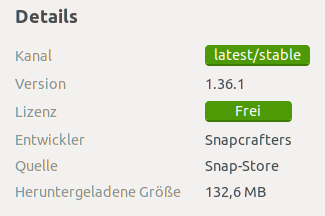
Now I am using the official source from the website and everything works fine.
spipau
on 23 Sep 2020
Could this by any chance be related to #4484?
 ilia-kats
on 17 Oct 2020
ilia-kats
on 17 Oct 2020
I also have the same issue on Ubuntu 20.04.1. I've installed signal from the Snap store. Do you think it might be a persmission issue with snap (like accessing camera and microphone) ?
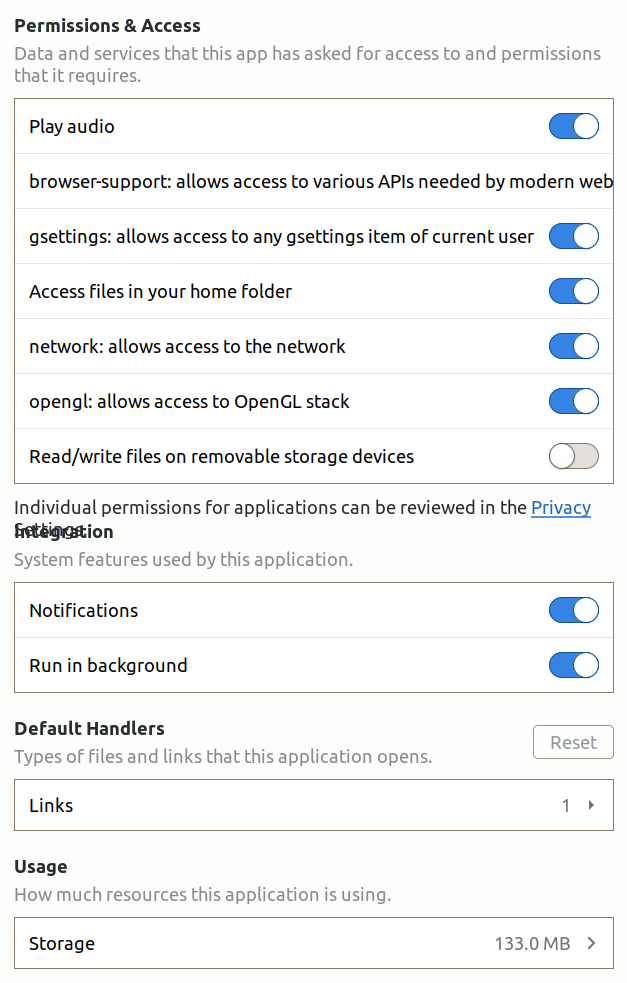
 100terres
on 22 Oct 2020
100terres
on 22 Oct 2020
We don't support the Snap distribution of Signal Desktop, so we can't help you there...could be worth reaching out to the folks who maintain the Snap to see if they have any ideas.
 EvanHahn-Signal
on 23 Oct 2020
EvanHahn-Signal
on 23 Oct 2020
Could be related to https://github.com/snapcrafters/signal-desktop/issues/44
100terres
on 23 Oct 2020
Because we don't support Signal Desktop on Snap and because of https://github.com/snapcrafters/signal-desktop/issues/44, I'm going to close this issue.
If you're able to reproduce this with our official apt-based distribution, let us know and we'll reopen!
EvanHahn-Signal
on 4 Nov 2020
Same issue on Ubuntu 20.04
 MatthewVella98
on 20 Dec 2020
MatthewVella98
on 20 Dec 2020
By installing signal from apt rather than snap solved the issue for me
 varun-mehra-942
on 10 Jan 2021
varun-mehra-942
on 10 Jan 2021
Related issues
 McLoo
·
3Comments
McLoo
·
3Comments
 lokesh-krishna
·
3Comments
lokesh-krishna
·
3Comments
 PanderMusubi
·
3Comments
PanderMusubi
·
3Comments
 hanzei
·
3Comments
hanzei
·
3Comments
 gesus14
·
3Comments
gesus14
·
3Comments
Most helpful comment
I'm having the same issue on Ubuntu 20.04.1. App freezes at the "ringing" screen, and none of the buttons work. The "ringing" sound keeps playing. App window can still be minimised, maximised, or closed to tray and opened up again, but I can't exit Signal nor can I back out of the ringing screen. Only thing I can do is kill it. No CPU or memory usage increase during that time, new messages aren't received or displayed.
Having said all this, this happens in my case with the Snap version. I tried installing the official way, and that seems to work. Haven't tried Flatpak. So, if that's not just me, but previous two posters also use Signal as Snap, maybe this is a Snap issue and this isn't the right place for this.