Signal-desktop: Win7x64: Unhandled Error: Cannot find module node_sqlite3.node after update to 1.23.0
Bug Description
Signal-desktop doesn't start after auto-update to 1.23.0: cannot find module node_sqlite3.node. Uninstall / Reinstall doesn't fix it either.
Steps to Reproduce
- Choose to download the update when prompted
- launch Signal via existing shortcut
Actual Result:

Expected Result:
Startup of the app.
Signal Version:
1.23.0
Operating System:
Windows 7 Enterprise, 64-bit
 M5864
M5864
All 30 comments
This happened after Auto-Update to 1.23.0 initiated by a popup message to update the Signal Version.
Windows 7 Professional 64-bit.

 AppyDay
on 21 Mar 2019
AppyDay
on 21 Mar 2019
我也是同样的问题
 goebao
on 22 Mar 2019
goebao
on 22 Mar 2019
@scottnonnenberg what more information could I provide to help?
 jbc22
on 22 Mar 2019
jbc22
on 22 Mar 2019
Windows 10 here on multiple machines. Reinstalling 1.22.0 from downloaded .exe works fine, but auto-upgrade and installing from 1.23.0 downloaded .exe crashes with this error.
 rsdifu
on 22 Mar 2019
rsdifu
on 22 Mar 2019
We're looking for potential reasons why it repros on some Windows 10 machines and not on others. On Windows 10, my testing hasn't resulted in the error at all. What's different about the machines where the error does happen? My Windows 10 is fully up to date, and pretty bare-bones - what has been installed/modified on the Windows 10 installs where this happens?
Now, on Windows 7, I can reproduce the problem reliably.
 scottnonnenberg-signal
on 22 Mar 2019
scottnonnenberg-signal
on 22 Mar 2019
My machines are fully up to date, and pretty bare-bones as well. They run browser-based apps in Firefox and Chrome (which are also kept up to date), and Signal.
rsdifu
on 22 Mar 2019
This sounds like it could be a pretty big change: 1.23.0 updated Electron to 4.x.
rsdifu
on 22 Mar 2019
希望能尽快解决在windows 7 64位下的这个问题。
goebao
on 22 Mar 2019
same error on my colleague (win10x64) (win8x64)
and my own win10x64 & win8.1x64 working fine.
 simonokay
on 22 Mar 2019
simonokay
on 22 Mar 2019
I just clicked the update to 1.23.0 and am suffering the same issue.
Win 10 Home (10.0.17134 Build 17134)
 random11
on 22 Mar 2019
random11
on 22 Mar 2019
Hello,
if of interest for you, same happened here (Win7x64 --never had problems before). Yesterday I was prompted to update my Signal Desktop, I clicked on the option to postpone it cause I was just using it at that moment, and it crashed giving this error:
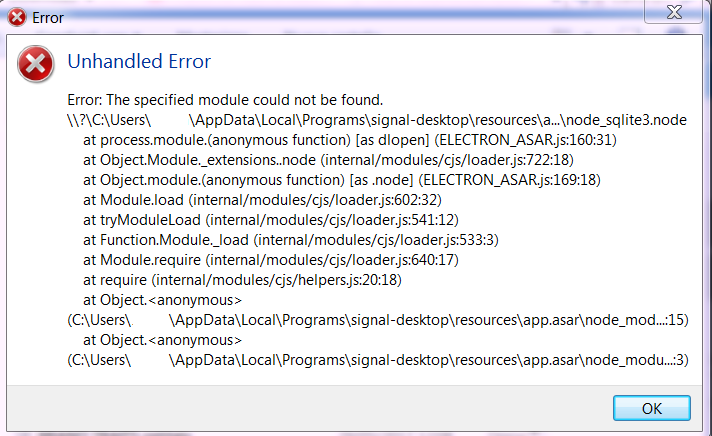
I don't know anything about code, however I tried the following steps:
downloaded the newest version and installed it => it crashed again, same error
restarted the computer, launched the latest .exe => same as above
disintalled Signal from the computer, deleted the previous .exe I had downloaded, downloaded it again, installed it => when it launched it, it crashed and gave the same error
searched for info about what to do, found here on github a previous thread where it was suggested to turn off the linked device on Android, then procede again on the computer, so I did that and then launched the .exe => again, immediate crash and error.
Hope that helps.
And, if I can ask this here: is there a place where I can find the previous version, so that I could still use Signal on my desktop 'till the bug for this one is fixed?
Thank you.
ED
ps: if my post violates some rule here on github, sorry, and hopefully a moderator will take care of it
 elldd
on 22 Mar 2019
elldd
on 22 Mar 2019
Hello,
if of interest for you, same happened here (Win7x64 --never had problems before). Yesterday I was prompted to update my Signal Desktop, I clicked on the option to postpone it cause I was just using it at that moment, and it crashed giving this error:
I don't know anything about code, however I tried the following steps:
- downloaded the newest version and installed it => it crashed again, same error
- disintalled Signal from the computer, deleted the previous .exe I had downloaded, downloaded it again, installed it => when it launched it, it crashed and gave the same error
- searched for info about what to do, found here on github a previous thread where it was suggested to turn off the linked device on Android, then procede again on the computer, so I did that and then launched the .exe => again, immediate crash and error.
Hope that helps.
And, if I can ask this here: is there a place where I can find the previous version, so that I could still use Signal on my desktop 'till the bug is fixed?
Thank you.
EDps: if my post violates some rule here on github, sorry, and hopefully a moderator will take care of it
as I know, even the previous version install successful, it will auto-update to 1.23 forcibly
simonokay
on 22 Mar 2019
as I know, even the previous version install successful, it will auto-update to 1.23 forcibly
Thank you. I thought something like that, since after the first attempt to install the new version --I had forgotten to add this in my previous post-- I tried to launch the old one but gave the same error, that's why I deleted it from the computer. I hoped there still was some older version available that didn't work that way
elldd
on 22 Mar 2019
@scottnonnenberg-signal The file isn't in the specified location. Whatever is responsible for the creation of the file seems to be failing. I'd be happy to do a troubleshooting session if it would help.
Got it working by installing the latest Visual Studio C++ Redistributeables. Seems to be required by node-sqlite3.
jbc22
on 22 Mar 2019
Got it working by installing vc_redist.x64.exe (I am on a 64-bit Windows 10) on https://support.microsoft.com/en-us/help/2977003/the-latest-supported-visual-c-downloads
Thanks to @jbc22
 HereticSK
on 22 Mar 2019
HereticSK
on 22 Mar 2019
Confirmed installing the latest Visual Studio C++ Redistributeables fixes the problem.
rsdifu
on 22 Mar 2019
This also worked for me. If you're on Windows 10 x64, use the 2017 redistributable here:
Microsoft Visual C++ Redistributable for Visual Studio 2017 x64
https://aka.ms/vs/15/release/vc_redist.x64.exe
 PacketShepard
on 22 Mar 2019
PacketShepard
on 22 Mar 2019
This also worked for me. If you're on Windows 10 x64, use the 2017 redistributable here:
Microsoft Visual C++ Redistributable for Visual Studio 2017 x64
https://aka.ms/vs/15/release/vc_redist.x64.exe
Just tried this too altho' my laptop runs Win7, it worked.
Thank you guys!
elldd
on 22 Mar 2019
I also can confirm installing this on Windows 7 Enterprise 64-bit has solved the issue. Signal is now starting as it should.
Microsoft Visual C++ Redistributable for Visual Studio 2017 x64
https://aka.ms/vs/15/release/vc_redist.x64.exe
M5864
on 22 Mar 2019
@M5864 I wouldn't close this. While installing VS Redist works, it's not a proper solution for the long term. The Signal installer should ensure the correct version of VS Redist is installed on the target machine.
jbc22
on 22 Mar 2019
v1.23.1-beta.1 was just released, and should fix this. Please check it out and let us know if it works for you (especially if you haven't tried installing the VC Redist as a workaround): https://updates.signal.org/desktop/signal-desktop-beta-win-1.23.1-beta.1.exe
scottnonnenberg-signal
on 22 Mar 2019
@scottnonnenberg-signal uninstalled VS Redist and reproduced the error with 1.23 and beta-win-1.23.0-beta.4.
Installed beta-win-1.23.1-beta.1.exe and I can confirm that the issue is fixed for me.
jbc22
on 22 Mar 2019
v1.23.1-beta.1 was just released, and should fix this. Please check it out and let us know if it works for you (especially if you haven't tried installing the VC Redist as a workaround): https://updates.signal.org/desktop/signal-desktop-beta-win-1.23.1-beta.1.exe
Installed it too, but w/out uninstalling the VC Redist --because at first I couldn't figure out where it was located..-, it works fine
elldd
on 22 Mar 2019
Since my original message, I had installed v1.22.0 to continue working and it was working fine.
I received several popups to update to the new version and kept clicking LATER.
Closed Signal desktop app.
Ran the https://updates.signal.org/desktop/signal-desktop-beta-win-1.23.1-beta.1.exe and
now I am being prompted to "Link your phone to Signal Desktop."
**I have NOT installed the VS Redist or made any changes other than loading the Beta 1.23.1.
?? Do you want me to try anything (for testing purposes) before I try and relink my account?
Thanks!
AppyDay
on 22 Mar 2019
No, with the testing you all have provided, I went ahead and promoted v1.23.1 to production, so those of you with v1.22.0 installed should be able to let it upgrade.
scottnonnenberg-signal
on 22 Mar 2019
I'm going to close this as fixed.
scottnonnenberg-signal
on 22 Mar 2019
Will everyone have to Re-Link there phone to their Signal-Desktop then?
AppyDay
on 22 Mar 2019
@AppyDay Only if you uninstalled the app. If you pull down a new version and install it over the old, you don't need to re-link.
scottnonnenberg-signal
on 23 Mar 2019
I just want to say that my wife was having the same issue with the same error message on windows 8.1, and after installing the latest release, she is still seeing the same error message about node_sqlite3.node.
 natelust
on 27 Mar 2019
natelust
on 27 Mar 2019
@natelust Since that may be a new issue, please contact [email protected] or file a new GitHub issue.
scottnonnenberg-signal
on 27 Mar 2019
Related issues
 ProactiveServices
·
3Comments
ProactiveServices
·
3Comments
 lokesh-krishna
·
3Comments
lokesh-krishna
·
3Comments
 vincenzopalazzo
·
3Comments
vincenzopalazzo
·
3Comments
 petcap
·
3Comments
petcap
·
3Comments
 shaaati
·
3Comments
shaaati
·
3Comments
Most helpful comment
@scottnonnenberg-signal uninstalled VS Redist and reproduced the error with 1.23 and beta-win-1.23.0-beta.4.
Installed beta-win-1.23.1-beta.1.exe and I can confirm that the issue is fixed for me.