Signal-desktop: "Error handling incoming message" in one conversation after upgrade, recent messages ordered older
- [X] I have searched open and closed issues for duplicates. This one seems similar but not close enough.
Bug Description
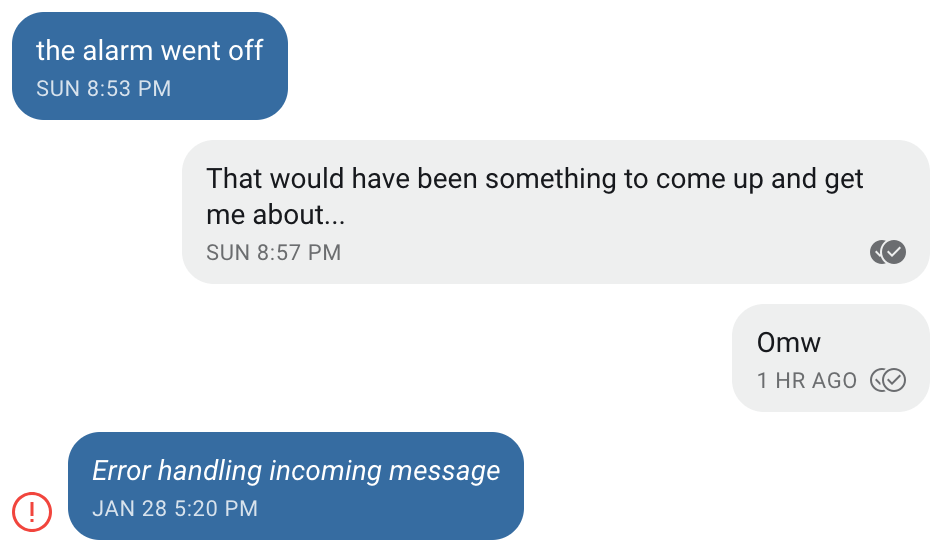
I was just prompted to upgrade Signal desktop on macOS. I did so. Upon restart, _one_ conversation has most messages with "Error handling incoming message" and the messages are dated Jan 28. However, if I scroll up, then I can see messages from just an hour ago. If I scroll back further, the messages that are supposedly unsync-able are not in date order.
e.g.
- messages dated 27 Jan
- secure session reset
- secure session reset (the last update, this happened and this seemed to help)
- messages dated 27 Jan
- messages dated 28 Jan
- messages dated 29 Jan-Feb 5 (including one one hour ago)
- error handling incoming message, dated 28 Jan (several)
- error handling incoming message, dated 29 Jan (several)
At first, I thought that it'd lost all of my recent messages. Then I realized that it's ordering them weirdly.
Steps to Reproduce
- Use Signal on Android and on macOS
- Upgrade the macOS version
- Observe
Actual Result:
Several "Error handling incoming message" errors are most recent in the conversation.
Expected Result:
Messages are present, or if for some reason they are unavailable/unrecoverable, they are at least in time-series order.
Screenshots
Platform Info
Signal Version:
1.21.0
Operating System:
macOS 10.14.1
Linked Device Version:
4.32.8
Link to Debug Log
https://debuglogs.org/8f9cf70b9ff6dcfeed3c98b2ba2ab24c7fd77d7c20f08c0c569e83f675e30a93
 colindean
All 46 comments
Also seeing lots of issues with Signal 1.21.0 on Mac.
OS:
macOS 10.14.2
Debug Log:
https://debuglogs.org/bd4ed0689a9a030bcb1e654aa744e5daff3adf52adfdf498adac1c12a6b1874f
 esiqveland
on 6 Feb 2019
esiqveland
on 6 Feb 2019
I also saw this problem with the 1.21.0 update on Mac this morning.
The steps were:
- My laptop was asleep.
- I had a few messages unread from one contact
- Prompted for update & updated
- The one contact with pending message is the message that has Error Handling Incoming message from.
Desktop log:
log.txt
Datestamp in log is approximately 2019-02-06T15:XX but update occurred prior to approx 2019-02-06T15:22
Phone client on ios, 2.34.0.26, device log:
https://debuglogs.org/f190799e22463660907647d1398074625b18d572bf0f2a055bc36766a12e656e.zip
 Chrismarsh
on 6 Feb 2019
Chrismarsh
on 6 Feb 2019
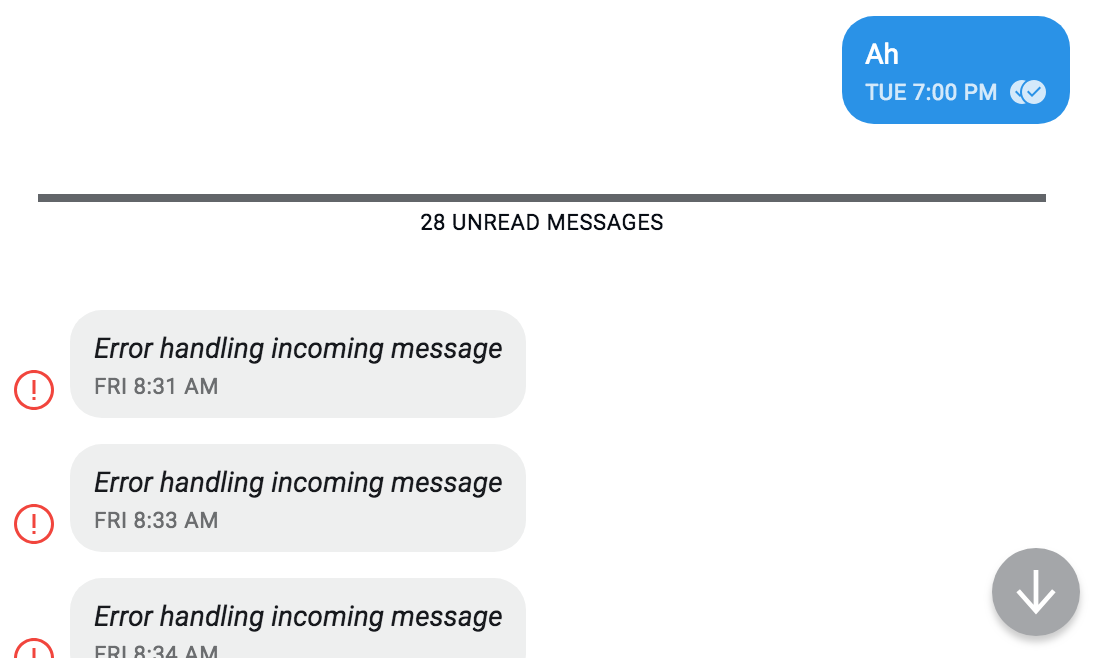
Looking more closely at the messages that have the error, I see the same behaviour as @colindean where the messages are out of order. I also missed that I had a second contact with 28 Error'd messages. For this contact, screenshot below, I do not have any message from them after my 'Ah' on my phone, so these Error'd messages are older
Chrismarsh
on 6 Feb 2019
It seems that none of you restart the application very often! When Signal restarts, it retries messages which weren't successfully processed the last time we tried - and we try a total of three times. That's what you're seeing - Desktop is retrying old messages and failing to process them, putting errors with older timestamps as the most recent message in a few conversations. Now that you've seen an error, Desktop won't try those messages again.
So my question for all of you: Did you previously notice any missing messages? If you do, please submit a debug log immediately and we can track down the original error which caused those message to stay in the cache instead of being processed to completion.
 scottnonnenberg-signal
on 6 Feb 2019
scottnonnenberg-signal
on 6 Feb 2019
It seems that none of you restart the application very often!
Nope! It'll run until I reboot, which only just happened because of a once-in-2-years kernel panic.
putting errors with older timestamps as the most recent message in a few conversations
Ah. It is definitely not clear that this is what is happening.
So my question for all of you: Did you previously notice any missing messages?
I have in the past, but that was months ago. Looking at the 38-error conversation, Those last occurred Feb 1 -- going back through my messages prior to Feb1, I'm seeing a lot out of order on desktop, but no missing messages from what I can see.
Chrismarsh
on 6 Feb 2019
It seems that none of you restart the application very often!
I restart apps:
- when I restart the computer, which is basically when OS updates require restart.
- when the app tells me that it needs to restart to update _and_ I see something in the update changelog window that is of interest to me (otherwise, it's a "install on restart").
- when the app crashes.
Did you previously notice any missing messages? If you do, please submit a debug log immediately and we can track down the original error which caused those message to stay in the cache instead of being processed to completion.
Yes, back on or around 28 Jan. Do you want a fresh debug log newer than what I submitted in the OP?
colindean
on 6 Feb 2019
It seems that none of you restart the application very often
I only restart apps if they have an update or the OS requires an important security fix that I need to restart for.
Did you previously notice any missing messages.
I have not noticed any missing messages, but this is not the main device I use for chatting, so I might not have noticed if any messages were missing.
esiqveland
on 6 Feb 2019
iOS 12.1.3, Signal v2.35.0.13 - https://debuglogs.org/7a062ee69fe216781f8e9e25a99a26dae9dd34ee265b9a3b16d98a9a23402cec.zip
macOS 10.14.3, Signal v1.21.1 https://gist.github.com/maniekbezkitu/197f19378d77ce706f1bb14b5dd88708
With the amount of error messages I am getting every day this is making Signal pretty much unusable. Session reset doesn't seem to help.
 maniekbezkitu
on 11 Feb 2019
maniekbezkitu
on 11 Feb 2019
It looks like I'm experiencing the same problem. I received hundreds of these messages this morning in a single conversation after restarting Signal on my macOS 10.13.6 laptop to pick up the Signal version 1.21.2 update. My Android client is version 4.33.5. Here's the debug log:
https://debuglogs.org/147abeb8104bade14b8dcd31a8e01bcd62959c2ae43fce2ccffbb2bec0042fe0
 mykmelez
on 13 Feb 2019
mykmelez
on 13 Feb 2019
@mykmelez This is the key line from your log:
INFO 2019-02-13T19:34:19.465Z getAllFromCache loaded 341 saved envelopes
What could all those messages be? The messages still in your cache when you start up are messages we tried to process once or twice before, but we failed in processing them and failed to remove them from the cache (usually errors remove messages from the cache). What conversation do they appear in? Does that give you any clue?
scottnonnenberg-signal
on 13 Feb 2019
I don't concur that this issue has to do only with old messages. The new Mac version fails to load messages from certain contacts from just seconds or minutes in the past, messages that the iOS app and previous Mac version handled. I ~will submit~ have submitted logs via email.
 oddnoc
on 14 Feb 2019
oddnoc
on 14 Feb 2019
Just updated to 1.22.0 and same problem. It's now hundreds of errors for 3 of my contacts
Chrismarsh
on 21 Feb 2019
What could all those messages be? The messages still in your cache when you start up are messages we tried to process once or twice before, but we failed in processing them and failed to remove them from the cache (usually errors remove messages from the cache). What conversation do they appear in? Does that give you any clue?
I have effectively only one conversation in Signal (the only other one has only a few messages in it), and that conversation has been going on for several years, with tens of messages exchanged daily. So there are thousands—if not tens of thousands—of messages in it, and there's been more than enough time for hundreds of failed messages to have accumulated, given that I experience a failed message once or twice a month at least.
mykmelez
on 21 Feb 2019
@mykmelez Please submit a debug log whenever a message fails. Most failed messages (especially if you see a notification for them in a conversation) should not be retried later.
scottnonnenberg-signal
on 21 Feb 2019
I just experienced this today with the upgrade to 1.22.0. Specifically, after upgrade, Signal shows the following for some older messages under at least 2 of my contacts:
Error handling incoming message
FRI 9:57 PM
Error handling incoming message
SAT 10:33 AM
Error handling incoming message
SAT 10:36 AM
Error handling incoming message
SAT 10:36 AM
Platform is macOS, Mojave, Signal 1.22.0 freshly updated today. Upon update and restart, those messages appear.
Error | Bad MAC
-- | --
Sent | Saturday, February 16, 2019 10:33 AM (REMOVED)
Received | Friday, February 22, 2019 2:27 PM (REMOVED)
Logs show Bad MAC errors as well.
 michaelsmoody
on 22 Feb 2019
michaelsmoody
on 22 Feb 2019
@sykosoft Please include your debug logs. Also, why did you remove the id next to the timestamp? That's important to allow us to cross-reference with your logs.
scottnonnenberg-signal
on 22 Feb 2019
@scottnonnenberg Happy to provide that, I'm mostly just trying to leave out relevant metadata. Similarly, from the logs, how can I make sure there's nothing remotely sensitive in them for sharing?
Thanks in advance
michaelsmoody
on 22 Feb 2019
@sykosoft If you're on windows, some file paths appear to sneak through our redaction. Beyond that, you should be fine. And if you're really worried, you can always send it to [email protected] instead fo posting it here.
scottnonnenberg-signal
on 22 Feb 2019
This remains a problem.
Signal 1.22
Rebooted after a week+ of uptime for security updates, and had over 400 "Error handling incoming message" errors.
https://debuglogs.org/21cf60f02ac579995770a816ac776db963c185aba6bc9ccb71b4134a05b62e0e
Chrismarsh
on 7 Mar 2019
@Chrismarsh Looking at your log, all of those messages came from messages left in your cache, which we retry on startup. We're looking for hints as to why those messages were left in your cache - in the conversations with those errors, have you noticed any previous weirdness recently?
scottnonnenberg-signal
on 8 Mar 2019
@scottnonnenberg-signal Weirdness being missed messages? Or just any thing that feels off? Either way, no. Is there a way to diagnose what messages those could have been? I guess I'm still a little unclear on these are -- are these messages that were never delivered? To the device I see the error on? Or on one of my other linked clients?
Chrismarsh
on 8 Mar 2019
Those errors are incoming messages from those contacts - full messages, or just delivery receipts, typing indicators, or read receipts. It's unlikely that they were successfully processed the first time, given the protections we have around duplicate messages.
scottnonnenberg-signal
on 8 Mar 2019
@scottnonnenberg-signal I just spoke with one of my contacts that I had the error messages with. There are no missing messages, and it seems like some of messages timestamps correspond to times I sent messages that were correctly delivered. I'm at a bit of a loss -- what other information can I provide to help?
Chrismarsh
on 8 Mar 2019
This just happened to me once again with an update/restart cycle. Now more messages than before. Seems I'm not the only one as well. Still in need of logs?
michaelsmoody
on 9 Mar 2019
@scottnonnenberg-signal I have an observation that may be helpful. I just realized that one of the conversations with the error is the Note To Self. I've sent a total of 2 messages to myself via Note to self, just to test. However, it had 91 errors in the conversation. So there are more errors and messages ever sent in the conversation.
Chrismarsh
on 11 Mar 2019
This error happened to me as well:
My friend restored a system backup (home was kept) and then had to relink his desktop client. I guess his client was confused because of the existing files in home.
Whenever he sent a message to me, this error appeared. It was resolved by me sending one message to him.
 darkdragon-001
on 12 Mar 2019
darkdragon-001
on 12 Mar 2019
I'm also experiencing this issue, and I had opened issue #3212 (now closed as duplicate) with my attached logs in case they are helpful. In that closed issue, @scottnonnenberg-signal asked:
Essentially - old messages from the cache are retried on restart. The question is: were messages missing before? Is there any pattern to the kinds of messages that were missing, if any?
Unfortunately I haven't noticed a pattern. Fortunately, I also haven't noticed missing messages, but I am a little concerned about message delivery reliability. I have convinced over a dozen "casual" users to switch to Signal, and I expect they will be quick to permanently switch away from Signal if they start losing messages.
Question: Is it best to manually restart the desktop app at least every three days, in order to potentially capture more logs of these issues before the log is truncated? Is there anything else we can to help narrow down the root cause of this bug?
@mykmelez Please submit a debug log whenever a message fails. Most failed messages (especially if you see a notification for them in a conversation) should not be retried later.
Is there an existing bug to which we should attach logs in this scenario? Or should we just email them to [email protected], maybe with the subject "failed messages on
 justlurking
on 12 Mar 2019
justlurking
on 12 Mar 2019
@justlurking Yes, please provide logs often, and more frequent restarts would help us track this down more easily (since we delete logs entries older than three days). One thing to keep in mind, though, is that we do want enough information to help us get a picture of what actually happened - information about the sending device, history of communication between the devices, etc. We'll want that even if you send it directly to support!
In general, I think I'd prefer that people always enter new bugs, and we can mark them as duplicate as appropriate.
scottnonnenberg-signal
on 12 Mar 2019
@scottnonnenberg-signal I'm experiencing this issue as well.
This first log was created right after a few "Error handling incoming message".
This second log I created after some restarts and trying to reset the secure session.
Moreover: If I "Reset session" in desktop, I'm unable to successfully deliver messages ("Note to Self") in the Signal app for Android:
 guimspace
on 6 Apr 2019
guimspace
on 6 Apr 2019
I have the same issue but on Ubuntu LTS 18.04 (Signal v1.33.0). Clicking on "more info" on the message yields the same type of info (number replaced with #):
Example 1:
Error   Identity key changed
Sent    Monday, April 13, 2020 7:59 AM (1586761179694)
Received    Monday, April 13, 2020 9:53 AM (1586768039814)
From
Avatar for contact ##### ###### ~Andreas
##### ###### ~Andreas
Example 2:
Error   Identity key changed
Sent    Monday, April 6, 2020 10:47 AM (1586166420187)
Received    Monday, April 13, 2020 9:53 AM (1586768039499)
From
Avatar for contact ##### ###### ~Andreas
##### ###### ~Andreas
Edit: Thought I'd add that sending messages in this conversation works just fine
 andreasmjg
on 13 Apr 2020
andreasmjg
on 13 Apr 2020
@guimspace Unfortunately your uploaded logs are inaccessible. Next time you upload logs, please test them. If that isn't working, you can provide your zipped-up logs folder from the Signal Desktop data directory.
@andreasmjg We need debug logs to make progress on investigations. We do appreciate information like that from the message details screen when trying to track down information about a specific message, but we need those logs.
scottnonnenberg-signal
on 13 Apr 2020
@scottnonnenberg-signal Can't, it won't submit. Any other way I can submit?
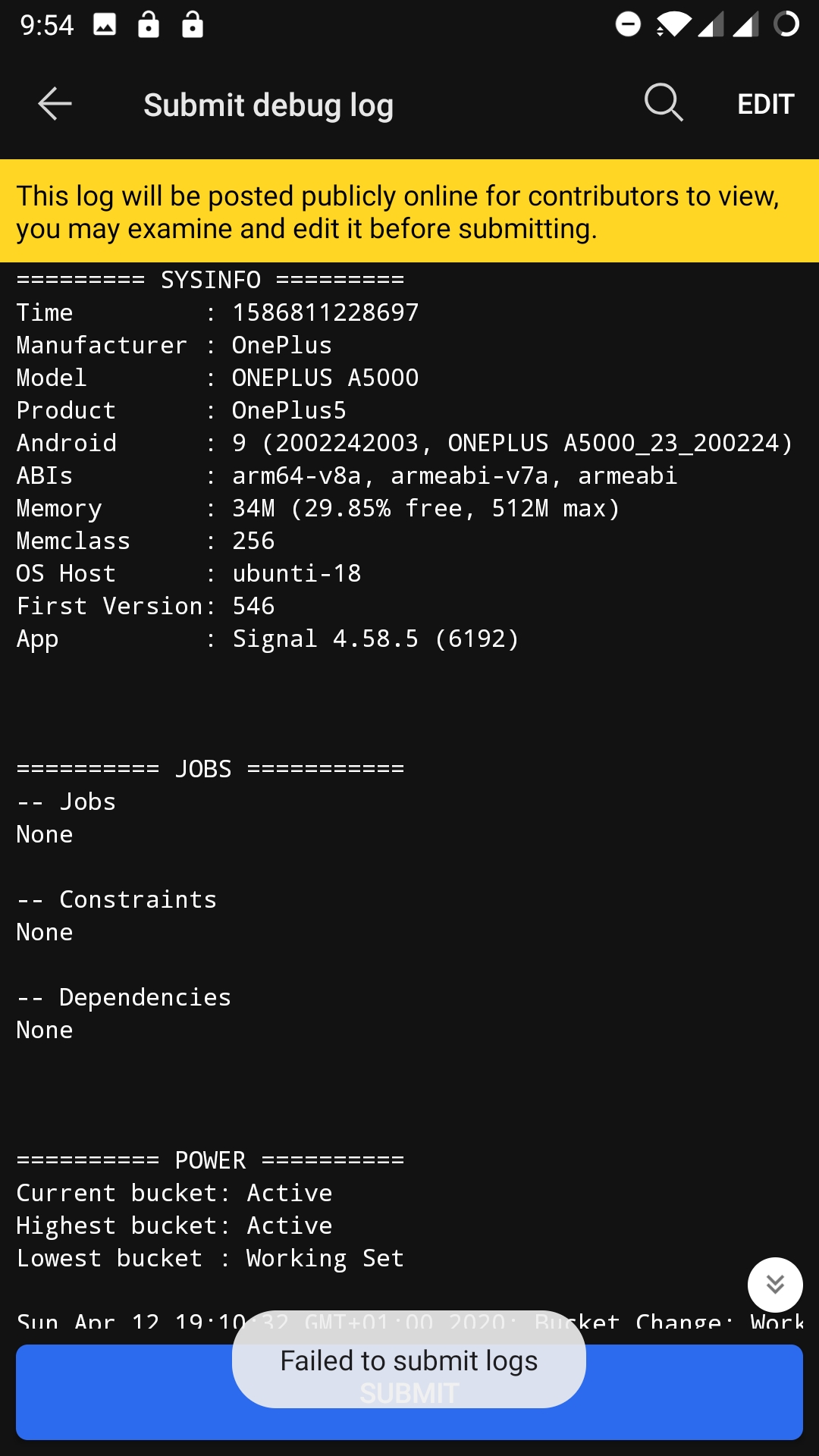
EDIT: Just kidding..? I switched to mobile network and it worked. Probably WiFi issue.
Here they are:
https://debuglogs.org/ed0d3069de8ac4d24b2f74b9986eecb7a4778ec706651a26fc4ab943eaee86e3
andreasmjg
on 13 Apr 2020
@andreasmjg We need your Desktop logs (View -> Debug Logs) if you are reporting a Signal Desktop log. The link you provided is an Android log.
scottnonnenberg-signal
on 14 Apr 2020
Err.. My apologies. Here's the desktop log: https://debuglogs.org/7f7d1f58979ee0211ea99722ff9e158cf14a295abeb816001979480bb189ca0c
@scottnonnenberg-signal
andreasmjg
on 14 Apr 2020
@andreasmjg Looks like all of your errors are coming from ...940.1 - is that your phone number? Is that your primary device, perhaps?
scottnonnenberg-signal
on 25 Apr 2020
@andreasmjg Looks like all of your errors are coming from ...940.1 - is that your phone number? Is that your primary device, perhaps?
Hi @scottnonnenberg-signal - my phone number ends in 7940 which is indeed my primary device. Not sure where the ".1" comes from though
andreasmjg
on 26 Apr 2020
@andreasmjg We have a change going out in the next release which should help your Desktop and Phone communicate with each other successfully.
scottnonnenberg-signal
on 28 Apr 2020
Keeps happening on Windows Desktop for me. What I can see here makes a lot of sense for why that's happening:
I looked into this a while ago and my (Googling) conclusion back then was that it happened, because Signal desktop client syncs before it updates. If it's out of date, it may generate those errors.
 insideClaw
on 7 May 2020
insideClaw
on 7 May 2020
Can confirm it still happens more often than not, with my sporadic usage of Signal Desktop but everyday usage of Signal for Android. Main reason I wouldn't easily recommend Signal for general usage right now, this has been happening for a while...
insideClaw
on 16 Aug 2020
@insideClaw Please provide debug logs when you run into this, even if you've provided debug logs in the past. For these tough issues, we need as much information as possible to track it down and fix it.
scottnonnenberg-signal
on 24 Aug 2020
I too have been having this problem. Works fine on one desktop, but very unreliable on the other. I guess this is why apps like this die off. People do not have time to search for solutions to a problem so basic as sms not sending. Switching back to messenger :(
 Sunny-Engineer
on 22 Sep 2020
Sunny-Engineer
on 22 Sep 2020
@Sunny-Engineer can you please send us your debug logs, you can find them via the menu View -> Debug Logs. It'll help us try and identify what issue you're experiencing.
 josh-signal
on 24 Sep 2020
josh-signal
on 24 Sep 2020
@scottnonnenberg-signal @josh-signal Debug logs -https://debuglogs.org/3fefbac05a537af4180e8d289b5822fdeb33b7a1b241d80fb9488bf7c0cad386
I spotted some errors about messages being from the future. I asked my conv partner, they confirmed their phone's time and date is correct.
Surprisingly, still keeps on happening with new messages even after updating, so I'm unable to use Signal Desktop at all now. It only worked for a while when I uninstalled it completely, but that was only for a short time before I logged in to a new version and discovered the same problem.
insideClaw
on 24 Sep 2020
@insideClaw Sadly, your debug log doesn't help us track down the cause of this. When would you say the last time you successfully received a message from that contact on that desktop instance? Can you describe your interaction with that user since then? Was this desktop offline for a while, perhaps? How long?
A reset session (available in the top-right menu) should fix that conversation going forward.
scottnonnenberg-signal
on 5 Oct 2020
@scottnonnenberg-signal
- Sep 3 10:04pm was the last successfully received message by that contact on the desktop instance. The next one shown is chat is from Sep 20 5:49pm shown as "Error handling incoming message", and everything ever since.
- Daily conversation, lots of messages back and forth on Signal Android.
- It was, judging by the timestamps above that'd be 17 days in which I haven't opened Signal Desktop.
Hope that helps.
Oh, had never tried the reset session functionality for this issue, thanks. I assume that will fix it for now - until next week or two of not using the Desktop client, that is.
insideClaw
on 6 Oct 2020
@insideClaw Thanks for the additional data. One thing that would really help us is if you take regular debug logs to chronicle your occasional use of Desktop. We only save three days of historical log data, so we will never get a full picture of what your desktop is doing in your scenarios unless you take some extra steps to help us out.
scottnonnenberg-signal
on 6 Oct 2020
Related issues
 McLoo
·
3Comments
McLoo
·
3Comments
 demux4555
·
3Comments
demux4555
·
3Comments
 hanzei
·
3Comments
hanzei
·
3Comments
 github-cygwin
·
3Comments
github-cygwin
·
3Comments
 shaaati
·
3Comments
shaaati
·
3Comments