Signal-android: Remote delete causing problem with Quote jump and Search functionality
- [x] I have searched open and closed issues for duplicates
- [x] I am submitting a bug report for existing functionality that does not work as intended
- [x] I have read https://github.com/signalapp/Signal-Android/wiki/Submitting-useful-bug-reports
- [x] This isn't a feature request or a discussion topic
Bug description
For example there were 100 messages, message 100th quote message 1st , and if there were 20 remote deletes then clicking on quote at 100th message (which was toward 1st) will jump you towards 20th message of that convo. No matter how many people are talking in group
Same with search , if what you searched was on text at location #1, and you do 20 remote deletes, that search will highight the correct text at location #1 but when you click on arrows it gonna take you to location #21 (20+1)
UPDATE : For example there were 100 messages, message 100th quote message 1st , and if there were 20 remote deletes then clicking on quote at 100th message (which was toward 1st) will jump you towards 20th message of that convo. No matter how many people are talking in group, Continuing on if after these 100 messages if there were 30 more remote deletes even tho these happen after the message have been quoted these still would shift the quote jump by 30 more messages.
Same with search , if what you searched was on text at location #1, and you do 20 remote deletes, that search will highight the correct text at location #1 but when you click on arrows it gonna take you to location #21 (20+1), Continuing on if after these 100 messages if there were 30 more remote deletes even tho these happen after the message have been quoted these still would shift the quote jump by 30 more messages.
If you do , delete for me for all the remote deletes , this doesn't happen, but only when you or someone else does remote delete , this bug comes to picture.
UPDATE: as @billie80 Points out later in the discussion this is also true when a person quotes someone and later in chat someone remote delete a message , if you now click on quote the quote shifts downwards too, even tho remote delete wasn't between message and the quoted message.
As an example :
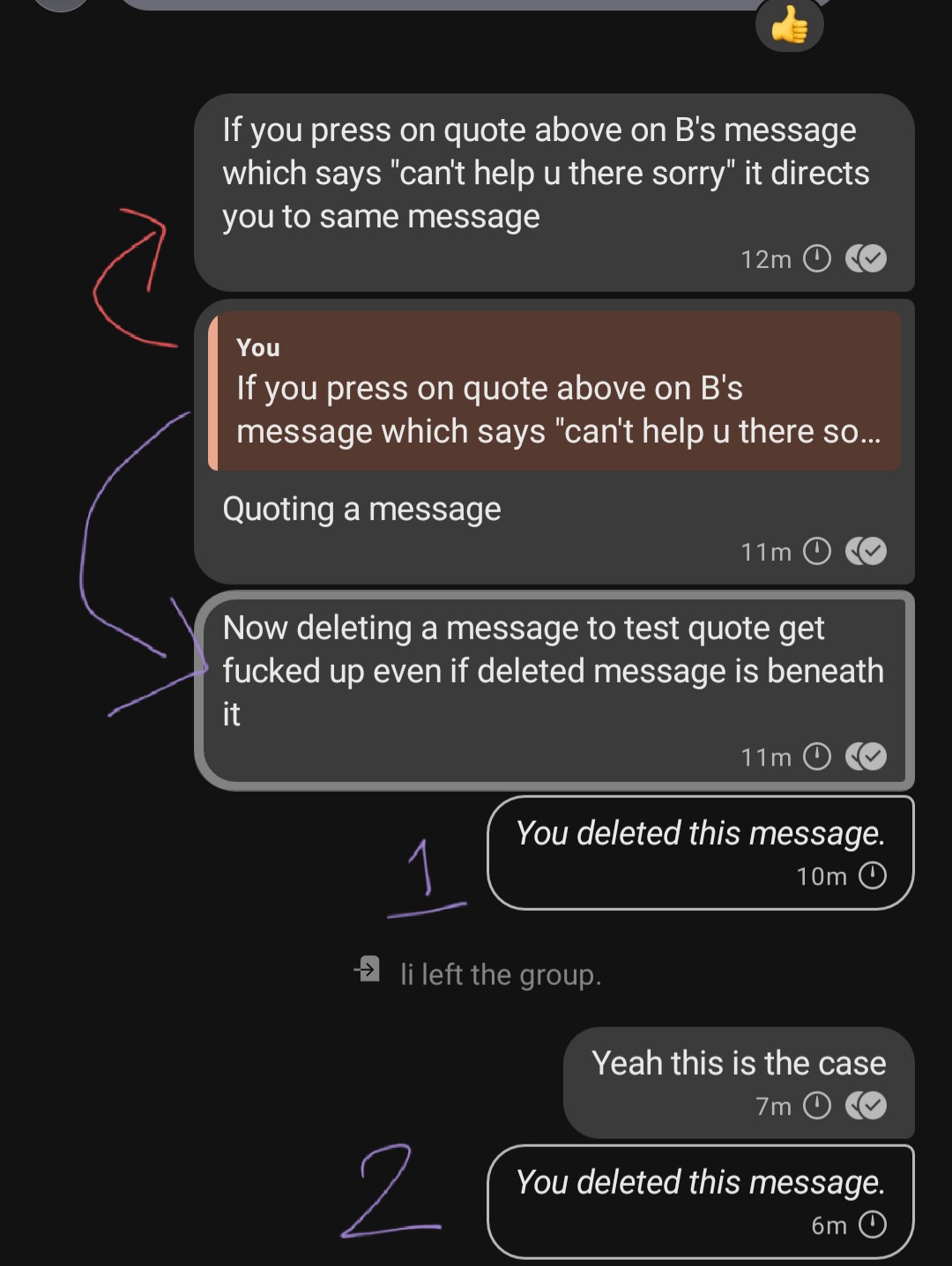
Screenshots
How normal quote jump must happen
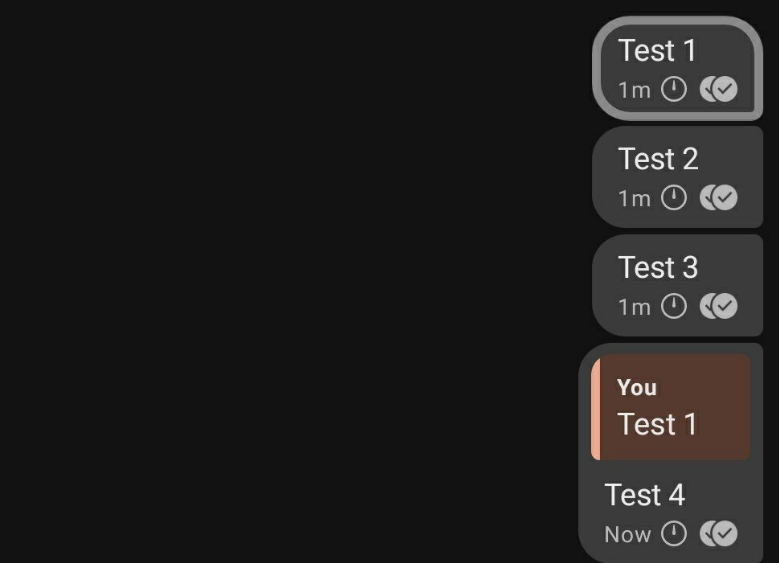
Deleting "test 2" and clicking on quote that should direct to "test 1"
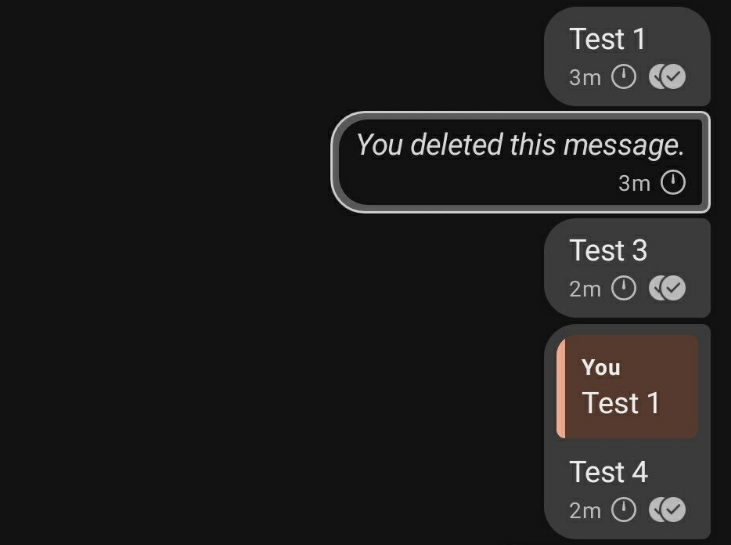
It jumps a message downwards
Deleting "test 2" and "test 3" , and clicking on quote that should direct to "test 1"

It keeps moving downwards depending on how many remote delete happened in chat in total in between quoted text and text that quotes it.
Device info
Device: SAMSUNG SM
Reproducible by everyone on Signal Android
Android version: 10
Signal version: 4.76.2
Link to debug log
https://debuglogs.org/7509591be6ee076dbf02ccab040d4e6307cb6d561f2e8445df0906a8fa20b310
 teynav
All 6 comments
I also encountered this issue!
Strangely this also happens for quoted replies further back in the conversation, meaning even replies before the deleted message are affected!
Can anybody also confirm this?
 billie80
on 12 Nov 2020
billie80
on 12 Nov 2020
@billie80 Can you show some screenshot to confirm what you mean by that?
teynav
on 14 Nov 2020
Not really but normally one would expect that by this issue only quoted messages after the remote deletion (messages which arrived at a later time) are affected.
In my example there is a conversation with only one deleted message but quotes are pointing to the wrong message after and before the deleted message.
In this case the quote always points to the next message as there is only one deleted message and this affects also messages and quotes that arrived days before the deleted message.
billie80
on 14 Nov 2020
Thanks @billie80 I can find what you are saying is appropriate , If i send text and quote something and later in chat i remote delete a random message the quote willl shift downwards depending on how many messages have been deleted.
I have updated the post, can you confirm this was the issue you were talking about?
teynav
on 16 Nov 2020
I found a workaround to the issue, although technically it's more manually intensive, you can select all deleted messages skeleton and click on delete for me. It should now fix quote jump issue and search issue.
teynav
on 4 Dec 2020
Sorry this got overlooked, it'll be fixed in the next major release :+1:
 greyson-signal
on 4 Dec 2020
greyson-signal
on 4 Dec 2020
Related issues
 McLoo
·
3Comments
McLoo
·
3Comments
 Wikinaut
·
3Comments
Wikinaut
·
3Comments
 jult
·
3Comments
jult
·
3Comments
 nxfifteen
·
3Comments
nxfifteen
·
3Comments
 vvug
·
3Comments
vvug
·
3Comments
Most helpful comment
Sorry this got overlooked, it'll be fixed in the next major release :+1: