Signal-android: Images get corrupted on send sometimes
- [x] I have searched open and closed issues for duplicates
- [x] I am submitting a bug report for existing functionality that does not work as intended
- [x] I have read https://github.com/signalapp/Signal-Android/wiki/Submitting-useful-bug-reports
- [x] This isn't a feature request or a discussion topic
Bug description
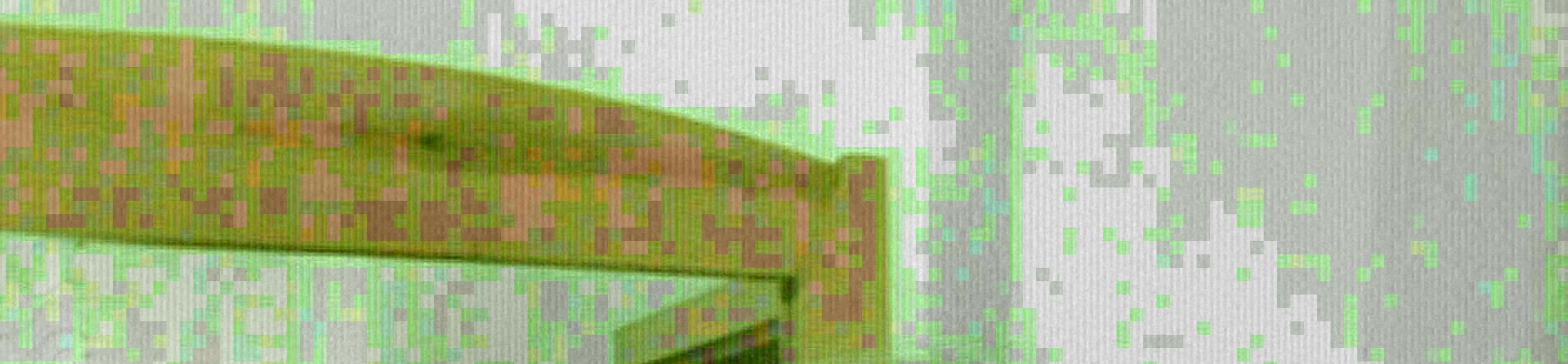
Sometimes I get messages from the sender where images get corrupted. Looks like immense JPEG artifacts with green tint.
The images are recorded with an external camera and look just fine. Also images which are not recorded on the smartphone of the sender get corrupted sometimes.
Steps to reproduce
- Seems to happen when the sender has weak signal or no connection to the internet
- happens from time to time
- Resending sometimes sends the image just fine
Expected result:
Images don't get corrupted
Screenshots
Device info
Device: samsung SM-G903F (S5 neo)
Android version: 6.0.1
Signal version: 4.41.6
Happens also on older signal versions
Link to debug log
https://debuglogs.org/ae4e78e357fce9a4ca76c4d055358e92a80c98b5b09ce466345c4819a5f21ca2
 piratenpanda
All 8 comments
Given that we don't process the images on the receiver side, this is likely a problem where something goes wrong with image compression on the sender side.
 greyson-signal
on 15 Jul 2019
greyson-signal
on 15 Jul 2019
Sorry, accidentally submitted last comment too soon.
Here's something to test:
- Have the sender attempt sending a small photo (say, 640x480 jpg) which we wouldn't need to compress, and see if that comes through ok.
- Have the sender attempt sending a very large photo (a jpg > 4k resolution), which we would compress, and see if that comes through artifacted.
Also, if you could get a debuglog from the sender afterwards, that would be great.
greyson-signal
on 15 Jul 2019
the log is from afterwards directly. Also the same image sent directly afterwards comes through fine, so it's not really reproducible or image size dependent
piratenpanda
on 16 Jul 2019
Is the log from the sender's side? I see no logs indicating an attachment upload.
Also, can you tell me the dimensions and size of the image? I basically need to know if it's over the threshold that we'd compress the image. If it isn't, then it could be a rendering problem on the receiver's side.
greyson-signal
on 16 Jul 2019
Sender side, yes. Strange, she collected the log straight afterwards. Will try to get a better one the next time this happens.
The image was 1932px*2576px. 780kB.
piratenpanda
on 16 Jul 2019
Ok, so after finding some other people with the same issue, I'm relatively confident this has something to do with the image compression. I forgot that we will re-encode all images as a cheap way to strip out any EXIF data. I'll try to see if this is a problem with Glide or if it's a problem with the phone's built-in image encoding.
greyson-signal
on 16 Jul 2019
Alrighty, so we figured it out. In poor network conditions, uploads will fail. But we compress before every upload attempt. So images end up getting overly compressed on bad networks. This was hard to find because newer android versions have some optimizations in bitmap compression where it won't overly-compress images, so this only happens on older android versions. We'll likely break compression out to a separate job from the upload job to fix this. Thanks!
greyson-signal
on 16 Jul 2019
Sounds good. Glad to help
piratenpanda
on 16 Jul 2019
Related issues
 wesinator
·
3Comments
wesinator
·
3Comments
 derWalter
·
3Comments
derWalter
·
3Comments
 notthematrix
·
3Comments
notthematrix
·
3Comments
 kwlg
·
3Comments
kwlg
·
3Comments
 donjoe0
·
3Comments
donjoe0
·
3Comments
Most helpful comment
Alrighty, so we figured it out. In poor network conditions, uploads will fail. But we compress before every upload attempt. So images end up getting overly compressed on bad networks. This was hard to find because newer android versions have some optimizations in bitmap compression where it won't overly-compress images, so this only happens on older android versions. We'll likely break compression out to a separate job from the upload job to fix this. Thanks!