Signal-android: Quote removal button difficult to see in dark theme.
- [x ] I have searched open and closed issues for duplicates
- [x ] I am submitting a bug report for existing functionality that does not work as intended
- [ ] I have read https://github.com/signalapp/Signal-Android/wiki/Submitting-useful-bug-reports
- [ x] This isn't a feature request or a discussion topic
Bug description
Quoted media in a draft message cannot be removed.
Steps to reproduce
- Quote a message that consists of a single picture
Actual result:
There is no way to remove the image from draft.
Expected result:
There should be a possibility to remove either the image from the draft of delete the whole draft. One possible solution could be long pressing on the quoted image and having a context menu with an entry to remove the image.
Device info
Device: Google Pixel 1
Android version: 9
Signal version: 4.36.2
 gartenriese2
All 6 comments
The entire quote can be removed by tapping the 'x' in the top right corner of the compose area. If you're asking to add the option to keep the quote but remove the image, that isn't something we support. Feature requests can be made and discussed on the forum. Thanks!
 greyson-signal
on 29 Mar 2019
greyson-signal
on 29 Mar 2019
Thanks, somehow I didn't see the 'x'.
gartenriese2
on 29 Mar 2019
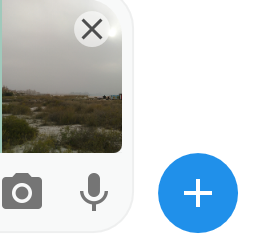
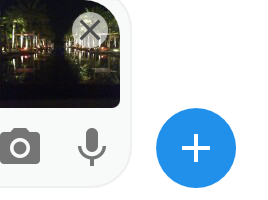
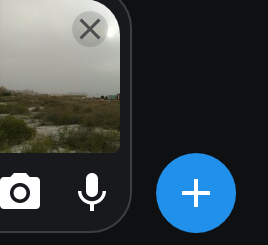
Probably because for some images the 'x' is almost invisible as it is located inside the picture! I myself also thought it is not possible to remove it from the draft but just did not see it. Maybe reposition it or increase the contrast. Seems to be worse for the dark theme.
 billie80
on 29 Mar 2019
billie80
on 29 Mar 2019
bright image with white theme
dark image with white theme
bright image with dark theme
dark image with dark theme
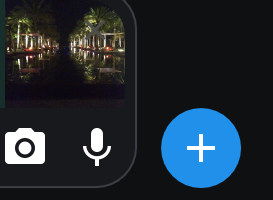
So with the dark theme and a dark image draft the 'x' is almost invisible.
billie80
on 29 Mar 2019
Any chance of reopening this issue? I think it should be considered a bug rather than anything else.
billie80
on 2 Apr 2019
I think this has improved with newer versions. There is no circle around the cross anymore. Now it seems to have a shaded outline.
In my opinion a little bit more shading would be better.
Also it seems that starting with the selection of images the dark theme is used unconditionally. Don't know if this is intended.
billie80
on 30 Jun 2020
Related issues
 vvug
·
3Comments
vvug
·
3Comments
 nxfifteen
·
3Comments
nxfifteen
·
3Comments
 5boro
·
3Comments
5boro
·
3Comments
 hiredgunhouse
·
3Comments
hiredgunhouse
·
3Comments
 Dyras
·
3Comments
Dyras
·
3Comments
Most helpful comment
bright image with white theme




dark image with white theme
bright image with dark theme
dark image with dark theme
So with the dark theme and a dark image draft the 'x' is almost invisible.