Signal-android: Contacts will not appear as recognised Signal contacts, but can be messaged via Signal network
- [x] I have searched open and closed issues for duplicates
- [x] I am submitting a bug report for existing functionality that does not work as intended
- [x] I have read https://github.com/signalapp/Signal-Android/wiki/Submitting-useful-bug-reports
- [x] This isn't a feature request or a discussion topic
Bug description
From a fresh Signal installation, syncing contacts will add all contacts to Signal (I have quite a few, so number of contacts could be a factor here), all with grey profile pictures, some with names, some with numbers only, but not as recognised Signal contacts. Android's contact list does not show 'signal text' and 'signal voice' in contacts that I know are using Signal. Chosing one of those contacts in Signal, I can send them encrypted texts via the Signal network, but they still will not show as Signal recognised contacts. Their names then would appear not as the names I have for them in Android's contact list, but as they appear in their Signal profiles, as would happen with contacts who are not in my Android's contact list. Signal used to work on the same phone before a system reset.
Android's accounts show that Signal account completes syncing. Removing the Signal account from Android's accounts and pulling the contact list downwards to sync from within Signal doesn't fix it. This has been reproduced several times, including after re-registering and re-installing Signal, and on using two ISP connections.
Steps to reproduce
- install Signal
- register account
- sync contacts or wait for contacts to be synced
Actual result: contacts appear as SMS only contact, but can be contacted via the Signal network
Expected result: contacts appear as recognised Signal contacts, with their names and pictures pulled from Android's contacts.
Screenshots

Device info
Device: Google Nexus 5
Android version: 6.0.1
Signal version: 4.32.8
Link to debug log
https://debuglogs.org/a51e64183d610f54fc7437d71c4836650eff045f807d886f8fb2de03ccd0931a
 amrgharbeia
All 14 comments
Looks like the write to the system's contacts indicating they're a Signal user is failing because it's over 1MB in size:
02-01 11:39:59.602  5985  7319 E JavaBinder: !!! FAILED BINDER TRANSACTION !!!  (parcel size = 1456508)
02-01 11:39:59.603  5985  7319 W DirectoryHelper: null
02-01 11:39:59.603  5985  7319 W DirectoryHelper: android.os.TransactionTooLargeException: data parcel size 1456508 bytes
02-01 11:39:59.603  5985  7319 W DirectoryHelper:   at android.os.BinderProxy.transactNative(Native Method)
02-01 11:39:59.603  5985  7319 W DirectoryHelper:   at android.os.BinderProxy.transact(Binder.java:503)
02-01 11:39:59.603  5985  7319 W DirectoryHelper:   at android.content.ContentProviderProxy.applyBatch(ContentProviderNative.java:518)
02-01 11:39:59.603  5985  7319 W DirectoryHelper:   at android.content.ContentProviderClient.applyBatch(ContentProviderClient.java:419)
02-01 11:39:59.603  5985  7319 W DirectoryHelper:   at android.content.ContentResolver.applyBatch(ContentResolver.java:1270)
02-01 11:39:59.603  5985  7319 W DirectoryHelper:   at org.thoughtcrime.securesms.contacts.ContactsDatabase.setRegisteredUsers(ContactsDatabase.java:140)
02-01 11:39:59.603  5985  7319 W DirectoryHelper:   at org.thoughtcrime.securesms.util.DirectoryHelper.updateContactsDatabase(DirectoryHelper.java:188)
02-01 11:39:59.603  5985  7319 W DirectoryHelper:   at org.thoughtcrime.securesms.util.DirectoryHelper.lambda$getLegacyDirectoryResult$1$DirectoryHelper(DirectoryHelper.java:309)
02-01 11:39:59.603  5985  7319 W DirectoryHelper:   at org.thoughtcrime.securesms.util.DirectoryHelper$$Lambda$3.call(Unknown Source)
02-01 11:39:59.603  5985  7319 W DirectoryHelper:   at java.util.concurrent.FutureTask.run(FutureTask.java:237)
02-01 11:39:59.603  5985  7319 W DirectoryHelper:   at java.util.concurrent.ThreadPoolExecutor.runWorker(ThreadPoolExecutor.java:1113)
02-01 11:39:59.603  5985  7319 W DirectoryHelper:   at java.util.concurrent.ThreadPoolExecutor$Worker.run(ThreadPoolExecutor.java:588)
02-01 11:39:59.603  5985  7319 W DirectoryHelper:   at java.lang.Thread.run(Thread.java:818)
Strange that the transaction is that large. There's plenty of numbers, sure, but not so many that the update should be that large.
 greyson-signal
on 1 Feb 2019
greyson-signal
on 1 Feb 2019
Looks like the write to the system's contacts indicating they're a Signal user is failing because it's over 1MB in size:
Strange that the transaction is that large. There's plenty of numbers, sure, but not so many that the update should be that large.
Are you saying this is happening because too many of my contacts are using Signal (a few hundred I'd say), or because my contact list is unusually large (under two thousand)?
amrgharbeia
on 1 Feb 2019
Same Issue: #8496
 Xashyar
on 1 Feb 2019
Xashyar
on 1 Feb 2019
@amrgharbeia I'm saying that even if you had a thousand Signal contacts, the transaction shouldn't be over a MB -- that'd imply there's >1KB of data to be updated for each contact. I'd venture that contacts are just weird though, and that underneath it's doing a lot of copying or something, and we should try updating things in smaller batches :)
greyson-signal
on 1 Feb 2019
@greyson-signal Do users have control on the size of update batch? How? I imagine I could export my contact list and re-import in two or three pieces, syncing each time, but ideally software should just handle it. A fix?
amrgharbeia
on 1 Feb 2019
@amrgharbeia Sorry, I'm saying that Signal itself needs to batch these. This isn't something the user should worry about. I'm looking into it.
greyson-signal
on 1 Feb 2019
The fix will be in 4.33.1, which will likely go to beta sometime later today. If you'd like to join the beta, you can do so here. Thanks!
greyson-signal
on 1 Feb 2019
Thanks, @greyson-signal. You are a star!
amrgharbeia
on 1 Feb 2019
@amrgharbeia Just wanted to give an update that I found a problem with my fix and am going to revert it for the 4.33.x release. I've made an updated fix that will go into 4.34.x. Apologies for the delay, just didn't want to put any last-minute changes into 4.33.x before we start rolling it out to production.
greyson-signal
on 6 Feb 2019
Related: #8418 (still open) and #7394 (closed during the cleanup).
 haffenloher
on 8 Feb 2019
haffenloher
on 8 Feb 2019
Hello! I have this issue too!
Huawei P10 Lite, Signal Beta, Android 8
Here is the screenshot:
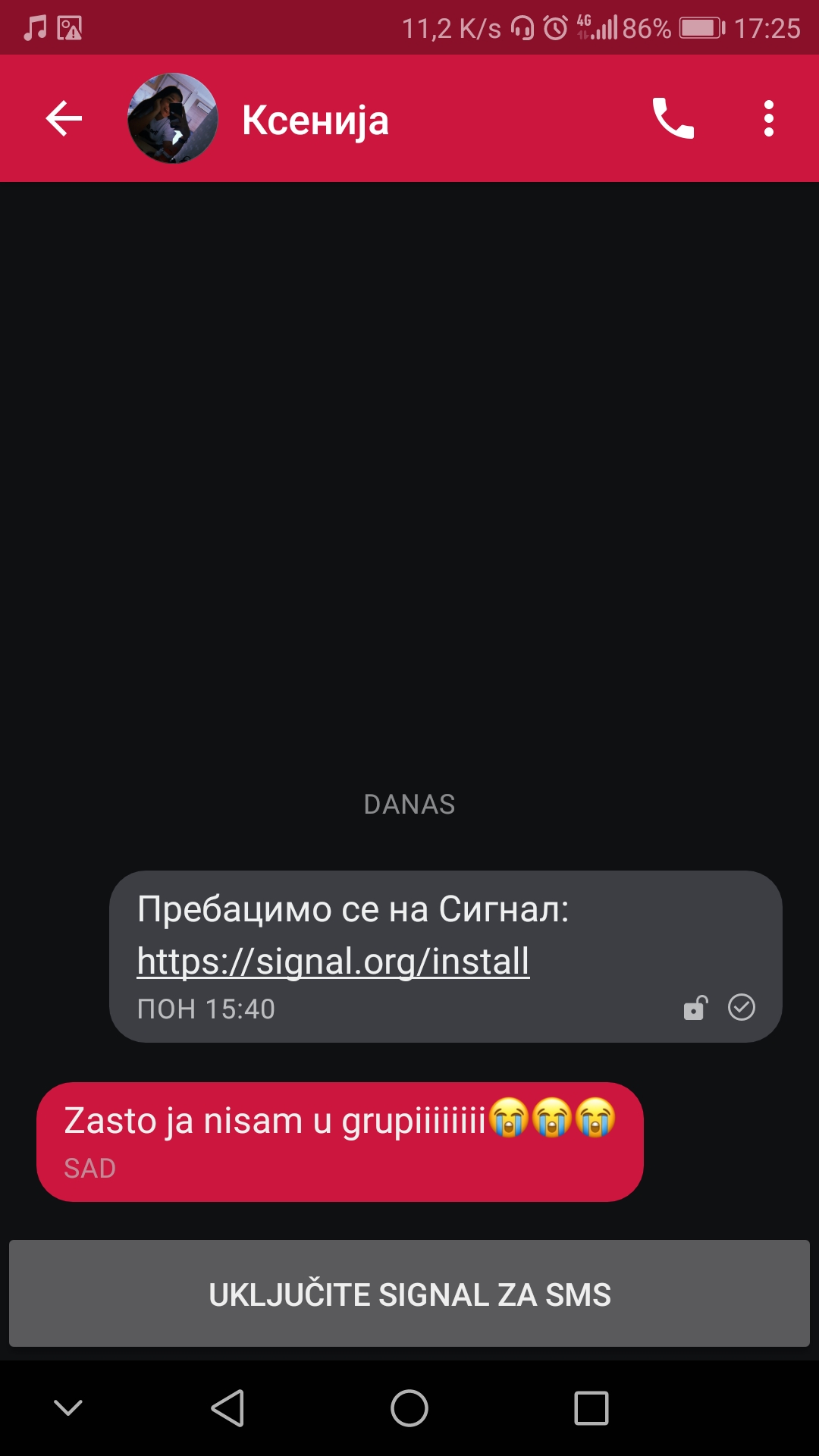
So, basically, User is on Signal and can chat with me, but to me that User is not on Signal yet. When I refresh the user database it's working. Bad UX if you ask me.
Cheers!
 nikdale
on 20 Aug 2019
nikdale
on 20 Aug 2019
When I refresh the user database it's working.
@nikdale Can you explain how you refresh the database?
Having the same issue #8496, but the issue is temporal, after a while (say 24 hours) Signal detects it as a registered contact.
Xashyar
on 20 Aug 2019
@Xashyar Pull down or choose Refresh in the three dot menu inside of the Conversation list > New message screen.
 u32i64
on 20 Aug 2019
u32i64
on 20 Aug 2019
As @u32i64 have said, that was the thing I did. Also, @Xashyar , it is temporarily, Signal Android app auto refresh is every few hours, but this is a bad UX. Somebody can't find the refresh thing and things that Signal is broken. Users hate that and all of us here want people to like Signal and use it evary day.
nikdale
on 20 Aug 2019
Related issues
 donjoe0
·
3Comments
donjoe0
·
3Comments
 vvug
·
3Comments
vvug
·
3Comments
 ilikenwf
·
3Comments
ilikenwf
·
3Comments
 Wikinaut
·
3Comments
Wikinaut
·
3Comments
 nxfifteen
·
3Comments
nxfifteen
·
3Comments