Signal-android: Odd behavior when trying to download (consecutively received) pictures
- [x] I have searched open and closed issues for duplicates
- [x] I am submitting a bug report for existing functionality that does not work as intended
- [x] I have read https://github.com/signalapp/Signal-Android/wiki/Submitting-useful-bug-reports
- [x] This isn't a feature request or a discussion topic
Bug description
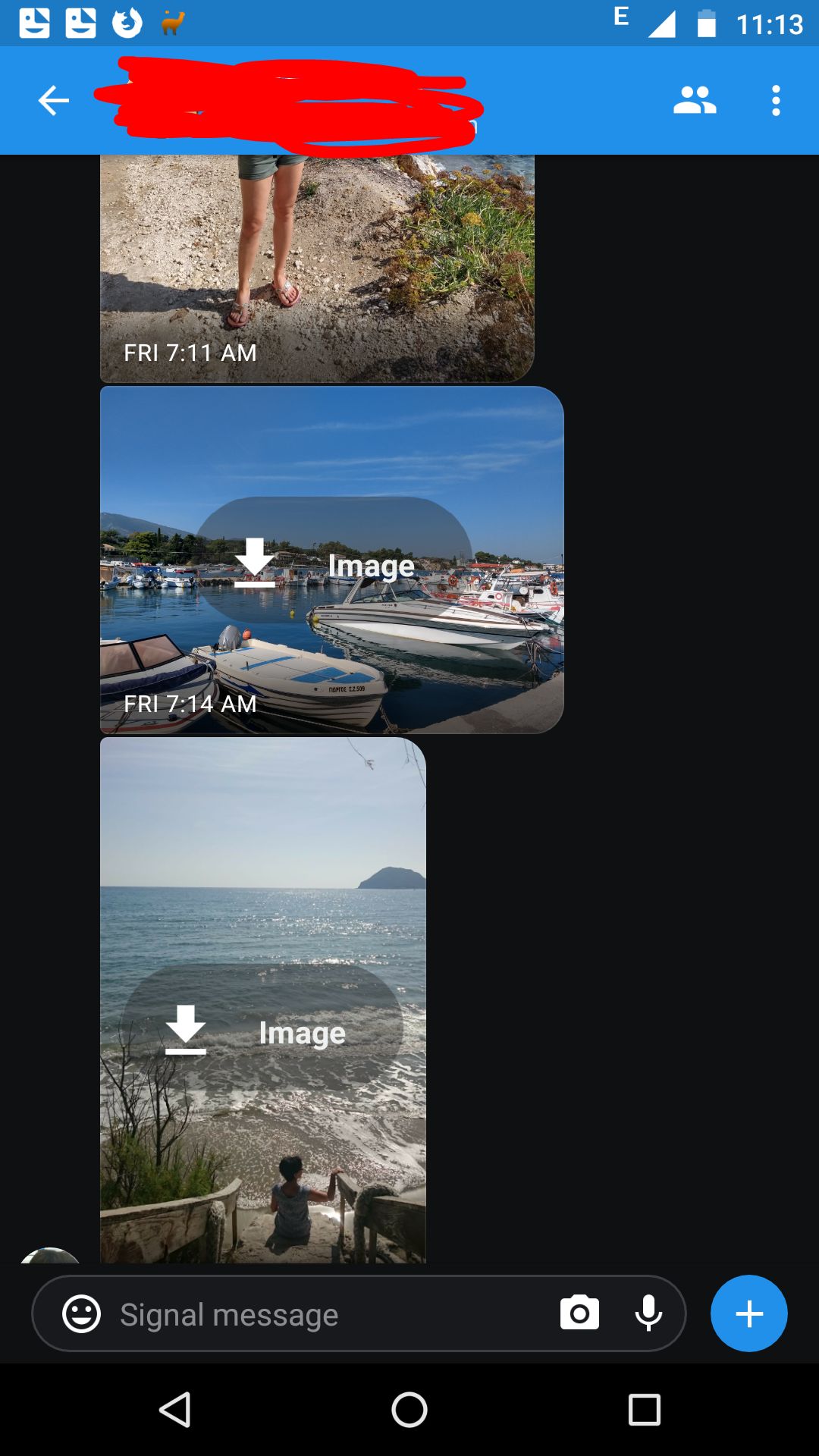
Since updating to v4.28.0 I regularly experience odd behavior when trying to download pictures I've received consecutively. For example, if I tap the download button overlay, Signal sometimes doesn't seem to react in any way. Sometimes, the download starts, but afterwards the download button layer doesn't disappear, although the picture is successfully downloaded. Sometimes it simply works, but most of the time it doesn't. Although I'm not sure, I think it always happened in group conversations. It doesn't matter whether I'm on 4G or on WIFI.
I don't remember this happening even once while I was using v4.23.4, so I guess this is caused by some change in the meantime.
Steps to reproduce
- Receive a bunch of pictures (in a group?)
- Try to download them by (quickly?) tapping the download button overlay for some/all of them
Actual result: Sometimes no reaction, sometimes successful download, but download button overlay is still visible and active (like I could download that picture once again)
Expected result: Upon successful download, the download button overlay alsways disappears.
Screenshots
Device info
Device: Motorola Moto G4 Plus
Android version: 7.0.0 (stock)
Signal version: 4.28.x and newer (4.29.4 is still affected)
Link to debug log
v4.28.0: https://debuglogs.org/5b605f72497c175f38b2c72256ece9d2ff2a84f53065e80f1d6e0b8d9432d6e3
v4.29.4: https://debuglogs.org/4d293cf91ee8c506a1be9afd217d82af0863d687dad137e9e977d33c22333a0e
 PiCob
PiCob
All 4 comments
First, the good news: All of the work that is requested is actually being run. We recently had a big migration to WorkManager, so it's important to note :)
The bug actually seems to be view-binding related, where the Slide model the ThumbnailView is being given is out-of-date, creating all sorts of funniness.
Quick fix for attachments that "do nothing when clicked" -- leave the conversation, come back, and try again.
Sorry for the inconvenience! I'm looking into a fix.
 greyson-signal
on 19 Oct 2018
greyson-signal
on 19 Oct 2018
Hey, thanks for the fast response. Unfortunately, re-entering the conversation doesn't fix the behavior you see on the screenshot above (download overlay), I even force-closed Signal. Needless to say, I can't view the image by tapping it, because Signal then pretends to download it again, ending up with the overlay still being visible. However, all media is accessible using the media overview.
PiCob
on 19 Oct 2018
Yeah, so unfortunately leaving and coming back only solves the problem of "the image doesn't download when I click it", which I saw happened a bunch in your logs. If it's downloaded, but has an overlay, then it's kind of in a bad state that you won't be able to get rid of without me making changes :/
I'll take that into consideration and see if there's a good way to make sure that state gets cleared when I fix this.
greyson-signal
on 19 Oct 2018
Bug spotted today in Signal Android 4.43.8 . Would describe as follows:
I saw an image had been send, a grey preview window was visible but the image still had to be downloaded. I also saw a button in the middle to download the image, but strangely enough the button looked like it was getting re-rendered over and over. This happened on two images at the same time. Pressing on the grey preview or on the download button had no effect, while it should have downloaded and viewed the image.
Note that his bug report is likely a duplicate of #8048. However this bug report is more descriptive and includes more unexpected events than #8048.
 Meteor0id
on 13 Jul 2019
Meteor0id
on 13 Jul 2019
Related issues
 McLoo
·
3Comments
McLoo
·
3Comments
 FeuRenard
·
3Comments
FeuRenard
·
3Comments
 halb9
·
3Comments
halb9
·
3Comments
 j3fffff
·
3Comments
j3fffff
·
3Comments
 ilikenwf
·
3Comments
ilikenwf
·
3Comments
Most helpful comment
Yeah, so unfortunately leaving and coming back only solves the problem of "the image doesn't download when I click it", which I saw happened a bunch in your logs. If it's downloaded, but has an overlay, then it's kind of in a bad state that you won't be able to get rid of without me making changes :/
I'll take that into consideration and see if there's a good way to make sure that state gets cleared when I fix this.