Signal-android: Notifications don't work
- [x] I have searched open and closed issues for duplicates
- [x] I am submitting a bug report for existing functionality that does not work as intended
- [x] I have read https://github.com/signalapp/Signal-Android/wiki/Submitting-useful-bug-reports
- [x] This isn't a feature request or a discussion topic
Bug description
When a new message arrives, my phone vibrates and for a few seconds the app's name "Signal" is shown on my phone's notification bar (albeit the icon is missing). The notification is not persisting in that there's no icon on the notification bar and when I pull down the notification bar there's no entry at all.
When I open up the conversation list in Signal, the newly arrived message is displayed in bold to indicat an unread status.
Steps to reproduce
- Use Signal 4.25.6
- Use Android 9
- Receive a message
Actual result: A notification is only shown for a few seconds, without an app icon. No noitification on expanded notification center.
Expected result: The notification should contain the app icon and the icon should be staying on the notification bar until the notification is discarded. When the notification bar is expanded, there should be a card with name, user image and content (depending on settings) which takes you to the converstation.
Screenshots
Please note that in this screenshot there's the app icon missing from the notification in the top left corner.

Device info
Device: Google Pixel (sailfish)
Android version: 9 (4898911, PPR1.180610.009)
Signal version: 4.25.6
Link to debug log
https://debuglogs.org/aceadbb7d973a0712cc700c8040251e7d77ec7a2e63732d5e764b89d7f347712
 jnns
jnns
All 44 comments
Do you have a linked desktop instance that may be foregrounded? It's possible that the notification is being shown, but then immediately being marked read on desktop.
 greyson-signal
on 3 Sep 2018
greyson-signal
on 3 Sep 2018
No, there's no linked desktop app which could consume the notifications.
I also noticed that when the display is off, it's normally waking up into a screensave-like mode which only shows the current time and the new notification. But now, when I reveive a new Signal message, the display is woken up to only display the time – nothing else.
jnns
on 3 Sep 2018
Just to be clear though, there is a linked desktop, yes? Your log shows that we're doing multi-device contact sync and stuff. Just verify by going to Settings > Linked Devices.
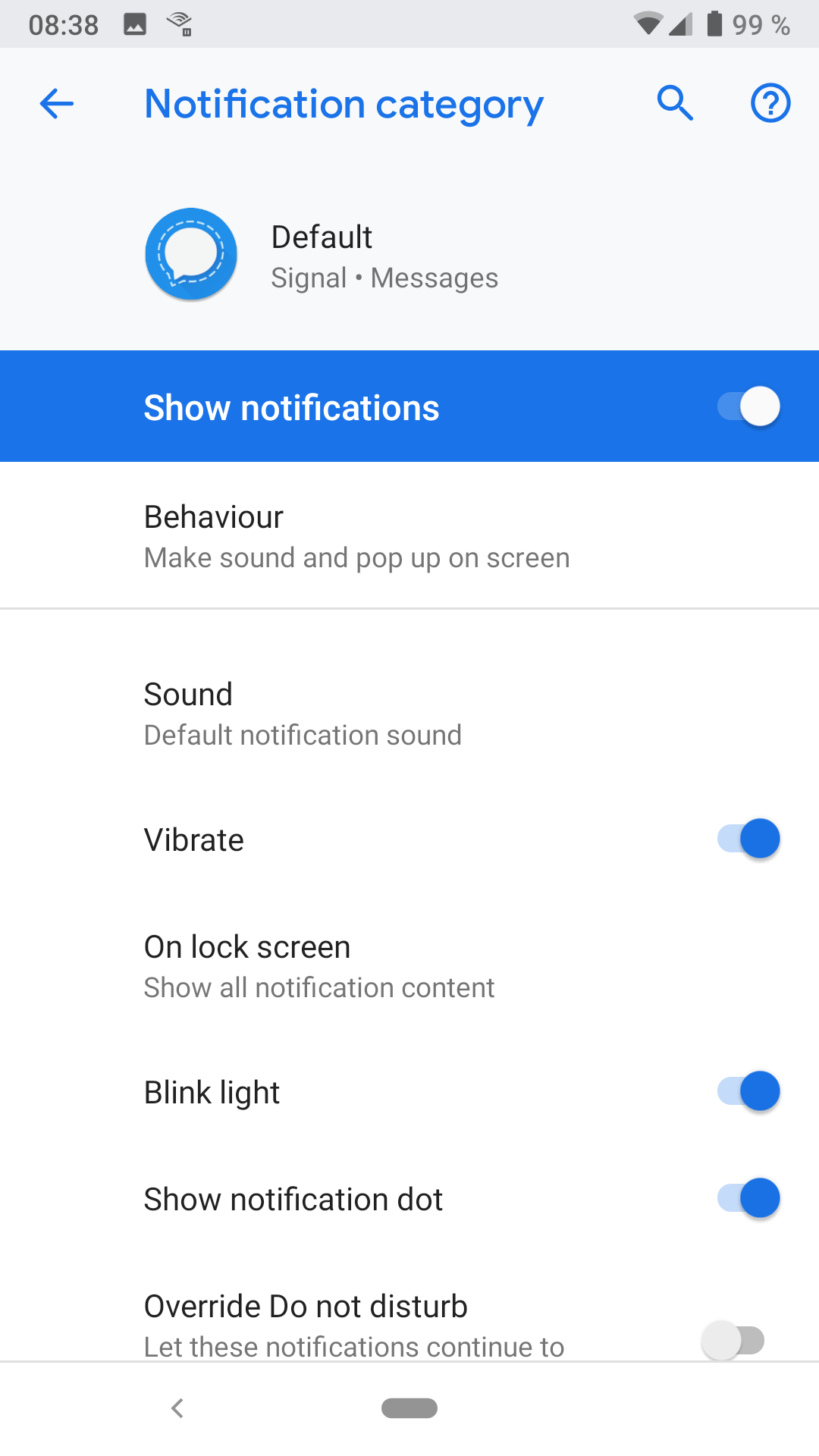
Next, can you check your channel settings for the Default messages channel? Maybe the priority got set to be lower somehow, which may cause it not to pop-up on your screen or make a sound?
greyson-signal
on 4 Sep 2018
Yes, there has been a linked device that hasn't been in use for a few weeks now. I now removed it from the list of linked devices to see if it changes anything.
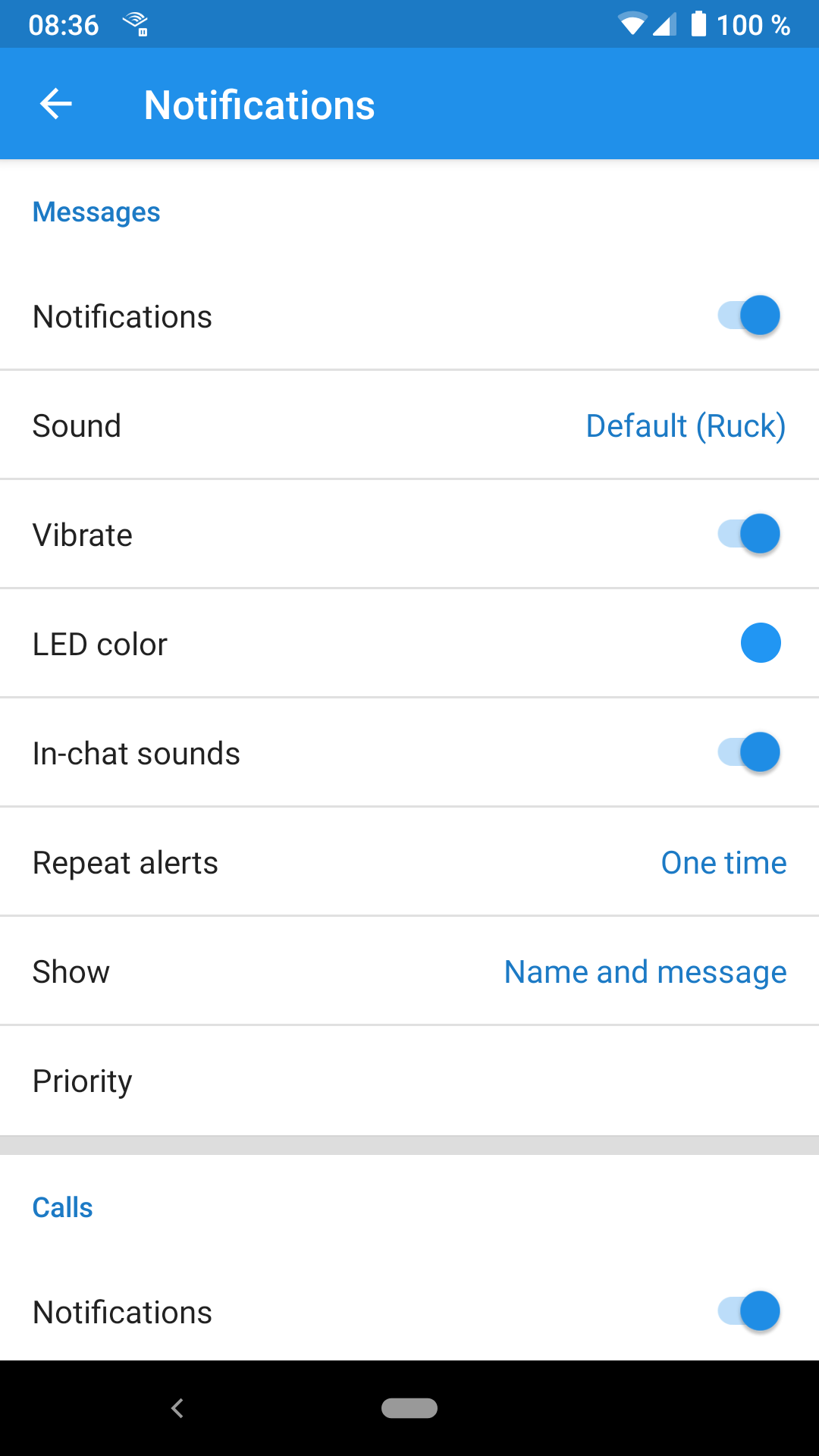
I didn't change any notification settings. Everything seems to be as it should.
There are notifications in the sense that either a sound is played or the device vibrates (depending on mode), the device wakes up in case its display is off, and the app name is shown briefly in the notification bar.
But afterwards there's no trace of the notification anymore. There's no message bubble in the notification center and no icon on the top bar indicating an unread message. The stand-by screen only shows the time whereas it should also display the newly arrived message.
jnns
on 4 Sep 2018
I am experiencing exactly this for SMS
https://debuglogs.org/b037ecc760ea8281af937813279c6f7b2267a74feee6b4e329631df2c7fea9c9
And Signal messages
https://debuglogs.org/7ca51b9151dddb3f07cd01bdbc58849b829b4ce4bf0c392cdbab8322ff2508b5
I have no linked devices and notifications are enabled in Android system with default settings
 RyanMalaspina
on 5 Sep 2018
RyanMalaspina
on 5 Sep 2018
@jnns Did you previously have any custom notifications set for specific people? And then restore from a backup? There was a bug that was fixed that could cause you to miss notifications after a backup restore due to notification channels not being reconstructed properly.
greyson-signal
on 8 Sep 2018
Same issue as OP, worked perfect before the Android upgrade. Notifications from other apps working fine based on testing.
 jaytheletterj
on 8 Sep 2018
jaytheletterj
on 8 Sep 2018
Did you previously have any custom notifications set for specific people? And then restore from a backup?
No, I did not set any custom notifications although I did restore from a backup months ago. But the notification issue only appeared very recently.
Meanwhile the bug does not appear on my device again. A reboot and / or a Signal update seems to have fixed it (I am on the beta channel).
jnns
on 11 Sep 2018
I have not customized my signal notifications at all and I am seeing this behavior as well on a Pixel XL with Android 9. The application name flashes in the notification shade but no notification persists. If there is any more information I can provide I will be happy to.
 rbclark
on 11 Sep 2018
rbclark
on 11 Sep 2018
It looks like @jnns 's issue has gone away. For those of you experiencing this bug, can you confirm the following:
- What's your device and Android version?
- Are you on the latest release? (4.25.10 at the time of posting)
- Do you have custom notifications set for anyone?
- Did you do a backup-restore somewhat recently?
- Do you have a linked desktop instance? Is it active when you have this problem?
- Have you tried restarting the device? (Seems to have helped @jnns)
Thanks!
greyson-signal
on 17 Sep 2018
- Pixel XL on Android 9 (fully up to date)
- 4.25.10
- No I do not
- No I have not
- Yes I do, however none of them are active when I have had the problem.
- Restarting the device temporary fixes the problem however it re-manifests itself after a while.
rbclark
on 19 Sep 2018
- nokia 6.1, android 8.1.0
- yes
- no
- no
- yes, no
- yes
 aaronshivers
on 19 Sep 2018
aaronshivers
on 19 Sep 2018
- Xiaomi Mi5, Android 8.0.0
- 4.26.2
- No
- No
- No, even after connecting a desktop instance there is no difference
- Yes, many times, notifications are never persistent
 paul-chelarescu
on 5 Oct 2018
paul-chelarescu
on 5 Oct 2018
Nexus 6P, updated / patched fully as of this date, running the latest version of Signal as of this date - that said, the problems I'm describing have persisted for close to a year now.
In that time I have achieved intermittent, and, at best, temporary resolution to these problems by:
restarting my phone
reinstalling Signal
making sure the Desktop app was closed
The Signal app on my phone starts off making notification noises and vibrating, as it is set to.
Then, without changing any settings, after a few incoming messages, the audio alerts stop.
Then, eventually vibration stops as well.
As I've said, I have had temporary luck with restarting my phone (sometimes) and reinstalling the app (sometimes) but not necessarily. Waiting 2 months is just as likely to "fix" the issue... temporarily.
 mborod
on 24 Oct 2018
mborod
on 24 Oct 2018
@mborod When you notice the notification problems, can you snag and submit a debug log? Notification problems can have different root causes. If you have a linked desktop, it might be that you have the conversation open, and it's marking your messages as read as they come in, and maybe that's something we have to tweak on desktop. Or maybe you're having generic GCM issues that's causing push notifications not to be delivered at all.
Hard to say without a debug log, so if you could send one that's taken within a couple hour of you experiencing the problem, that'd be very helpful!
greyson-signal
on 24 Oct 2018
I have the same issue. On LeEco LePro 3 AI (LEX657), Android 6.0.
Sound notifications are never played. And I don't receive notifications at all if the application is not has not the focus, even if signal is always open in background.
Here are the logs: https://debuglogs.org/fb37c7d95107a5a5688adca4e55952eba55c1fe40ac580c3afe47591f2dbf5bb
And another logs : https://debuglogs.org/ead1de677b6954e84a853e4a8680e61246554de94ac9b7916e547e9a91084207
 Booteille
on 24 Oct 2018
Booteille
on 24 Oct 2018
@greyson-signal I do not know if this issue was resolved elsewhere, but I am having this problem on my phone
- What's your device and Android version? Pixel 3, Android 9(P)
- Are you on the latest release? (4.25.10 at the time of posting) Yes, 4.30.8
- Do you have custom notifications set for anyone? No
- Did you do a backup-restore somewhat recently? Yes
- Do you have a linked desktop instance? Is it active when you have this problem? No
- Have you tried restarting the device? Helps but only temporarily, problem resumes after a few notifications.
Any suggestions?
 gculling
on 5 Dec 2018
gculling
on 5 Dec 2018
Can you provide logs please?
Booteille
on 5 Dec 2018
gculling
on 5 Dec 2018
perhaps not spot on the original issue, case not: sorry.
On my Galaxy S8 SM-G55F I needed unread messages from more than one sender to trigger an icon badge notification. Quite peculiar. I was planning to post an issue today. However, Signal beta channel version 4.31.4 fixed the issue. Now all incoming messages trigger the Signal icon badge like the rest of the apps.
https://debuglogs.org/d9ae50799b6785c26f0b250c45611f930c066efb01ec5c5df1c0a9f9c7a019cc
 torlarse
on 5 Dec 2018
torlarse
on 5 Dec 2018
- Google Pixel 3, v9.1
- Yes.
- No.
- No.
- Yes, no.
- Yes, doesn't help.
Logs: https://debuglogs.org/effaa0bee3cf6f274791f9b2a6015ca060dd16fb9c5d6d4b0120f15d345287d9
 rogerkirkness
on 11 Dec 2018
rogerkirkness
on 11 Dec 2018
 burntcookie90
on 12 Dec 2018
burntcookie90
on 12 Dec 2018
Icon badge worked just fine on beta 4.31.4. Does not work in beta 4.31.5.
My debug logs also seem to fail? Immediately after sending debug log, the link does not work in Firefox browser on device.
https://debuglogs.org/f6a8df127125237ee84424f5386243be75c0be3bf0b10a46304a3ff6f32f304b
torlarse
on 12 Dec 2018
The issue is back for me since a few days. It took me a while to notice it. When I receive a message, the display wakes up for a short period and displays the time but neither app icon nor message. When I unlock the screen and have a look at the notification center, there's no notification from Signal whatsoever. Only when I open the app I see that there's an unread message in the conversation list.
It seems that this issue occurred again with one of the latest Signal updates. Since filling the issue three months ago I didn't have problems with Signal at all.
I didn't restart the phone yet but will do so after posting this.
If you want to have a look at the debug log, please note that there should have been a notification for a message at 21:08 on Friday, 2018-12-14.
https://debuglogs.org/14db047795390bfbef93120891a27316e8407729fb20674ac81464fc1ddb0f59
jnns
on 14 Dec 2018
@jnns
So I do see that we posted a notification at that time:
2018-12-14 21:08:49.277 MEZ I MessageNotifier: Posted notification. Notification(channel=contact_+***********23_1539521335061 pri=0 contentView=null vibrate=null sound=null tick defaults=0x0 flags=0x201 color=0xff2090ea category=msg groupKey=messages actions=2 vis=PRIVATE)
(Don't read into the sound=null stuff -- all of the sounds and stuff are pulled from the notification channel instead of being set on the notification itself)
Are you able to see notifications from that contact in general, or did it just act funny this one time? Had you recently changed their custom notification sounds or anything?
greyson-signal
on 15 Dec 2018
The notification may be posted but the way it is displayed is very odd:
When a new message arrives, my phone vibrates and for a few seconds the app's name "Signal" is shown on my phone's notification bar (albeit the icon is missing). The notification is not persisting in that there's no icon on the notification bar and when I pull down the notification bar there's no entry at all.
When I open up the conversation list in Signal, the newly arrived message is displayed in bold to indicat an unread status.
When the phone is asleep when a message arrives, it either vibrates or rings and wakes up but there's no entry in the notification center. So notifications are posted but they don't appear to the user.
This behaviour is shown across all my Signal contacts, not just one contact in particular. It doesn't just act funny once; it's like that for at least four days now (since I posted to this issue again).
I didn't change any settings or set any custom notifications whatsoever. Apart from the recent Signal updates nothing changed. Although this isn't caused by a recent updated because it happened the first time in September.
A reboot does help and restores the expected notification behaviour.
jnns
on 18 Dec 2018
@jnns Does the problem reoccur when you respond to a text message from the notification bar?
gculling
on 18 Dec 2018
No, replying to a message via the notification doesn't cause the issue to re-appear. Everything's fine since the restart.
jnns
on 18 Dec 2018
Ok, so, this is a weird bug. I received a broken notification (no body, just the "Signal" in the top left) and opened the app to see the unread messages. I attempted to click on the top conversation in the list (while the broken notification was still active), but the click actually activated the system notification drop down. This leads me to believe the application is actually posting some sort of transparent notification that then clears itself.
burntcookie90
on 20 Dec 2018
Please post a debug log.
On Thu, Dec 20, 2018, 9:03 AM Vishnu Rajeevan <[email protected]
wrote:
Ok, so, this is a weird bug. I received a broken notification (no body,
just the "Signal" in the top left) and opened the app to see the unread
messages. I attempted to click on the top conversation in the list, but the
click actually activated the system notification drop down. This leads me
to believe the application is actually posting some sort of transparent
notification that then clears itself.—
You are receiving this because you were mentioned.
Reply to this email directly, view it on GitHub
https://github.com/signalapp/Signal-Android/issues/8168#issuecomment-449009011,
or mute the thread
https://github.com/notifications/unsubscribe-auth/AjlVq2oA3akc2iZBy7ncFkJz1HIOI6sHks5u65jCgaJpZM4WXXiT
.
greyson-signal
on 20 Dec 2018
Please post a debug log.
https://debuglogs.org/45f37a47d735c0f9e3d99e94f9c84177cc46227140633232b19896eeb7d78b91
nothing of value from when the message came in (~9AM EST)
New log grabbed immediately after problem notification
https://debuglogs.org/414ec884058a9b6eb2e68a514242858521aac3f58a0505717242da259a59922d
burntcookie90
on 20 Dec 2018
Lots of requests for debug logs and suggestions that maybe people who said they weren't running the desktop app at the time actually were, and had the conversation in question open, so it snagged the notification.
First of all, if I have the desktop app open, even on the conversation in question, I still want the phone to make a notification sound, and the only way I don't is if you give me a preference setting for this circumstance and I set it to "off".
Second, there have been debug logs posted, and more than that, explanations of exact steps to reproduce the very problem reliably. Back when I was coding, developers / programmers were lucky to get that and were expected to solve problems before the weekend, not in whatever it's been now, like over a year I've seen this problem persist.
I'll check back on this issue again, eventually, but just want to say, I have a lot of cheaply produced apps on my phone that manage to produce push notifications without any problem. I think someone needs to take this module back to basics, start again maybe.
I hope Signal does work out this show-stopping issue, it would be nice to be able to use it. Heck I'd even pay something, if it worked reliably.
mborod
on 20 Dec 2018
Hi,
To me this definitely seems to become a serious issue. I've had 2 conversations where I did only see a delivery status for several days and no read status. I also did not got a response to those messages. Just spoke one of them and he confirmed he only did see there was a message once he opened Signal. This afternoon I send a message to my SO and I also only see the delivered status and no read status. This lasted until we met and I checked the phone. The moment I unlocked the phone a notification sound was played and then there was a notification shown. I do realize this is not exactly the same behavior as others describe on this thread but it might be related. I've created a debug log and attached this. The message I send was at 15:13 and yes I see in the log on her phone a notification was generated. This was definitely not displayed until the phone was unlocked. My SO has android 8 device and the person I spoke to does also has android 8 on his phone. For the 2 other persons in the other conversation I'm not sure.
https://debuglogs.org/4d7b115458915b3fc79ee9eca80e214752316746f2b060c0e249a3bb818cfdbe
 bme13
on 23 Dec 2018
bme13
on 23 Dec 2018
I've checked a few logs and with my little knowledge I was not able to find anything useful. Except in the log from burntcookie90 (https://debuglogs.org/3044a37e1d8ce3c4358cce342e4a04e43517f3586f91d10d263e4645f2e6c9ef) There I occasionally see the message "Empty notification state. Skipping". Based on the code I guess the cancelActiveNotifications is called since the bundled argument is false. From the description it seems that this cancelActiveNotifications also clears the current notifications. Is my understanding for that correct?
In order to provide additional information, would it be useful to add a notification logger e.g. as described here
bme13
on 24 Dec 2018
I am experiencing this as well. Pixel 2, fully updated. Current app version. I have checked all the settings, and notifications are enabled across the board. No desktop version currently installed. It does make a noise when I receive an SMS, but the notification never appears in my status bar. I have tried removing and reinstalling the app to no avail. Any further suggestions?
Log: https://debuglogs.org/d04a02ce7a00cfc8ae6d0ca5f31a8d49c1e66356f122721ae446fc89e5812f04
 lhassell
on 8 Jan 2019
lhassell
on 8 Jan 2019
@lhassell For me, rebooting the phone seems to temporarily fix the issue. It seems to be a state the app gets into (once it starts happening it keeps happening), and it gets back into that state eventually, but restarting the phone makes notifications work normally again for at least a day or so (sometimes much longer).
 cumber
on 9 Jan 2019
cumber
on 9 Jan 2019
I had the same issue on my moto x4. I ended up disabling the notification dot in settings (since I don't have one) and deleting my conversations to get prepared to uninstall and reinstall... then, before I got a chance to uninstall I received a couple of texts and the notifications worked fine. It has now been a week and I'm still all good. I don't know what fixed it, but those are the actions I performed prior to it working again. No uninstall has been done and I didn't need to reboot. I offer no explanations.
Android 9
Moto x4
Nov 2018 patch
Signal 4.31.6
 TheGuad
on 9 Jan 2019
TheGuad
on 9 Jan 2019
Consistently, Signal needs unread messages from more than one unique sender to trigger the badge icon. No open desktop app.
Samsung Galaxy S8+
Signal 4.31.6 beta
https://debuglogs.org/cea7292c7b759da3bca76d8eaf71770c4879e732ca4e3fa569bf50ca25edd40b
torlarse
on 11 Jan 2019
Hi @torlarse. That is a different issue. See https://github.com/signalapp/Signal-Android/issues/7580. It will most likely be solved in the next release.
bme13
on 11 Jan 2019
Had the problem again and after deleting the conversation, my alerts for all other conversations started working again.
TheGuad
on 14 Jan 2019
@TheGuad Did this just happen? Can you post a debug log?
greyson-signal
on 14 Jan 2019
I can't remember exactly when it happened and I have since deleted the conversation I was having when it did. I'll note date and time next time and submit another log. Deleting the conversation definitely fixed it for a long time though.
https://debuglogs.org/74f46d2244013689c6126c2aea1047fa445179f9b6d58a25f8f49e6aea3e4ba8
TheGuad
on 14 Jan 2019
Since the discussion died down, there's been some work on Notification channels to add some new guarantees around channel accuracy and such. Also, anecdotally I had a friend tell me he was experiencing this, but he discovered it was happening with multiple apps on his phone and appeared to be an Android issue. He did a factory reset and his phone appeared to go back to normal. YMMV
greyson-signal
on 31 May 2019
Hi,
I convinced my family to switch to Signal, unfortunatly, got the same pb on 2 smartphones both on Android 9 (Samsung & Pocophone).
 frdonn
on 29 Dec 2019
frdonn
on 29 Dec 2019
Related issues
 ilikenwf
·
3Comments
ilikenwf
·
3Comments
 halb9
·
3Comments
halb9
·
3Comments
 wesinator
·
3Comments
wesinator
·
3Comments
 FeuRenard
·
3Comments
FeuRenard
·
3Comments
 nxfifteen
·
3Comments
nxfifteen
·
3Comments