Signal-android: PDF attachments sent from own Signal-Desktop instance cannot be opened or saved.
- [x] I have searched open and closed issues for duplicates (Legacy issue #6791)
- [x] I am submitting a bug report for existing functionality that does not work as intended
- [x] I have read https://github.com/signalapp/Signal-Android/wiki/Submitting-useful-bug-reports
- [x] This isn't a feature request or a discussion topic
Bug description
Attachments such as a PDF file cannot be opened, if it was sent from a Signal-Desktop instance linked to the same phone number.
Steps to reproduce
- Have a Signal-Desktop instance linked to your account.
- Send someone a PDF file using the Signal-Desktop instance.
- Have the message with the attachment display on your Signal-Android.
- Click on the thumbnail of the PDF or long press the message and hit the 'save' icon.
Actual result: Nothing happens or a toast with
Expected result: The PDF should open, or be saved
Screenshots
When long pressing the message and selecting the save icon, the following toast pops up.
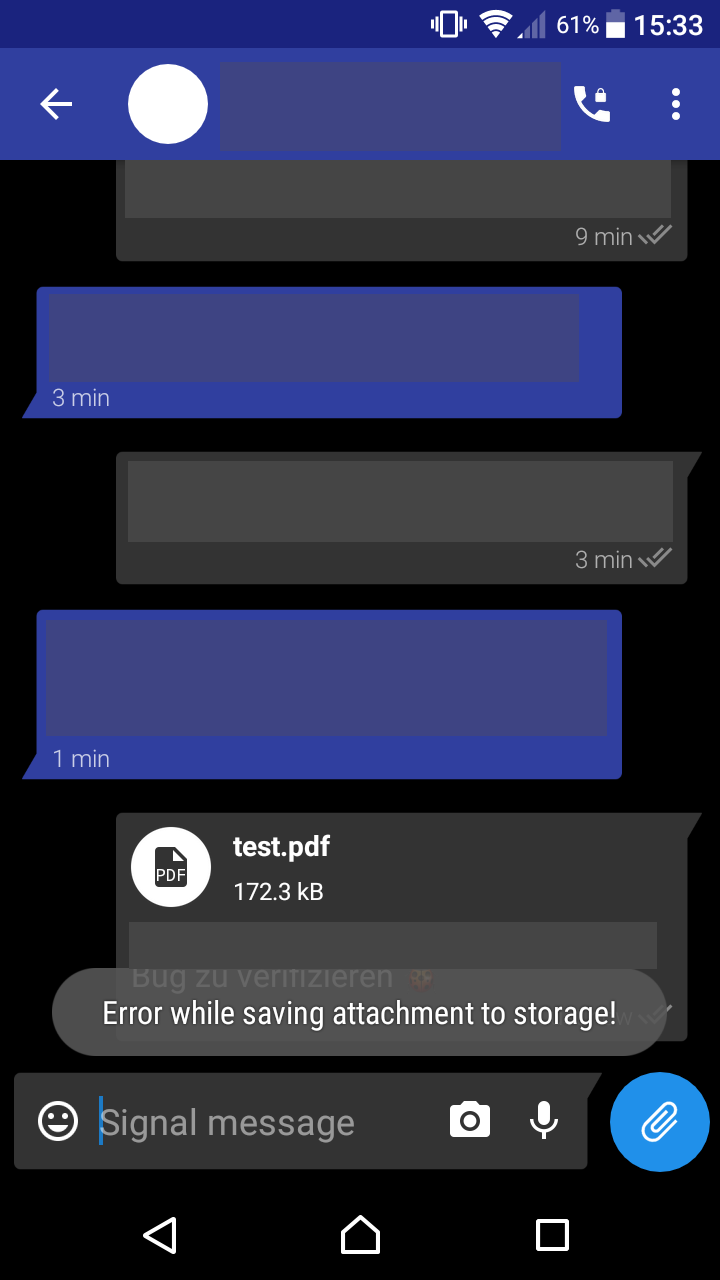
Device info
Device: Xperia Z5 Compact
Android version: 7.1.1
Signal version: 4.17.5
Link to debug log
There is one in the legacy issue. If a new one is needed, please let me know and I can provide one.
References
Legacy Issue: #6791
 He-Ro
He-Ro
All 17 comments
Tagging people that responded to the legacy issue: @Trolldemorted @chiraag-nataraj @merkste @mpas97
He-Ro
on 3 Apr 2018
The log in the issue you reference does not cover the failed action. Please include a new one.
 moxie0
on 3 Apr 2018
moxie0
on 3 Apr 2018
I sent a PDF to one of my contacts using my linked Signal-Desktop. Then on my Phone I went to that conversation and saw the message. There I clicked on the round PDF symbol and nothing happened. I then long pressed on the message and selected the Save icon. Then the toast appears informing me that an error occurred.
After that I immediately went into the settings to submit the following debug log:
https://debuglogs.org/ca8a15bd8190a3821d6bbf75e822de62b047e417a526db1798ffee7378828de9
(I have a PDF reader installed, that is not the issue)
Edit And here is a debug log of Signal-Desktop, in case that is of any use: https://debuglogs.org/04ae028065deedf66beae37d34a96126cb2b175570172925e9cfca58c1104b8f
He-Ro
on 3 Apr 2018
I don't think tapping the PDF thumbnail outputs anything to the log in the standard build.
However after you select the message and try to save it, the log says:
04-03 18:31:40.967 25079 25079 W ConversationFragment: No slide with attachable media found, failing nicely.
This is very reproducable for me. Here's an example pdf you can test with: https://signal.org/bigbrother/documents/2016-10-04-eastern-virginia-subpoena.pdf
 2-4601
on 3 Apr 2018
2-4601
on 3 Apr 2018
I can't repro this in individual or group chats, with your test PDF or with others. This is likely a dupe of #7609, which has been fixed. Thank you!
 greyson-signal
on 26 Apr 2018
greyson-signal
on 26 Apr 2018
Not fixed in 4.19.2 for me:
https://debuglogs.org/c9dfc6c97eba892695406271800e7eb2dac522f2c2ae0014d943c965f68de06f
- send https://signal.org/bigbrother/documents/2016-10-04-eastern-virginia-subpoena.pdf with Signal Desktop to someone else
- open the conversation on master Android
- tap the PDF: nothing happens
- select message and save: a wild toast appears "Error while saving attachment to storage"
2-4601
on 26 Apr 2018
@2-4601 Thanks for following up. If possible, can you verify if this happens _only_ when sending from desktop? i.e. Is it possible for you to send a PDF from another iOS/Android device, and see if that works?
Also, if it is only desktop, can you let me know what version you're running?
greyson-signal
on 26 Apr 2018
Does not occur if I send from another Android. Only from Desktop. Currently using Desktop version SignalBeta/1.9.0-beta.1
2-4601
on 26 Apr 2018
@2-4601 Can you check which content types the clients are sending (I assume they differ)?
 Trolldemorted
on 27 Apr 2018
Trolldemorted
on 27 Apr 2018
@Trolldemorted How to check it? Does it show in the debug logs? Here's from Desktop: https://debuglogs.org/10e67a1bdc8f7b381fd9e4d3cb6c3b8849e1260d595bb7fb72dd77244f2df2d0
2-4601
on 27 Apr 2018
I don't think that that is in the debug log, but signal-cli tells you the content type in its output, in signal-windows you can open the sqlite db and check the attachments table, in signal-android you should be able to place a breakpoint somewhere™ and have a look with the debugger.
Trolldemorted
on 27 Apr 2018
Re-opening this issue, but I'm still not able to repro on my variety of devices (Moto X, Moto E, Pixel, Pixel 2, Galaxy SIII, etc).
@2-4601 If there's any way for you to verify if this problem is exclusive to your device, that'd be super helpful!
greyson-signal
on 30 Apr 2018
I tested now on another device (Nvidia K1) and I can also reproduce with that one:
Android debug log: https://debuglogs.org/57abe04bbf6948720c3fec7819f11a2cd06d65eec19d6bdbea2898baed3c8fb7
Desktop debug log: https://debuglogs.org/a521a1c535930d5ecf09419fd3cd3932b72ef9d2169b8120c92bc32ed7337ddc
Can you list the steps that you did when you tried to reproduce this? (just to rule out the possibility of me miscommunicating the steps)
2-4601
on 30 Apr 2018
I had this issue about 2 weeks ago with the versions available at that time from the deb repository (probably 1.7.1) and play store (I'd say < 4.18) respectively. Now with 1.8.0 and 4.18.3 I can not reproduce it anymore with newly send messages. However I still can't open nor save the pdf of the 2 week old message.
 b3nmore
on 30 Apr 2018
b3nmore
on 30 Apr 2018
I have to apologize, I just linked a signal-desktop slave and saw that the content types are the same.
Trolldemorted
on 1 May 2018
@greyson-signal I had a closer look at this this evening. Looks like we have to rephrase the issue:
Every attachment in a sync message that was not automatically downloaded cannot be downloaded or saved.
You save synced messages as outgoing messages, and do not differ when you render them. See this excerpt from ConversationItem:
private void setMediaAttributes(MessageRecord messageRecord) {
  boolean showControls = !messageRecord.isFailed() && (!messageRecord.isOutgoing() || messageRecord.isPending());
If messageRecord is a synced message which did not fail isOutgoing() returns true, isPending() returns false, so showControls is false. If showControls is false, the DocumentView will not register a click listener:
public void setDocument(final @NonNull DocumentSlide documentSlide,
                                       final boolean showControls)
{
  if (showControls && documentSlide.isPendingDownload()) {
    controlToggle.displayQuick(downloadButton);
    downloadButton.setOnClickListener(new DownloadClickedListener(documentSlide));
so clicking on the attachment doesn't do anything and does not show up in the debug log.
Hope this helps!
Trolldemorted
on 2 May 2018
Fixed by ea4ac9db30acac270512bacacba5ede1e2d28844
2-4601
on 22 Jun 2018
Related issues
 wesinator
·
3Comments
wesinator
·
3Comments
 FeuRenard
·
3Comments
FeuRenard
·
3Comments
 kwlg
·
3Comments
kwlg
·
3Comments
 hiredgunhouse
·
3Comments
hiredgunhouse
·
3Comments
 5boro
·
3Comments
5boro
·
3Comments
Most helpful comment
@greyson-signal I had a closer look at this this evening. Looks like we have to rephrase the issue:
Every attachment in a sync message that was not automatically downloaded cannot be downloaded or saved.
You save synced messages as outgoing messages, and do not differ when you render them. See this excerpt from
ConversationItem:If
messageRecordis a synced message which did not failisOutgoing()returns true,isPending()returns false, soshowControlsis false. IfshowControlsis false, theDocumentViewwill not register a click listener:so clicking on the attachment doesn't do anything and does not show up in the debug log.
Hope this helps!