Signal-android: Excessive data usage
- [X] I have searched open and closed issues for duplicates
- [X] I am submitting a bug report for existing functionality that does not work as intended
- [X] I have read https://github.com/signalapp/Signal-Android/wiki/Submitting-useful-bug-reports
- [X] This isn't a feature request or a discussion topic
Bug description
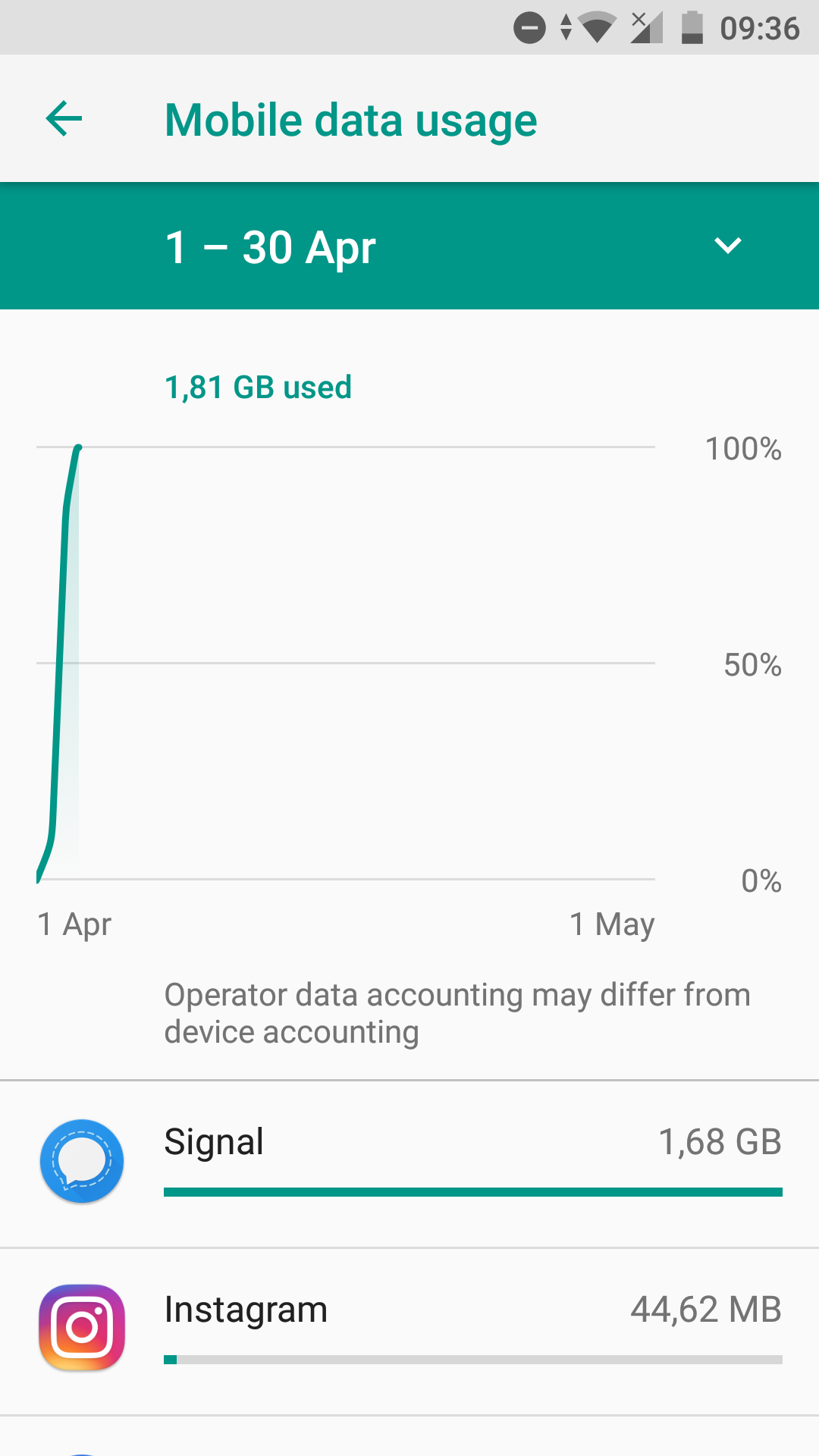
Signal uses up exorbitant amounts of data. This seems to be the same bug as #6914. It appears on both mine and my friend's phone. We both have Google Play installed, don't make calls, don't use gif search or transmit any other kind of large media files.
This bug makes the app completely unusable for me since it cost me 60 Euros in data fees last month and has already used up all my data for this month.

 jsoendermann
All 21 comments
Possible duplicate of #7602 (no doubt due to the deeply misguided #7598).
 sampablokuper
on 3 Apr 2018
sampablokuper
on 3 Apr 2018
@jsoendermann Please always include a debug log. I am unable to reproduce this issue, so I'll need something to go on.
 moxie0
on 3 Apr 2018
moxie0
on 3 Apr 2018
@moxie0 there is already a debug log in the duplicate that I linked above, and also in the original issue that this one and that one both stem from (#6914), that was arbitrarily closed and locked due to #7598. Please can you intervene and roll back #7598 so that comprehensibility can be restored to the Signal bug tracker? Thanks.
sampablokuper
on 3 Apr 2018
I am also affected by this and available to troubleshoot. Disallowing background data seems to mitigate this (obviously), but then signal doesn't work (also obviously).
 skorokithakis
on 3 Apr 2018
skorokithakis
on 3 Apr 2018
@skorokithakis debug log?
 Trolldemorted
on 3 Apr 2018
Trolldemorted
on 3 Apr 2018
@Trolldemorted #7602 (https://debuglogs.org/5b530b9da6f9dd81c803521dbc168ae12c15795ef7c86aeef9232f1813deb235)
skorokithakis
on 3 Apr 2018
What happened to the linefeeds? And it is pretty short :|
Trolldemorted
on 3 Apr 2018
I'm not sure, I pressed "send debug log" and that's what it gave me :(
skorokithakis
on 3 Apr 2018
Also having a similar issue; Signal seems to have used ~1.1GB of my mobile data at 00:00:00 on 03/04/18, according to my phone provider. I am running Signal Beta on a Oneplus 3T running LineageOS 15.1 with no GAPPS (microG enabled and Signal registered with GCM). Looking at my chat history, I was making a video call somewhere during this time, but I was connected to WiFi and I'm pretty sure an hour-long call shouldn't use 1GB of data?
This is my debug log, but I'm not sure how much use it will be as it doesn't seem to cover the timeslot in question: https://debuglogs.org/194c24bb86852f649ac4672c44842b6600dc8c250d45f5890d6730e8b9fcb12e
 prototaxites
on 3 Apr 2018
prototaxites
on 3 Apr 2018
@skorokithakis There's nothing really in that debug log. You could try using adb logcat with Signal in the background to see if there's any activity.
In general, though, Signal doesn't do anything in the background unless it receives a GCM notification, at which point it simply retrieves the message.
There are exactly 4 periodic tasks:
- APK update task (for non-play distribution APKs only). Happens once every 6 hours. Should only be a single small network request.
- Local backup (if backups are enabled). Happens once a day. Should not require any network access.
- Rotate signed prekey. Happens once every 2 days. Should only be a single small network request.
- Directory update. Happens every 12 hours. The largest of the periodic requests, but only one.
The only other thing Signal can do in the background is the sync adapter, which runs whenever Android tells it to run. This is not defined, but it should roughly correspond to changes in the Android contact database. If there are no changes, it should only run very occasionally.
Possibilities that I see right now:
- Anything involving LineagoeOS, microG, or any of that hacky stuff... who knows. None of that stuff seems to work very well, so there are often too many variables.
- The Android OS is not reporting data usage correctly.
- Android is running the sync adapter too often, and we should manually throttle it.
I think the most straightforward thing would be for someone affected by this to look at the activity on their network and see if Signal is doing something while in the background. And if so, what.
moxie0
on 3 Apr 2018
Hmm, the sync adapter made me wonder: I'm using DavDroid (which syncs contacts to my own server), is anyone else affected by this bug using it (or something similar)?
The heavy data usage is also happening when I'm on wifi, I see 1 GB of data on wifi as well, so I assume I can take a look at the network at some point and see what's going on.
skorokithakis
on 3 Apr 2018
@skorokithakis Sounds like a promising lead. When Signal's sync adapter is run, you should see that in logcat as well.
moxie0
on 3 Apr 2018
Ah, is there something I can filter for to get all the relevant messages?
skorokithakis
on 3 Apr 2018
@moxie0 I think there was a problem with attachments that were 404ing and Signal-Android was constantly trying to redownload them, but that would be visible in the logs, wouldn't it?
Trolldemorted
on 3 Apr 2018
I also saw something else in the logs, which is probably unrelated, but I figure I should mention it: Is anyone else using the Keepass2Android Autofill Helper? I think this problem started right about when I installed that.
skorokithakis
on 3 Apr 2018
I have uninstalled the Autofill Helper and the problem persists. Still not sure exactly how to debug it, I didn't see anything in the logs at first glance.
skorokithakis
on 1 May 2018
DavDroid seems like a much more likely culprit to me.
moxie0
on 3 May 2018
Is there a way I can debug it to make sure? I had a look at the logcat but nothing odd turned up.
skorokithakis
on 3 May 2018
If DavDroid was the problem, this should have been resolved by bf692e8da354d3bfd44fe85fb3abb3cadec5e857, which throttles the contact sync operation to once every 6 hours. Please re-open if it's still an issue. Thanks!
 greyson-signal
on 7 Oct 2018
greyson-signal
on 7 Oct 2018
I configured DavDroid to only sync on wifi and this problem largely went away. Hopefully this workaround mitigates the situation further, thank you.
skorokithakis
on 8 Oct 2018
Hello, today I've find out that I've experienced this behavior, can you please tell me should I post full debug report here or should I open new issue ?
 a-d-v-e-n-t-u-r-o-u-s
on 3 Feb 2020
a-d-v-e-n-t-u-r-o-u-s
on 3 Feb 2020
Related issues
 jult
·
3Comments
jult
·
3Comments
 FeuRenard
·
3Comments
FeuRenard
·
3Comments
 ilikenwf
·
3Comments
ilikenwf
·
3Comments
 nxfifteen
·
3Comments
nxfifteen
·
3Comments
 donjoe0
·
3Comments
donjoe0
·
3Comments
Most helpful comment
Possible duplicate of #7602 (no doubt due to the deeply misguided #7598).