Signal-android: Signal freezing when trying to send SMS
I have:
- [X] searched open and closed issues for duplicates
- [X] read https://github.com/WhisperSystems/Signal-Android/wiki/Submitting-useful-bug-reports
Bug description
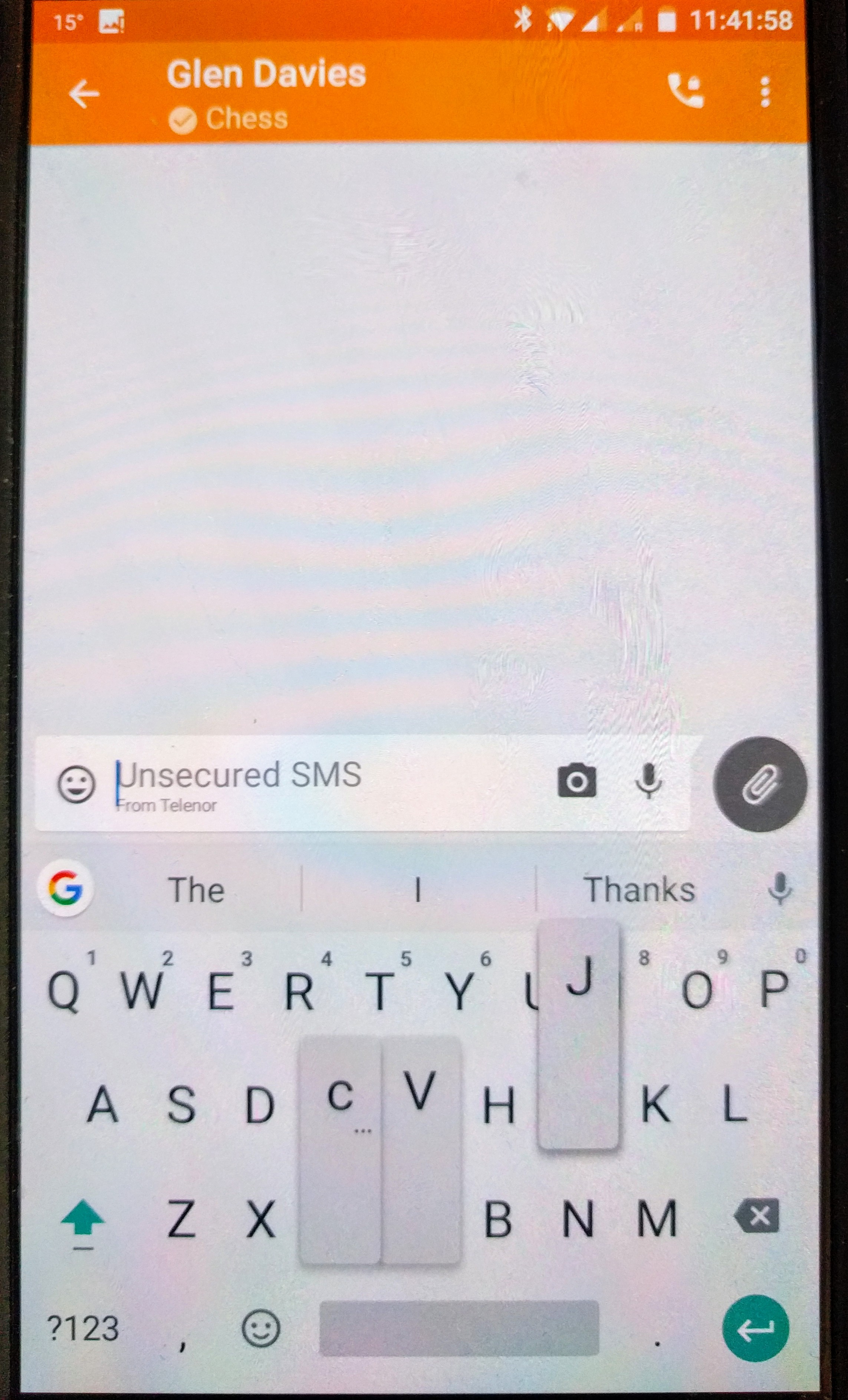
When composing an insecure SMS the app freezes and stops responding. Keyboard becomes laggy, and gets stuck on the screen. If in secure mode this does not happen.
Steps to reproduce
Open signal, select inseure text message, type.
Actual result: Keyboard stops responding, phone runs slowly
Expected result: Keyboard responds normally, can type an insecure SMS
Screenshots
Device info
Device: One Plus 3T A3003
Android version: 7.1.1
Signal version: 4.7.4
Link to debug log
 fyrstyk
All 11 comments
I can't reproduce this and there's nothing in the debug log. Only difference I could think of would be the character counter.
 moxie0
on 3 Jul 2017
moxie0
on 3 Jul 2017
Hi fyrstyk,
I have exactly the same issue ... I try to uninstall/install Signal, switch to another SMS messenger and revert to Signal, replace keyboard from SwiftKey to Swype ... remain the issue ! I'm stuck for sending SMS ...
Have find a workaround on your side ?
Device: One Plus A3003
Android version: 7.1.1
Signal version: 4.7.4
Monty
 msimonpietri
on 13 Jul 2017
msimonpietri
on 13 Jul 2017
Hi
I found the issue on my phone after much twiddling. It is a dual sim phone and the issue also happened in the default SMS client and the one downloaded from Google Play, except the Google app came up with an error..... No default sms message centre. In Settings, then SIM & network set a default SIM for messaging.
Fixed.
I would suggest that a check for this is implemented in Signal, as this is an issue for Dual SIM phones.
Hope that helps.
fyrstyk
on 13 Jul 2017
Thank you fyrstyk !!! Yes I'm in dual sim mode ... and I had this parameter set to "always ask" ... now this is fixed !
Thank you again ! And I agree, there must be a check in Signal to avoid this ...
Monty
msimonpietri
on 13 Jul 2017
Excellent!
I was set to always ask as well. It seems to affect all SMS platforms even the original one+ platform. Not sure if it is specific to the handset, or an android issue.
If one of the SMS apps was able to tell me the error instead of freezing up or force closing then I suspect that Signal can be made to check.
Glad you got it sorted, I was seconds away from doing a full wipe on the phone!
fyrstyk
on 13 Jul 2017
I just switched from a OnePlus 3 to a OnePlus 3T and I have the exact same issue. I didn't have it on the OP3 with the exact same configuration (no default SMS provider when using 2 Sims). Seems to be a OP3T issue.
 ccuq
on 16 Jul 2017
ccuq
on 16 Jul 2017
I can confirm the issue with Signal on a OnePlus 3, as well as the work around to fix it. However, I didn't have any issues in the standard 'Messaging' app.
This bug seems to have been introduced within the last month, as before about 2 weeks ago I had no issues with Signal.
 compiaffe
on 31 Jul 2017
compiaffe
on 31 Jul 2017
I have this problem on the OnePlus 5, but I already have the default SMS set to SIM1, so the workaround doesn't work for me. 👎
 drmartinsweden
on 7 Oct 2017
drmartinsweden
on 7 Oct 2017
@drmartinsweden one the OnePlus3 I had exact the same problem although It was set to SIM1, what helped was changing the settings and setting them back to SIM1. (Perhaps some bug when they are on default and not really set ?!)
 Arvoreen75
on 10 Oct 2017
Arvoreen75
on 10 Oct 2017
I have this problem with OnePlus 3 after it returned from RMA.
Same firmware version.
In signal the back button does not work and the keyboard freezes, so unable to type anything, either secure or insecure message. Tried Gboard and Swift keyboards, same.
Thanks for looking into this.
EDIT:
i already had selected default sim1, i changed it to sim2 and now it seems to work also with sim1 normally ...
 denialo
on 26 Nov 2017
denialo
on 26 Nov 2017
GitHub Issue Cleanup:
See #7598 for more information.
 automated-signal
on 3 Apr 2018
automated-signal
on 3 Apr 2018
Related issues
 jult
·
3Comments
jult
·
3Comments
 gmsl360
·
3Comments
gmsl360
·
3Comments
 derWalter
·
3Comments
derWalter
·
3Comments
 hiredgunhouse
·
3Comments
hiredgunhouse
·
3Comments
 notthematrix
·
3Comments
notthematrix
·
3Comments
Most helpful comment
Hi
I found the issue on my phone after much twiddling. It is a dual sim phone and the issue also happened in the default SMS client and the one downloaded from Google Play, except the Google app came up with an error..... No default sms message centre. In Settings, then SIM & network set a default SIM for messaging.
Fixed.
I would suggest that a check for this is implemented in Signal, as this is an issue for Dual SIM phones.
Hope that helps.