Signal-android: Marked as verified status messages should not be shown in groups
I have:
- [x] searched open and closed issues for duplicates
- [x] read https://github.com/WhisperSystems/Signal-Android/wiki/Submitting-useful-bug-reports
Bug description
Marking a contact as verified or unverified generates a status message in each conversation the contact is in. But both actions are manually and deliberately carried out by the user, so I think that one status message in the one-to-one conversation is enough.
Steps to reproduce
- choose a contact that is member of several groups
- mark that contact as verified
- check the conversation list
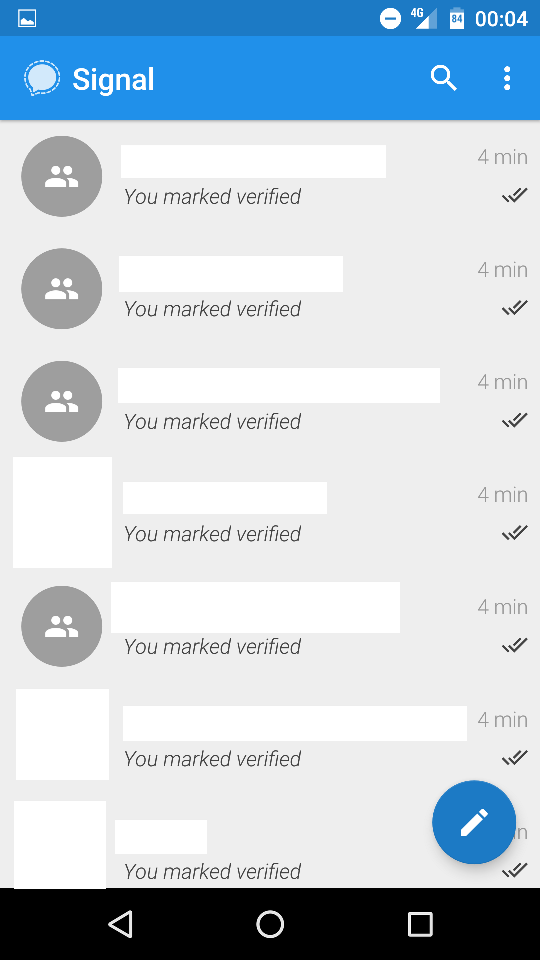
Actual result: All conversations that the contact is in have a new status message and thus jump to the top of the conversation list, however old the group conversation may have been
Expected result: Only show a status message in the one-to-one conversation
Maybe it would still be somewhat helpful to generate a status message in a group once all group members have been verified.
Device info
Signal version: 4.7.0
 cascheberg
All 17 comments
 scienmind
on 18 Jun 2017
scienmind
on 18 Jun 2017
I do not agree: I think it's useful to be able to scroll the group history and have a record of when any safety number changed.
 paride
on 19 Jun 2017
paride
on 19 Jun 2017
@paride You would still be able to see when a safety number changed, just not at what time you have verified it, which is less important IMHO.
Also, safety number changed status messages are not as annoying as the current verified status message, because they only appear in each conversation individually after you have opened it.
cascheberg
on 19 Jun 2017
Especially annoying because it makes all groups, including archived ones, to bubble to the top.
 dcherian
on 19 Jun 2017
dcherian
on 19 Jun 2017
I'm going to keep showing it in groups, but the conversation list state should no longer update
 moxie0
on 19 Jun 2017
moxie0
on 19 Jun 2017
unfortunately the conversation list state still is updated for all conversations with the person I just verified. Now it has two check marks each.
Platform info
Device: Fairphone FP2
Android: 6.0.1
Signal 4.7.3 beta
log:
https://gist.github.com/3a3076a3ab366d24d360f8b498e73c03
 rainerzufall
on 25 Jun 2017
rainerzufall
on 25 Jun 2017
@rainerzufall I can't reproduce this, can you provide steps to reproduce?
moxie0
on 25 Jun 2017
I tested with other contacts and it is not reproducible with contacts I have never marked as verified before. BUT with the contact I verified with the initial 4.7.0 beta, it is reproducible.
steps:
Go to conversation >> tap on contact name >> click on view safety number >> tap verified switch >> exit until I am in conversation list overview >> see how all threads with this contact are marked as verified (result looks like the screenshot I posted above)
rainerzufall
on 25 Jun 2017
Can you give steps from a fresh install? So you're saying that you need to verify a contact and then unverify them? Or verify a contact and then go through a key change?
moxie0
on 25 Jun 2017
I have only one phone, so a fresh install will be difficult until encrypted backup is back. I don't want to loose my key, but I will try to get hold of another phone tomorrow!
So you're saying that you need to verify a contact and then unverify them? Or verify a contact and then go through a key change?
No. It is not about "verify a contact and then unverify them" again. It was also not about a key change.
What happend is:
With 4.7.0 I verified one contact. As a result all threads with this contact said "You marked verified".
You fixed it with: https://github.com/WhisperSystems/Signal-Android/commit/04f364942ec8b052bd10592067408792b713ee8c
Until 4.7.3 I did not change the verification status of this contact (I did not mark this contact as unverified). Now while toying around I marked this person as unverified. And saw that all threads were updated (like in the initial report). I marked the contact verified again and all threads were updated again. And then I came here and posted in this thread with the screenshot and my log.
I hope I explained it clear enough now. But my guess since it is only happening with the one contact I verified in 4.7.0 I suspect, that a fresh install will do.
rainerzufall
on 25 Jun 2017
I can actually reproduce this exact behaviour. Same situation, I only verified one contact when I updated to 4.7.0. I tested your fix in 4.7.1 and it was working. But now in 4.7.3 marking that contact as unverified updates all groups again and shows two check marks. That contact did not have a safety number change since first verification.
But I can also reproduce this bug with seemingly any other contact by going to the "view safety number" screen and then toggling the switch to verified and right back to unverified without leaving the screen.
I can't yet find a way to reproduce this after a fresh install on a different phone.
cascheberg
on 25 Jun 2017
To be clear, the verification notice should show up in all threads containing that contact.
But the threads should no longer be percolated to the top of your inbox.
Are you still seeing that all the threads with that member percolate to the top of your inbox when verification changes?
On Jun 25, 2017, at 08:29, Christian Ascheberg notifications@github.com wrote:
I can actually reproduce this exact behaviour. Same situation, I only verified one contact when I updated to 4.7.0. I tested your fix in 4.7.1 and it was working. But now in 4.7.3 marking that contact as unverified updates all groups again and shows two check marks. That contact did not have a safety number change since first verification.
But I can also reproduce this bug with seemingly any other contact by going to the "view safety number" screen and then toggling the switch to verified and right back to unverified without leaving the screen.
I can't yet find a way to reproduce this after a fresh install on a different phone.—
You are receiving this because you are subscribed to this thread.
Reply to this email directly, view it on GitHub, or mute the thread.
 michaelkirk
on 25 Jun 2017
michaelkirk
on 25 Jun 2017
Yes, notices show up in threads that I did not open, threads jump to the top when verification changes, without further interaction. It's also happening (now) with previously never verified contacts when I just verify them once.
Debug log https://gist.github.com/anonymous/d62e16c50bd575319ca7b1dd08f2fafc
So far I noticed that at the end there are receipts for contacts *15 and *38 which I just verified for testing but did not send any messages to in the proccess.
cascheberg
on 25 Jun 2017
To be clear, the verification notice should show up in all threads containing that contact.
But the threads should no longer be percolated to the top of your inbox.
Are you still seeing that all the threads with that member percolate to the top of your inbox when verification changes?
yes. for this one aforementioned contact.
rainerzufall
on 25 Jun 2017
I am testing Signal 4.7.4 now and I found something interesting. (I don't know what has changed in this release because Moxie has not pushed the changes in signal service yet.)
I tested the following:
- disabled internet access, linked desktop device
- verify and unverify one contact (a few times)
- check conversation list: no problems
- enable internet access
- check conversation list: (un)verified status messages show up in groups without further interaction
- unlink desktop device
- verify and unverify same contact (a few times)
- no problems
So the issue never occurred while I disabled internet access or after I unlinked my Signal desktop device.
The desktop device was offline all the time.
cascheberg
on 26 Jun 2017
Here's what I just tried:
1) Fresh install
2) Create a conversation with two contacts, A and B.
3) Create a group with contact A
4) Send a message to B
5) Send a message to A
The conversation list order is now:
1) A
2) B
3) Group with A
Now if I toggle/untoggle verification status with A, no matter how many times, no matter whether there's a linked desktop device or not, the group with A stays at the bottom of the list.
If someone could provide steps to reproduce from a fresh install that'd be helpful.
moxie0
on 27 Jun 2017
I am able to reproduce the issue on my testing device with a fresh install. My second device is the one I use every day, so I don't want to reset it.
Facts are:
- both devices are running Android 5.1.1 (stock and Cyanogen) and Signal 4.7.4
- both devices are linked to different desktop devices
- I think that it might somehow be relevant that both devices are linked
- both desktop devices are offline
- issue does not occur if either of the Android devices is offline
- issue pops up as soon as both devices are online
- no other undelivered messages
- not 100% reproducible, but it does happen
- status messages can have two check marks
Tomorrow maybe I can try to reproduce the issue using another fresh install on a virtual device to rule out any problems with my seconds device.
Moxie, if you push a branch with further logging, I could post a debug log, if that helps.
cascheberg
on 27 Jun 2017
Related issues
 halb9
·
3Comments
halb9
·
3Comments
 FeuRenard
·
3Comments
FeuRenard
·
3Comments
 notthematrix
·
3Comments
notthematrix
·
3Comments
 derWalter
·
3Comments
derWalter
·
3Comments
 ilikenwf
·
3Comments
ilikenwf
·
3Comments
Most helpful comment
I'm going to keep showing it in groups, but the conversation list state should no longer update