Signal-android: Annoying notification "background connection enabled"
With the websocket version there appears a notification saying "background connection enabled". It can't be dismissed. Please remove that notification, since I know that I am using websockets.
 Tamriel
All 17 comments
A notification is required in order to run a foreground service, which is necessary to keep the connection alive in the most battery friendly way.
 moxie0
on 22 Apr 2017
moxie0
on 22 Apr 2017
Telegram figured out a way to have no notification and to consume much less battery.
You may look at their code.
Tamriel
on 22 Apr 2017
Messenger lite doesn't need a notification to work in background without google play services either
 michallepicki
on 22 May 2017
michallepicki
on 22 May 2017
The mailing app K9 can also keep push connections open without a notification. They work reliable and K9 uses far less energy than signal on my phone.
 theBoatman
on 6 Jun 2017
theBoatman
on 6 Jun 2017
Seems like you can get rid of the notification (at least for a while) with the following trick:
- Slide the notification to the right and open "more settings" (or long press it)
- Click on the "A"
- Put the slider to the top left (all Signal notifications are gone)
- Press on A again (now again other Signal notifications will come in as usual)
Other notifications or even opening the app does not bring the persistant notification back.
This will last until Signal app (for whatever reason) restarts.
 NotSoImportant
on 2 Feb 2018
NotSoImportant
on 2 Feb 2018
I don't want to discuss the reason why this notification has to be shown, I'm sure you know what you're doing. But it would be very nice if the icon of the notification could be changed, so that it represents the function of the notification. To just use the same icon as for a new message is very confusing. I find myself checking the notification a few times a day because I think there is a new message.
 null-git
on 2 Mar 2018
null-git
on 2 Mar 2018
I would prefer the occasional delays in message syncing and/or battery inefficiency over the persistent loss of screen space. You could at least add a settings toggle; Tasker did something similar for "running in the foreground".
 bsmith-cycorp
on 4 Apr 2018
bsmith-cycorp
on 4 Apr 2018
Can this be re-examined for Android O? It has much more granular notification settings.
 paperdigits
on 28 Jun 2018
paperdigits
on 28 Jun 2018
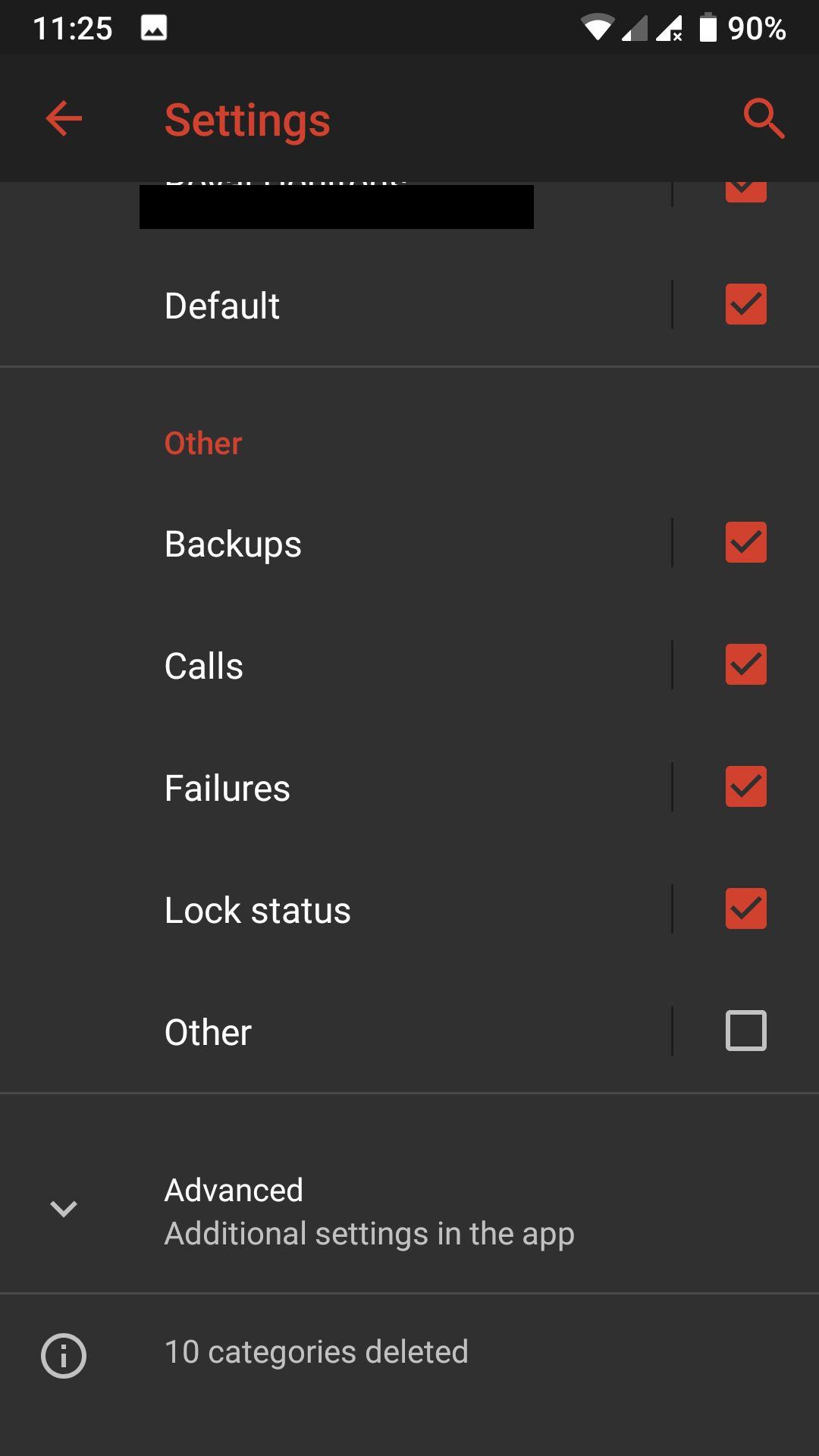
Found a way that worked for me on Android Pie (LineageOS, no GSF(No Google Installed))
Settings > Apps & Notifications > Signal > Uncheck 'Other' like in the screenshot
 ghost
on 29 Mar 2019
ghost
on 29 Mar 2019
Hi
My OS is Fairphone Open 19.02.1. Is there a way to get rid of the "Background connection enabled" message of Signal? Thanks!
 chrisdane
on 23 Apr 2019
chrisdane
on 23 Apr 2019
It might be a good idea to open a feature request on this topic "keep Signal open in the background without play services and without notification"
 Meteor0id
on 5 Jun 2019
Meteor0id
on 5 Jun 2019
I got this message today after receiving the message in signal; "This device does not support play services. Tap to disable system battery optimizations that prevent signal from retrieving messages while inactive"
My question is how in the world does my US AT&T samsung S10 not support play push services for this?
This doesn't seem like it should be necessary to have signal always running in the background.
 Nephilimi
on 11 Nov 2019
Nephilimi
on 11 Nov 2019
I got this message today after receiving the message in signal; "This device does not support play services. Tap to disable system battery optimizations that prevent signal from retrieving messages while inactive"
My question is how in the world does my US AT&T samsung S10 not support play push services for this?
My Pixel 3a XL as well.
 zeroedout
on 18 Dec 2019
zeroedout
on 18 Dec 2019
Did you install signal from the play store or elsewhere? Play store version should support play services. If you grabbed the apk from signal's website, it doesn't.
On December 18, 2019 2:25:08 AM PST, Alishams Hassam notifications@github.com wrote:
I got this message today after receiving the message in signal; "This
device does not support play services. Tap to disable system battery
optimizations that prevent signal from retrieving messages while
inactive"My question is how in the world does my US AT&T samsung S10 not
support play push services for this?My Pixel 3a XL as well.
--
You are receiving this because you commented.
Reply to this email directly or view it on GitHub:
https://github.com/signalapp/Signal-Android/issues/6561#issuecomment-566971377
paperdigits
on 18 Dec 2019
For me I got it from the play store. Apparently the play store version will fall back if play services can't be reached right then. My notification went away after a while.
Nephilimi
on 18 Dec 2019
Thanks for the clue to fixing this issue for myself. I'm using microG (Google Play Services alternative), and I had to re-install Signal after setting up their alternative to Google Cloud Messaging. They actually mention this problem at that link.
 carlin-q-scott
on 21 Jan 2020
carlin-q-scott
on 21 Jan 2020
For me I got it from the play store. Apparently the play store version will fall back if play services can't be reached right then. My notification went away after a while.
today when reinstalling signal i got the message that i didnt have play services even though i do and signal switched to web sockets and this perpetual notification... but then i realized i was blocking signal's essential access through the tracker control vpn... make sure signal has access to google severs BEFORE you first open it. i had to reinstall it a few times to figure this out.
 landry314
on 6 Dec 2020
landry314
on 6 Dec 2020
Related issues
 vvug
·
3Comments
vvug
·
3Comments
 j3fffff
·
3Comments
j3fffff
·
3Comments
 wesinator
·
3Comments
wesinator
·
3Comments
 derWalter
·
3Comments
derWalter
·
3Comments
 FeuRenard
·
3Comments
FeuRenard
·
3Comments
Most helpful comment
Found a way that worked for me on Android Pie (LineageOS, no GSF(No Google Installed))
Settings > Apps & Notifications > Signal > Uncheck 'Other' like in the screenshot