Signal-android: Emoji glitching in emoji drawer
I have:
- [x] searched open and closed issues for duplicates
- [x] read https://github.com/WhisperSystems/Signal-Android/wiki/Submitting-useful-bug-reports
Bug description
Apparently, tinting something that is not an ImageView is not supported on API <21. Therefore the new category icons from f7474362f look like this on 4.2:

(also note how my phone still shows slight signs of #2957 :/)
Looks like we would have to either generate separate light and dark theme PNGs or use setColorFilter somewhere to fix this?
 haffenloher
All 19 comments
Damn, we'll have to make assets. What's your phone info? I'd like to create an emulator that will reproduce those visual glitches.
 moxie0
on 19 Dec 2016
moxie0
on 19 Dec 2016
Generated assets to fix the tinting issue, reopening to track the glitching you're seeing.
moxie0
on 19 Dec 2016
I can reproduce the glitches (slight signs of #2957) with the following phone:
Device : motorola XT1021 (cm_condor)
Android : 4.4.4 (430c6b1557, cm_condor-userdebug 4.4.4 KTU84Q 430c6b1557 test-keys)
 lazlolazlolazlo
on 19 Dec 2016
lazlolazlolazlo
on 19 Dec 2016
@lazlolazlolazlo I built an emulator with those device specifications and am unable to reproduce. Can you post a screenshot?
moxie0
on 19 Dec 2016
@moxie0 the phone's specs are here!
haffenloher
on 19 Dec 2016
3.25.0:

3.25.1:

lazlolazlolazlo
on 19 Dec 2016
I can't seem to reproduce this in an emulator, guess I'm going to have to get a phone
moxie0
on 3 Jan 2017
This issue is also reported in the community forum:
https://whispersystems.discoursehosting.net/t/updated-emojis-are-not-showing-correctly/1024
 FeuRenard
on 18 May 2017
FeuRenard
on 18 May 2017
FYI, this issue disappeared for me after I played with Android's Accessibility settings (I turned the "Large text" option on and off again, which seems to have changed my phone's DPI settings?). Now everything is slightly larger. I have 8 instead of 9 emoji per row in the emoji drawer and the glitching is gone.
haffenloher
on 13 Jun 2017
@moxie0 Again this problem happens in 4.12.0
 ghost
on 1 Nov 2017
ghost
on 1 Nov 2017
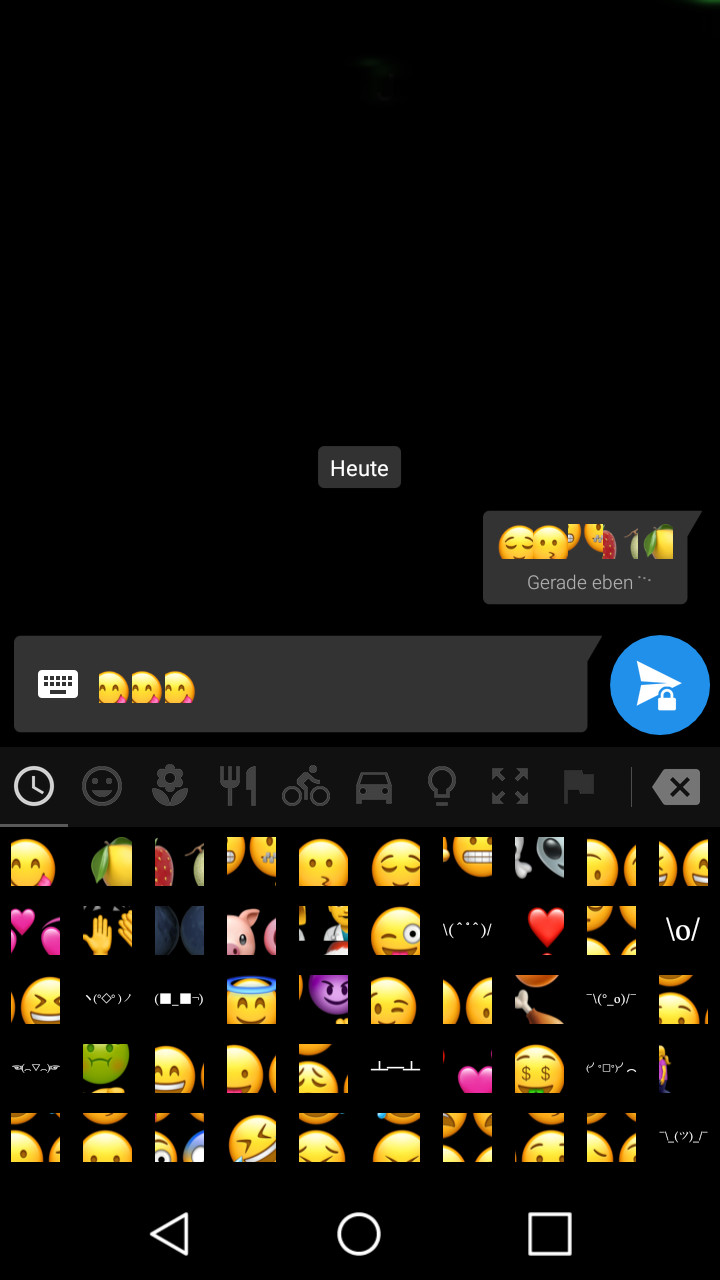
But this time it is not restricted to the drawer but also happens in messages.
 warblend
on 3 Nov 2017
warblend
on 3 Nov 2017
I'm unable to reproduce this on a Samsung S4 (Android 4.4), OnePlus One (Android 5), Nexus 5 (Android 6), Moto G (Android 6), or Pixel (Android 8). @warblend Is there anything particular about your device that you can think of?
moxie0
on 3 Nov 2017
@moxie0 me and my friend using Qmobile my Android 6.0 and friend Android 5.2 i think we have same problem like @warblend
ghost
on 3 Nov 2017
@moxie0 I will think about it,but right now nothing specific comes to my mind. It seems to be related to the device as a friend of mine who owns a phone of the same model is experiencing the same issue.
warblend
on 3 Nov 2017
I'm also having the same issue. Interestingly, my emoji drawer has a pattern to it: 6 emojis are spread out over 8 emoji boxes. If more screenshots/information is needed, let me know.
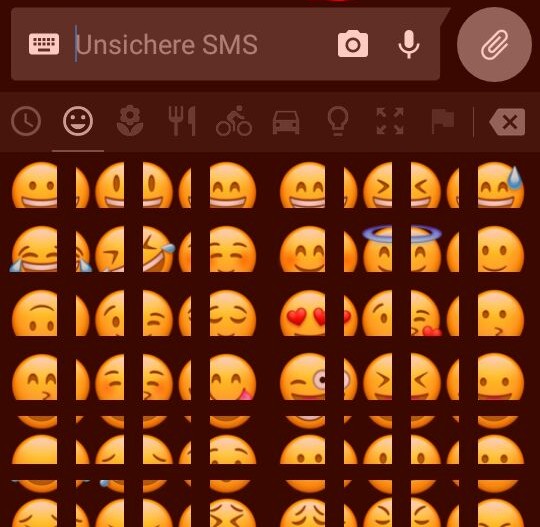
Device: Samsung Galaxy Grand Prime
Android version: 5.1.1
Signal version: 4.12.0
Debug log: https://gist.github.com/anonymous/8078d907268ba77d99bc01a5b9fe169e
 nrizzio
on 4 Nov 2017
nrizzio
on 4 Nov 2017
It's also broken for me, but only since the latest version. Note: I did change the DPI of my phone using the build.prop file.

Huawei P8 lite ALE-21
Android 6.0
Signal: since 4.12
EDIT:
Still a problem in 4.12.2
 Oisins
on 4 Nov 2017
Oisins
on 4 Nov 2017
Also have this issue on LineageOS 7.1.2 after latest Signal beta 4.12.2 update. Samsung S4 Mini. Also emoji generated by keyboard show the same multiple/split emoji images when entered into Signal text field but appear correctly within the keyboard. I haven't adjusted pixel display etc… but It is a small phone.
 IronJunkie
on 4 Nov 2017
IronJunkie
on 4 Nov 2017
Possible workaround, turn off Signal emoji in Signal settings so that signal uses your phones system emoji, then emojl appear correctly in Signal messages.
IronJunkie
on 4 Nov 2017
@moxie0 but now after 4.12.3 update emojis edges are rough now not clear circle face emojis.
ghost
on 7 Nov 2017
Related issues
 donjoe0
·
3Comments
donjoe0
·
3Comments
 vvug
·
3Comments
vvug
·
3Comments
 5boro
·
3Comments
5boro
·
3Comments
 j3fffff
·
3Comments
j3fffff
·
3Comments
 derWalter
·
3Comments
derWalter
·
3Comments
Most helpful comment
@moxie0 but now after 4.12.3 update emojis edges are rough now not clear circle face emojis.