Sidemenu: Creating UISideMenuNavigationController via Storyboard if installed using Carthage not working
New Issue Checklist
I have read the guidelines for contributing and I understand:
- [x] My issue is happening in the latest version of SideMenu.
- [x] My issue was not solved in the README.
- [x] My issue can not be answered on stackoverflow.com.
- [x] My issue is not a request for new functionality that I am unwilling to build and contribute with a pull request.
- [ ] My issue is reproducible in the demo project.
Xcode 9.1, macOS High Sierra 10.12.6, Carthage 0.26.2
Issue Description
The identity inspector doesn't recognize UISideMenuNavigationController, nor SideMenu as an applicable module if I'm using Carthage. Not reproducible with Cocoapods.
 michael-mckenna
All 18 comments
@michael-mckenna Carthage support was added awhile back by another contributor. Admittedly, I do not use Carthage. Do you have any idea what the solution is?
 jonkykong
on 1 Nov 2017
jonkykong
on 1 Nov 2017
Hey thanks for the quick response. Sorry, I'm unfamiliar with the inner-workings of Carthage so I do not know.
michael-mckenna
on 1 Nov 2017
Hey @soheilbm, it's been a while since this was added, but have you had any issues with SideMenu + Carthage?
Or anyone else, for that matter?
I'll likely opt for removing the Carthage support from the README rather than fixing it myself (no time), unless someone else is willing to figure out what's going on.
jonkykong
on 2 Nov 2017
Hey @jonkykong I notice that the class and module don't have autofills in the interface builder when installing with Carthage, but typing them in works without issue. I can also subclass, though again the autofill doesn't recognize either as a valid UINavigationController subclass. Loosely related may be that I also don't see the IBInspectables correctly in the attributes inspector, but if I make a subclass and override the leftSide or menuWidth properties with getter/setters the delegate to super, then it works.
 jsnelling
on 3 Nov 2017
jsnelling
on 3 Nov 2017
@jsnelling Is your project in Swift 3? SideMenu is Swift 4. I suspect that mixed Swift versions may be causing some of these problems.
jonkykong
on 3 Nov 2017
@michael-mckenna does typing in the class names manually work for you?
jonkykong
on 3 Nov 2017
@jonkykong I'm getting the same result as jsnelling in that autocomplete in the text field doesn't work and the IBInsectables aren't showing in the attributes inspector. Using Swift 4
michael-mckenna
on 3 Nov 2017
@michael-mckenna so you are able to get it to work by entering them manually?
@jsnelling @michael-mckenna try cleaning your projects and deleting your derived data to see if that gets the properties to appear.
I would also suggest trying Cocoapods instead to see if that works (if it doesn't, then it sounds like something is up with the project rather than Carthage).
Unfortunately, a cursory search on the web shows a bunch of _possible_ causes without a clear cause... since this is a rarely reported issue I'm not going to investigate a solution to this (sorry). Sticking to the rule of 80/20, I'm trying to only invest my time on problems that face more than 20% of people.
jonkykong
on 3 Nov 2017
@jonkykong - I'm Swift 4.0 + iOS 11 on XCode 9.1. It repros with a brand new project. Create blank application for iPhone. Add sidemenu to Cartfile and update. Add to linked libraries. Drag a new Navigation Controller onto the storyboard and try typing class and module. Delete/rebuild has no effect.
Since it's still fully functional, I'm not worried :-) Mostly I was just trying to add more context to this task since - at least for me - the title seems inaccurate. Creating via storyboard is working, it doesn't doesn't autocomplete. Storyboard configuration via IBInspectable doesn't work but a shallow local subclass with overrides is a totally reasonable workaround.
Very nice project by the way! Thank you!
jsnelling
on 3 Nov 2017
+1 to jsnelling's comment on Nov 3
Happens to me too, Swift 4.0 + iOS 11 on XCode 9.1.
 jfelb
on 11 Dec 2017
jfelb
on 11 Dec 2017
I also have this issue with Carthage... I cannot select the custom class as UISideMenuNavigationController. Even though I manually type the custom class, the properties do not appear in the Attributes inspector.
It's sad since that project really pleased me and the explanations were quite clear to set it up...
 damsc69
on 29 Dec 2017
damsc69
on 29 Dec 2017
@damsc69 if you have the time, I'm looking to the community to troubleshoot the issue and produce a fix for everyone's benefit. Feel free to create a pull request with a solution, if you find it.
jonkykong
on 29 Dec 2017
+1 to jsnelling's comment on Nov 3
Happens to me too, Swift 4.0 + iOS 11 on XCode 9.3
I see your looking for a community fix, I'll try and see what I can come up with.
 BCtopics
on 8 Apr 2018
BCtopics
on 8 Apr 2018
I had the same issue with Cocoapods as well, until updating to latest version 4.0. (Xcode 9.4 (9F1027a)). After updating the pod, it's working alright.
 suculent
on 5 Jun 2018
suculent
on 5 Jun 2018
I am having the same issue with carthage but not with cocoapods. @jsnelling can you share the subclass for a workaround as of now.
 mastermind247
on 18 Aug 2018
mastermind247
on 18 Aug 2018
@mastermind247 sure! So if you have a class like UISideMenuNavigationController that you'd normally be able to configure with interface builder and can't, I found (if I remember correctly) that creating a local class in my project MyUISideMenuNavigationController that extends from UISideMenuNavigationController but doesn't override anything, would behave correctly and allow me to select it as the type and configure in IB. Hope that helps.
jsnelling
on 19 Aug 2018
I am able to configure everything in IB, but as others mentioned, @IBInspectable's don't appear under the nice UI in IB. However, you can still set them using IB KVO like so:
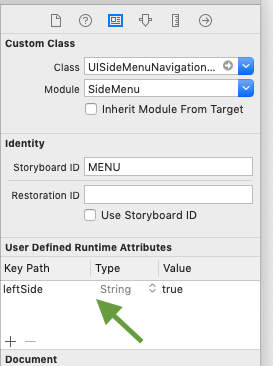
Admittedly this is only really needed for leftSide property which seems to be set to false by default which i found unusual compared to how most apps are on the market.
Nevertheless, everything works perfectly. Amazing work putting this together @jonkykong
 az-oolloow
on 19 Mar 2019
az-oolloow
on 19 Mar 2019
Update: you should now be using SideMenuNavigationController instead of UISideMenuNavigationController.
jonkykong
on 24 Jul 2020
Related issues
 bryan1anderson
·
4Comments
bryan1anderson
·
4Comments
 nahouto
·
4Comments
nahouto
·
4Comments
 dattatrayParthenon
·
3Comments
dattatrayParthenon
·
3Comments
 szooky
·
3Comments
szooky
·
3Comments
 harshvishu
·
3Comments
harshvishu
·
3Comments
Most helpful comment
+1 to jsnelling's comment on Nov 3
Happens to me too, Swift 4.0 + iOS 11 on XCode 9.3
I see your looking for a community fix, I'll try and see what I can come up with.