Sidemenu: Error: SideMenu Warning: attempt to push a View Controller from nil where its navigationController == nil. It must be embedded in a Navigation Controller for this to work.
New Issue Checklist
I have read the guidelines for contributing and I understand:
- [x ] My issue is happening in the latest version of SideMenu.
- [x ] My issue was not solved in the README.
- [x ] My issue can not be answered on stackoverflow.com.
- [x ] My issue is not a request for new functionality that I am unwilling to build and contribute with a pull request.
- [ ] My issue is reproducible in the demo project.
Issue Description
I instantiate the sidemenu views like so before setting as root due to already having an existing nav controller so needing to replace it:
func createHomeView() {
        // present view -- switches the root to the new navigation controller
        let homeViewController = HomeScreenViewController.init(homeView: HomeScreenView(frame: UIScreen.main.bounds))
        let menuViewController = SideMenuViewController.init(sideMenuView: SideMenuView(frame: UIScreen.main.bounds))
        // menu
        let leftNavigationController = UISideMenuNavigationController(rootViewController: menuViewController)
        leftNavigationController.leftSide = true
        SideMenuManager.menuLeftNavigationController = leftNavigationController
        // home
        let rightNavigationController = UISideMenuNavigationController(rootViewController: homeViewController)
        SideMenuManager.menuRightNavigationController = rightNavigationController
        // slide style
        SideMenuManager.menuAddPanGestureToPresent(toView: self.navigationController!.view)
        SideMenuManager.menuPresentMode = .viewSlideInOut
        SideMenuManager.menuFadeStatusBar = false
        SideMenuManager.menuAnimationOptions = .curveEaseInOut
        // animation and presentation
        let snapshot:UIView = (self.eventView.window?.snapshotView(afterScreenUpdates: true))!
        SideMenuManager.menuRightNavigationController?.view.addSubview(snapshot)
        self.appDelegate.window?.rootViewController = SideMenuManager.menuRightNavigationController
        UIView.animate (withDuration: 0.3, animations: { () in
            snapshot.layer.opacity = 0
            snapshot.layer.transform = CATransform3DMakeScale(1.5, 1.5, 1.5)
        }, completion: {
            (value: Bool) in
            snapshot.removeFromSuperview()
        });
    }
So here i create my views and then set the right nav as the root (my home view)
I assume this is already the cause of the issue, but I cant see how i can correctly present it on top of my existing nav controller without taking this route.
I then try to tap a menu item on the sidebar in the next presented view, and i get that error in the title. But i am able to use swipe gestures set on the nav controller, so im not sure how it can read nil?
Here is the code for handling cell taps in the sidemenu view controller
func pushTappedModule(selected: MenuItem) {
        let selectedModule = selected.pageType
        switch selectedModule {

        case "home":
            let pushedController = HomeScreenViewController(homeView: HomeScreenView(frame: UIScreen.main.bounds))
            SideMenuManager.menuRightNavigationController?.pushViewController(pushedController, animated: true)
        default:
            print("failed to match menu item to a viewController")
        }
    }
What would be the solution here? I assume it stems from setting as root to replace the previous VC, but i cant set a new Nav controller and set the SideMenuManager.menuRightNavigationController as root in it either.
Thanks for clarity on how to approach this scenario with the framework, stack couldnt help
 jackdem
All 7 comments
@jackdem did you manage to find a solution to this? Having the same issue at the moment, was wondering what I'm missing.
Edit:
In case someone finds this helpful, I needed to have the View Controller that invoked the side menu to be embedded in a Navigation Controller.
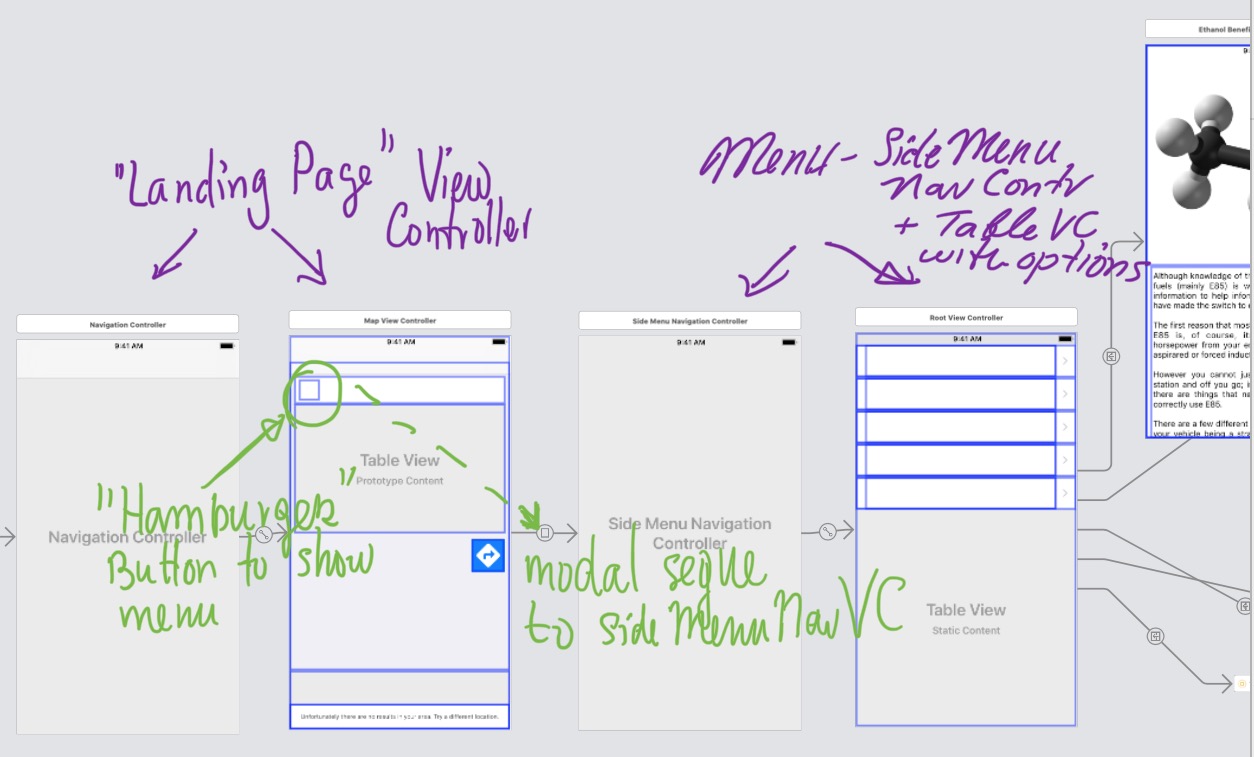
So my final structure was something like this:
Nav Controller -> [Main View Controller] -> (modal) Side Menu Nav Controller -> (embed/root view controller relationship) Table View Controller (with menu options) -> (push) other view controllers that represent content for each menu option.
My original structure didn't have the first navigation controller (as I assumed that Side Menu Nav Controller was enough, as it's a subclass of a navigation controller - which is where I'm assuming others are going wrong when encountering this issue).
If your pushed view controllers need to show a navigation bar, but the root VC doesn't, - hide it in the root VC's viewWillAppear method, and show it in viewWillDisappear.
Hopefully this will help someone. While the documentation for this project is great, this particular case can be a little confusing and README didn't quite cover it. The example project is a great illustration though, so go through that if you get stuck.
 aurora14
on 29 Oct 2017
aurora14
on 29 Oct 2017
@aurora14 Thank you very much iv'e used your solution and everything works fine now
 trhtkv
on 5 Jun 2018
trhtkv
on 5 Jun 2018
@aurora14 May you upload image of your storyboard so it will be more understandable?
 Idomo
on 16 Oct 2018
Idomo
on 16 Oct 2018
@aurora14 May you upload image of your storyboard so it will be more understandable?
I'll see what I can do. It was done for a client, therefore I may need to redact some things before I can do any screenshots. But if time permits, I'll mock up a sample project. I know it's hard to explain and read a lot of code/conceptual text, and with the project you can explore the structure for yourself :)
aurora14
on 17 Oct 2018
@Idomo does this help?
I'm not saying this is the only way, or 100% the right way to do it, but it worked for me, and some others in this thread, by the sounds of it.
aurora14
on 25 Oct 2018
I got the same error while setting the SideMenu as root view controller. I noticed the suggested solution above requires a different view controller as root to show the SideMenu, but the structure cannot achieve something like this

Is there anyway we can achieve this?
 kuoliangkwong
on 18 Dec 2018
kuoliangkwong
on 18 Dec 2018
I was having the same issue and it was because there was not Nav Controller on the MainView controller.
Simple fix.
 myanalysis
on 4 Aug 2019
myanalysis
on 4 Aug 2019
Related issues
 taylorhredding
·
3Comments
taylorhredding
·
3Comments
 szooky
·
5Comments
szooky
·
5Comments
 joebenton
·
5Comments
joebenton
·
5Comments
 harshvishu
·
3Comments
harshvishu
·
3Comments
 Mohamed-Akl
·
3Comments
Mohamed-Akl
·
3Comments
Most helpful comment
@jackdem did you manage to find a solution to this? Having the same issue at the moment, was wondering what I'm missing.
Edit:
In case someone finds this helpful, I needed to have the View Controller that invoked the side menu to be embedded in a Navigation Controller.
So my final structure was something like this:
Nav Controller -> [Main View Controller] -> (modal) Side Menu Nav Controller -> (embed/root view controller relationship) Table View Controller (with menu options) -> (push) other view controllers that represent content for each menu option.
My original structure didn't have the first navigation controller (as I assumed that Side Menu Nav Controller was enough, as it's a subclass of a navigation controller - which is where I'm assuming others are going wrong when encountering this issue).
If your pushed view controllers need to show a navigation bar, but the root VC doesn't, - hide it in the root VC's viewWillAppear method, and show it in viewWillDisappear.
Hopefully this will help someone. While the documentation for this project is great, this particular case can be a little confusing and README didn't quite cover it. The example project is a great illustration though, so go through that if you get stuck.