SideMenu Warning: menuLeftNavigationController cannot be modified while it's presented.
New Issue Checklist
I have read the guidelines for contributing and I understand:
- [x] My issue is happening in the latest version of SideMenu.
- [x] My issue was not solved in the README.
- [x] My issue can not be answered on stackoverflow.com.
- [x] My issue is not a request for new functionality that I am unwilling to build and contribute with a pull request.
- [x] My issue is reproducible in the demo project.
Issue Description
Hi am facing the issue
SideMenu Warning: menuLeftNavigationController cannot be modified while it's presented.how to resolve this where am i doing wrong. It happens only when the app is still in the background once removed from the back ground it works as expected.
 Gantaios
All 14 comments
The warning is that the menu is presented and you're trying to change it. You are probably presenting something from SideMenu and reinitializing it on return from background. Instead initialize it from you app delegate or root view controller to only do it once.
 jonkykong
on 11 May 2017
jonkykong
on 11 May 2017
Hi @jonkykong can you tell me how to do that i am using via storyboards.
Thanks
Gantaios
on 12 May 2017
Sorry, but I unfortunately am not able to spend time teaching how to code
on iOS here. This question is better suited for stackoverflow.com.
On Thu, May 11, 2017 at 10:22 PM Gantaios notifications@github.com wrote:
Hi @jonkykong https://github.com/jonkykong can you tell me how to do
that i am using via storyboards.
Thanks—
You are receiving this because you were mentioned.Reply to this email directly, view it on GitHub
https://github.com/jonkykong/SideMenu/issues/194#issuecomment-300986564,
or mute the thread
https://github.com/notifications/unsubscribe-auth/AFdl_z7tQGOfkft9YFQYSVTwJ_4eFfRFks5r4-yDgaJpZM4NX101
.
jonkykong
on 12 May 2017
@Gantaios The problem is the presenting controller of Menu still live although SidMenu go away , so you should make it nil , to do that call self.dismiss(animated: false, completion: nil) method when you want go away from SideMenu.
 bokhary3
on 22 Nov 2017
bokhary3
on 22 Nov 2017
        let newViewController = storyBoard.instantiateViewController(withIdentifier: controller)

        self.dismiss(animated: true) { () -> Void in
            //Perform segue or push some view with your code
            UIApplication.shared.keyWindow?.rootViewController = newViewController
        }
 j0cker
on 12 Jul 2018
j0cker
on 12 Jul 2018
@j0cker @bokhary3 Thank you so much, you both saved my day.
 naveedahmad99
on 31 Jul 2018
naveedahmad99
on 31 Jul 2018
@j0cker I have copied your code but it's not working for me . Do you have any idea how to handle that ?
 shayanaghajan
on 1 Sep 2018
shayanaghajan
on 1 Sep 2018
@j0cker I have copied your code but it's not working for me . Do you have any idea how to handle that ?
let newViewController = storyboard?.instantiateViewController(withIdentifier: "MainTabBarController")
SideMenuManager.default.menuRightNavigationController?.dismiss(animated: true) { () -> Void in
UIApplication.shared.keyWindow?.rootViewController = newViewController
}
 masgarifor2
on 7 Apr 2019
masgarifor2
on 7 Apr 2019
@jonkykong I completely understand that you are not an iOS instructor and that it is tons of work to maintain a library like this... but man... I cannot believe the tone of your responses in issue after issue .... How hard of an answer was it (you could have literally said 'dismiss the view') with seemingly enough traffic to warrant a humane response. Thank you @bokhary3 and @j0cker
 barrylachapelle
on 3 Jun 2019
barrylachapelle
on 3 Jun 2019
@barrylachapelle I appreciate your response. It’s a “principle of thing” for me. I know like it seems like it only takes a second here and there, but all I can tell you is that I get questions like this _all the time_, and if I spend a few minutes here and there helping every developer with a fundamentals question it would seriously add up over time. In my book, this is a teachable moment - rather than me being obligated to help people, people should also feel empowered to take the few seconds to research on google for questions like this which is answered really fast. My reply is simply to help encourage self-help behaviors, rather than foster dependencies on me to respond to them directly (which means they wait for me, and take both my and their time).
I hope this makes sense. If it doesn’t, the only thing I can say is that you’ll understand if you put up a popular code repo and realize how much activity comes your way as a result.
jonkykong
on 3 Jun 2019
@j0cker I have copied your code but it's not working for me . Do you have any idea how to handle that ?
let newViewController = storyboard?.instantiateViewController(withIdentifier: "MainTabBarController") SideMenuManager.default.menuRightNavigationController?.dismiss(animated: true) { () -> Void in UIApplication.shared.keyWindow?.rootViewController = newViewController }
Hi! I used your code but the slide menu are still full screen until I close it after several times. Is there anyway I can always avoid the slide menu into full screen in the app? Thank you!
 tu6778
on 1 Jul 2019
tu6778
on 1 Jul 2019
@j0cker I have copied your code but it's not working for me . Do you have any idea how to handle that ?
let newViewController = storyboard?.instantiateViewController(withIdentifier: "MainTabBarController") SideMenuManager.default.menuRightNavigationController?.dismiss(animated: true) { () -> Void in UIApplication.shared.keyWindow?.rootViewController = newViewController }
        let newViewController = storyBoard.instantiateViewController(withIdentifier: controller)

        self.dismiss(animated: true) { () -> Void in
            //Perform segue or push some view with your code
            UIApplication.shared.keyWindow?.rootViewController = newViewController
        }
Hi! I used your code but it seems doesn't work. Could you provide instructions how to use these code? Thank you!
tu6778
on 1 Jul 2019
what do you want to do this view controller? and navigation controller?
On Mon, Jul 1, 2019 at 5:43 PM tu6778 notifications@github.com wrote:
@j0cker https://github.com/j0cker I have copied your code but it's not
working for me . Do you have any idea how to handle that ?let newViewController =
storyboard?.instantiateViewController(withIdentifier:
"MainTabBarController")
SideMenuManager.default.menuRightNavigationController?.dismiss(animated:
true) { () -> Void in UIApplication.shared.keyWindow?.rootViewController =
newViewController }let newViewController = storyBoard.instantiateViewController(withIdentifier: controller) self.dismiss(animated: true) { () -> Void in //Perform segue or push some view with your code UIApplication.shared.keyWindow?.rootViewController = newViewController }Hi! I used your code but it seems doesn't work. Could you provide
instructions how to use these code? Thank you!—
You are receiving this because you are subscribed to this thread.
Reply to this email directly, view it on GitHub
https://github.com/jonkykong/SideMenu/issues/194?email_source=notifications&email_token=AJUNXXOIWXEAHQ6YKBZXHXTP5HYF3A5CNFSM4DK7LU22YY3PNVWWK3TUL52HS4DFVREXG43VMVBW63LNMVXHJKTDN5WW2ZLOORPWSZGODY55VRA#issuecomment-507239108,
or mute the thread
https://github.com/notifications/unsubscribe-auth/AJUNXXNLBPBO3AE6UQ7ASBTP5HYF3ANCNFSM4DK7LU2Q
.
 parveenBanuS
on 1 Jul 2019
parveenBanuS
on 1 Jul 2019
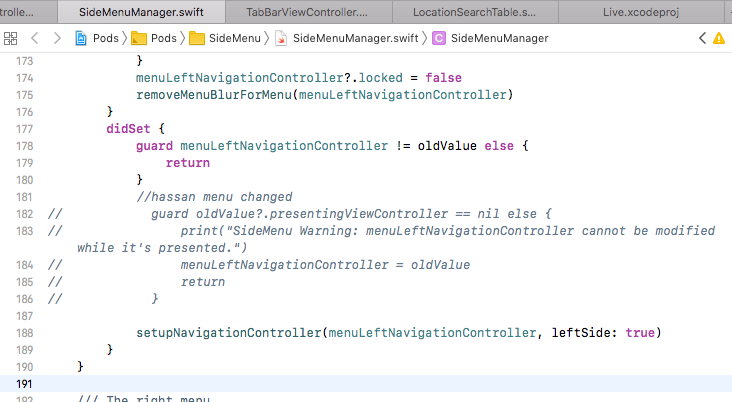
Goto SideMenuManager.swift file and comment the following code( i comment this code in pod and my menu is working properly)
guard oldValue?.presentingViewController == nil else {
print("SideMenu Warning: menuLeftNavigationController cannot be modified while it's presented.")
menuLeftNavigationController = oldValue
return
}
 FaizUlHassan123
on 3 Jul 2019
FaizUlHassan123
on 3 Jul 2019
Related issues
 harshvishu
·
3Comments
harshvishu
·
3Comments
 gulzatique
·
5Comments
gulzatique
·
5Comments
 selaysoysal
·
7Comments
selaysoysal
·
7Comments
 taylorhredding
·
3Comments
taylorhredding
·
3Comments
 szooky
·
5Comments
szooky
·
5Comments
Most helpful comment